The AICaption control uses AI capabilities to convert voice into text in real time, translate the text, and display the source and target texts. This feature is applicable to audio and video content apps. It helps users efficiently obtain information through captions in scenarios where audio content cannot be directly browsed or users are unfamiliar with audio source languages.
Since: 5.0.0(12)
Modules to Import
import {
  AICaptionComponent, AudioInfo, AudioData, AICaptionOptions, AICaptionController, AICaptionFontSize
} from '@kit.SpeechKit';
AICaptionComponent
AICaption component, which can be loaded as a dynamic component.
Decorator: @Component
System capability: SystemCapability.AI.AICaption
Model restriction: This API can be used only in the stage model.
Since: 5.0.0(12)
Parameters:
| Name | Type | Mandatory | Decorator Type | Description |
|---|---|---|---|---|
| isShown | boolean | Yes | @Link | Indicates whether to display captions. true: yes (Automatic audio recognition and caption generation are supported since version 5.1.0(18).) false: no |
| controller | AICaptionController | Yes | - | Caption controller. |
| options | AICaptionOptions | Yes | - | Caption initialization parameters. |
[h2]build
build(): void
Constructor used to create an AICaptionComponent object.
System capability: SystemCapability.AI.AICaption
Model restriction: This API can be used only in the stage model.
Since: 5.0.0(12)
Example:
import { AICaptionComponent, AICaptionController, AICaptionOptions } from '@kit.SpeechKit';

@Entry
@Component
struct Index {
  private captionOption?: AICaptionOptions;
  private controller = new AICaptionController();
  @State isShow: boolean = false;

  aboutToAppear(): void {
    this.captionOption = {
      initialOpacity: 1,
      onPrepared: () => {
        // ...
      },
      onError: () => {
        // ...
      }
    };
  }

  build() {
    Column() {
      // Call the AICaptionComponent to initialize captions.
      AICaptionComponent({
        isShown: this.isShow,
        controller: this.controller,
        options: this.captionOption
      })
    }
  }
}
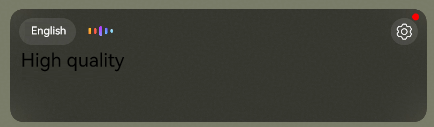
The following figure shows the component.
AICaptionController
Main function entry class of the AICaption control.
System capability: SystemCapability.AI.AICaption
Model restriction: This API can be used only in the stage model.
Since: 5.0.0(12)
Example:
import { AICaptionComponent, AICaptionOptions, AICaptionController } from '@kit.SpeechKit';

@Entry
@Component
struct Index {
  private options?: AICaptionOptions;
  private controller = new AICaptionController();
  @State isShown: boolean = false;

  aboutToAppear(): void {
    this.options = {
      initialOpacity: 1,
      onPrepared: () => {
        // ...
      },
      onError: () => {
        // ...
      }
    };
  }

  build() {
    Column() {
      // Call the AICaptionComponent to initialize captions.
      AICaptionComponent({
        isShown: this.isShown,
        controller: this.controller,
        options: this.options
      })
    }
  }
}
[h2]isCapabilitySupported
isCapabilitySupported(): boolean
Checks whether the device supports the AI caption feature.
System capability: SystemCapability.AI.AICaption
Model restriction: This API can be used only in the stage model.
Since: 26.0.0
Returns:
| Type | Description |
|---|---|
| boolean | Indicates whether the AI caption feature is supported. true: yes; false: no. |
Example:
import { AICaptionComponent, AICaptionOptions, AICaptionController } from '@kit.SpeechKit';
import { BusinessError } from '@kit.BasicServicesKit';

@Entry
@Component
struct Index {
  private captionOption?: AICaptionOptions;
  private controller: AICaptionController = new AICaptionController();
  @State isSupport: boolean = false;
  @State isShown: boolean = false;

  aboutToAppear(): void {
    // AI caption initialization parameters, which are used to set the caption opacity and callback functions.
    this.captionOption = {
      initialOpacity: 1,
      onPrepared: () => {
        console.info('onPrepared')
      },
      onError: (error: BusinessError) => {
        console.error(`AICaption component error. Error code: ${error.code}, message: ${error.message}`);
      }
    };
    this.isSupport = this.controller.isCapabilitySupported();
    this.isShown = true;
  }

  build() {
    Column({ space: 20 }) {
      // Call the AICaptionComponent to initialize captions.
      if (this.isSupport) {
        AICaptionComponent({
          isShown: this.isShown,
          controller: this.controller,
          options: this.captionOption
        })
      }
    }
  }
}
[h2]getAudioInfo
getAudioInfo(): AudioInfo
Obtains the audio information to be recognized.
System capability: SystemCapability.AI.AICaption
Model restriction: This API can be used only in the stage model.
Since: 5.0.0(12)
Returns:
| Type | Description |
|---|---|
| AudioInfo | Audio information supported by the caption currently in use. |
Example:
import { AICaptionController, AudioInfo } from '@kit.SpeechKit';

try {
  let controller = new AICaptionController();
  let audioInfo: AudioInfo = controller.getAudioInfo();
} catch (e) {
  console.error(`GetAudioInfo failed. Code: ${e.code}, message: ${e.message}`);
}
[h2]writeAudio
writeAudio(audioData: AudioData): void
Writes audio data. The audio stream data needs to be obtained through the getAudioInfo method. (When this API is called, the app's audio will no longer be automatically obtained for caption generation. Instead, the written audio stream will be used.)
System capability: SystemCapability.AI.AICaption
Model restriction: This API can be used only in the stage model.
Since: 5.0.0(12)
Parameters:
| Name | Type | Mandatory | Description |
|---|---|---|---|
| audioData | AudioData | Yes | Audio data. |
Error codes:
For details about the error codes, please refer to ArkTS API Error Codes.
| ID | Error Message |
|---|---|
| 401 | Parameter error. |
| 1012900012 | Audio recognition failed. |
Example:
import { AICaptionController, AudioData } from '@kit.SpeechKit';


let audioData: AudioData = {
  data: new Uint8Array()
};
try {
  let controller = new AICaptionController();
  controller.writeAudio(audioData);
} catch (e) {
  console.error(`WriteAudio failed. Code: ${e.code}, message: ${e.message}`);
}
AudioInfo
Audio stream information.
System capability: SystemCapability.AI.AICaption
Model restriction: This API can be used only in the stage model.
Since: 5.0.0(12)
| Name | Type | Read-Only | Optional | Description |
|---|---|---|---|---|
| audioType | string | No | No | Audio type. Currently, only PCM encoding is supported. |
| sampleRate | audio.AudioSamplingRate | No | No | Audio sampling rate. Currently, only 16000 is supported. |
| soundChannel | audio.AudioChannel | No | No | Audio channel. Currently, only one channel is supported. |
| sampleBit | number | No | No | Number of audio sampling bits. Currently, only 16 is supported. |
AudioData
Audio data.
System capability: SystemCapability.AI.AICaption
Model restriction: This API can be used only in the stage model.
Since: 5.0.0(12)
| Name | Type | Read-Only | Optional | Description |
|---|---|---|---|---|
| data | Uint8Array | No | No | Audio data. Currently, the audio data can contain only 640 or 1280 bytes. It is recommended that the interval for sending each request be 20 ms (when the length of the audio to be transmitted is 640 bytes) or 40 ms (when the length of the audio to be transmitted is 1280 bytes). |
AICaptionOptions
Caption initialization options.
System capability: SystemCapability.AI.AICaption
Model restriction: This API can be used only in the stage model.
Since: 5.0.0(12)
| Name | Type | Read-Only | Optional | Description |
|---|---|---|---|---|
| initialOpacity | number | No | Yes | Opacity of the panel background in simplified caption mode. - For phones and tablets, the value ranges from 0 to 1. 1 indicates fully opaque and 0 indicates fully transparent (that is, a component is hidden but still occupies space in the layout). The default value is 0. - For 2-in-1 devices, the values are 0 (fully transparent), 0.5 (semi-transparent), and 1 (fully opaque). The default value is 0. |
| onPrepared | Callback<void> | No | No | Callback for listening to the completion of control initialization. |
| onError | ErrorCallback | No | No | Callback for listening to control errors. |
| sourceLanguage | string | No | Yes | Source language of the caption. Value range: ['zh', 'en']. 'zh' indicates Chinese, and 'en' indicates English. The default value is 'zh'. Since: 6.1.1(24) |
| targetLanguage | string | No | Yes | Target language of the caption. - When sourceLanguage is set to English, the value range of targetLanguage is ['zh', 'en', 'zh-en']. - When sourceLanguage is set to Chinese, the value range of targetLanguage is ['zh']. 'zh' indicates Chinese, 'en' indicates English, and 'zh-en' indicates both Chinese and English. The default value is 'zh'. Since: 6.1.1(24) |
| fontSize | AICaptionFontSize | No | Yes | Font size of the source and target languages in the caption. The default setting is the normal size. Since: 6.1.1(24) |
| fontColor | ResourceColor | No | Yes | Font color of the source and target languages in the caption. The default color is white. Since: 6.1.1(24) |
Error codes:
For details about the error codes, please refer to ArkTS API Error Codes.
| ID | Error Message |
|---|---|
| 1012900010 | AI caption service is busy. |
| 1012900011 | AI caption controller initialized failed. |
| 1012900013 | AI caption controller init param failed. |
AICaptionFontSize
Enumeration class of the AI caption font size.
System capability: SystemCapability.AI.AICaption
Model restriction: This API can be used only in the stage model.
Since: 6.1.1(24)
| Name | Value | Description |
|---|---|---|
| SMALL | 1 | Indicates that the font size is small. |
| NORMAL | 2 | Indicates that the font size is normal. |
| BIG | 3 | Indicates that the font size is big. |
| LARGE | 4 | Indicates that the font size is extra large. |