Symptom
The error message "compatibleSdkVersion and releaseType of the app do not match the apiVersion and releaseType on the device." is displayed during HAP installation.

Solution
This issue occurs because the minimum compatible SDK version configured in your project is later than the device image version.
You can run the hdc shell param get const.ohos.apiversion command to query the API version of the current device and compare it with the API version of the compatibleSdkVersion field configured in the project-level build-profile.json5 file. If the versions do not match, adopt the following solutions:
Solution 1: Upgrade the device image version to match the version required by your project. You can do this through the system settings on the device.
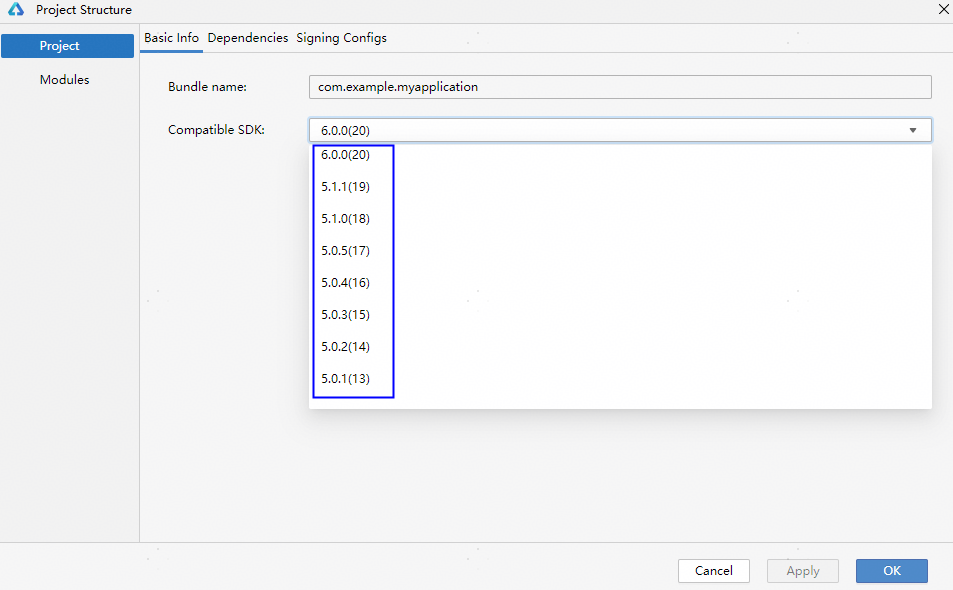
Solution 2: Decrease the API version of your project. Click in the upper right corner  of DevEco Studio and select a lower version for Compatible SDK.

- If "[Fail]ExecuteCommand need connect-key? please confirm a device by help info" is returned after the command is executed, multiple debugging devices may be connected or the Emulator and real device are used at the same time.
- If both the Emulator and real device are connected, disconnect the Emulator.
- If multiple devices are connected, you need to use the -t parameter to specify the identifier of the target device each time when executing the command. You can run the hdc list targets command to query the connected devices, and then run the hdc -t connect-key shell param get const.ohos.apiversion command to specify the target device to be connected. connect-key is the device identifier, that is, the information returned by the hdc list targets command.