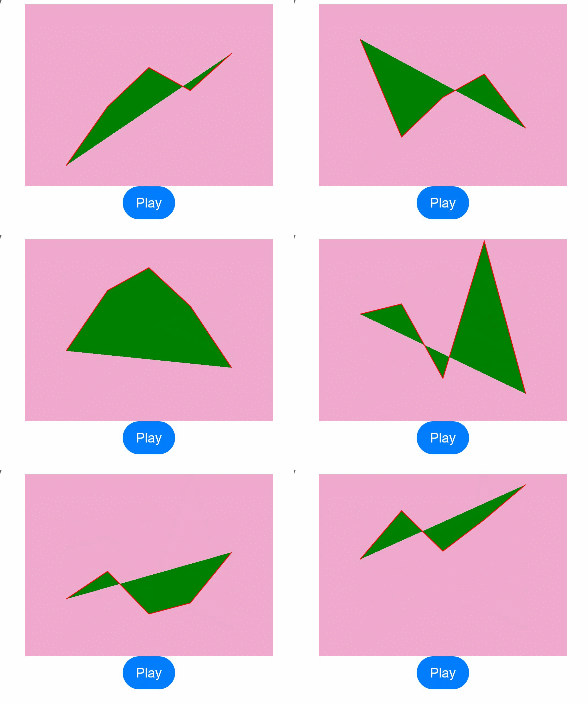
The @AnimatableExtend decorator enables animation capabilities for normally non-animatable component properties. During animation execution, frame-by-frame callbacks are executed to change the values of non-animatable properties to allow them to achieve animation effects. Additionally, you can implement frame-by-frame layout effects by changing the values of animatable properties in the per-frame callback function.
-
Animatable attribute: If an attribute method is called before the animation attribute, changing the value of this attribute can trigger the animation effect of the animation attribute. Such an attribute is called an animatable attribute. Examples include height, width, backgroundColor, translate, and the fontSize attribute of the Text component.
-
Non-animatable attribute: If an attribute method is called before the animation attribute, changing the value of this attribute cannot trigger the animation effect of the animation attribute. Such an attribute is called a non-animatable attribute. An example is the points attribute of the Polyline component.

This decorator is supported since API version 10. Updates will be marked with a superscript to indicate their earliest API version.
This decorator can be used in atomic services since API version 11.
[h2]Syntax
@AnimatableExtend(UIComponentName) function functionName(value: typeName) {
  .propertyName(value)
} -
@AnimatableExtend can be defined only globally.
-
The parameter of the @AnimatableExtend decorated function must be of the number type or a custom type that implements the AnimatableArithmetic<T> API.
-
The function body of an @AnimatableExtend decorated function can only access attribute methods of the component type specified within the parentheses of @AnimatableExtend.
[h2]Available APIs
The AnimatableArithmetic<T> API defines the animation operation rules for non-number data types. To animate non-number data (such as arrays, structs, and colors), you need to implement the addition, subtraction, multiplication, and equality checking functions in the AnimatableArithmetic<T> API. This enables the data to participate in animation interpolation calculations and to detect whether the data has changed. That is, the non-number data is defined as the types that implement the AnimatableArithmetic<T> API.
| Name | Input Parameter Type | Return Value Type | Description |
|---|---|---|---|
| plus | AnimatableArithmetic<T> | AnimatableArithmetic<T> | Defines the addition rule of the data type. |
| subtract | AnimatableArithmetic<T> | AnimatableArithmetic<T> | Defines the subtraction rule of the data type. |
| multiply | number | AnimatableArithmetic<T> | Defines the multiplication rule of the data type. |
| equals | AnimatableArithmetic<T> | boolean | Defines the equality judgment rule of the data type. |
When to Use
The following example implements the frame-by-frame layout effects by changing the width of the Text component.
@AnimatableExtend(Text)
function animatableWidth(width: number) {
  // Write the width to the width attribute of the Text component in the frame-by-frame callback.
  .width(width)
}

@Entry
@Component
struct AnimatablePropertyText {
  @State textWidth: number = 80;

  build() {
    Column() {
      Text('AnimatableProperty')
        .animatableWidth(this.textWidth)
        .animation({ duration: 2000, curve: Curve.Ease })
      // Switch textWidth by clicking the button, triggering the Text component to update the width frame by frame and produce an animation effect.
      Button('Play')
        .onClick(() => {
          this.textWidth = this.textWidth == 80 ? 160 : 80;
        })
    }.width('100%')
    .padding(10)
  }
} 
The following example implements a polyline animation effect.
class Point {
  x: number;
  y: number;

  constructor(x: number, y: number) {
    this.x = x;
    this.y = y;
  }

  plus(rhs: Point): Point {
    return new Point(this.x + rhs.x, this.y + rhs.y);
  }

  subtract(rhs: Point): Point {
    return new Point(this.x - rhs.x, this.y - rhs.y);
  }

  multiply(scale: number): Point {
    return new Point(this.x * scale, this.y * scale);
  }

  equals(rhs: Point): boolean {
    return this.x === rhs.x && this.y === rhs.y;
  }
}

// PointVector implements the AnimatableArithmetic<T> API.
class PointVector extends Array<Point> implements AnimatableArithmetic<PointVector> {
  constructor(value: Array<Point>) {
    super();
    value.forEach(p => this.push(p));
  }

  plus(rhs: PointVector): PointVector {
    let result = new PointVector([]);
    const len = Math.min(this.length, rhs.length);
    for (let i = 0; i < len; i++) {
      result.push((this as Array<Point>)[i].plus((rhs as Array<Point>)[i]));
    }
    return result;
  }

  subtract(rhs: PointVector): PointVector {
    let result = new PointVector([]);
    const len = Math.min(this.length, rhs.length);
    for (let i = 0; i < len; i++) {
      result.push((this as Array<Point>)[i].subtract((rhs as Array<Point>)[i]));
    }
    return result;
  }

  multiply(scale: number): PointVector {
    let result = new PointVector([]);
    for (let i = 0; i < this.length; i++) {
      result.push((this as Array<Point>)[i].multiply(scale));
    }
    return result;
  }

  equals(rhs: PointVector): boolean {
    if (this.length != rhs.length) {
      return false;
    }
    for (let i = 0; i < this.length; i++) {
      if (!(this as Array<Point>)[i].equals((rhs as Array<Point>)[i])) {
        return false;
      }
    }
    return true;
  }

  get(): Array<Object[]> {
    let result: Array<Object[]> = [];
    this.forEach(p => result.push([p.x, p.y]));
    return result;
  }
}

@AnimatableExtend(Polyline)
function animatablePoints(points: PointVector) {
  .points(points.get())
}

@Entry
@Component
struct  AnimatablePropertyExample {
  @State points: PointVector = new PointVector([
    new Point(50, Math.random() * 200),
    new Point(100, Math.random() * 200),
    new Point(150, Math.random() * 200),
    new Point(200, Math.random() * 200),
    new Point(250, Math.random() * 200),
  ])

  build() {
    Column() {
      Polyline()
        .animatablePoints(this.points)
        .animation({ duration: 1000, curve: Curve.Ease })// Set animation parameters.
        .size({ height: 220, width: 300 })
        .fill(Color.Green)
        .stroke(Color.Red)
        .backgroundColor('#eeaacc')
      Button('Play')
        .onClick(() => {
          // points is a data type that implements the animation protocol. During the animation, points can be changed from the previous PointVector data to the new one based on the defined operation rules and animation parameters to generate the PointVector data of each frame and then generate an animation.
          this.points = new PointVector([
            new Point(50, Math.random() * 200),
            new Point(100, Math.random() * 200),
            new Point(150, Math.random() * 200),
            new Point(200, Math.random() * 200),
            new Point(250, Math.random() * 200),
          ]);
        })
    }.width('100%')
    .padding(10)
  }
}