Complete the basic preparations by referring to Application Development Preparations, and then proceed with the following development preparations.
Applying for the Game Launch Acceleration Service
For security purposes, the system has added permission protection to the game launch acceleration service. To use related APIs, you must submit a request for enabling game launch acceleration. The capability will be available only after the request is approved.
[h2]Review Rules
This capability is available only to games.
The cold start duration of a game must be longer than 5 seconds.
[h2]Application Procedure
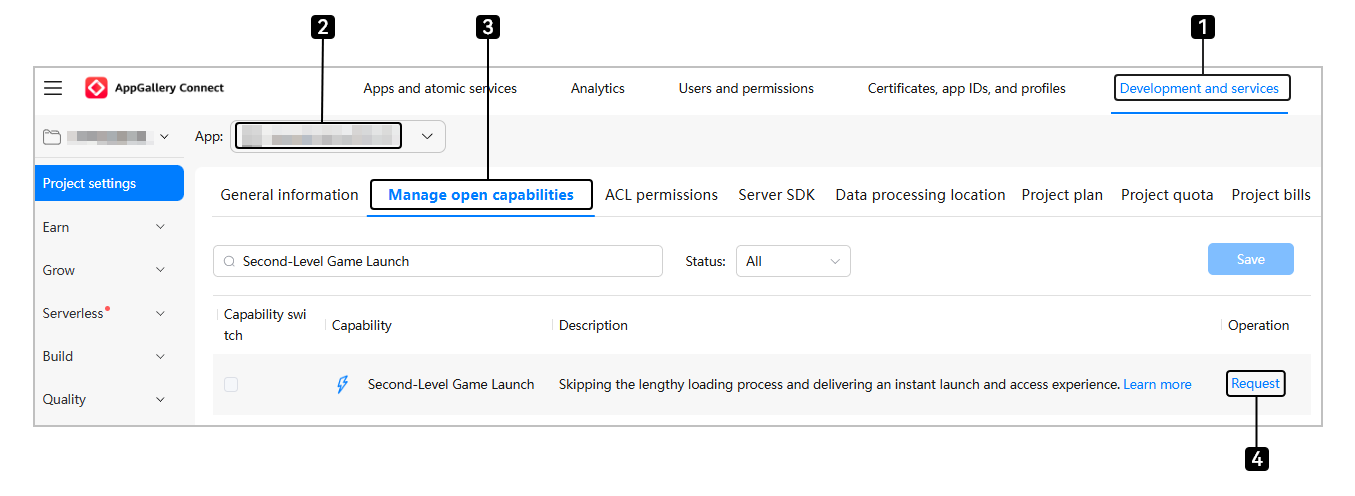
Sign in to AppGallery Connect and click Development and services.
Select your project from the project list. In the app list, select the app for which you want to request the game launch acceleration service.
Enter the Project Settings > Manage open capabilities page.
Click Request on the right side of Second-Level Game Launch.
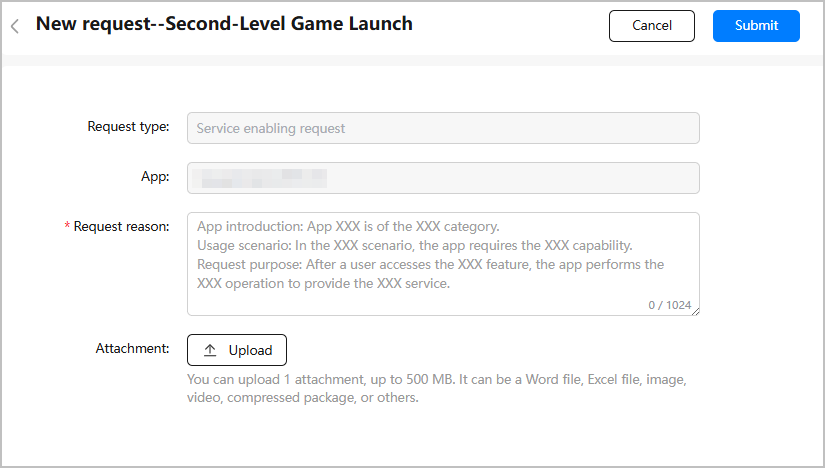
Provide required information, including the app introduction, usage scenario, and request purpose, based on the template in Request reason. Then, click Submit.
Return to the Manage open capabilities page. The original Request button changes to Requesting. The request result will be provided within 1 to 3 working days. Please check the service enabling request information in the interaction center.

After the application is approved, Community will send a notification to you and the application status changes to Approved. Now your app has successfully enabled the game launch acceleration service.
