EmbeddedComponent is used to embed, in the current page, the UI provided by an EmbeddedUIExtensionAbility within the same app or from another app that meets cross-application permission conditions. The EmbeddedUIExtensionAbility runs in an independent process, handling page layout and rendering.
It is usually used in modular development scenarios where process isolation is required.

-
This component is supported since API version 12. New APIs added in later versions are marked with a superscript to indicate their initial version.
-
The APIs in this module can only be used in the stage model.
-
Before API version 26.0.0, when the EmbeddedComponent gained focus, the focus was directly delivered to the first focusable child node in the launched EmbeddedUIExtensionAbility process. Since API version 26.0.0,
if focus moves to the EmbeddedUIExtensionAbility from outside, the focus is normally delivered to the first focusable child node.
if focus is transferred to the EmbeddedUIExtensionAbility due to a hierarchical page switch, the same rules as for UIAbility apply. When the EmbeddedUIExtensionAbility and UIAbility launch a hierarchical page that has no defaultFocus set and does not actively request focus, the focus stays on the root container and is not delivered to child nodes.
Constraints
The EmbeddedComponent is supported only on devices configured with multi-process permissions. Developers can use the canIUse API or check system settings to determine whether the current device supports multi-process permissions.
EmbeddedComponent can only be used in a UIAbility, and by default, the launched EmbeddedUIExtensionAbility must belong to the same app as the UIAbility. Since API version 26.0.0, cross-application launching of the EmbeddedUIExtensionAbility by the EmbeddedComponent is allowed when all of the following conditions are met:
-
The app to which the EmbeddedComponent belongs has applied for the ohos.permission.SUPPORT_CROSS_APP_EMBED_FOR_OA permission (this permission can only be applied for by enterprise normal apps).
-
The appIdentifier of the app is in the allowlist of apps supported by the EmbeddedUIExtensionAbility (that is, the appIdentifierAllowList attribute of the extensionAbilities tag).
[h2]EmbeddedComponent
EmbeddedComponent(loader: import('../api/@ohos.app.ability.Want').default, type: EmbeddedType)
Creates a cross-process embedded component to display the UI of the EmbeddedUIExtensionAbility with the same bundle name or that meets cross-application permission conditions.
Atomic service API: This API can be used in atomic services since API version 12.
System capability: SystemCapability.ArkUI.ArkUI.Full
Parameters
| Name | Type | Mandatory | Description |
|---|---|---|---|
| loader | import('../api/@ohos.app.ability.Want').default | Yes | EmbeddedUIExtensionAbility to be loaded. |
| type | EmbeddedType | Yes | Type of the provider. Currently, the supported value is EmbeddedType.EMBEDDED_UI_EXTENSION, indicating that the embedded UI is provided by EmbeddedUIExtensionAbility. |
[h2]EmbeddedComponent
EmbeddedComponent(loader: import('../api/@ohos.app.ability.Want').default, type: EmbeddedType, options?: EmbeddedOptions)
Creates a cross-process embedded component to display the UI of the EmbeddedUIExtensionAbility with the same bundle name or that meets cross-application permission conditions. Compared with the API in API version 12, this API adds the options parameter for passing construction parameters.
Since: 26.0.0
Atomic service API: This API can be used in atomic services since API version 26.0.0.
System capability: SystemCapability.ArkUI.ArkUI.Full
Parameters
| Name | Type | Mandatory | Description |
|---|---|---|---|
| loader | import('../api/@ohos.app.ability.Want').default | Yes | EmbeddedUIExtensionAbility to load. |
| type | EmbeddedType | Yes | Type of the provider. The currently supported value is EmbeddedType.EMBEDDED_UI_EXTENSION, indicating that the embedded UI is provided by the EmbeddedUIExtensionAbility. |
| options | EmbeddedOptions | No | Optional configuration of the embedded component, used to set the placeholder, DPI follow strategy, window mode follow strategy, and so on. For details, see EmbeddedOptions. |
Attributes
The universal attributes are supported.

The default and minimum width and height of the EmbeddedComponent are both 10 vp. The following width- and height-related attributes are not supported: constraintSize, aspectRatio, layoutWeight, flexBasis, flexGrow, and flexShrink.
Events
Event information related to screen coordinates is converted based on the position, width, and height of the EmbeddedComponent, before being transferred to the EmbeddedUIExtensionAbility for processing.
Universal events, such as the click event, are not supported. Only the following events are supported.
[h2]onTerminated
onTerminated(callback: import('../api/@ohos.base').Callback<TerminationInfo>)
Triggered when the launched EmbeddedUIExtensionAbility exits normally by calling terminateSelfWithResult or terminateSelf.

Atomic service API: This API can be used in atomic services since API version 12.
System capability: SystemCapability.ArkUI.ArkUI.Full
Parameters
| Name | Type | Mandatory | Description |
|---|---|---|---|
| callback | import('../api/@ohos.base').Callback<TerminationInfo> | Mandatory | Callback used to receive the return result of EmbeddedUIExtensionAbility. The input parameter type is TerminationInfo. |

- If the EmbeddedUIExtensionAbility is terminated by calling terminateSelfWithResult, the carried information is passed as arguments into the callback function.
- If the EmbeddedUIExtensionAbility is terminated by calling terminateSelf, in the arguments of the callback function, code takes the default value 0, and want is undefined.
[h2]onError
onError(callback: import('../api/@ohos.base').ErrorCallback)
Called when an error occurs during the running of the started EmbeddedUIExtensionAbility. Through the code, name, and message in the callback parameters, error information can be obtained and handled. For details about the error codes, see UIExtension Error Codes.

Atomic service API: This API can be used in atomic services since API version 12.
System capability: SystemCapability.ArkUI.ArkUI.Full
Parameters
| Name | Type | Mandatory | Description |
|---|---|---|---|
| callback | import('../api/@ohos.base').ErrorCallback | Mandatory | Callback used to receive error information. The input parameter type is BusinessError. You can obtain error information through code, name, and message in the parameter and handle it accordingly. |

This callback is triggered in the following scenarios:
- Failure to launch the EmbeddedUIExtensionAbility.
- Failure to notify the provider EmbeddedUIExtensionAbility to switch to the background.
- Failure to notify the provider to destroy the EmbeddedUIExtensionAbility.
- Abnormal exit of the provider EmbeddedUIExtensionAbility.
- Nested use of EmbeddedComponent within the EmbeddedUIExtensionAbility.
[h2]onDrawReady
onDrawReady(callback: Callback<void>)
Triggered when the launched EmbeddedUIExtensionAbility draws its first frame.

Since: 26.0.0
Model restriction: This API can be used only in the stage model.
Atomic service API: This API can be used in atomic services since API version 26.0.0.
System capability: SystemCapability.ArkUI.ArkUI.Full
Parameters
| Name | Type | Mandatory | Description |
|---|---|---|---|
| callback | Callback<void> | Yes | Callback invoked when the EmbeddedUIExtensionAbility draws the first frame. |
EmbeddedOptions
Used to pass optional construction parameters when creating an EmbeddedComponent.
Since: 26.0.0
Model restriction: This API can be used only in the stage model.
Atomic service API: This API can be used in atomic services since API version 26.0.0.
System capability: SystemCapability.ArkUI.ArkUI.Full
| Name | Type | Read-Only | Optional | Description |
|---|---|---|---|---|
| placeholder | ComponentContent | No | Yes | Sets the placeholder, which is displayed before the connection between the EmbeddedComponent and the EmbeddedUIExtensionAbility is established. Default value: null, indicating that no placeholder is displayed. |
| areaChangePlaceholder | Record<string, ComponentContent> | No | Yes | Sets the size-change placeholder, which is displayed when the size of the EmbeddedComponent changes and the content rendering of the EmbeddedUIExtensionAbility is not complete. The key is the size-change scenario type (for example, "FOLD_TO_EXPAND" indicates the fold-to-expand scenario), and the value is the placeholder component for the corresponding scenario. The currently supported key includes: FOLD_TO_EXPAND. If an unsupported key is passed in, the placeholder does not take effect. Default value: null, indicating that no size-change placeholder is set. |
| dpiFollowStrategy | EmbeddedDpiFollowStrategy | No | Yes | Sets the DPI so that it can follow the host or the EmbeddedUIExtensionAbility. Default value: FOLLOW_UI_EXTENSION_ABILITY_DPI, indicating that the DPI follows the EmbeddedUIExtensionAbility. |
| windowModeFollowStrategy | EmbeddedWindowModeFollowStrategy | No | Yes | Sets the window mode so that it can follow the host or the EmbeddedUIExtensionAbility. Default value: FOLLOW_UI_EXTENSION_ABILITY_WINDOW_MODE, indicating that the window mode follows the EmbeddedUIExtensionAbility. Since: 26.0.0 |
EmbeddedDpiFollowStrategy
Defines the DPI follow strategy, which is used to set the DPI to follow either the host or the EmbeddedUIExtensionAbility. For example, when the EmbeddedUIExtensionAbility needs to maintain visual consistency with the host app, you can choose to follow the host DPI. When the EmbeddedUIExtensionAbility needs to independently adapt to the DPI configuration of its own resources, you can choose to follow the EmbeddedUIExtensionAbility DPI.
Since: 26.0.0
Model restriction: This API can be used only in the stage model.
Atomic service API: This API can be used in atomic services since API version 26.0.0.
System capability: SystemCapability.ArkUI.ArkUI.Full
| Name | Value | Description |
|---|---|---|
| FOLLOW_HOST_DPI | 0 | The DPI follows the host. |
| FOLLOW_UI_EXTENSION_ABILITY_DPI | 1 | The DPI follows the EmbeddedUIExtensionAbility. |
EmbeddedWindowModeFollowStrategy
Defines the window mode follow strategy, which is used to set the window mode to follow either the host or the EmbeddedUIExtensionAbility. For example, when the EmbeddedUIExtensionAbility needs to maintain the same window mode (such as full screen or split screen) as the host app, you can choose to follow the host. When the EmbeddedUIExtensionAbility needs to independently control the window mode, you can choose to follow the EmbeddedUIExtensionAbility.
Since: 26.0.0
Model restriction: This API can be used only in the stage model.
Atomic service API: This API can be used in atomic services since API version 26.0.0.
System capability: SystemCapability.ArkUI.ArkUI.Full
| Name | Value | Description |
|---|---|---|
| FOLLOW_HOST_WINDOW_MODE | 0 | The window mode follows the host. |
| FOLLOW_UI_EXTENSION_ABILITY_WINDOW_MODE | 1 | The window mode follows the EmbeddedUIExtensionAbility. |
TerminationInfo
Provides the result returned by the started EmbeddedUIExtensionAbility.
Atomic service API: This API can be used in atomic services since API version 12.
System capability: SystemCapability.ArkUI.ArkUI.Full
| Name | Type | Read-Only | Optional | Description |
|---|---|---|---|---|
| code | number | No | No | Result code returned when the pulled EmbeddedUIExtensionAbility exits, determined by the data passed in when terminateSelfWithResult or terminateSelf is called. If the exit is through terminateSelf, the default value of code is 0. |
| want | import('../api/@ohos.app.ability.Want').default | No | Yes | Data returned when the pulled EmbeddedUIExtensionAbility exits. If the exit is through terminateSelf, the value is undefined. |
Example: Loading an EmbeddedComponent Component
This example demonstrates the basic usage of the EmbeddedComponent component and EmbeddedUIExtensionAbility. The bundleName of the sample app is "com.example.embeddedComponent", and the EmbeddedUIExtensionAbility launched within the same app is "ExampleEmbeddedAbility". This example can only run on devices configured with multi-process permissions (such as PCs and 2-in-1 devices). Developers can use the device type check API or system settings to confirm whether the current device has multi-process permissions.
Since API version 26.0.0, the onDrawReady API is added.
-
The EntryAbility (UIAbility) of the sample application loads the ets/pages/Index.ets file, whose content is as follows:
import { Want } from '@kit.AbilityKit'; import { ComponentContent } from '@kit.ArkUI'; class Params { } @Builder function LoadingBuilder(params: Params) { Column() { LoadingProgress() .color(Color.Blue) } } @Builder function AreaChangePlaceholderBuilder(params: Params) { Column() { } .width('100%') .height('100%') .backgroundColor(Color.Orange) } @Entry @Component struct Index { @State message: string = 'Message: '; private want: Want = { bundleName: 'com.example.embeddedComponent', abilityName: 'ExampleEmbeddedAbility', }; @State dpiFollowStrategy: EmbeddedDpiFollowStrategy = EmbeddedDpiFollowStrategy.FOLLOW_UI_EXTENSION_ABILITY_DPI; @State windowStrategy: EmbeddedWindowModeFollowStrategy = EmbeddedWindowModeFollowStrategy.FOLLOW_UI_EXTENSION_ABILITY_WINDOW_MODE; private initPlaceholder = new ComponentContent(this.getUIContext(), wrapBuilder(LoadingBuilder), new Params()); private areaChangePlaceholder = new ComponentContent(this.getUIContext(), wrapBuilder(AreaChangePlaceholderBuilder), new Params()); build() { Row() { Column() { Text(this.message) .fontSize(20) .fontWeight(FontWeight.Bold) EmbeddedComponent(this.want, EmbeddedType.EMBEDDED_UI_EXTENSION, { placeholder: this.initPlaceholder, areaChangePlaceholder: { 'FOLD_TO_EXPAND' : this.areaChangePlaceholder, }, windowModeFollowStrategy: this.windowStrategy, dpiFollowStrategy: this.dpiFollowStrategy }) .width('100%') .height('90%') .onTerminated((info) => { // Triggered when the terminateSelfWithResult button is clicked in the extension page. this.message = 'Termination: code = ' + info.code + ', want = ' + JSON.stringify(info.want); }) .onError((error) => { // Triggered on failure or exception. this.message = 'Error: code = ' + error.code; }) .onDrawReady(() => { // Since API version 26.0.0, the onDrawReady callback is triggered when the launched EmbeddedUIExtensionAbility draws the first frame, and the text box displays the following information. this.message = `onDrawReady`; }) } .width('100%') } .height('100%') } } -
The EmbeddedUIExtensionAbility (ExampleEmbeddedAbility) to start by the EmbeddedComponent is implemented in the ets/extensionAbility/ExampleEmbeddedAbility.ets file. The file content is as follows:
import { EmbeddedUIExtensionAbility, UIExtensionContentSession, Want } from '@kit.AbilityKit'; const TAG: string = '[ExampleEmbeddedAbility]'; export default class ExampleEmbeddedAbility extends EmbeddedUIExtensionAbility { onCreate() { console.info(TAG, `onCreate`); } onForeground() { console.info(TAG, `onForeground`); } onBackground() { console.info(TAG, `onBackground`); } onDestroy() { console.info(TAG, `onDestroy`); } onSessionCreate(want: Want, session: UIExtensionContentSession) { console.info(TAG, `onSessionCreate, want: ${JSON.stringify(want)}`); let param: Record<string, UIExtensionContentSession> = { 'session': session }; let storage: LocalStorage = new LocalStorage(param); // Load the pages/extension.ets content. session.loadContent('pages/extension', storage); } onSessionDestroy(session: UIExtensionContentSession) { console.info(TAG, `onSessionDestroy`); } } -
The entry page file ets/pages/extension.ets for ExampleEmbeddedAbility (EmbeddedUIExtensionAbility) is as follows. The path to this page must also be configured in the resources/base/profile/main_pages.json file.
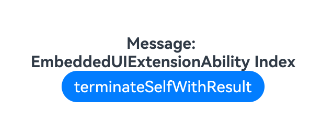
import { UIExtensionContentSession } from '@kit.AbilityKit'; @Entry @Component struct Extension { @State message: string = 'EmbeddedUIExtensionAbility Index'; private storage: LocalStorage | undefined = this.getUIContext()?.getSharedLocalStorage(); private session: UIExtensionContentSession | undefined = this.storage?.get<UIExtensionContentSession>('session'); build() { Column() { Text(this.message) .fontSize(20) .fontWeight(FontWeight.Bold) Button('terminateSelfWithResult').fontSize(20).onClick(() => { // Call terminateSelfWithResult to exit when the button is clicked. this.session?.terminateSelfWithResult({ resultCode: 1, want: { bundleName: 'com.example.embeddedComponent', abilityName: 'ExampleEmbeddedAbility', } }); }) }.width('100%').height('100%') } } -
Add the configuration for ExampleEmbeddedAbility under the extensionAbilities tag in the module.json5 file. The type is set to embeddedUI, as shown below:
{ "name": "ExampleEmbeddedAbility", "srcEntry": "./ets/extensionAbility/ExampleEmbeddedAbility.ets", "type": "embeddedUI" } -
The file directory structure is as follows:
. └── main ├── ets │ ├── extensionAbility │ │ └── ExampleEmbeddedAbility.ets │ └── pages | ├── extension.ets │ └── Index.ets ├── resources | └── base | └── profile | └── main_pages.json └── module.json5 -
The following is an example: