
The API version number format has been adjusted since 26.0.0 (for details, see the version number format adjustment description). This adjustment does not affect the basic logic for determining API compatibility. Therefore, the old version number format is still used in the examples provided in this document.
The relationship between the latest API versions is as follows:
26.0.0 > 6.1.1(24) > 6.1.0(23) > 6.0.2(22) > 6.0.1(21) > 6.0.0(20) > 5.1.1(19) > 5.1.0(18) > 5.0.5(17)
In your application's source code project configuration file (build-profile.json5), the targetSdkVersion and compatibleSdkVersion fields define the target SDK version and minimum SDK version for your application.
It is recommended that you adapt your application to the latest released API version by setting targetSdkVersion to match compileSdkVersion to benefit from the latest features. You can upgrade targetSdkVersion based on actual requirements.
Some applications might upgrade their targetSdkVersion without updating the compatibleSdkVersion. This section explains how to handle compatibility adaptation in such scenarios.
For example, API A undergoes a version-isolated behavioral change in SDK version 5.0.2(14). Your application upgrades its targetSdkVersion to 5.0.2(14) or later and adapts to the new behavior, while the compatibleSdkVersion remains set to 5.0.1(13). In this case, if the application is distributed to a device running 5.0.1(13), you must ensure it remains compatible and functions normally on that device (as shown in the figure below).
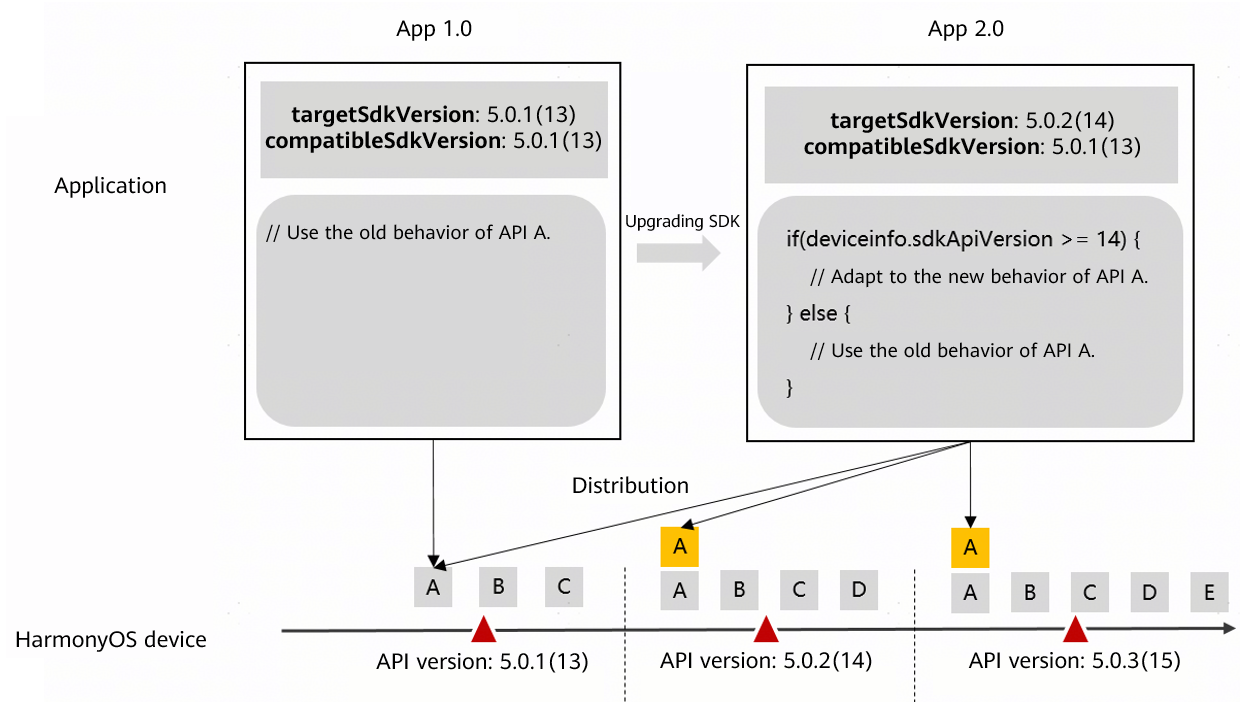
In this scenario, you can handle compatibility using the following methods.
Maintaining Compatibility for Earlier Versions Using C/ArkTS APIs
- For APIs specific to HarmonyOS device features (APIs marked with since M.F.S(N), documented as "Since: M.F.S(N)," and located under the hms directory in the SDK physical package), use the distributionOSApiVersion API for compatibility checks.ArkTS API:
import { deviceInfo } from '@kit.BasicServicesKit';
// For HarmonyOS-specific APIs, that is, APIs marked with since M.F.S(N)
getTestData(): void {
    // Compatibility check: 50002 is converted from the new API's since field using M*10000 + F*100 + S.
    if (deviceInfo.distributionOSApiVersion >=  50002) {
        // Logic adapted for the API behavioral change in version 5.0.2(14)
    } else {
        // Keep the original logic for compatibility.
    }
}
C API:
#include <deviceinfo.h> #include <stdio.h> // For HarmonyOS-specific APIs, that is, APIs marked with since M.F.S(N) void GetTestData() { // Compatibility check: 50002 is converted from the new API's since field using M*10000 + F*100 + S. if (OH_GetDistributionOSApiVersion() >= 50002) { // Logic adapted for the API behavioral change in version 5.0.2(14) } else { // Keep the original logic for compatibility. } } - For APIs specific to the OpenHarmony base (APIs marked with since N, documented as "Since: N," and located under the openharmony directory in the SDK physical package), use the sdkApiVersion API for compatibility checks.ArkTS API:
import { deviceInfo } from '@kit.BasicServicesKit';
// For OpenHarmony base public APIs, that is, APIs marked with since N
getTestData(): void {
    // Add compatibility check.
    if (deviceInfo.sdkApiVersion >= 14) {
        // Logic adapted for the API behavioral change in version 5.0.2(14)
    } else {
        // Keep the original logic for compatibility.
    }
}
C API:
#include <deviceinfo.h>
#include <stdio.h>
// For OpenHarmony base public APIs, that is, APIs marked with since N
void GetTestData() {
    // Add compatibility check.
    if (OH_GetSdkApiVersion() >=  14) {
        // Logic adapted for the API behavioral change in version 5.0.2(14)
    } else {
        // Keep the original logic for compatibility.
    }
}