Strong reference: In the context of a compiler/linker, a reference to a symbol is considered a strong reference if the linker reports an error and terminates the linking when it cannot find the definition of the symbol during processing.
Weak reference: In the context of a compiler/linker, a reference to a symbol is considered a weak reference if the linker does not report an error but instead sets the address of the symbol to 0 when it cannot find the definition of the symbol during processing.
Weak library: In the context of a compiler/linker, a library is considered a weak library if all references in the library are weak references.
If no additional build arguments are added to DevEco Studio or the build script, the reference to the C API in the application is a strong reference. The dynamic loader will attempt to resolve them immediately when loading the library. If no strong reference is found, the application will be terminated.
If you want to use C APIs of a later version in your code and ensure that the code can run on both later and earlier versions, you can use the following methods, as listed in the following table.
Solution | Disadvantage | Advantage | Technical Requirements |
|---|---|---|---|
Since SDK API version 22, you can enable the weak reference of C APIs and use the APIAVAILABLE API to check compatibility. | The configuration procedure is time-consuming, the dependency library may be incorrectly configured, and the verification is insufficient, which may cause runtime crashes. (Due to the weak reference and weak library features, if the dependency library is incorrectly configured, the error cannot be intercepted during compilation. If no sufficient test is performed, the application may crash during runtime.) | The code is simple. | High The weak reference and weak library mechanisms will be used, which will be involved in the following configuration steps. |
Using the APIAVAILABLE API to Check Compatibility

The API version number format has been adjusted since 26.0.0 (for details, see the version number format adjustment description). This adjustment does not affect the basic logic for determining API compatibility. Therefore, the old version number format is still used in the examples provided in this document.
The relationship between the latest API versions is as follows:
26.0.0 > 6.1.1(24) > 6.1.0(23) > 6.0.2(22) > 6.0.1(21) > 6.0.0(20) > 5.1.1(19) > 5.1.0(18) > 5.0.5(17)
[h2]Building a HAP Using Hvigor

This feature has new functions in both DevEco Studio and the SDK. Therefore, this feature requires the use of DevEco Studio and the SDK of the matching versions. Do not use DevEco Studio and the SDK of non-matching versions.
Step 1: Enable the weak reference of C APIs.

Weak references are not strongly verified during compilation. Instead, they depend on the check and processing in the running state. Therefore, if you use weak reference but do not add the dependency library of the weak reference, the compilation will succeed. For example, if your application's compatibleSdkVersion is 20 and you call the OH_PictureInPicture_SetPipInitialSurfaceRect() function (which is introduced in API version 20) but forget to link it with libnative_window_manager.so, your application will be successfully compiled, but will crash when the OH_PictureInPicture_SetPipInitialSurfaceRect() function is called. The only way to expose this issue is to test it.
Enable the weak reference of C APIs by passing the compatibleSdkVersion to the compiler. The method for enabling this feature varies depending on the DevEco Studio version.
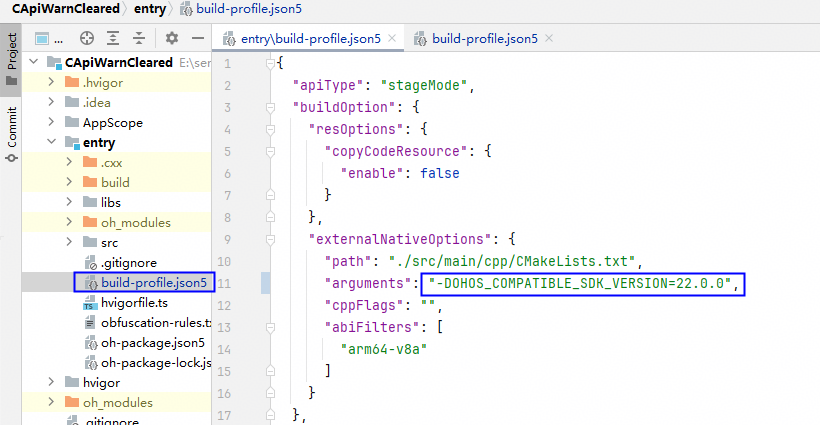
- If the DevEco Studio version is later than 6.0.2.640 Release (API 22 Release) and is not 6.1.0.830 (API 23 Release):Add "arguments": "-DOHOS_COMPATIBLE_SDK_VERSION=x.x.x" to the module-level build-profile.json5 file. Replace x.x.x with the value of the compatibleSdkVersion field in the project-level build-profile.json5 file. The rules are as follows:
- For a HarmonyOS project, set compatibleSdkVersion to a value in the format X.Y.Z(N) and -DOHOS_COMPATIBLE_SDK_VERSION to N.0.0.
- For an OpenHarmony project, set compatibleSdkVersion to N and -DOHOS_COMPATIBLE_SDK_VERSION to N.0.0.
- Example: The compatibleSdkVersion value in the project-level build-profile.json5 file is 6.0.2(22).
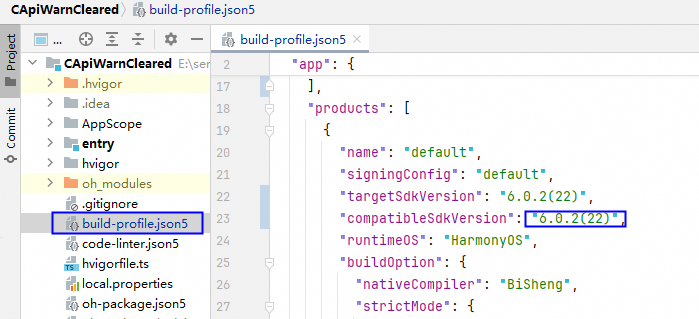
In this case, add "arguments": "-DOHOS_COMPATIBLE_SDK_VERSION=22.0.0" to the module-level build-profile.json5 configuration file.
- If the DevEco Studio version is 6.1.0.830 (API 23 Release), weak references are automatically enabled by default. (You must perform steps 1 to 5, especially the step of adding the dependency library of the used API. Otherwise, risks may occur.)The compatibility is automatically determined based on the compatibleSdkVersion configuration in the project-level build-profile.json5 file. You do not need to add "arguments": "-DOHOS_COMPATIBLE_SDK_VERSION=x.x.x" to the build-profile.json5 configuration file in the entry directory. If "arguments": "-DOHOS_COMPATIBLE_SDK_VERSION=x.x.x" already exists, ensure that the version number is updated synchronously with compatibleSdkVersion (or directly delete -DOHOS_COMPATIBLE_SDK_VERSION=x.x.x). The x.x.x version number is configured based on the value of the compatibleSdkVersion field in the project-level build-profile.json5 file. The rules are as follows:
- For a HarmonyOS project, set compatibleSdkVersion to X.Y.Z(N) and -DOHOS_COMPATIBLE_SDK_VERSION to N.0.0.
- For an OpenHarmony project, set compatibleSdkVersion to N and -DOHOS_COMPATIBLE_SDK_VERSION to N.0.0.
Step 2: Configure the dependency library of the weak reference (the dependency library exists on the device of an earlier version).

The library on which the API depends needs to be manually added to the link library. Otherwise, the application will crash during running.
Verification method: Check whether the configuration of the dependency library is missing. Disable weak reference in step 1 to ensure that the compilation is successful, and then enable weak reference.
The sample code is as follows:
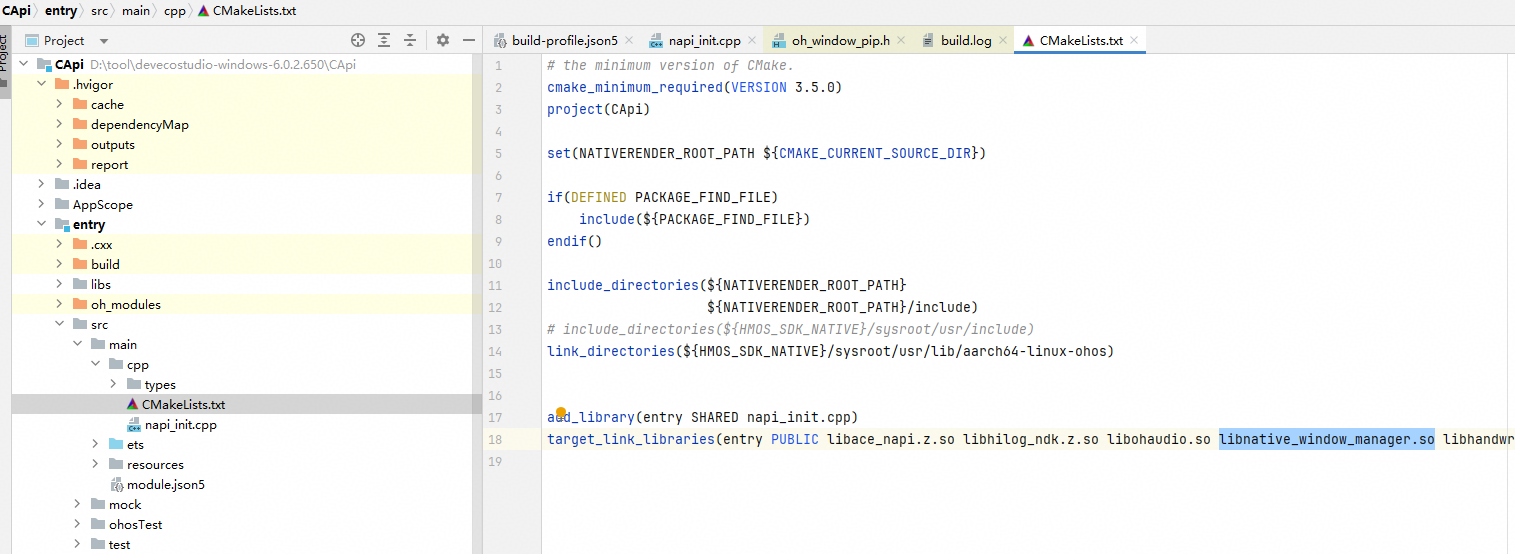
If the OH_PictureInPicture_SetPipInitialSurfaceRect() function is used in the code, you need to add the libnative_window_manager.so library file on which the function depends to the link library. Add the dependency of the libnative_window_manager.so link library to the module-level CMakeLists .txt configuration file, as shown in the following figure.
Step 3: Configure the dependency library of the weak library (the dependency library does not exist on devices of earlier versions, and devices running versions earlier than API 22 do not support this feature)

If the dynamic library on which the used API depends does not exist on devices of earlier versions, the weak library mechanism needs to be used.
Verification method: Check whether the configuration of the dependency library is missing. Disable weak reference in step 1 to ensure that the compilation is successful, and then enable weak reference.
The sample code is as follows:
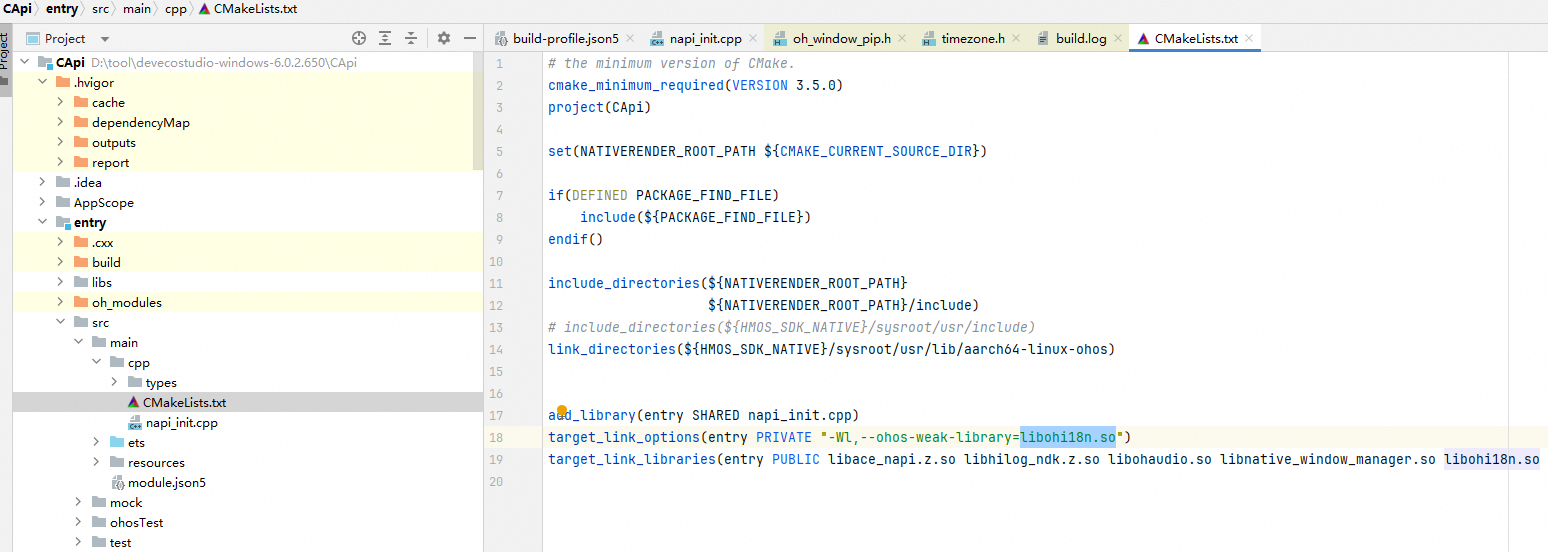
The OH_i18n_GetFirstStartFromTimeArrayTimeZoneRule() function is used in the code, which is in the newly added dynamic library libohi18n.so. You need to add the link option "-Wl,--ohos-weak-library=libohi18n.so" to the module-level CMakeLists.txt configuration file and add the libohi18n.so dependency to target_link_libraries, as shown in the following figure.
Step 4: Check compatibility.

The APIAVAILABLE macro is a simple encapsulation of the built-in function __builtin_available of the compiler. It is used to obtain the device version number at runtime and compare it with the version number specified by __builtin_available, and then enter the corresponding branch for processing.
#define __INNER_CONCAT(a, b) a##.##b
#define __INNER_APIAVAILABLE(ver) __builtin_available(ohos ver, *)
/**
  * @brief To ensure compatibility and stability of an application across different versions.
  * Prevent crashes caused by invoking non-existent APIs on older systems through compile-time
  * and runtime conditional checks.
  * Whenever using APIs that are newer than the distribution target version,
  * it is essential to protect them with the APIAVAILABLE method and provide a reasonable fallback solution.
  *
  * @param maj, int value 0 - 99.
  * @param min, int value 0 - 99.
  * @param patch, int value 0 - 99.
  * @since 22
  */
#define APIAVAILABLE(maj, min, patch) __INNER_APIAVAILABLE(__INNER_CONCAT(maj, min##.##patch))
- For APIs specific to HarmonyOS device features (APIs marked with since X.Y.Z(N), documented as "Since: X.Y.Z(N)," and located under the hms directory in the SDK physical package), use the APIAVAILABLE API for compatibility checks.
API declaration:
/**
 * @brief Query Device Security Mode.
 *
 * This method is used to query device security mode.
 *
 * @return Current device security mode, see {@link DSM_DeviceSecurityMode}.
 * @since 5.0.1(13)
 */
DSM_DeviceSecurityMode HMS_DSM_GetDeviceSecurityMode(void);
Use APIAVAILABLE for compatibility check:
if (APIAVAILABLE(13,0,0)) {
    // Call the API of version 5.0.1(13).
    HMS_DSM_GetDeviceSecurityMode();
} else {
    // Fallback solution.
}
- For APIs specific to the OpenHarmony base (APIs marked with since N, documented as "Since: N," and located under the openharmony directory in the SDK physical package), use the APIAVAILABLE API for compatibility checks.
API declaration:
/**
 * @brief Start locating and subscribe location changed.
 *
 * @param requestConfig - Pointer to the locating request parameters.\n
 * For details, see {@link Location_RequestConfig}.\n
 * You can use {@link OH_Location_CreateRequestConfig} to create an instance.\n
 * @return Location functions result code.\n
 *     For a detailed definition, please refer to {@link Location_ResultCode}.\n
 *     {@link LOCATION_SUCCESS} Successfully start locating.\n
 *     {@link LOCATION_INVALID_PARAM} The input parameter requestConfig is a null pointer.\n
 *     {@link LOCATION_PERMISSION_DENIED} Permission verification failed. The application does not have the\n
 *         permission required to call the API.\n
 *     {@link LOCATION_NOT_SUPPORTED} Capability not supported.\n
 *         Failed to call function due to limited device capabilities.\n
 *     {@link LOCATION_SERVICE_UNAVAILABLE} Abnormal startup of location services.\n
 *     {@link LOCATION_SWITCH_OFF} The location switch is off.\n
 * @permission ohos.permission.APPROXIMATELY_LOCATION
 * @since 13
 */
Location_ResultCode OH_Location_StartLocating(const Location_RequestConfig* requestConfig);
Use APIAVAILABLE for compatibility check:
if (APIAVAILABLE(13,0,0)) {
    // Call the API of version 13.
    OH_Location_StartLocating(requestConfig);
} else {
    // Fallback solution.
}
Supplementary information:
Compilation error scenario 1: The code uses an API of a later version, but APIAVAILABLE is not used for compatibility check. The following error is reported:

The code needs to be adjusted as follows:
Error code:
OH_PictureInPicture_SetPipInitialSurfaceRect(controllerId, ABOUT_TO_START, 0, 100, 100);

Code after modification:
if (APIAVAILABLE(20,0,0)) {
    OH_PictureInPicture_SetPipInitialSurfaceRect(controllerId, ABOUT_TO_START, 0, 100, 100);
}
Compilation error scenario 2: The code uses an API of a later version, but APIAVAILABLE is not properly used for compatibility check. The following error is reported:

The code needs to be adjusted as follows (OH_PictureInPicture_SetPipInitialSurfaceRect is a new function in API version 20):
Error code:
if (APIAVAILABLE(19,0,0)) {
    OH_PictureInPicture_SetPipInitialSurfaceRect(controllerId, ABOUT_TO_START, 0, 100, 100);
}

Code after modification:
if (APIAVAILABLE(20,0,0)) {
    OH_PictureInPicture_SetPipInitialSurfaceRect(controllerId, ABOUT_TO_START, 0, 100, 100);
}
Step 5: Test features.

After the weak reference mechanism is enabled, whether weak reference exists cannot be determined in the compilation phase and can only be exposed during runtime. Therefore, thorough verification is required. Otherwise, the application may crash.
1. When using the APIAVAILABLE for compatibility check, test devices of the compatibleSdkVersion version to ensure that the application can be started properly. For example, if compatibleSdkVersion is API version 20, verify the startup on a device running API version 20.
2. When using the APIAVAILABLE for compatibility check, test the new C API features in the compilation-matched SDK version to ensure that the C API features are normal. For example, if the OH_i18n_GetFirstStartFromTimeArrayTimeZoneRule function is used, ensure that the application can run to the OH_i18n_GetFirstStartFromTimeArrayTimeZoneRule function and the features are normal during the test.
[h2]Building a HAP Using Non-Hvigor Mode
Step 1: Pass compatibleSdkVersion to the compiler and enable the weak reference of C APIs.

Weak references are not strongly verified during compilation. Instead, they depend on the check and processing in the running state. Therefore, if you use weak reference but do not add the dependency library of the weak reference, the compilation will succeed. For example, if your application's compatibleSdkVersion is 20 and you call the OH_PictureInPicture_SetPipInitialSurfaceRect() function (which is introduced in API version 20) but forget to link it with libnative_window_manager.so, your application will be successfully compiled, but will crash when the OH_PictureInPicture_SetPipInitialSurfaceRect() function is called. The only way to expose this issue is to test it.
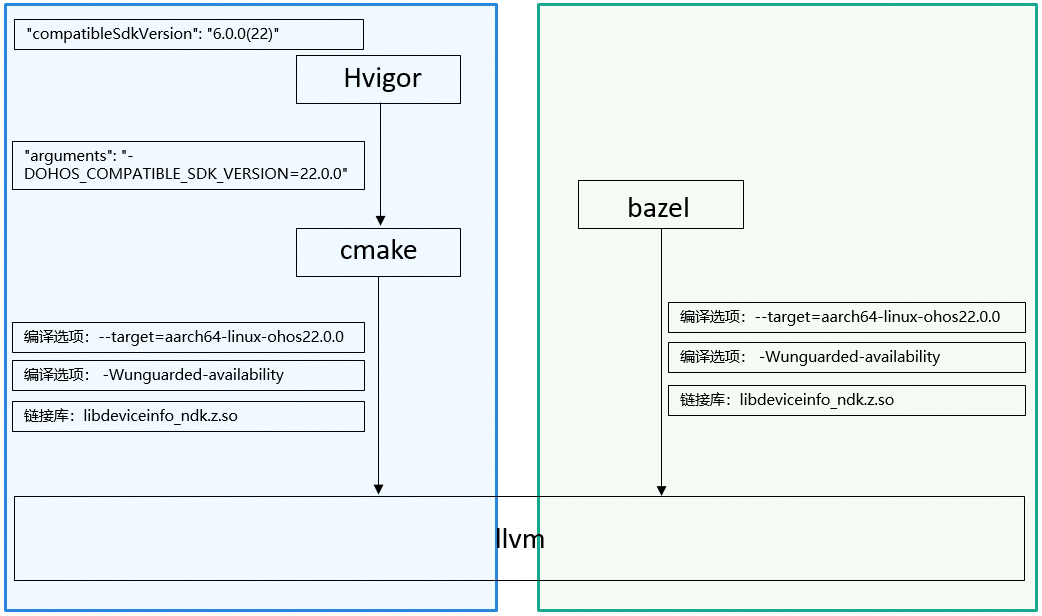
In the scenario where a HAP is built in non-Hvigor mode, for example, using Bazel, you need to pass the build options "--target=aarch64-linux-ohosx.x.x" and "-Wunguarded-availability" to llvm, and add the dependency library libdeviceinfo_ndk.z.so. The version number x.x.x in the argument is configured based on the compatibleSdkVersion configured in the project-level build-profile.json5 file.
- For a HarmonyOS project, set compatibleSdkVersion to a value in the format X.Y.Z(N) and --target to aarch64-linux-ohosN.0.0.
- For an OpenHarmony project, set compatibleSdkVersion to N and --target to aarch64-linux-ohosN.0.0.
Supplementary information:
Building a HAP using Hvigor: Hvigor converts the value of compatibleSdkVersion into "arguments": "-DOHOS_COMPATIBLE_SDK_VERSION=x.x.x" and transfers it to CMake. CMake parses the argument and converts it into the --target=aarch64-linux-ohosx.x.x build option, which is then transferred to the LLVM compiler. Additionally, the compilation options -Wunguarded-availability and the dependency library libdeviceinfo_ndk.z.so are added. The LLVM compiler checks the compilation and runtime phases to check API compatibility.
The following figure shows the transfer process.
Step 2: Configure the dependency library of the weak reference (the dependency library exists on the device of an earlier version).

The library on which the API depends needs to be manually added to the link library. Otherwise, the application will crash during running.
Verification method: Check whether the configuration of the dependency library is missing. Disable weak reference in step 2 to ensure that the compilation is successful, and then enable weak reference.
Configure the dependency library required by the API function and place it in the link library.
Step 3: Configure the dependency library of the weak library (the dependency library does not exist on devices of earlier versions, and devices running versions earlier than API 22 do not support this feature).

If the API you are using is in a new dynamic library in a later version (the dynamic library does not exist on devices running earlier versions), you need to use the weak library mechanism.
Verification method: Check whether the configuration of the dependency library is missing. Disable weak reference in step 1 to ensure that the compilation is successful, and then enable weak reference.
Configure the dependency library required by the API function and place it in the link library. In addition, add the link option "-Wl,--ohos-weak-library=libxxx.so". Replace libxxx.so with the actual dynamic library.
Step 4: Check compatibility.
For details, see step 4 in "Building a HAP Using Hvigor."
Step 5: Test features.
For details, see step 5 in "Building a HAP Using Hvigor."
Supplementary information:
The version numbers, function names, and library names used in this topic are for reference only.