The adaptation process includes adaptation preparation, application adaptation, developer verification, application release, and end-to-end (E2E) verification.
Figure 1 Adaptation process

Adaptation Preparation
During adaptation preparation, you need to analyze the data scope and differences between the APK application in HarmonyOS and the HarmonyOS application in HarmonyOS NEXT.
Before development, the device must be upgraded to HarmonyOS NEXT Developer Preview1 or a later version through OTA.
Application Adaptation
In application adaptation, you need to implement BackupExtensionAbility in the code of the HarmonyOS application so that the application can be connected to the backup and restore framework to convert and migrate application data. For more adaptation guidance, see Guidelines on Application Data Migration and Adaptation.

All the required data must be converted and migrated before the execution of BackupExtensionAbility is complete, after which the backup and restore framework clears the backup and restore directory.
After that, the HarmonyOS application accesses the HarmonyOS application sandbox to obtain application data.
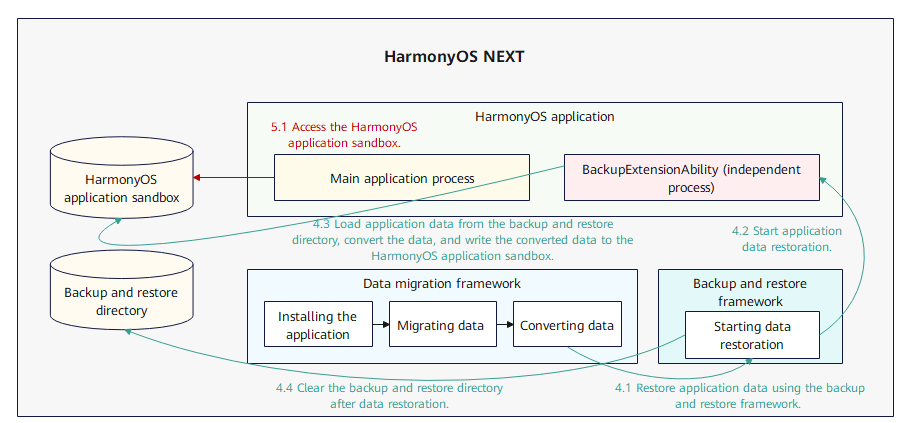
The following table lists the backup and restore directories.
| Backup and restoration directory |
|---|
| /data/storage/el1/base/.backup/restore/{APK package name}/de/ |
| /data/storage/el2/base/.backup/restore/{APK package name}/ce/ |
| /data/storage/el2/base/.backup/restore/{APK package name}/A/data/ |
| /data/storage/el2/base/.backup/restore/{APK package name}/A/obb/ |
For details about the HarmonyOS app sandbox directory, please refer to Application Sandbox.
Developer Self-verification
After completing application adaptation, you need to verify the result of HarmonyOS application data migration and adaptation. For more information about self-verification, please refer to Developer Self-verification.
To obtain the migration debugging tool required for developer verification, perform the following steps:
For HarmonyOS NEXT Developer Beta1 and later versions, industry partners can submit a service ticket on the IssueReporter platform to Huawei technical support to apply for the migration debugging tool to simulate data migration verification. Independent developers can submit a service ticket online via Developer Support.
For versions earlier than HarmonyOS NEXT Developer Beta1, you can use the preset migration debugging tool to simulate data migration verification.
Application release
After adaption to HarmonyOS, the application has to be released to HUAWEI AppGallery for E2E verification. For details about how to release a HarmonyOS app, please refer to Releasing an App (APP).

To release a HarmonyOS application, you need to configure the mapping between the HarmonyOS application and the APK.
E2E Verification
After the HarmonyOS application is released to HUAWEI AppGallery, Huawei technical support personnel will push the rollback version to you. If the device is running HarmonyOS NEXT, you need to roll back the device to HarmonyOS and use the APK application to generate data in HarmonyOS. After the application data is prepared, upgrade the device to HarmonyOS NEXT provided by HUAWEI in OTA mode. Check whether the HarmonyOS application in HarmonyOS NEXT successfully inherits the data of the original APK application.