Introduction
This document provides guidance on how to develop profile capabilities for actively pairing and connecting devices.
[h2]Applying for the Required Permission
Apply for the ohos.permission.ACCESS_BLUETOOTH permission. For details about how to configure and apply for permissions, see Declaring Permissions and Requesting User Authorization.
[h2]Importing Required Modules
Import the connection, a2dp, hfp, hid, baseProfile, constant, and error code modules.
import { connection, a2dp, hfp, hid, baseProfile, constant, common } from '@kit.ConnectivityKit';
import { BusinessError } from '@kit.BasicServicesKit';
[h2]Subscribing to Pairing State Change Events
By subscribing to pairing state change events, an app can obtain the pairing state in real time. The pairing process involves transitions between multiple states, among which BOND_STATE_BONDED indicates that the devices are paired.
Whether the app initiates pairing with another device or another device initiates pairing with the local device, the app can obtain the pairing state through this event.
// Define the callback for pairing state changes.
function onReceiveEvent(data: connection.BondStateParam) {
    console.info('pair result: '+ JSON.stringify(data));
}

try {
  // Subscribe to pairing state changes.
  connection.on('bondStateChange', onReceiveEvent);
} catch (err) {
  console.error('errCode: ' + (err as BusinessError).code + ', errMessage: ' + (err as BusinessError).message);
}
[h2]Initiating Pairing
If the pairing state of the target device is BOND_STATE_INVALID, the current device can proactively pair with the target device.
- You can obtain the target device through the device discovery process. For details, see Bluetooth Discovery or BLE Device Discovery.
During the pairing process, a dialog box is displayed. The dialog box style varies according to the pairing type. The following figure shows the Confirm Passkey dialog box. The pairing can proceed only when the user agrees to the authorization.
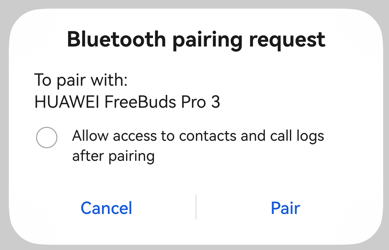
Figure 1 Bluetooth pairing request dialog box
The actual MAC address of a Bluetooth device is private information. During device discovery, the Bluetooth subsystem assigns a virtual MAC address to each Bluetooth device and saves the mapping between the virtual MAC address and the actual MAC address.
If you do not know the address type of the target device, you are advised to initiate pairing using the method for API version 20 and earlier. For details, see connection.pairDevice.
- In this pairing mode, you do not need to know the MAC address type of the target device.
// Obtain the address of the target device through the device discovery process.
let device = '11:22:33:44:55:66';

try {
  // Initiate pairing.
  connection.pairDevice(device).then(() => {
    console.info('pairDevice');
  }, (error: BusinessError) => {
    console.error('pairDevice: errCode:' + error.code + ', errMessage:' + error.message);
  });
} catch (err) {
  console.error('startPair: errCode:' + err.code + ', errMessage:' + err.message);
}
If you know the address type of the target device, you are advised to use the pairing mode supported since API version 21. For details, see connection.pairDevice.
- In this pairing mode, you need to specify both the MAC address and address type of the target device.
let btAddr: common.BluetoothAddress = {
    "address": '11:22:33:44:55:66', // Actual or virtual MAC address of the target device.
    "addressType": common.BluetoothAddressType.REAL, // Address type of the target device
}

try {
    // Initiate pairing.
    connection.pairDevice(btAddr).then(() => {
        console.info('pairDevice');
    }, (error: BusinessError) => {
        console.error('pairDevice: errCode:' + error.code + ', errMessage:' + error.message);
    });
} catch (err) {
  console.error('startPair: errCode:' + err.code + ', errMessage:' + err.message);
}
[h2]Connecting to the Profile of a Paired Device
After successful pairing, an application can call connectAllowedProfiles to connect to the profiles supported by the target device, including A2DP, HFP, HID, and PAN. If you need to use the SPP connection, see SPP-based Connection and Data Transmission.
- The Bluetooth subsystem queries and saves all profiles supported by the target device during pairing.
- After the pairing is complete, the application can call getRemoteProfileUuids to query the profiles supported by the target device. If an applicable profile exists, the application can initiate a connection to the profile within 30 seconds after successful pairing.
// Device address of the paired device
let device = 'XX:XX:XX:XX:XX:XX';

// Create an A2DP, HFP, or HID instance.
let a2dpSrc = a2dp.createA2dpSrcProfile();
let hfpAg = hfp.createHfpAgProfile();
let hidHost = hid.createHidHostProfile();

// Define the callback for A2DP connection state change events.
function onA2dpConnectStateChange(data: baseProfile.StateChangeParam) {
  console.info(`A2DP State: ${JSON.stringify(data)}`);
}

// Define the callback for HFP connection state change events.
function onHfpConnectStateChange(data: baseProfile.StateChangeParam) {
  console.info(`HFP State: ${JSON.stringify(data)}`);
}

// Define the callback for HID connection state change events.
function onHidConnectStateChange(data: baseProfile.StateChangeParam) {
  console.info(`HID State: ${JSON.stringify(data)}`);
}

try {
    // Check whether the target device supports the A2DP, HFP, and HID profiles.
    // Subscribe to connection state change events depending on the supported profile.
    a2dpSrc.on('connectionStateChange', onA2dpConnectStateChange);
    hfpAg.on('connectionStateChange', onHfpConnectStateChange);
    hidHost.on('connectionStateChange', onHidConnectStateChange);

    // Initiate a connection to the profile.
    connection.connectAllowedProfiles(device).then(() => {
      console.info('connectAllowedProfiles');
    }, (error: BusinessError) => {
      console.error('errCode:' + error.code + ',errMessage' + error.message);
    });
} catch (err) {
  console.error('errCode:' + err.code + ',errMessage' + err.message);
}
Sample Code
import { connection, a2dp, hfp, hid, baseProfile, constant } from '@kit.ConnectivityKit';
import { BusinessError } from '@kit.BasicServicesKit';

export class PairDeviceManager {
  device: string = '';
  pairState: connection.BondState = connection.BondState.BOND_STATE_INVALID;
  a2dpSrc = a2dp.createA2dpSrcProfile();
  hfpAg = hfp.createHfpAgProfile();
  hidHost = hid.createHidHostProfile();

  // Define the callback for pairing state change events.
  onBondStateEvent = (data: connection.BondStateParam) => {
    console.info('pair result: '+ JSON.stringify(data));
    if (data && data.deviceId == this.device) {
      this.pairState = data.state; // Save the pairing state of the target device.
    }
  };

  // Initiate pairing. The device address can be obtained through the device discovery process.
  public startPair(device: string) {
    this.device = device;
    try {
      // Subscribe to pairing state change events.
      connection.on('bondStateChange', this.onBondStateEvent);
    } catch (err) {
      console.error('bondStateChange errCode: ' + (err as BusinessError).code + ', errMessage: ' + (err as BusinessError).message);
    }

    try {
      // Initiate pairing.
      connection.pairDevice(device).then(() => {
        console.info('pairDevice');
      }, (error: BusinessError) => {
        console.error('pairDevice: errCode:' + error.code + ',errMessage' + error.message);
      });
    } catch (err) {
      console.error('startPair: errCode:' + err.code + ',errMessage' + err.message);
    }
  }

  // Define the callback for A2DP connection state change events.
  onA2dpConnectStateChange = (data: baseProfile.StateChangeParam) => {
    console.info(`A2DP State: ${JSON.stringify(data)}`);
  };

  // Define the callback for HFP connection state change events.
  onHfpConnectStateChange = (data: baseProfile.StateChangeParam) => {
    console.info(`HFP State: ${JSON.stringify(data)}`);
  };

  // Define the callback for HID connection state change events.
  onHidConnectStateChange = (data: baseProfile.StateChangeParam) => {
    console.info(`HID State: ${JSON.stringify(data)}`);
  };

  // Initiate a connection.
  public async connect(device: string) {
    try {
      let uuids = await connection.getRemoteProfileUuids(device);
      console.info('device: ' + device + ' remoteUuids: '+ JSON.stringify(uuids));
      let allowedProfiles = 0;
      // If an applicable profile exists, enable listening for connection state changes of the profile.
      if (uuids.some(uuid => uuid == constant.ProfileUuids.PROFILE_UUID_A2DP_SINK.toLowerCase())) {
        console.info('device supports a2dp');
        allowedProfiles++;
        this.a2dpSrc.on('connectionStateChange', this.onA2dpConnectStateChange);
      }
      if (uuids.some(uuid => uuid == constant.ProfileUuids.PROFILE_UUID_HFP_HF.toLowerCase())) {
        console.info('device supports hfp');
        allowedProfiles++;
        this.hfpAg.on('connectionStateChange', this.onHfpConnectStateChange);
      }
      if (uuids.some(uuid => uuid == constant.ProfileUuids.PROFILE_UUID_HID.toLowerCase()) ||
        uuids.some(uuid => uuid == constant.ProfileUuids.PROFILE_UUID_HOGP.toLowerCase())) {
        console.info('device supports hid');
        allowedProfiles++;
        this.hidHost.on('connectionStateChange', this.onHidConnectStateChange);
      }
      if (allowedProfiles > 0) { // If there is an applicable profile, initiate a connection.
        connection.connectAllowedProfiles(device).then(() => {
          console.info('connectAllowedProfiles');
        }, (error: BusinessError) => {
          console.error('errCode:' + error.code + ',errMessage' + error.message);
        });
      }
    } catch (err) {
      console.error('errCode:' + err.code + ',errMessage' + err.message);
    }
  }
}

let pairDeviceManager = new PairDeviceManager();
export default pairDeviceManager as PairDeviceManager;