Use Cases
This service allows you to query operational information about your app or atomic service. Currently, it supports querying scene values and ad signature verification information. Scene values describe the paths through which users access an app and atomic service. You can use this service to query the scenario in which your app or atomic service is opened. For details, please refer to Scene Value List. We currently support querying scene values for atomic services, and will support the capability for apps in the future. Ad signature verification version queries come into play only when your app or atomic service encompasses advertising scenarios. It allows you to query the logic of processing ad signature verification parameters.
Service Process
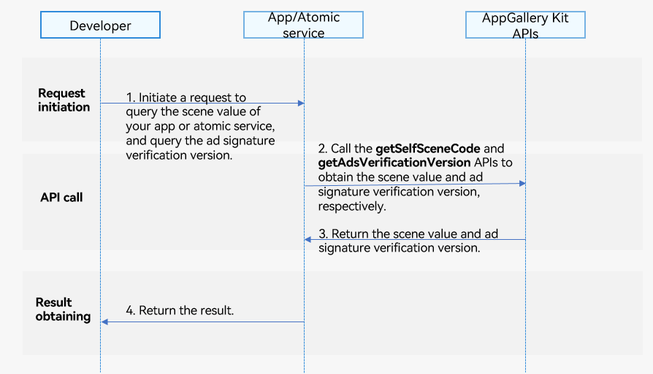
-
You request to query the scene value of your app or atomic service, and query the ad signature verification version.
-
Your app or atomic service calls the getSelfSceneCode and getAdsVerificationVersion APIs to obtain the scene value and ad signature verification version, respectively.
-
The APIs return the scene value and ad signature verification version to your app or atomic service.
-
Your app or atomic service returns the result to you.
Constraints
-
The ecosystem query service is supported on phones, tablets, and PCs/2-in-1 devices. Starting from version 5.1.1(19), it is also supported on TVs.
-
If no scene value has been generated for your app or atomic service, getSelfSceneCode will return an empty value.
-
The ecosystem query service does not support the Emulator. Use a real device for debugging.
API Description
The ecosystem query service provides the following APIs. For details, please refer to the API reference.
| API | Description |
|---|---|
| getSelfSceneCode():string | Obtains the scene value of your app or atomic service. |
| getAdsVerificationVersion(): number | Obtains the ad signature verification version. |
[h2]Obtaining the Scene Value of Your App or Atomic Service
-
Import the required modules.
import { hilog } from '@kit.PerformanceAnalysisKit'; import { sceneManager } from '@kit.AppGalleryKit'; -
Call the getSelfSceneCode API.
try {
  const sceneCode: string = sceneManager.getSelfSceneCode();
  hilog.info(0, 'TAG', 'Succeeded in getting SelfSceneCode res = ' + sceneCode);
} catch (error) {
  hilog.error(0, 'TAG', `getSelfSceneCode failed. code is ${error.code}, message is ${error.message}`);
}
[h2]Obtaining the Ad Signature Verification Version
-
Import the required modules.
import { hilog } from '@kit.PerformanceAnalysisKit'; import { sceneManager } from '@kit.AppGalleryKit'; -
Call the getAdsVerificationVersion API.
try {
  const version: number = sceneManager.getAdsVerificationVersion();
  hilog.info(0, 'TAG', 'Succeeded in getting AdsVerificationVersion res = ' + version);
} catch (error) {
  hilog.error(0, 'TAG', `getAdsVerificationVersion failed. code is ${error.code}, message is ${error.message}`);
}