Directory Structure
The following figure shows the typical directory structure of the JavaScript module (entry/src/main/js/module) for an application with feature abilities (FA) using JavaScript APIs.
Figure 1 Directory structure
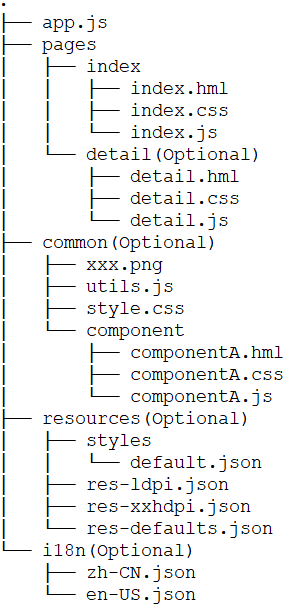
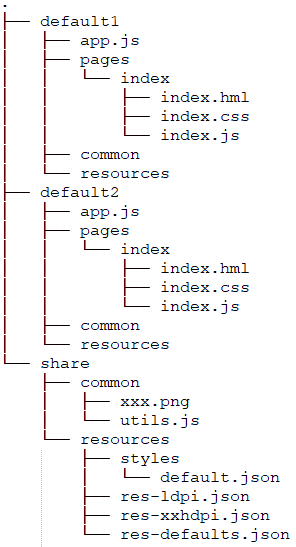
Figure 2 Directory structure for multiple instances resource sharing
Functions of the files are as follows:
-
.hml files describe the page layout.
-
.css files describe the page style.
-
.js files process interactions between pages.
Functions of the folders are as follows:
-
The app.js file manages global JavaScript logics and application lifecycle. For details, see app.js.
-
The pages directory stores all component pages.
-
The common directory stores public resource files, such as media resources, custom components, and .js files.
-
The resources directory stores resource configuration files, for example, for multi-resolution loading. For details, see Resource Limitations and Access.
-
The share directory is used to configure resources shared by multiple instances. For example, images and JSON files in this directory can be shared by default1 and default2 instances.

-
The i18n and resources folders cannot be renamed.
-
If the same resource name and directory are used under the share directory and the instance (default) directory, the resource in the instance directory will be used when you reference the directory.
-
The share directory does not support i18n.
-
You should create the optional folders (shown in the directory structure) as needed after you create the project in DevEco Studio.
File Access Rules
Application resources can be accessed via an absolute or relative path. An absolute path starts with a slash (/), and a relative path starts with ./ or ../. The rules are as follows:
-
To reference a code file, use a relative path, for example, ../common/utils.js.
-
To reference a resource file, use an absolute path, for example: /common/xxx.png.
-
Store code files and resource files in the common directory and access the files in a required fashion.
-
In a .css file, use the url() function to create a URL, for example, url(/common/xxx.png).

When code file A needs to reference code file B:
-
If code files A and B are in the same directory, you can use either a relative or absolute path in code file B to reference resource files.
-
If code files A and B are in different directories, you must use an absolute path in code file B to reference resource files. The reason is that the directory of code file B changes during Webpack packaging.
-
Use an absolute path if you want to dynamically change the resource file path through data binding in a .js file.