Generally, UI development involves operations performed on rectangular windows. However, on PCs/2-in-1 devices, applications may use various irregularly shaped windows to display interaction content. The irregular shapes mentioned here include, but are not limited to, circles, triangles, and other non-rectangular forms. You can use these irregularly shaped windows to show UI interaction diversity based on the content within the windows, thereby enhancing user experience of applications. Similar examples include a magnifier in a text application, a bubble box with an indication arrow, and a floating window that provides auxiliary features.
This section describes how to implement irregularly shaped windows on PCs/2-in-1 devices. Based on the window shapes, the scenarios are as follows:
How to Implement
During window creation in ArkUI, the width and height are used as parameters to describe the initial size of a window. The default shape is rectangle. You can change the final shape of the window by setting a mask.
The mask is a two-dimensional array whose size corresponds to the width and height of the initial window. This means that, each element in the array can be mapped one-to-one with the pixels in the window. The value of each item in the array can only be 0 or 1: 0 indicates that the pixel in the corresponding position of the window is transparent, and 1 indicates that the pixel is opaque.
In short, the mask is essentially a dot matrix representation of the window shape outlined by the number 1. For details, see setWindowMask().
- Create an irregularly shaped child window or floating window, configure the attributes such as the position and size of the window, and set the page to be loaded.
- Based on the to-be-implemented irregular shape, the corresponding two-dimensional array mask is calculated. Then set the mask for the target window.
- Display the target window based on the logic requirements.

The size of the two-dimensional array mask windowMask must be the same as the initial width and height of the window, and the value of each item must be 0 or 1. Otherwise, the configured shape does not take effect.
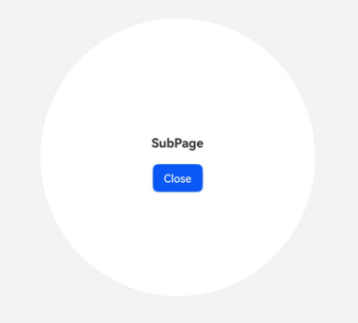
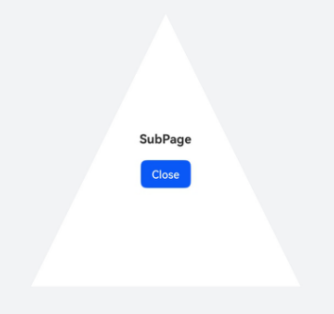
A geometric shaped window refers to a window whose shape follows specific rules and can be precisely and uniquely defined using descriptive language This section will illustrate the implementation of the following two shapes: a circle with a diameter of 500; and an isosceles triangle with a base of 500 and a height of 500.
[h2]Creating a Child Window
To obtain an irregularly shaped window, you need to create a default rectangular window first. The development procedure is as follows:
- To use APIs such as setWindowMask(), you need to create the syscap.json file in the /src/main directory of the module and add the following content to the file:
// entry/src/main/syscap.json { "devices": { "general": [ "2in1" ] }, "development": { "addedSysCaps": [ "SystemCapability.Window.SessionManager" ] } } - Use createSubWindow() to create a child window (see Setting a Child Window of an Application) or use createWindow() to create a floating window , set the position, size, and other attributes of the window, and then use setUIContent() to set the page to be loaded by the window.
windowStage = AppStorage.get('windowStage');
if (windowStage === null) {
  hilog.error(0x0000, 'Sample', 'Failed to create the subwindow. Cause: windowStage is null');
  return;
}
const windowWidth = 500;
const windowHeight = 500;
try {
  subWindow = await windowStage!.createSubWindow('mySubWindow');
  subWindow.moveWindowTo(300, 300);
  subWindow.resize(windowWidth, windowHeight);
  subWindow.setUIContent('pages/SubPage');
  // ...
  subWindow.showWindow();
} catch (exception) {
  hilog.error(0x0000, 'Sample', 'Failed to create sub window. Cause: ' + JSON.stringify(exception));
}
- Calculate the two-dimensional array mask windowMask based on the shape of the irregularly shaped window to be implemented.
- Below is an example using a circle with a diameter of 500 and its center at the midpoint of the original rectangle. For details about the final effect, see the circular child window effect.
function fillCircle(array: number[][], x: number, y: number, radius: number): void { for (let i = x - radius; i <= x + radius; i++) { for (let j = y - radius; j <= y + radius; j++) { const distSquared = (i - x)**2 + (j - y)**2; if (distSquared <= radius**2 && i >= 0 && j >= 0 && i < array.length && j < array[0].length) { array[i][j] = 1; } } } } async function getCircleMask(width: number, height: number): Promise<number[][]> { const radius = Math.min(width, height) / 2; const maskArray: number[][] = new Array(height).fill(null).map(() => new Array(width).fill(0)); fillCircle(maskArray, height / 2, width / 2, radius); return maskArray; } - Below is an example using an isosceles triangle with the base equal to the width of the original rectangle and the height equal to the height of the original rectangle. For details about the final effect, see the triangle child window effect.
function fillTriangle(array: number[][], base: number, height: number): void {
  // i < height-10 in order to remove the round corner
  for (let i = 0; i < height - 10; i++) {
    for (let j = 0; j < base; j++) {
      if (j >= base / 2 - base / 2 * i / height && j <= base / 2 + base / 2 * i / height) {
        array[i][j] = 1;
      }
    }
  }
}

async function getTriangleMask(width: number, height: number): Promise<number[][]> {
  const maskArray: number[][] = new Array(height).fill(null).map(() => new Array(width).fill(0));
  fillTriangle(maskArray, width, height);
  return maskArray;
}
- Below is an example using a circle with a diameter of 500 and its center at the midpoint of the original rectangle. For details about the final effect, see the circular child window effect.
- Call the setWindowMask(windowMask) API to set the window shape.
async function setWindowShape(win: window.Window, width: number, height: number, getMaskFunc: (w: number, h: number, picPath?: string) => Promise<number[][]>, picPath?: string): Promise<void> { const windowMask = await getMaskFunc(width, height, picPath); if (canIUse('SystemCapability.Window.SessionManager')) { try { win.setWindowMask(windowMask); } catch (e) { let err = e as BusinessError; hilog.error(0x0000, 'Simple', `failed code=${err.code}, message=${err.message}`); } } else { hilog.info(0x0000, 'Simple', 'can not use SessionManager syscap'); } } /** * Set the window with circle shape * @param win The target window * @param width The original window width * @param height The original window height */ export async function setWindowCircleShape(win: window.Window, width: number, height: number): Promise<void> { setWindowShape(win, width, height, getCircleMask) } /** * Set the window with triangle shape * @param win The target window * @param width The original window width * @param height The original window height */ export async function setWindowTriangleShape(win: window.Window, width: number, height: number): Promise<void> { setWindowShape(win, width, height, getTriangleMask) } - Call the showWindow() API to display the irregularly shaped child window.
subWindow.showWindow();
To implement an irregularly shaped window, typically you use the graphics files provided by designers as inputs and convert them into corresponding shape masks based on the image processing capability of ArkUI.
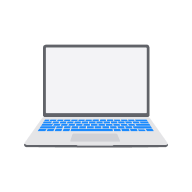
This section uses the preceding figure as an example to describe how to implement an irregularly shaped window.
- Read the image file and convert it into pixelMap data.
/** * Convert image to PixelMap object */ export async function image2PixelMap(Context: Context, icon: string, w: number, h: number): Promise<image.PixelMap> { try { const rawFileDescriptor: resourceManager.RawFileDescriptor = Context.resourceManager.getRawFdSync(icon); const imageSource: image.ImageSource = image.createImageSource(rawFileDescriptor); const pixelMap: Promise<PixelMap> = imageSource.createPixelMap({ editable: false, desiredPixelFormat: image.PixelMapFormat.BGRA_8888, desiredSize: { width: w, height: h } }); imageSource.release() return pixelMap; } catch (e) { let err = e as BusinessError; hilog.error(0x0000, 'Simple', `failed code=${err.code}, message=${err.message}`); } return new Promise<image.PixelMap>((resolve, reject) => { reject('null') }); } - Obtain the color information array from pixelMap, extract the opacity of each pixel to allPixels, and convert the opacity to generate maskArray of the corresponding shape.
export async function getPicMask(Context: Context,width: number, height: number, picPath: string): Promise<number[][]> { const maskArray: number[][] = new Array(height).fill(null).map(() => new Array(width).fill(0)); const pixelMap: image.PixelMap = await image2PixelMap(Context, picPath, width, height); const pixelArrayBuffer: ArrayBuffer = new ArrayBuffer(width * height * 4); await pixelMap.readPixelsToBuffer(pixelArrayBuffer); const allPixels: number[] = []; const unit8Pixels: Uint8Array = new Uint8Array(pixelArrayBuffer); for (let i = 0, j = 0; i < unit8Pixels.length; i += 4, j++) { // unit8Pixels[i+3] is alpha channel of BGRA_8888 allPixels[j] = unit8Pixels[i + 3] > 0 ? 1 : 0; } pixelMap.release() let k = 0; for (let i = 0; i < height; i++) { for (let j = 0; j < width; j++) { maskArray[i][j] = allPixels[k++]; } } return maskArray; } - Call the setWindowMask(windowMask) API to set the window shape.
async function setWindowShape(win: window.Window, width: number, height: number, getMaskFunc: (w: number, h: number, picPath?: string) => Promise<number[][]>, picPath?: string): Promise<void> { const windowMask = await getMaskFunc(width, height, picPath); if (canIUse('SystemCapability.Window.SessionManager')) { try { win.setWindowMask(windowMask); } catch (e) { let err = e as BusinessError; hilog.error(0x0000, 'Simple', `failed code=${err.code}, message=${err.message}`); } } else { hilog.info(0x0000, 'Simple', 'can not use SessionManager syscap'); } } /** * Set the window with pic shape * @param win The target window * @param width The original window width * @param height The original window height * @param picPath The pic path in rawfile */ export async function setWindowPicShape(win: window.Window, Context: Context, width: number, height: number, picPath: string): Promise<void> { setWindowShape(win, width, height, (w, h, picPath) => { return getPicMask(Context,w, h, picPath!) }, picPath) } - Call the showWindow() API to display the irregularly shaped child window.
subWindow.showWindow();
