Constraints
The performance maintenance and test capability supports phones, 2-in-1 devices, tablets, and wearables. Starting from version 5.1.1(19), it is also supported on TVs.
Capturing Details About HTTP Request/Response Streams
During performance maintenance and testing, you can use TracingConfiguration to collect detailed tracing information about HTTP requests for your app In TracingConfiguration, you can set four parameters: verbose (whether to enable details tracing), infoToCollect (type of events to be collected), collectTimeInfo (whether to collect time-related information), and httpEventsHandler (callback of the response handler for a specific operation during an HTTP request or response).
The following describes how to obtain detailed information such as data receiving time, request header receiving time, and data transmission completion time of an HTTP request/response.
-
Import required modules. In this example, the following modules are imported as Remote Communication Kit is used to initiate network requests and handle response success and failure:
import { rcp } from '@kit.RemoteCommunicationKit'; import { BusinessError } from '@kit.BasicServicesKit'; -
In HttpEventsHandler, set onDataReceive (callback used when a part of the HTTP response body is received), onHeaderReceive (callback used to process the received headers during the response), and onDataEnd (callback triggered when data transmission is complete).
// Define a custom response handler. const customHttpEventsHandler: rcp.HttpEventsHandler = { onDataReceive: (incomingData: ArrayBuffer) => { // Custom logic for processing incoming data. console.info(`Received data: ${incomingData.byteLength}`, ); return incomingData.byteLength; }, onHeaderReceive: (headers: rcp.RequestHeaders) => { // Custom logic for processing response headers. console.info(`Received headers: ${JSON.stringify(headers)}`); }, onDataEnd: () => { // Custom logic for processing the completion of data transmission. console.info('Data transfer complete'); } }; -
Set verbose in the tracingConfig object to true, indicating that detailed tracing is enabled. In the infoToCollect object of the tracingConfig object, set the values of incomingData, outgoingData, incomingHeader, and outgoingHeader to true.
// Configure tracing settings. const tracingConfig: rcp.TracingConfiguration = { verbose: true, infoToCollect: { incomingHeader: true, // Collect incoming header events. outgoingHeader: true, // Collect outgoing header events. incomingData: true, // Collect incoming data events. outgoingData: true // Collect outgoing data events. }, collectTimeInfo: true, httpEventsHandler: customHttpEventsHandler }; const securityConfig: rcp.SecurityConfiguration = { tlsOptions: { tlsVersion: 'TlsV1.3' } }; -
Call rcp.createSession() to pass tracingConfig and create a communication session object.
// Create a communication session object and pass related configurations.
const session = rcp.createSession({ requestConfiguration: { tracing: tracingConfig, security: securityConfig } });
// 'https://www.example.com' is a sample URL.
session.get('https://www.example.com').then((response) => {
  console.info(`Request succeeded, message is ${JSON.stringify(response)}`);
  // ...
}).catch((err: BusinessError) => {
  console.error(`err: error code is ${err.code}, error data is ${err.data}`);
  // ...
});
Time Points in the HTTP Request Process
In the process of performance maintenance and testing, the time points of HTTP request processing are crucial. With the detailed fields provided by TimeInfo, the request process can be precisely controlled. You can either directly refer to the time points or calculate durations between specified time points as required to improve testing efficiency.
Next, we will use a figure, a timeline, and a code example to provide a detailed analysis of the key time points in the request process.
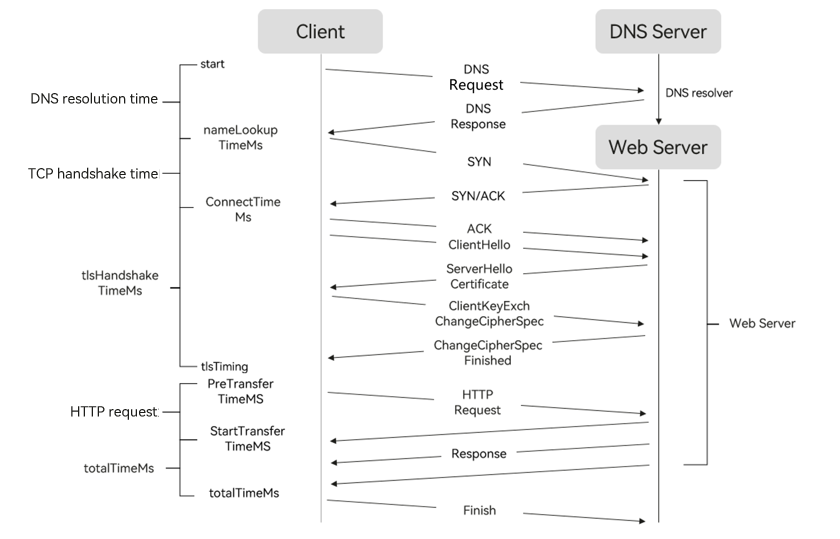
The figure shows the general HTTP request process, covering some key time points. The following timeline will help you better understand the process.
[h2]TimeInfo
Request initiation (time 0) -> nameLookupTimeMs (DNS resolution) -> connectTimeMs (connection establishment) -> tlsHandshakeTimeMs (TLS handshake) -> data request arriving at the server (preTransferTimeMs) -> first packet received from the server (startTransferTimeMs).

All time points are measured from the request initiation (0). For example, if tlsHandshakeTimeMs is 150.1 ms, it means that the time taken from the request initiation (time 0) until the completion of the TLS handshake is 150.1 ms.
Methods for calculating the durations of key phases in network requests are as follows:
-
First packet delivery duration: startTransferTimeMs – preTransferTimeMs
-
TLS handshake duration (excluding the connection setup time): tlsHandshakeTimeMs – connectTimeMs
-
Duration for receiving the remaining data: totalTimeMs – startTransferTimeMs
[h2]Sample Code
- Import required modules. In this example, the following modules are imported as Remote Communication Kit is used to initiate network requests and handle response success and failure:
import { BusinessError } from '@kit.BasicServicesKit'; import { rcp } from '@kit.RemoteCommunicationKit'; - The following code will record the preceding three key phases, so you can adjust your app performance based on the obtained time information to ensure user experience.
// 1. Create a session and specify the request URL. 'https://www.example.com' is a sample URL.
const session = rcp.createSession();
const requestURL = 'https://www.example.com';

// 2. To track and analyze the time consumed for each phase during a request, turn on this switch.
const configuration: rcp.Configuration = {
  tracing: {
    collectTimeInfo: true
  }
}

// 3. Create a request.
const request = new rcp.Request(requestURL, 'GET');
request.configuration = configuration;

// 4. Use FETCH to initiate a network request carrying the configuration.
session.fetch(request).then((response: rcp.Response) => {
  // Parameters in timeInfo may be undefined. Therefore, before performing calculation based on any two parameters, add the logic to determine whether the parameters are undefined.
  if (!response.timeInfo) {
    console.error(`timeInfo is undefined ${response.timeInfo}`);
    return;
  }
  let remainderDataTime = response.timeInfo?.totalTimeMs - response.timeInfo?.startTransferTimeMs;
  let firstPackageTime = response.timeInfo?.startTransferTimeMs - response.timeInfo?.preTransferTimeMs;
  let tlsTime = response.timeInfo?.tlsHandshakeTimeMs - response.timeInfo?.connectTimeMs;

  console.info(`First packet delivery duration${firstPackageTime}`);
  console.info(`TLS handshake duration (excluding the connection setup time)${tlsTime}`);
  console.info(`Duration for receiving the remaining data${remainderDataTime}`);

  // ...
}).catch((err: BusinessError) => {
  console.error(`Response err, the error code is ${err.code}, error data is ${err.data}`);
  // ...
})