This section uses a simple operator as an example to describe the entire development process, including operator project creation, code compilation, build and deployment, and runtime verification. This section uses the Add operator with dynamic shape input as an example to distinguish it from the built-in Add operator, and define the operator type as AddCustom.
Creating a Project
The DDK package provides the project creation tool msOpGen. You can enter the operator prototype definition file to generate an Ascend C operator development project.
Compile the prototype definition JSON file of the AddCustom operator.
Assume that the prototype definition file of the AddCustom operator is named add_custom.json and stored in $HOME/sample. The file content is as follows:
[
    {
        "op": "AddCustom",
        "input_desc": [
            {
                "name": "x",
                "param_type": "required",
                "format": [
                    "ND"
                ],
                "type": [
                    "fp16"
                ]
            },
            {
                "name": "y",
                "param_type": "required",
                "format": [
                    "ND"
                ],
                "type": [
                    "fp16"
                ]
            }
        ],
        "output_desc": [
            {
                "name": "z",
                "param_type": "required",
                "format": [
                    "ND"
                ],
                "type": [
                    "fp16"
                ]
            }
        ]
    }
]
Set the environment variable and run the source ${install_path}/ddk/ tools/tools_ascendc/set_ascendc_env.sh command. ${install_path} indicates the unzip directory of the tools package.
Generate a development project of the AddCustom operator using msOpGen.
msopgen gen -i $HOME/sample/add_custom.json -c ai_core-<soc_version> -out $HOME/sample/AddCustom
-i: path of the operator prototype definition file add_custom.json.
-c: ai_core-<soc_version>, indicating that the operator is executed on the AI Core. <soc_version> indicates the model of the Kirin AI processor, which can be queried by running the following command in the operating environment:
hdc -t ${target} shell param get ohos.boot.chiptypetarget: SN of the device. You can run the hdc list targets command to obtain the SNs of all devices in the current operating environment.
Example:
msopgen gen -i ./add_custom.json -c ai_core-kirin9020 -out ./AddCustom
Operator projects created based on AI processors of the same series have the same basic capabilities. After the command is executed, the operator project directory is generated in the $HOME/sample directory. The project contains the operator implementation template file and build script:
AddCustom
├── build_devices.sh // Script for compiling device-side deliverables, reserved for online compilation scenarios. You do not need to pay attention to this.
├── build.sh // Compilation entry script
├── cmake
│   ├── config.cmake
│   └── util // Directory that stores the scripts used for operator project compilation and common build files
├── CMakeLists.txt // CMakeLists.txt script of the operator project
├── CMakePresets.json // Compilation configuration items
├── framework // Directory for storing the implementation file of the operator plugin. The generation of single-operator model files does not depend on the operator plugin and can be ignored.
├── op_host // Implementation file on the host
│   ├── add_custom_tiling.h // Tiling definition file of the operator
│   ├── add_custom.cpp // Content file for operator prototype registration, shape derivation, information library, and tiling implementation.
│   ├── CMakeLists.txt
├── op_kernel // Implementation file on the kernel
│   ├── CMakeLists.txt
│   ├── add_custom.cpp // File for implementing the operator kernel function
└── scripts // Directory of scripts used for custom operator project packing

In the preceding directory structure, the bold files op_host/add_custom_tiling.h, op_host/add_custom.cpp, and op_kernel/add_custom.cpp files need to be modified during subsequent operator development. Other files do not need to be modified.
Operator Kernel Function Implementation
Implement the kernel function of the operator in the AddCustom/op_kernel/add_custom.cpp file in the project storage directory. You can view the complete sample code in add_custom.cpp. The following describes the key implementation code.
The following figure shows the internal calling of the operator kernel function implementation code.
Figure 1 Kernel function call relationship
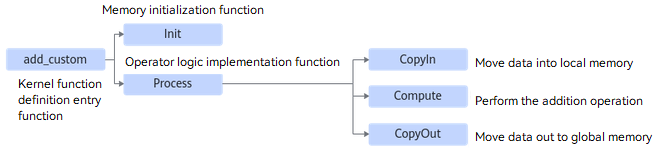
In addition to the initialization of the Init function, the pipeline tasks are moved-in, computed, and moved-out in Process. You can focus on the implementation of these tasks.
Define the kernel function and call the Init and Process functions of the operator class in the kernel function.
extern "C" __global__ __aicore__ void add_custom(GM_ADDR x, GM_ADDR y, GM_ADDR z, GM_ADDR workspace, GM_ADDR tiling)
{
    // Obtain the tiling parameters passed by the host.
    GET_TILING_DATA(tiling_data, tiling);
    // Initialize the operator class.
    KernelAdd op;
    // Initialization function of the operator class that initializes the memory.
    op.Init(x, y, z, tiling_data.totalLength, tiling_data.tileNum);
    // Complete the core logic of operator implementation.
    op.Process();
}
Define the KernelAdd operator class. The members and member functions are implemented as follows:
#include "kernel_operator.h"
constexpr int32_t BUFFER_NUM = 2;
class KernelAdd {
public:
    __aicore__ inline KernelAdd() {}
    // Initialization function, which initializes the memory.
    __aicore__ inline void Init(GM_ADDR x, GM_ADDR y, GM_ADDR z, uint32_t totalLength, uint32_t tileNum)
    {
        // Use the obtained TilingData to compute variables such as singleCoreSize (total size of computed data on each core), tileNum (number of blocks on each core), and singleTileLength (size of each block).
        this->blockLength = totalLength / AscendC::GetBlockNum();
        this->tileNum = tileNum;
        this->tileLength = this->blockLength / tileNum / BUFFER_NUM;

        // Obtain the start index of the current core.
        xGm.SetGlobalBuffer((__gm__ DTYPE_X*)x + this->blockLength * AscendC::GetBlockIdx(), this->blockLength);
        yGm.SetGlobalBuffer((__gm__ DTYPE_Y*)y + this->blockLength * AscendC::GetBlockIdx(), this->blockLength);
        zGm.SetGlobalBuffer((__gm__ DTYPE_Z*)z + this->blockLength * AscendC::GetBlockIdx(), this->blockLength);
        // Allocate memory for the input and output queues through TPipe.
        pipe.InitBuffer(inQueueX, BUFFER_NUM, this->tileLength * sizeof(DTYPE_X));
        pipe.InitBuffer(inQueueY, BUFFER_NUM, this->tileLength * sizeof(DTYPE_Y));
        pipe.InitBuffer(outQueueZ, BUFFER_NUM, this->tileLength * sizeof(DTYPE_Z));
    }
    // Core processing function, which implements the operator logic and calls the private member functions CopyIn, Compute, and CopyOut to complete the three-stage pipelined execution of the vector operator.
    __aicore__ inline void Process()
    {
        int32_t loopCount = this->tileNum * BUFFER_NUM;
        for (int32_t i = 0; i < loopCount; i++) {
            CopyIn(i);
            Compute(i);
            CopyOut(i);
        }
    }


private:
    // CopyIn function, which completes the processing in the CopyIn phase and is called by the Process function.
    __aicore__ inline void CopyIn(int32_t progress)
    {
        // Allocate input tensors from the queue.
        AscendC::LocalTensor<DTYPE_X> xLocal = inQueueX.AllocTensor<DTYPE_X>();
        AscendC::LocalTensor<DTYPE_Y> yLocal = inQueueY.AllocTensor<DTYPE_Y>();
         // Copy data from GlobalTensor to LocalTensor.
        AscendC::DataCopy(xLocal, xGm[progress * this->tileLength], this->tileLength);
        AscendC::DataCopy(yLocal, yGm[progress * this->tileLength], this->tileLength);
        // Place LocalTensor in the VECIN queue (the logical storage location of the copy-in data in vector programming).
        inQueueX.EnQue(xLocal);
        inQueueY.EnQue(yLocal);
    }
    // Compute function, which completes the processing in the Compute phase and is called by Process function.
    __aicore__ inline void Compute(int32_t progress)
    {
        // Get the tensor from the queue for subsequent compute.
        AscendC::LocalTensor<DTYPE_X> xLocal = inQueueX.DeQue<DTYPE_X>();
        AscendC::LocalTensor<DTYPE_Y> yLocal = inQueueY.DeQue<DTYPE_Y>();
        // Allocate output tensors from the queue.
        AscendC::LocalTensor<DTYPE_Z> zLocal = outQueueZ.AllocTensor<DTYPE_Z>();
        // Call the Add API to compute.
        AscendC::Add(zLocal, xLocal, yLocal, this->tileLength);
        // Place the computation result of LocalTensor in the VECOUT queue.
        outQueueZ.EnQue<DTYPE_Z>(zLocal);
        // Release the input tensor.
        inQueueX.FreeTensor(xLocal);
        inQueueY.FreeTensor(yLocal);
    }
    // CopyOut function, which completes the processing in the CopyOut phase and is called by the Process function.
    __aicore__ inline void CopyOut(int32_t progress)
    {
        // Get the output tensor from the VECOUT queue.
        AscendC::LocalTensor<DTYPE_Z> zLocal = outQueueZ.DeQue<DTYPE_Z>();
        // Copy the output tensor to the GlobalTensor.
        AscendC::DataCopy(zGm[progress * this->tileLength], zLocal, this->tileLength);
        // Release the LocalTensor that is no longer used.
        outQueueZ.FreeTensor(zLocal);
    }


private:
    // Pipe memory management object.
    AscendC::TPipe pipe;
    // Input data queue management object. QuePosition is VECIN.
    AscendC::TQue<AscendC::QuePosition::VECIN, 1> inQueueX, inQueueY;
    // Output data queue management object. QuePosition is VECOUT.
    AscendC::TQue<AscendC::QuePosition::VECOUT, 1> outQueueZ;
    // Object for managing the input and output global memory addresses. xGm and yGm are inputs, and zGm is the output.
    AscendC::GlobalTensor<DTYPE_X> xGm;
    AscendC::GlobalTensor<DTYPE_Y> yGm;
    AscendC::GlobalTensor<DTYPE_Z> zGm;
    // Total size of compute data on each core
    uint32_t blockLength;
    // Total number of compute data blocks on each core
    uint32_t tileNum;
    // Size of each block
    uint32_t tileLength;
};
Operator Implementation on the Host
After the kernel function is developed and verified, implement the function on the host, requiring the add_custom_tiling.h and add_custom.cpp files in the AddCustom/op_host directory. The following briefly describes the key implementation of the two files. For details about the complete sample code, see add_custom_tiling.h and add_custom.cpp.
Modify the add_custom_tiling.h file by adding the following code in bold to define tiling parameters:
#ifndef ADD_CUSTOM_TILING_H
#define ADD_CUSTOM_TILING_H
#include "register/tilingdata_base.h"
namespace optiling {
BEGIN_TILING_DATA_DEF(AddCustomTilingData)
  // The AddCustom operator uses two tiling parameters: **totalLength** and **tileNum**.
  TILING_DATA_FIELD_DEF(uint32_t, totalLength); // Total data to compute
  TILING_DATA_FIELD_DEF(uint32_t, tileNum); // Total number of compute data blocks on each core
END_TILING_DATA_DEF;

// Register the tiling to the corresponding operator.
REGISTER_TILING_DATA_CLASS(AddCustom, AddCustomTilingData)
}
#endif // ADD_CUSTOM_TILING_H
Modify the add_custom.cpp file to implement tiling.
Modify the TilingFunc function to obtain the tiling context, obtain the input and output shape based on the context, set TilingData based on the shape information, save TilingData in serial mode, and set TilingKey.
namespace optiling {
const uint32_t BLOCK_DIM = 1;
const uint32_t TILE_NUM = 8;
static ge::graphStatus TilingFunc(gert::TilingContext* context)
{
    AddCustomTilingData tiling;
    uint32_t totalLength = context->GetInputShape(0)->GetOriginShape().GetShapeSize();
    context->SetBlockDim(BLOCK_DIM);
    tiling.set_totalLength(totalLength);
    tiling.set_tileNum(TILE_NUM);
    tiling.SaveToBuffer(context->GetRawTilingData()->GetData(), context->GetRawTilingData()->GetCapacity());
    context->GetRawTilingData()->SetDataSize(tiling.GetDataSize());
    size_t *currentWorkspace = context->GetWorkspaceSizes(1);
    currentWorkspace[0] = 0;
    return ge::GRAPH_SUCCESS;
}
} // namespace optiling
Implement the shape derivation of the AddCustom operator in the add_custom.cpp file.
The output shape of the Add operator is equal to the input shape. Therefore, the input shape is directly assigned to the output shape. The InferShape function in the code generated by msOpGen does not need to be modified.
Modify the operator prototype registration in the add_custom.cpp file. This is the entrypoint function.
namespace ops {
class AddCustom : public OpDef {
public:
    explicit AddCustom(const char* name) : OpDef(name)
    {
        // First input of the Add operator
        this->Input("x")
            .ParamType(REQUIRED) // Required for input.
            .DataType({ ge::DT_FLOAT16, ge::DT_FLOAT, ge::DT_INT32 }) // Data types supported by the input
            .Format({ ge::FORMAT_ND, ge::FORMAT_ND, ge::FORMAT_ND }); // Data formats supported by the input
        / Second input of the Add operator
        this->Input("y")
            .ParamType(REQUIRED)
            .DataType({ ge::DT_FLOAT16, ge::DT_FLOAT, ge::DT_INT32 })
            .Format({ ge::FORMAT_ND, ge::FORMAT_ND, ge::FORMAT_ND });
        this->Output("z")
            .ParamType(REQUIRED)
            .DataType({ ge::DT_FLOAT16, ge::DT_FLOAT, ge::DT_INT32 })
            .Format({ ge::FORMAT_ND, ge::FORMAT_ND, ge::FORMAT_ND });
        // Associate with the InferShape function.
        this->SetInferShape(ge::InferShape);
        // Associate with the Tiling function.
        this->AICore()
            .SetTiling(optiling::TilingFunc);
        // Register the AI processor model supported by the operator. Replace it with the actual AI processor model, for example, Kirin9020.
        this->AICore().AddConfig("kirinxxx");
    }
};
// End the operator registration.
OP_ADD(AddCustom);
} // namespace ops
Operator Project Build and Deployment
Build the AddCustom project, generate the custom operator installation package, and install it in the operator library.
Build the custom operator project to generate the custom operator package.
Run the following command in the operator project directory to build the operator project AddCustom:
./build.sh
After the build is successful, the build_out directory is created in the current directory, and the custom operator deliverables are generated in the build_out/autogen directory.
Deploy the custom operator installation package.
During the compilation, the deliverables are installed to the specified directory under the DDK installation directory ${DDK_INSTALL_PATH}.
${DDK_INSTALL_PATH}/tools/platformDirectory structure after the deployment:
platform // Platform plugin directory
├── kirin9020 // Kirin AI processor type
│   ├── config
│   │   └── npu_custom_opinfo.json // Operator information library
│   ├── lib64
│   │   └── libcustom_op.so // Binary file on the host
│   ├── ops
│   │   └── impl
│   │       ├── custom // kernel deliverables
│   │       │   ├── add_custom.cpp
│   │       │   ├── add_custom.py
│   │       │   └── op_proto.h
│   │       └── impl
│   └── simulator
└── README.md