The Web component provides two rendering modes, which can be adapted to different container sizes as required.
Asynchronous Rendering Mode (Default)
In asynchronous rendering mode (renderMode: RenderMode.ASYNC_RENDER), the Web component is treated as a graphics surface node and is displayed independently. You are advised to use this mode on application pages that consist of only Web components to improve performance and reduce power consumption.
-
The height of the Web component must not exceed 7,680 px (physical pixels); otherwise, a blank screen occurs.
-
Dynamic mode switching is not supported.
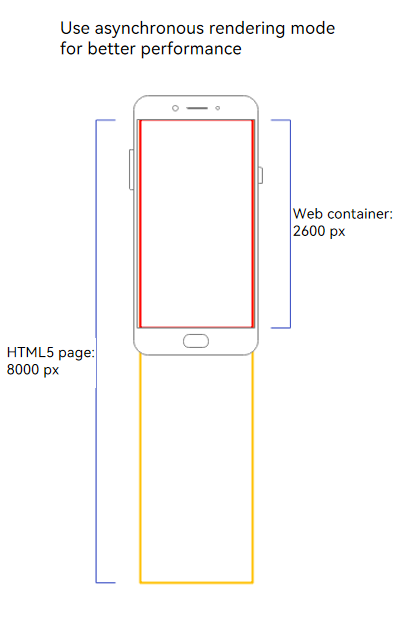
You expect the Web component to serve as the main body for displaying the app page. As shown in Figure 1, in this scenario, the height of the Web component is exactly one screen or close to one screen (embedded in Navigation). The loaded HTML5 page is taller than the Web component, so a scrollbar is generated inside the Web component, and users can browse the HTML5 page content by swiping inside the Web component. You can implement the main business content of the app using only the Web component. In this case, asynchronous rendering mode is recommended to improve performance.
Figure 1 Asynchronous rendering mode
Synchronous Rendering Mode
In synchronous rendering mode (renderMode: RenderMode.SYNC_RENDER), the Web component is treated as the graphics canvas node and is displayed together with the system component. In this case, longer Web component content can be rendered, but the performance consumption increases.
-
DSS (Display Subsystem) composition is not supported.
-
Dynamic mode switching is not supported.
-
The maximum height of the Web component must not exceed 500,000 px (physical pixels).
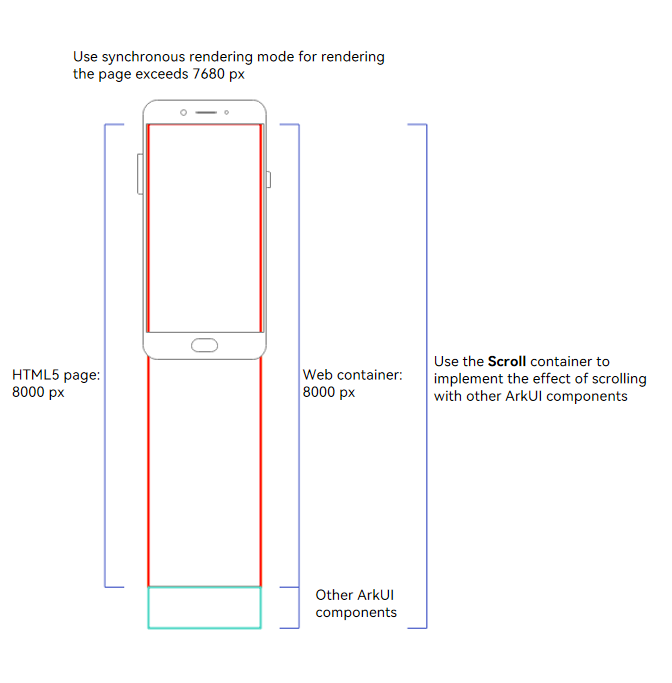
You expect the Web component to serve as the carrier of rich text display and become part of the app page, scrolling and interacting together with other ArkUI components. As shown in Figure 2, the height of the HTML5 page is the same as that of the Web component, so no scrollbar is generated inside the Web component. Instead, the Web component is displayed as an extra-long component, and scrolling within the app is implemented through the Scroll component to ensure that users can smoothly browse the Web content and the content of other ArkUI components. When the Web component is required to render an extra-long component as part of the business content, no scrollbar is allowed inside the Web component, and the page layout must be completed in coordination with other ArkUI components, synchronous rendering mode is recommended to support the rendering of extra-long pages.
Figure 2 Synchronous rendering mode
Sample Code
import { webview } from '@kit.ArkWeb';

@Entry
@Component
struct WebHeightPage {
  private webviewController: WebviewController = new webview.WebviewController()

  build() {
    Column() {
      Web({
        src: 'www.example.com',
        controller: this.webviewController,
        renderMode: RenderMode.ASYNC_RENDER // Set the rendering mode.
      })
    }
  }
}