This section describes the code reuse development process in a single-team scenario, where the atomic service bundle is split and the application supports on-demand loading.

- Add an atomic service product to the build-profile.json5 file in the project root directory.
{
    "name": "atomicServiceHsp",
    "compatibleSdkVersion": "5.0.0(12)",
    "bundleName": "com.atomicservice.5765880207853289681",
    "bundleType": "atomicService",
    "runtimeOS": "HarmonyOS"
}
Here bundleName should be replaced with the bundle name of the requested atomic service in AppGallery Connect.

- Configure this signature file.
{
    "name": "atomicServiceHsp",
    "signingConfig": "atomicServiceHsp",
    "compatibleSdkVersion": "5.0.0(12)",
    "bundleName": "com.atomicservice.5765880207853289681",
    "bundleType": "atomicService",
    "runtimeOS": "HarmonyOS",
    "icon": "$media:app_icon"
}
- Right-click the project's AppScope directory, create a resource directory named resourceAtomicServiceHsp for the atomic service product, and add the corresponding resource files for the atomic service's label and icon.
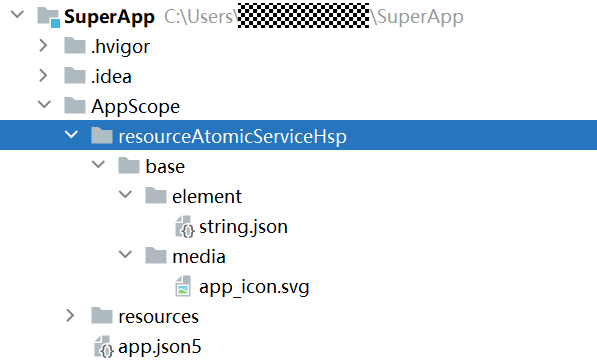
- Configure the atomic service product's resource directory, label, icon, and version in the build-profile.json5 file at the project root.
{
    "name": "atomicServiceHsp",
    "signingConfig": "atomicServiceHsp",
    "compatibleSdkVersion": "5.0.0(12)",
    "bundleName": "com.atomicservice.5765880207853289681",
    "bundleType": "atomicService",
    "runtimeOS": "HarmonyOS",
    "icon": "$media:app_icon",
    "label": "$string:app_name",
    "versionCode": 1000000,
    "versionName": "1.0.0",
    "resource": {
      "directories": [
        "./AppScope/resourceAtomicServiceHsp"
      ]
    }
}
- Change the product selected for the current project to the atomic service product (atomicServiceHsp).

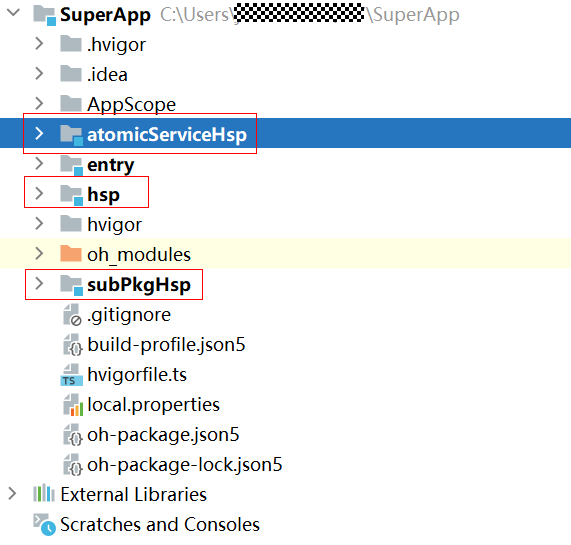
- Create modules related to the atomic service.
atomicServiceHsp: an entry module that serves as the entry point for the atomic service and contains a UIAbility.
hsp: a shared module that hosts the implementation of the atomic service's home page and can be reused by applications.
subPkgHsp: a shared module that hosts the atomic service's sub-bundle page (level-2 page) and can be reused by applications.
- Implement all pages for the atomic service.
Implement an empty page in the atomicServiceHsp module:
// src/main/ets/pages/Index.ets
@Entry
@Component
struct Index {
  pageStack : NavPathStack = new NavPathStack();

  build() {
    Navigation(this.pageStack){
    }
    .hideNavBar(true)
  }
}
Implement the atomic service home page in the hsp module:
// src/main/ets/components/PageOneHsp.ets
@Builder
export function PageOneHspBuilder() {
  PageOneHsp()
}
@Component
struct PageOneHsp {
  pathStack: NavPathStack = new NavPathStack()
  build() {
    NavDestination() {
      Column() {
        Button('Sub-bundle page').margin({ top: 20 })
      }
    }
    .title('Home page')
    .margin({ top: 100 })
    .onReady((context: NavDestinationContext) => {
      this.pathStack = context.pathStack
    })
  }
}
Configure the system routing table in the hsp module's resources/base/profile/router_map.json file:
{
  "routerMap": [
    {
      "name": "PageOneHsp",
      "pageSourceFile": "src/main/ets/components/PageOneHsp.ets",
      "buildFunction": "PageOneHspBuilder",
      "data": {
        "description" : "this is PageOne"
      }
    }
  ]
}
Configure the system routing table in the hsp module's module.json5 file:
{
  "module": {
    "name": "hsp",
    "type": "shared",
    "description": "$string:shared_desc",
    "routerMap": "$profile:route_map",
    "deviceTypes": [
      "phone",
      "tablet"
    ],
    "deliveryWithInstall": true,
  }
}
Implement the atomic service's level-2 page in the subPkgHsp module:
// src/main/ets/components/SubPkgPageOneHsp.ets
@Builder
export function SubPkgPageOneHspBuilder() {
  SubPkgPageOneHsp()
}
@Component
struct SubPkgPageOneHsp {
  pathStack: NavPathStack = new NavPathStack()
  build() {
    NavDestination() {
      Column(){
        Text('Sub-bundle page').margin({ top: 100 })
      }.width('100%').height('100%')
    }
    .title('Sub-bundle page')
    .margin({ top: 100 })
    .onReady((context: NavDestinationContext) => {
      this.pathStack = context.pathStack
    })
  }
}
Configure the system routing table in the subPkgHsp module's resources/base/profile/router_map.json file:
{
  "routerMap": [
    {
      "name": "SubPkgPageOneHsp",
      "pageSourceFile": "src/main/ets/components/SubPkgPageOneHsp.ets",
      "buildFunction": "SubPkgPageOneHspBuilder",
      "data": {
        "description" : "this is SubPkgPageOneHsp"
      }
    }
  ]
}
Configure the system routing table in the subPkgHsp module's module.json5 file:
{
  "module": {
    "name": "subPkgHsp",
    "type": "shared",
    "description": "$string:shared_desc",
    "routerMap": "$profile:route_map",
    "deviceTypes": [
      "phone",
      "tablet"
    ],
    "deliveryWithInstall": true,
  }
}
- Configure the atomic service bundle dependencies and preloading relationships, and implement cross-module page routing.

- The atomicServiceHsp module's home page is empty, as its loading relies on the hsp module. Therefore, you need to configure the necessary dependencies in the atomicServiceHsp module's oh-package.json5 file. During distribution, the HAP built by the atomicServiceHsp module and the HSP from its dependent module are downloaded and installed at the same time.
- Bundle splitting reduces the size of the atomic service bundle. Additionally, since the subPkgHsp module has no dependencies on other modules, there is no need to configure dependencies between it and the other two modules. During distribution, the HSP built from the subPkgHsp module can be downloaded and installed independently.
- To avoid the 1-2 second delay in bundle loading when first navigating from the atomic service home page to its sub-bundle page, configure preloading for the subPkgHsp module in the atomicServiceHsp module's module.json5 file.
Configure the dependency in the atomicServiceHsp module's oh-package.json5 file:
{
  "name": "atomicservicehsp",
  "version": "1.0.0",
  "description": "Please describe the basic information.",
  "main": "",
  "author": "",
  "license": "",
  "dependencies": {
    "hsp": "file:../hsp"
  }
}
Add the logic to automatically route to the hsp module's PageOneHsp.ets within the atomicServiceHsp module's Index.ets:
// src/main/ets/pages/Index.ets
@Entry
@Component
struct Index {
  pageStack : NavPathStack = new NavPathStack();

  build() {
    Navigation(this.pageStack){
    }.onAppear(() => {
      this.pathStack.pushPathByName("PageOneHsp", null, false);
    })
    .hideNavBar(true)
  }
}
Add logic to the hsp module's PageOneHsp.ets to route to the subPkgHsp module's SubPkgPageOneHsp page when the button is clicked:
@Builder
export function PageOneHspBuilder() {
  PageOneHsp()
}
@Component
struct PageOneHsp {
  pathStack: NavPathStack = new NavPathStack()
  build() {
    NavDestination() {
      Column() {
        Button('Sub-bundle page').onClick(() => {
          this.pathStack.pushPathByName("SubPkgPageOneHsp", null, false);
        }).margin({ top: 20 })
      }
    }
    .title('Home page')
    .margin({ top: 100 })
    .onReady((context: NavDestinationContext) => {
      this.pathStack = context.pathStack
    })
  }
}
Configure the preloading of the subPkgHsp module in the atomicServiceHsp module's module.json5 file:
"atomicService": {
  "preloads": [
    {
      "moduleName": "subPkgHsp"
    }
  ]
},
Once the above steps are completed, the atomic service development is finished. The following explains how to reuse the atomic service's code in an application.

- To reuse the code, edit the build-profile.json5 file in the project root directory and use applyToProducts to apply both the atomic service hsp module and subPkgHsp module to the application's product (default).
{
    "name": "hsp",
    "srcPath": "./hsp",
    "targets": [
        {
            "name": "default",
            "applyToProducts": [
                "default",
                "atomicServiceHsp"
            ]
        }
    ]
},
{
    "name": "subPkgHsp",
    "srcPath": "./subPkgHsp",
    "targets": [
        {
            "name": "default",
            "applyToProducts": [
                "default",
                "atomicServiceHsp"
          ]
        }
    ]
}
- Implement button-click navigation to the atomic service home page in the entry module's Index.ets:
// Index.ets
@Entry
@Component
struct Index {
  pageStack: NavPathStack = new NavPathStack();
  build() {
    Navigation(this.pageStack) {
      Column() {
        Button('Reuse code').onClick(() => {
          this.pathStack.pushPathByName("PageOneHsp", null, false);
        })
          .margin({ top: 20 })
      }
    }
    .title('Application home page')
  }
}
The above completes code reuse for both the application and atomic service during the development phase.