Implement model loading, compilation, and inference at the native layer, and use the application layer for data transfer and display.
Pre-process the input data into the desired model input before model inference, and process the model output into the desired results. In addition, the SDK provides APIs for setting model compilation and running for you to use as needed.
The following describes the procedure for the utilization of a single model in synchronous mode at the application layer and native layer. For details about the API, see API Reference. For details about the example, see SampleCode. In this example, an offline model can be loaded to classify objects in images. The following figure shows the app running effect.
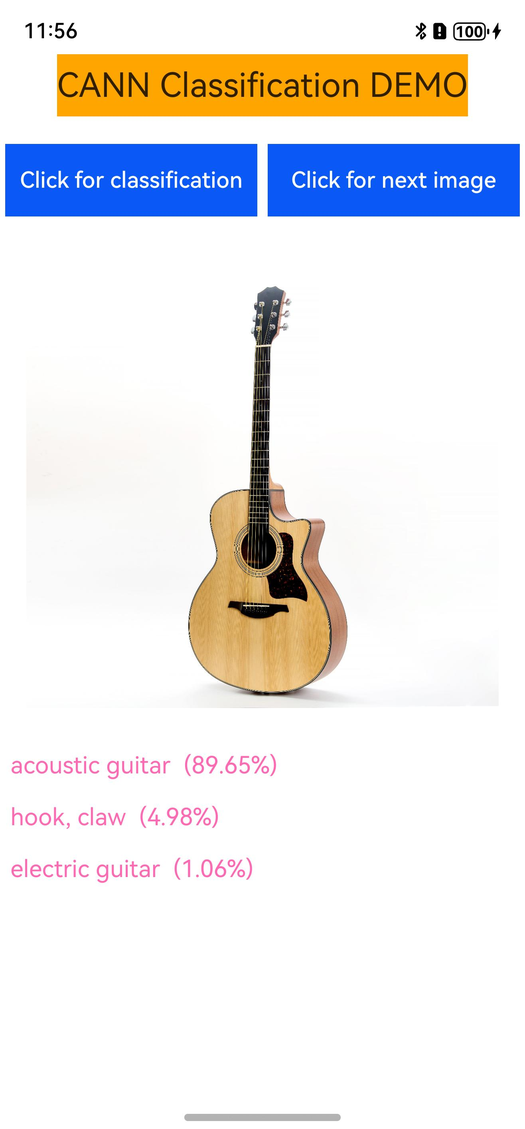
Presetting the Model
In order for the app to read the model file and process the inference result, you need to preset the offline model and the inference result label file in the entry/src/main/resources/rawfile directory of the project.
For details about how to convert and generate an offline model used in this example, see Caffe Model Conversion.
Loading the Offline Model
Load the model and read the inference result label file when creating the app.
Call the LoadModel function at the NAPI layer to read the model buffer.
(Optional) Call the HMS_HiAIOptions_SetOmOptions API as required to enable maintenance and debugging (such as profiling).
Pass the model buffer to the HIAIModelManager::LoadModelFromBuffer API of the HIAIModelManager class. This API calls OH_NNCompilation_ConstructWithOfflineModelBuffer to create a model compilation instance.
Set deviceID of the model.
size_t deviceID = 0;
const size_t *allDevicesID = nullptr;
uint32_t deviceCount = 0;
// Obtain the IDs of all connected devices.
OH_NN_ReturnCode ret = OH_NNDevice_GetAllDevicesID(&allDevicesID, &deviceCount);
if (ret != OH_NN_SUCCESS || allDevicesID == nullptr) {
    OH_LOG_ERROR(LOG_APP, "OH_NNDevice_GetAllDevicesID failed");
    return OH_NN_FAILED;
}
// Obtain the ID of the device named HIAI_F.
for (uint32_t i = 0; i < deviceCount; i++) {
    const char *name = nullptr;
    // Obtain the name of the specified device.
    ret = OH_NNDevice_GetName(allDevicesID[i], &name);
    if (ret != OH_NN_SUCCESS || name == nullptr) {
        OH_LOG_ERROR(LOG_APP, "OH_NNDevice_GetName failed");
        return OH_NN_FAILED;
    }
    if (std::string(name) == "HIAI_F") {
        deviceID = allDevicesID[i];
        break;
    }
}

// modelData and modelSize indicate the memory address and size of the model. For details about how to create a compilation, see CANN Kit Codelab.
OH_NNCompilation *compilation = OH_NNCompilation_ConstructWithOfflineModelBuffer(modelData, modelSize);
// Set the device ID of the compiler to HIAI_F.
ret = OH_NNCompilation_SetDevice(compilation, deviceID);
if (ret != OH_NN_SUCCESS) {
    OH_LOG_ERROR(LOG_APP, "OH_NNCompilation_SetDevice failed");
    return OH_NN_FAILED;
}
Call OH_NNCompilation_Build to compile the model.
Call OH_NNExecutor_Construct to create a model executor.
Call OH_NNCompilation_Destroy to release the model compilation instance.
For details about the preceding process, see the LoadModel function in the entry/src/main/cpp/Classification.cpp file and the HIAIModelManager::LoadModelFromBuffer function in entry/src/main/cpp/HIAIModelManager.cpp file of SampleCode.
Preparing Input and Output Data
Process the model input. For example, as the model input in the demo is 1 x 3 x 227 x 227 float data, the input image needs to be converted into this format before being passed to the NAPI layer.
Create the input and output tensors of the model, and fill the input tensors with data passed by the application layer.
// Create input data.
size_t inputCount = 0;
std::vector<NN_Tensor*> inputTensors;
OH_NN_ReturnCode ret = OH_NNExecutor_GetInputCount(executor, &inputCount); // Create an executor by referring to CANN Kit Codelab.
if (ret != OH_NN_SUCCESS || inputCount != inputData.size()) { // inputData refers to the input data you have created.
    OH_LOG_ERROR(LOG_APP, "OH_NNExecutor_GetInputCount failed, size mismatch");
    return OH_NN_FAILED;
}
for (size_t i = 0; i < inputCount; ++i) {
    NN_TensorDesc *tensorDesc = OH_NNExecutor_CreateInputTensorDesc(executor, i); // Create an executor by referring to CANN Kit Codelab.
    NN_Tensor *tensor = OH_NNTensor_Create(deviceID, tensorDesc); // Obtain the deviceID by referring to step 3 in Loading an Offline Model or CANN Kit Codelab.
    if (tensor != nullptr) {
        inputTensors.push_back(tensor);
    }
    OH_NNTensorDesc_Destroy(&tensorDesc);
}
if (inputTensors.size() != inputCount) {
    OH_LOG_ERROR(LOG_APP, "input size mismatch");
    DestroyTensors(inputTensors); // DestroyTensors is the function for releasing the tensor memory. For details, see the CANN Kit Codelab.
    return OH_NN_FAILED;
}

// Initialize the input data.
for (size_t i = 0; i < inputTensors.size(); ++i) {
    void *data = OH_NNTensor_GetDataBuffer(inputTensors[i]);
    size_t dataSize = 0;
    OH_NNTensor_GetSize(inputTensors[i], &dataSize);
    if (data == nullptr || dataSize != inputData[i].size()) { // inputData is the input data of the model. For details about how to use it, see the CANN Kit Codelab.
        OH_LOG_ERROR(LOG_APP, "invalid data or dataSize");
        return OH_NN_FAILED;
    }
    memcpy(data, inputData[i].data(), inputData[i].size()); // inputData is the input data of the model. For details about how to use it, see the CANN Kit Codelab.
}

// Create the output data the same way as how you have created the input data.
size_t outputCount = 0;
std::vector<NN_Tensor*> outputTensors;
ret = OH_NNExecutor_GetOutputCount(executor, &outputCount); // Create an executor by referring to CANN Kit Codelab.
if (ret != OH_NN_SUCCESS) {
    OH_LOG_ERROR(LOG_APP, "OH_NNExecutor_GetOutputCount failed");
    DestroyTensors(inputTensors); // DestroyTensors is the function for releasing the tensor memory. For details, see the CANN Kit Codelab.
    return OH_NN_FAILED;
}
for (size_t i = 0; i < outputCount; i++) {
    NN_TensorDesc *tensorDesc = OH_NNExecutor_CreateOutputTensorDesc(executor, i); // For details about how to create an executor, see the CANN Kit Codelab.
    NN_Tensor *tensor = OH_NNTensor_Create(deviceID, tensorDesc); // Obtain the deviceID by referring to step 3 in Loading an Offline Model or CANN Kit Codelab.
    if (tensor != nullptr) {
        outputTensors.push_back(tensor);
    }
    OH_NNTensorDesc_Destroy(&tensorDesc);
}
if (outputTensors.size() != outputCount) {
    DestroyTensors(inputTensors); // DestroyTensors is the function for releasing the tensor memory. For details, see the CANN Kit Codelab.
    DestroyTensors(outputTensors); // DestroyTensors is the function for releasing the tensor memory. For details, see the CANN Kit Codelab.
    OH_LOG_ERROR(LOG_APP, "output size mismatch");
    return OH_NN_FAILED;
}
For details about the preceding process, see the InitIOTensors function in the entry/src/main/cpp/Classification.cpp file and the HIAIModelManager::InitIOTensors function in the entry/src/main/cpp/HIAIModelManager.cpp file in SampleCode.
Synchronous Offline Model Inference

If the model is not changed, inference can be performed for multiple times after the model is compiled and loaded for the first time.
Call OH_NNExecutor_RunSync to complete synchronous inference of the model.
For details, see the RunModel function in the entry/src/main/cpp/Classification.cpp file and the HIAIModelManager::RunModel function in the entry/src/main/cpp/HIAIModelManager.cpp file in SampleCode.
Post-processing of Model Output
Obtain the output tensor by calling OH_NNTensor_GetDataBuffer. The output tensor contains the model's output data.
Process the output data to get the expected result.
For example, in the demo, the model outputs the probabilities of 1000 labels, and the output data is processed to get the labels with the three largest probabilities.
Destroy the tensors and executor instance.
For details about the preceding process, see the GetResult and UnloadModel functions in the entry/src/main/cpp/Classification.cpp file and the HIAIModelManager::GetResult and HIAIModelManager::UnloadModel functions in the entry/src/main/cpp/HIAIModelManager.cpp file in SampleCode.

You can set the model inference priority as required. The OH_NNCompilation_SetPriority API is used. The default value is OH_NN_PRIORITY_NONE. This API must be called before model inference.