Overview
For app continuation, you need to select a proper data migration solution. Selecting a migration solution is directly related to data volume and whether file migration is involved, as described in the following table.
< 100 KB | > 100 KB | |
|---|---|---|
File migration is required | ||
File migration is not required |

How to Develop
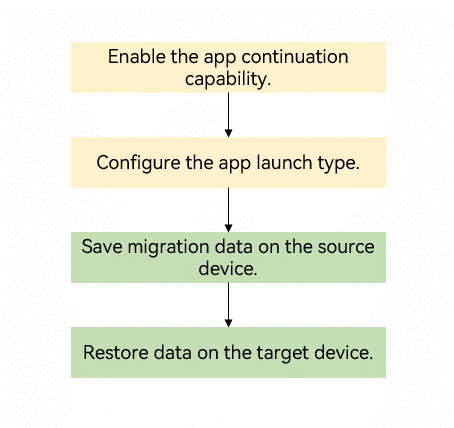
To implement app continuation, you need to enable the app continuation capability, configure the app launch type, save migration data on the source device, and restore data on the target device. For details about the development process, see App Continuation Overview. This topic only describes how to select a data migration solution in different scenarios.
Using want.param for Data Migration
- Save migration data on the source device.
export default class EntryAbility extends UIAbility { // ... async onContinue(wantParam: Record<string, Object | undefined>): Promise<AbilityConstant.OnContinueResult> { // ... // Migrate simple data using wantParam.param wantParam.wantBasicData = AppStorage.get('wantBasicData'); // ... // Return AGREE to allow cross-device migration return AbilityConstant.OnContinueResult.AGREE; } // ... } - Restore data on the target device.
export default class EntryAbility extends UIAbility {
  private distributedObject: distributedDataObject.DataObject | undefined = undefined;
  private storage: LocalStorage = new LocalStorage();
  private distributedFileUtil: DistributedFileUtil | undefined = undefined;
  onCreate(want: Want, launchParam: AbilityConstant.LaunchParam): void {
    hilog.info(DOMAIN, TAG, FORMAT, `Ability onCreate`);
    this.distributedFileUtil = new DistributedFileUtil(this.context);
    this.appContinuity(want, launchParam);
  }

  onNewWant(want: Want, launchParam: AbilityConstant.LaunchParam): void {
    hilog.info(DOMAIN, TAG, FORMAT, `Ability onNewWant`);
    this.appContinuity(want, launchParam);
  }

  appContinuity(want: Want, launchParam: AbilityConstant.LaunchParam) {
    if (launchParam.launchReason === AbilityConstant.LaunchReason.CONTINUATION) {
      if (want.parameters !== undefined) {
        // Use want.param to migrate the simple data page data
        AppStorage.setOrCreate('wantBasicData', want.parameters.wantBasicData);
      }
      // ...
      try {
        // Restore window stage with new LocalStorage instance
        this.context.restoreWindowStage(this.storage);
      } catch (err) {
        hilog.error(DOMAIN, TAG, FORMAT, `RestoreWindowStage failed. Cause : ${err}`);
      }
    }
  }

  // ...
}
[h2]Basic Data Migration
- Save migration data on the source device.
Create a distributed data object in onContinue() of the source UIAbility and save the data. The execution process is as follows:
- Call create() in onContinue() to create a distributed data object and fill the data to be migrated into the distributed data object.
- Call genSessionId() to generate a networking ID for the distributed data object. The distributed data object calls setSessionId() to pass the ID to activate the distributed data object.
- Call save() to persist the activated distributed data object. This ensures that the app on the target device can continue to access the data even if the app on the source device exits.
- Pass the generated sessionId to the target app through want. The sessionId is used to activate the distributed data object of the target app and transfer data to the target app.

- The distributed data object needs to be activated and then persisted. Therefore, save() must be called after setSessionId() is called.
- To prevent the app on the source device from exiting before the data migrated to the target device is saved, use await to wait until save() is complete. Starting from API version 12, an asynchronous onContinue() API is provided for this scenario.
- Currently, the sessionId field in wantParams is used by the system during migration. You are advised to define other key values in wantParams to store the session ID generated for the distributed data object to avoid exceptions.
export class ContinuationData {
  public basicDataStr: string | undefined;
  public basicDataNum: number | undefined;
  public distributedData: DistributedData | undefined;
  // ...
  constructor(
    basicDataStr: string | undefined,
    basicDataNum: number | undefined,
    distributedData: DistributedData | undefined,
    // ...
  ) {
    this.basicDataStr = basicDataStr;
    this.basicDataNum = basicDataNum;
    this.distributedData = distributedData;
    // ...
  }
  // ...
}
export default class EntryAbility extends UIAbility { private distributedObject: distributedDataObject.DataObject | undefined = undefined; private storage: LocalStorage = new LocalStorage(); private distributedFileUtil: DistributedFileUtil | undefined = undefined; // ... async onContinue(wantParam: Record<string, Object | undefined>): Promise<AbilityConstant.OnContinueResult> { if (!this.distributedFileUtil) { return AbilityConstant.OnContinueResult.REJECT; } // ... let sessionId: string = distributedDataObject.genSessionId(); wantParam.distributedSessionId = sessionId; // ... let contentInfo: ContinuationData = new ContinuationData( AppStorage.get('basicDataStr') ?? '', AppStorage.get('basicDataNum') ?? undefined, AppStorage.get('distributedData') ?? undefined, // ... (AppStorage.get('pageInfos') as NavPathStack).getAllPathName()[0] ); let source = await contentInfo.flatAssets(); this.distributedObject = distributedDataObject.create(this.context, source); this.distributedObject.setSessionId(sessionId).catch((err: BusinessError) => { hilog.info(DOMAIN, TAG, FORMAT, `SetSessionId failed. Cause code: ${err.code}`); }); await this.distributedObject.save(wantParam.targetDevice as string).catch((err: BusinessError) => { hilog.info(DOMAIN, TAG, FORMAT, `Failed to save. Code: ${err.code}`); }); // Return AGREE to allow cross-device migration return AbilityConstant.OnContinueResult.AGREE; } // ... } - Restore data on the target device.
In onCreate() or onNewWant() of the target UIAbility, add the same networking ID to the distributed data object on the target device to restore data. The process is as follows:
- Create an empty distributed data object for receiving data to be restored.
- Read the networking ID of the distributed data object from want.
- Register on() to listen for data changes of the distributed data object. In the callback of the event whose status is restored, implement the operation to be performed when the data restoration is complete.
- Call setSessionId() to connect the target app to the network and activate the distributed data object.

- The distributed data object of the target app connected to the network cannot be a temporary variable. Since on() for the distributed data object uses an asynchronous callback and may be executed after onCreate() or onNewWant() is complete. The temporary variable will be released, which causes a null pointer exception. You can use class member variables to avoid this exception.
- Before a distributed data object on the target device is activated, set the attribute of the object used to create the distributed data object to undefined. Otherwise, the data on the source device will be overwritten by new data after the distributed data object is connected to the network, and data restore will fail.
- Before activating a distributed data object, call on() of the object to register listening to prevent data restore failure caused by missing the restored event.
export default class EntryAbility extends UIAbility {
  private distributedObject: distributedDataObject.DataObject | undefined = undefined;
  private storage: LocalStorage = new LocalStorage();
  private distributedFileUtil: DistributedFileUtil | undefined = undefined;
  onCreate(want: Want, launchParam: AbilityConstant.LaunchParam): void {
    hilog.info(DOMAIN, TAG, FORMAT, `Ability onCreate`);
    this.distributedFileUtil = new DistributedFileUtil(this.context);
    this.appContinuity(want, launchParam);
  }

  onNewWant(want: Want, launchParam: AbilityConstant.LaunchParam): void {
    hilog.info(DOMAIN, TAG, FORMAT, `Ability onNewWant`);
    this.appContinuity(want, launchParam);
  }

  appContinuity(want: Want, launchParam: AbilityConstant.LaunchParam) {
    if (launchParam.launchReason === AbilityConstant.LaunchReason.CONTINUATION) {
      // ...
      let mailInfo: ContinuationData = new ContinuationData(undefined, undefined, undefined, undefined, undefined,
        undefined, undefined, undefined, undefined, undefined);
      this.distributedObject = distributedDataObject.create(this.context, mailInfo);
      // Add a data restored listener.
      try {
        this.distributedObject.on('status',
          (_sessionId: string, _networkId: string, status: 'online' | 'offline' | 'restored') => {
            if (status === 'restored') {
              if (!this.distributedObject || !this.distributedFileUtil) {
                return;
              }
              // Use the distributed object migration to transfer the basic page data
              AppStorage.setOrCreate('basicDataStr', this.distributedObject['basicDataStr'] ?? '');
              AppStorage.setOrCreate('basicDataNum', this.distributedObject['basicDataNum'] ?? undefined);
              AppStorage.setOrCreate('distributedData', this.distributedObject['distributedData'] ?? undefined);
              // ...
              AppStorage.setOrCreate('curPageInfos', this.distributedObject['curPageInfos'] ?? undefined);
            }
          });
      } catch (err) {
        hilog.error(DOMAIN, TAG, FORMAT, `On status failed. Cause code: ${err.code}`);
      }
      let sessionId: string = want.parameters?.distributedSessionId as string;
      this.distributedObject.setSessionId(sessionId).catch((err: BusinessError) => {
        hilog.info(DOMAIN, TAG, FORMAT, `SetSessionId failed. Cause code: ${err.code}`);
      });
      try {
        // Restore window stage with new LocalStorage instance
        this.context.restoreWindowStage(this.storage);
      } catch (err) {
        hilog.error(DOMAIN, TAG, FORMAT, `RestoreWindowStage failed. Cause : ${err}`);
      }
    }
  }

  // ...
}
[h2]Migrating File Assets
- Migrating a single file asset
For file data such as images and documents, you need to convert the data to the commonType.Asset type and then encapsulate the data into distributed data objects for migration. The migration implementation is similar to that of common distributed data objects. The following describes only the differences:
- On the source device, save the file assets to be migrated to the distributed data object DataObject. The procedure is as follows:
- Copy file assets to the distributed file directory. For details, see Basic File APIs.
async writeDistributedFile(buf: ArrayBuffer, displayName: string): Promise<void> { let distributedDir: string = this.context.distributedFilesDir; let fileName: string = '/' + displayName; let filePath: string = distributedDir + fileName; let file: fileIo.File | undefined = undefined; try { file = await fileIo.open(filePath, fileIo.OpenMode.READ_WRITE | fileIo.OpenMode.CREATE); hilog.info(DOMAIN, TAG, FORMAT, 'Create file success.'); await fileIo.write(file.fd, buf); hilog.info(DOMAIN, TAG, FORMAT, `File written successfully: ${displayName}`); } catch (error) { let err: BusinessError = error as BusinessError; hilog.error(DOMAIN, TAG, FORMAT, `Failed to open / write. Code: ${err.code}`); } finally { if (file) { try { await fileIo.close(file); } catch (err) { hilog.error(DOMAIN, TAG, FORMAT, `Failed to close. Cause: ${err}`); } } } } - Use the file in the distributed file directory to create an asset object.
async getAssetInfo(append: ImageInfo): Promise<commonType.Asset | undefined> { let filePath = this.context.distributedFilesDir + '/' + append.imageName; let attachment: commonType.Asset; try { let uri: string = fileUri.getUriFromPath(filePath); let stat = await fileIo.stat(filePath); attachment = { name: append.imageName, uri: uri, path: filePath, createTime: stat.ctime.toString(), modifyTime: stat.ctime.toString(), size: stat.size.toString() }; hilog.info(DOMAIN, TAG, FORMAT, `[getAssetInfo] attachments name: ${attachment.name}`); return attachment; } catch (err) { hilog.error(DOMAIN, TAG, FORMAT, `Stat failed. Cause code: ${err.code}`); return undefined; } } - Save the asset object as the root attribute of the distributed data object.
let imageUri: ImageInfo | undefined = AppStorage.get<ImageInfo>('imageUri');
let asset: commonType.Assets | undefined;
if (imageUri !== undefined) {
  await this.distributedFileUtil.pixelMapToBuffer(imageUri);
  asset = await this.distributedFileUtil.buildAssetsFromImageInfo(imageUri);
}
// ...
let contentInfo: ContinuationData = new ContinuationData(
  // ...
  AppStorage.get('monoFileStr') ?? '',
  AppStorage.get('monoFileNum') ?? undefined,
  asset ?? undefined,
  // ...
  (AppStorage.get('pageInfos') as NavPathStack).getAllPathName()[0]
);
let source = await contentInfo.flatAssets();
this.distributedObject = distributedDataObject.create(this.context, source);
Then, add the data object to the network and persist it. The procedure is the same as the migration of a common data object on the source device.
- Migrating multiple file assets
If multiple assets in an app need to be synchronized, use either of the following methods:
- Implement each asset as a root attribute of the distributed data object. Use this method if the number of assets to be migrated is fixed.
- Convert an array of assets into an object for transfer. Use this method if the number of assets to be migrated dynamically changes (for example, a user selects an uncertain number of images). Currently, the asset array cannot be directly transferred as the root attribute.
To implement method 1, you can add more assets by referring to the method of adding an asset. To implement method 2, refer to the code snippet below:
export class ContinuationData {
  // ...
  public multiFileStr: string | undefined;
  public multiFileNum: number | undefined;
  public attachments: commonType.Assets | undefined;
  public curPageInfos: string | undefined;
  constructor(
    // ...
    multiFileStr: string | undefined,
    multiFileNum: number | undefined,
    attachments: commonType.Assets | undefined,
    curPageInfos: string | undefined
  ) {
    // ...
    this.multiFileStr = multiFileStr;
    this.multiFileNum = multiFileNum;
    this.attachments = attachments;
    this.curPageInfos = curPageInfos;
  }
  async flatAssets(): Promise<object> {
    let obj: object = this;
    if (this.attachment !== undefined) {
      obj[`attachment${0}`] = this.attachment[0];
    }
    if (this.attachments !== undefined) {
      for (let i = 0; i < this.attachments.length; i++) {
        obj[`attachments${i}`] = this.attachments[i];
      }
    }
    return obj;
  }
}
let imageUriArray: Array<ImageInfo> | undefined = AppStorage.get<Array<ImageInfo>>('imageUriArray'); let assets: commonType.Assets | undefined; if (imageUriArray !== undefined) { for (const item of imageUriArray) { await this.distributedFileUtil.pixelMapToBuffer(item); } assets = await this.distributedFileUtil.buildAssetsFromImageArray(AppStorage.get<Array<ImageInfo>>('imageUriArray')); } let contentInfo: ContinuationData = new ContinuationData( // ... AppStorage.get('multiFileStr') ?? '', AppStorage.get('multiFileNum') ?? undefined, assets ?? undefined, (AppStorage.get('pageInfos') as NavPathStack).getAllPathName()[0] ); let source = await contentInfo.flatAssets(); this.distributedObject = distributedDataObject.create(this.context, source);