A JS widget is a widget whose pages are developed using the web-like paradigm (HML+CSS+JSON). It now supports both the FA model and the stage model app models. For development guides, see Developing a JS Widget (Stage Model) and Developing a JS Widget (FA Model). When developing a new widget, you are advised to use ArkTS declarative development to build the UI. For differences between the declarative and web-like paradigms, see ArkUI Overview.
How to Implement
Below shows the working principles of a JS widget.
Figure 1 Working principles
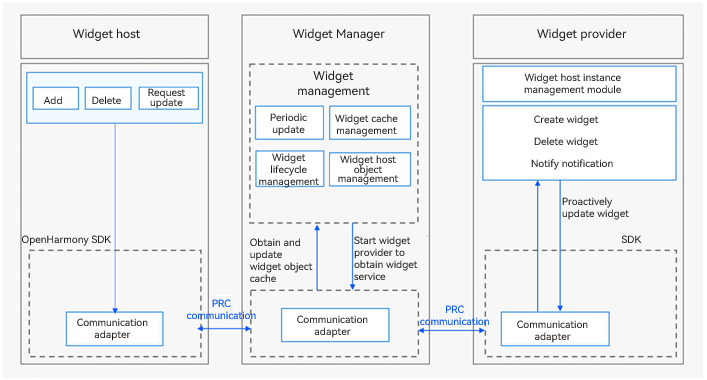
The widget host consists of the following modules:
Widget usage: provides operations such as creating, deleting, or updating a widget.
Communication adapter: provided by the SDK for communication with the Widget Manager. It sends widget-related operation instructions to the Widget Manager.
The Widget Manager consists of the following modules:
Periodic update: starts a scheduled task based on the update policy to periodically update a widget after it is added to the Widget Manager.
Cache manager: caches view information of a widget after it is added to the Widget Manager. This enables the cached data to be directly returned when the widget is obtained next time, greatly reducing the latency.
Lifecycle manager: suspends update when a widget is switched to the background or is blocked, and updates and/or clears widget data during upgrade and deletion.
Object manager: manages RPC objects of the widget host. It is used to verify requests from the widget host and process callbacks after the widget update.
Communication adapter: communicates with the widget host and provider through RPCs.
The widget provider consists of the following modules:
Widget service: implemented by the widget provider developer to process requests on widget creation, update, and deletion, and to provide corresponding widget services.
Instance manager: implemented by the widget provider developer for persistent management of widget instances allocated by the Widget Manager.
Communication adapter: provided by the SDK for communication with the Widget Manager. It pushes update data to the Widget Manager.

You only need to develop the widget provider. The system automatically handles the work of the widget host and Widget Manager.