Use Case
The in-app multi-window capability is supported since version 6.0.0(20).
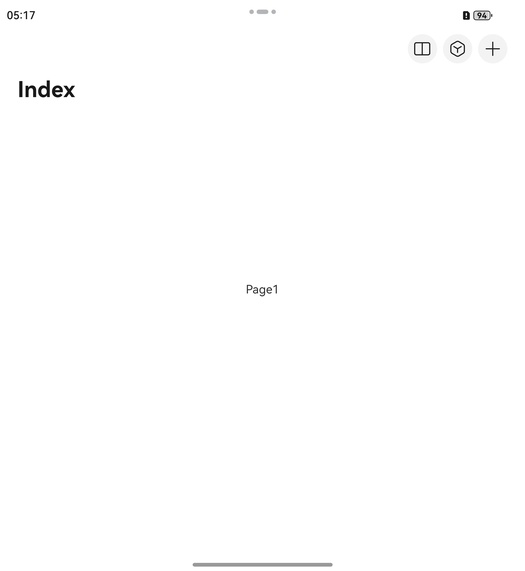
You can enable the in-app multi-window icon (split-screen icon) by configuring the multiWindowEntryInAPPMenu attribute under menu in titleBar.
Constraints
This capability is applicable only when the current device and its screen state support the multitask view. Currently, the following device types support the multitask view:
-
Bi-fold phones in unfolded state
-
Tri-fold phones in dual-screen mode or triple-screen mode (in landscape mode)
-
Tablets in landscape mode
For other device types or states, this component will not respond to any taps on the in-app multi-window icon.
Development Procedure
-
Import required modules.
// Starting from version 6.0.2(22), you do not need to manually import HdsNavigationAttribute. For details, refer to the "Modules to Import" section of the HdsNavigation reference document. import { HdsNavigation, HdsNavigationMenuContentOptions, HdsNavigationAttribute } from '@kit.UIDesignKit'; import { Want } from '@kit.AbilityKit'; -
Create a level-1 navigation component. Then set the multiWindowEntryInAPPMenu attribute under menu in titleBar to configure the in-app multi-window icon.
@Entry
@Component
struct MultiWindowEntryInAPPTest {
  private want: Want = {
    // Replace the values of bundleName, moduleName, and abilityName with those of your app to start the UIAbility in the app.
    // Note: The following parameters are only examples. Replace them with the actual parameters of your app.
    bundleName: 'com.example.myapplication',
    moduleName: 'entry',
    abilityName: 'FuncAbility',
  }
  @State menuContent: HdsNavigationMenuContentOptions = {
    multiWindowEntryInAPPMenu: {
      want: this.want
    },
    maxCount: 3,
    value: [
      { content: { label: 'menu1', icon: $r('sys.symbol.search_things'), } },
      { content: { label: 'menu2', icon: $r('sys.symbol.plus'), } }
    ]
  }

  build() {
    HdsNavigation() {
      Stack() {
        Text('Page1')
      }.alignContent(Alignment.Center)
      .width('100%')
      .height('100%')
    }
    .hideToolBar(false)
    .navBarWidth('100%')
    .titleBar({
      content: {
        title: {
          mainTitle: "Index"
        },
        menu: this.menuContent
      }
    })
  }
}