Interaction Process
For a local AVSession, the data sources are on the local device. The figure below illustrates the interaction process.
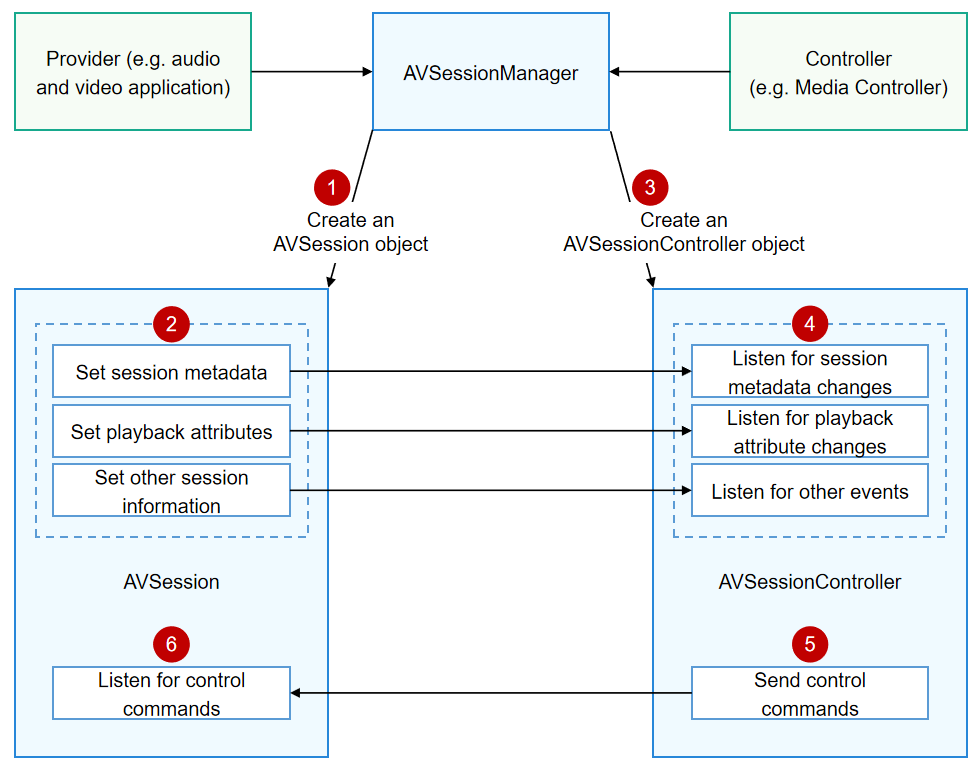
This process involves two roles: provider and controller.

The controller must be a system application. A third-party application can be a provider.
In the local AVSession, the provider exchanges information with the controller through AVSessionManager.
-
The provider creates an AVSession object through AVSessionManager.
-
The provider sets session metadata (such as media ID, title, and media duration) and session playback attributes (such as playback state, playback speed, and playback position) through the AVSession object.
-
The controller creates an AVSessionController object through AVSessionManager.
-
Through the AVSessionController object, the controller listens for changes of the session metadata and playback attributes.
-
Through the AVSessionController object, the controller sends control commands to the AVSession object.
-
Through the AVSession object, the provider can listen for control commands from the media session controller, for example, "play" (play), "playNext" (play next), "fastForward" (fast-forward), and "setSpeed" (set playback speed).
AVSessionManager
AVSessionManager provides the types and functions for creating an AVSession, creating an AVSessionController, sending system control events, and listening for AVSession state changes.
In fact, unlike AVSession and AVSessionController objects, AVSessionManager is not a concrete object but the module namespace of the media session. In actual programming, you can import it as follows:
import { avSession as AVSessionManager } from '@kit.AVSessionKit'; All methods in the module namespace can be used as methods of AVSessionManager.
The code snippet below shows how the provider creates an AVSession object by using AVSessionManager:

The sample code below demonstrates only the API call for creating an AVSession object. When actually using it, the app must ensure that the AVSession object instance persists throughout background playback to prevent it from being reclaimed or released by the system, which would cause the system to restrict background audio playback.
import { avSession as AVSessionManager } from '@kit.AVSessionKit';
@Entry
@Component
struct Index {
  @State message: string = 'hello world';

  build() {
    Column() {
      Text(this.message)
        .onClick(async () => {
          // Create an AVSession object.
          let context = this.getUIContext().getHostContext() as Context;
          let session: AVSessionManager.AVSession = await AVSessionManager.createAVSession(context, 'SESSION_NAME', 'audio');
          console.info(`session create done : sessionId : ${session.sessionId}`);
        })
    }
    .width('100%')
    .height('100%')
  }
}
For more methods of AVSessionManager, see the API documentation: Module Description.