When to Use
The floating ball is a non-full-screen application window that hovers over the device screen, providing temporary global capabilities for cross-application interaction.
Applications can display key information in a small window (floating ball) mode. Once in this compact mode, users can perform other operations on the screen, enhancing their overall experience.

The floating ball feature is supported since API version 20.
The floating ball feature is supported on the Emulator of DevEco Studio 6.0.1 Release or later.
Constraints
For security purposes, the floating ball can be started only when the application is running in the foreground and has granted the ohos.permission.USE_FLOAT_BALL permission. For details, see Requesting Restricted Permissions
This permission is currently restricted to cross-app scenarios including question searching, bill logging, price comparison, order sniping, and translation, as well as real-time market tracking for financial apps. Upon integration, the permission must be used strictly within these scope limits; failure to comply will result in penalties and restrictions.
Each application can start one floating ball at a time, and a device can have a maximum of two floating balls at the same time. When the maximum number of floating balls is reached, a new floating ball replaces the oldest one.
The floating ball can be used on phones, tablets, and 2-in-1 devices.
Available APIs
The following table lists the common APIs for the floating ball feature. For details, see @ohos.window.floatingBall (Floating Ball Window).
| API | Description |
|---|---|
| isFloatingBallEnabled(): boolean | Checks whether the current device supports the floating ball feature. |
| create(config: FloatingBallConfiguration): Promise<FloatingBallController> | Creates a floating ball controller. |
| startFloatingBall(params: FloatingBallParams): Promise<void> | Starts the floating ball. |
| updateFloatingBall(params: FloatingBallParams): Promise<void> | Updates the floating ball. |
| stopFloatingBall(): Promise<void> | Stops the floating ball. |
| on(type: 'stateChange', callback: Callback<FloatingBallState>): void | Registers a callback to listen for floating ball lifecycle state changes. |
| off(type: 'stateChange', callback?: Callback<FloatingBallState>): void | Unregisters the callback used to listen for floating ball lifecycle state changes. |
| on(type: 'click', callback: Callback<void>): void | Registers a callback to listen for click events of the floating ball. |
| off(type: 'click', callback?: Callback<void>): void | Unregisters the callback used to listen for click events of the floating ball. |
| getFloatingBallWindowInfo(): Promise<FloatingBallWindowInfo> | Obtains the window information of the floating ball. |
| restoreMainWindow(want: Want): Promise<void> | Restores the main window of the application and loads the specified page. |
Interaction Modes
The floating ball provides the following interaction modes:
Click: The floating ball click event is triggered.
Long press: The floating ball vibrates and enters a deletion-ready state, allowing users to delete individual or all floating balls.
Drag: Users can manually drag the floating ball to change its position. While dragging, it automatically avoids the status bar, fixed soft keyboard, navigation bar, and other components. In landscape mode, it does not automatically avoid the input method. For details about how to change the soft keyboard to fixed or floating state, see Input Method Service. When released, the floating ball automatically snaps to the nearest side. To delete the floating ball, drag it to the trash bin area (the middle of the bottom) and release.
Position memory: The position of the floating ball is saved when it is closed. When it is started next time, it is displayed at the position where it was closed last time. Screen rotation or device restart resets it to the default position (upper-right side of the screen).
Floating Ball Specifications and Layout
Currently, four floating ball template layouts are supported. For details, see FloatingBallTemplate.
Static layout, which provides an icon and a title.
Standard text layout, which provides a title and content.
Emphasized text layout, which provides an icon, a title, and content.
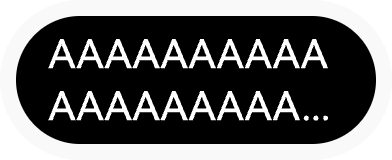
Plain text layout, which provides only a title and can be displayed in two lines.
Currently, the overall width of the floating ball ranges from 70 vp to 98 vp, and the height is 40 vp. The font size of the title and content cannot be customized.
The following diagrams illustrate different template layouts. The actual display may vary by language or content.
Figure 1 Static layout
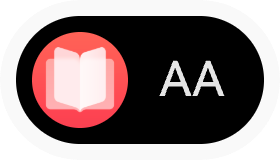
Figure 2 Static layout - extra-long title
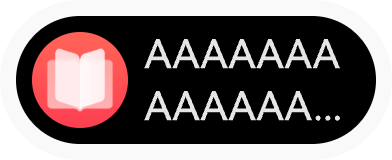
Figure 3 Standard text layout
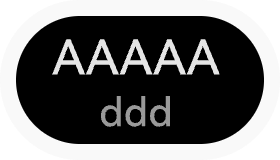
Figure 4 Standard text layout - extra-long content
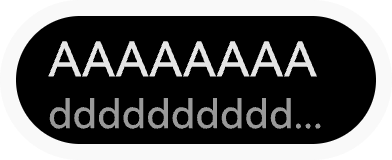
Figure 5 Emphasized text layout
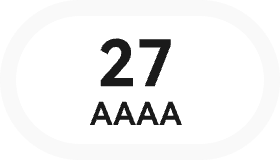
Figure 6 Emphasized text layout - extra-long content
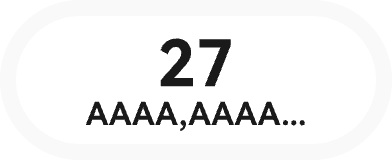
Figure 7 Emphasized text layout � icon
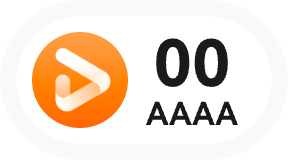
Figure 8 Emphasized text layout - icon and extra-long content
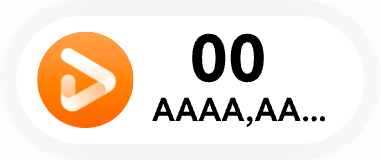
Figure 9 Plain text layout
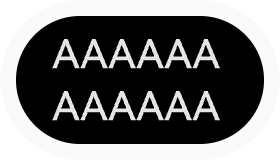
Figure 10 Plain text layout - extra-long text title
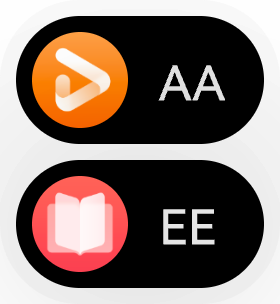
When two applications start the floating ball, they merge, as shown below. The overall height is 76 vp.
Figure 11 Merged floating ball display
How to Develop
Import the module and declare the floating ball controller.
Use the create() API to create a floating ball controller instance, and register the click event callback and status change event callback. Then, use the startFloatingBall() API to start the floating ball.
Use the updateFloatingBall() API to update the floating ball information to control the content displayed in the floating ball.
Use the stopFloatingBall() API to stop the floating ball. When there is no need to display the floating ball, you can stop it as required.
// Utils.ts
// This page provides a tool class to demonstrate the logic for creating, updating, and closing the floating ball.
import hilog from '@ohos.hilog';
import image from '@ohos.multimedia.image';
import { BusinessError } from '@kit.BasicServicesKit';
import { floatingBall } from '@kit.ArkUI';
import { Want } from '@kit.AbilityKit';
import { ContextUtil } from './ContextUtil';

const DOMAIN: number = 0xF811;
const TAG: string = '[Sample_FloatingBall]';
const BUNDLE_NAME: string = ContextUtil.context.abilityInfo.bundleName;

export class Utils {
    public static getRawfilePixelMapSync(path: string): image.PixelMap {
        try {
            const BUFFER = ContextUtil.context.resourceManager.getRawFileContentSync(path);
            const IMAGE_SOURCE: image.ImageSource = image.createImageSource(BUFFER.buffer as ArrayBuffer);
            hilog.debug(DOMAIN, TAG, `Get rawfile pixelMap path '${path}' successfully`);
            return IMAGE_SOURCE.createPixelMapSync();
        } catch (e) {
            hilog.error(DOMAIN, TAG, `Get rawfile pixelMap path '${path}' failed, error: ${e}`);
            throw e as Error;
        }
    }

    // Logic for starting the floating ball.
    public static async onClickCreateFloatingBall(
        floatingBallController: floatingBall.FloatingBallController | undefined,
        template: floatingBall.FloatingBallTemplate,
        onActiveRowChange: (value: number) => void, // Callback for reception status update.
        title: string = 'title',
        content: string = 'content',
        backgroundColor: string = '#0ff77c',
        icon?: image.PixelMap): Promise<void> {
        // Register a listener for click callback events.
        try {
            floatingBallController?.on('click', () => {
                hilog.debug(DOMAIN, TAG, `FloatingBall onClickEvent`);
                let want: Want = {
                    bundleName: BUNDLE_NAME,
                    abilityName: 'MainAbility'
                }
                // Use a promise to return the result.
                floatingBallController?.restoreMainWindow(want)
                .then(() => {
                    hilog.debug(DOMAIN, TAG, `Success in restoring FloatingBall main window`);
                }).catch((err: BusinessError) => {
                    hilog.error(DOMAIN, TAG, `failed to restore FloatingBall main window. code: ${err.code}, message: ${err.message}`);
                })
            })
        } catch (e) {
            hilog.error(DOMAIN, TAG, `Failed to register click listener: ${e}`);
        }
        // Register a listener for state change events.
        try {
            floatingBallController?.on('stateChange',
            (state: floatingBall.FloatingBallState) => {
                hilog.debug(DOMAIN, TAG, `FloatingBall stateCange: ${state}`);
                if(state === floatingBall.FloatingBallState.STOPPED) {
                    floatingBallController?.off('click')
                    floatingBallController?.off('stateChange')
                    floatingBallController = undefined;
                    // Execution state update callback.
                    onActiveRowChange?.(-1);
                }
            })
        } catch (e) {
            hilog.error(DOMAIN, TAG, `Failed to register stateChange listener: ${e}`);
        }
        // Start the floating ball.
        let startParams: floatingBall.FloatingBallParams = icon? {
            template: template,
            title: title,
            content: content,
            backgroundColor: backgroundColor,
            icon: icon
        } : {
            template: template,
            title: title,
            content: content,
            backgroundColor: backgroundColor
        }
        try {
            floatingBallController?.startFloatingBall(startParams)
            .then(() => {
                hilog.debug(DOMAIN, TAG, `succeed in starting FloatingBall`);
            }).catch((err: BusinessError) => {
                hilog.error(DOMAIN, TAG, `failed to start FloatingBall. code: ${err.code}, message: ${err.message}`);
            })
        } catch (e) {
            console.error('startFloatingBall Error', e)
        }
    }

// Logic for updating the floating ball.
public static onClickUpdateFloatingBall(
    floatingBallController: floatingBall.FloatingBallController | undefined,
    template: floatingBall.FloatingBallTemplate,
    title: string = 'newTitle',
    content: string = 'newContent',
    icon?: image.PixelMap): void {
        // Randomly use numeric suffixes for the title and content during the update.
        let random_string: string = Math.floor(Math.random() * 100).toString();
        let updateParams: floatingBall.FloatingBallParams = icon ? {
            template: template,
            title: title + random_string,
            content: content + random_string,
            backgroundColor: '#f6ea0a',
            icon: icon
        } : {
            template: template,
            title: title + random_string,
            content: content + random_string,
            backgroundColor: '#f6ea0a',
        }
        try {
            floatingBallController?.updateFloatingBall(updateParams).then(() => {
                hilog.debug(DOMAIN, TAG, `Succeed in updating FloatingBall`);
            }).catch((err: BusinessError) => {
                hilog.error(DOMAIN, TAG, `failed to update FloatingBall. code: ${err.code}, message: ${err.message}`);
            })
        } catch (e) {
            console.error('updateFloatingBall Error:', e)
        }
    }

    // Logic for stopping the floating ball.
    public static onClickStopFloatingBall(floatingBallController: floatingBall.FloatingBallController | undefined): void {
        // stop is an asynchronous process. The actual deletion result needs to be obtained through the stateChange callback.
        floatingBallController?.stopFloatingBall().then(() => {
            hilog.debug(DOMAIN, TAG, `Succeed in stopping FloatingBall`);
        }).catch((err: BusinessError) => {
            hilog.error(DOMAIN, TAG, `failed to stop FloatingBall. code: ${err.code}, message: ${err.message}`);
        })
    }
}
// Index.ets
// This page uses the button click event to display the basic operations of the floating ball.
import hilog from '@ohos.hilog';
import image from '@ohos.multimedia.image';
import { floatingBall } from '@kit.ArkUI';
import { Utils } from '../util/Utils';
const DOMAIN: number = 0xF811;
const TAG: string = '[Sample_FloatingBall]';
@Entry
@Component
struct Index {
// Available rows. The value -1 indicates that all rows are visible.
@State private activeRow: number = -1;
// Declare the floating ball controller.
private floatingBallController: floatingBall.FloatingBallController | undefined = undefined;
// Cache the icon (static layout).
private cachedIcon1: image.PixelMap | undefined = undefined;
// Cache the icon (emphasized text layout).
private cachedIcon2: image.PixelMap | undefined = undefined;
// Status update function of activeRow (ensure that the value of activeRow is updated to �1 when the floating ball is destroyed.)
private activeRowChange = (value: number) => {this.activeRow = value};
// Check whether a layout is available (whether it is dimmed).
private isEnabled(rowInex: number): boolean {
return this.activeRow === -1 || this.activeRow === rowInex;
}
build() {
Column({space: 12}) {
// Static layout, which provides a title and an icon. This layout cannot be modified after being created.
Row({space: 6}) {
Button('STATIC').onClick( async () => {
// Obtain the context from the component and ensure that the return value of this.getUIContext().getHostContext() is UIAbilityContext.
if (!this.floatingBallController) {
this.floatingBallController = await floatingBall.create({
context: this.getUIContext().getHostContext()
})
}
if (this.floatingBallController) {
// Load the icon only when cachedIcon1 is not cached. If cachedIcon1 is cached, use it directly.
if (!this.cachedIcon1) {
let pixelMap = Utils.getRawfilePixelMapSync('books.png'); // The image dimensions have the upper limit.
if (pixelMap) {
this.cachedIcon1 = pixelMap; // Cache the icon.
hilog.debug(DOMAIN, TAG, `Success to load icon PixelMap`);
} else {
hilog.error(DOMAIN, TAG, `Failed to load icon PixelMap`);
}
}
Utils.onClickCreateFloatingBall(this.floatingBallController,
floatingBall.FloatingBallTemplate.STATIC, this.activeRowChange, 'title', 'content', '#0ff77c', this.cachedIcon1)
this.activeRow = 0;
}
})
.enabled(this.isEnabled(0))
// Update the floating ball information. (The layout cannot be updated after being created, and the button is permanently dimmed.)
Button('Update1').enabled(false)
// Close the floating ball.
Button('Close1').onClick(() => {
Utils.onClickStopFloatingBall(this.floatingBallController);
this.activeRow = -1; // Restore the display of all rows after the floating ball is closed.
})
.enabled(this.isEnabled(0))
}
.width('100%')
.justifyContent(FlexAlign.Center)
// Standard text layout, which provides a title and content.
Row({space: 6}) {
Button('NORMAL').onClick( async () => {
// Obtain the context from the component and ensure that the return value of this.getUIContext().getHostContext() is UIAbilityContext.
if (!this.floatingBallController) {
this.floatingBallController = await floatingBall.create({
context: this.getUIContext().getHostContext()
})
}
if (this.floatingBallController) {
Utils.onClickCreateFloatingBall(this.floatingBallController,
floatingBall.FloatingBallTemplate.NORMAL, this.activeRowChange, 'title', 'content')
this.activeRow = 1;
}
})
.enabled(this.isEnabled(1))
// Update the floating ball information.
Button('Update2').onClick(() => Utils.onClickUpdateFloatingBall(this.floatingBallController,
floatingBall.FloatingBallTemplate.NORMAL))
.enabled(this.isEnabled(1))
// Close the floating ball.
Button('Close2').onClick(() => {
Utils.onClickStopFloatingBall(this.floatingBallController);
this.activeRow = -1; // Restore the display of all rows after the floating ball is closed.
})
.enabled(this.isEnabled(1))
}
.width('100%')
.justifyContent(FlexAlign.Center)
// Highlighted text layout, supporting title, icon, and content.
Row({space: 6}) {
Button('EMPHATIC').onClick( async () => {
// Obtain the context from the component and ensure that the return value of this.getUIContext().getHostContext() is UIAbilityContext.
if (!this.floatingBallController) {
this.floatingBallController = await floatingBall.create({
context: this.getUIContext().getHostContext()
})
}
if (this.floatingBallController) {
// Load the icon only when cachedIcon2 is not cached. If cachedIcon2 is cached, use it directly.
if(!this.cachedIcon2) {
let pixelMap = Utils.getRawfilePixelMapSync('video.png'); // The image dimensions have the upper limit.
if (pixelMap) {
this.cachedIcon2 = pixelMap; // Cache the icon.
hilog.debug(DOMAIN, TAG, `Success to load icon PixelMap`);
} else {
hilog.debug(DOMAIN, TAG, `Failed to load icon PixelMap`);
}
}
Utils.onClickCreateFloatingBall(this.floatingBallController,
floatingBall.FloatingBallTemplate.EMPHATIC, this.activeRowChange, '16', 'Min', '#0ff77c', this.cachedIcon2)
this.activeRow = 2;
}
})
.enabled(this.isEnabled(2))
// Update the floating ball information.
Button('Update3').onClick(() => Utils.onClickUpdateFloatingBall(this.floatingBallController,
floatingBall.FloatingBallTemplate.EMPHATIC, '', 'Min', this.cachedIcon2))
.enabled(this.isEnabled(2))
// Close the floating ball.
Button('Close3').onClick(() => {
Utils.onClickStopFloatingBall(this.floatingBallController);
this.activeRow = -1; // Restore the display of all rows after the floating ball is closed.
})
.enabled(this.isEnabled(2))
}
.width('100%')
.justifyContent(FlexAlign.Center)
// Plain text layout, which provides only a title.
Row({space: 6}) {
Button('SIMPLE').onClick( async () => {
// Obtain the context from the component and ensure that the return value of this.getUIContext().getHostContext() is UIAbilityContext.
if (!this.floatingBallController) {
this.floatingBallController = await floatingBall.create({
context: this.getUIContext().getHostContext()
})
}
if (this.floatingBallController) {
Utils.onClickCreateFloatingBall(this.floatingBallController,
floatingBall.FloatingBallTemplate.SIMPLE, this.activeRowChange, 'title')
this.activeRow = 3;
}
})
.enabled(this.isEnabled(3))
// Update the floating ball information.
Button('Update4').onClick(() => Utils.onClickUpdateFloatingBall(this.floatingBallController,
floatingBall.FloatingBallTemplate.SIMPLE))
.enabled(this.isEnabled(3))
// Close the floating ball.
Button('Close4').onClick(() => {
Utils.onClickStopFloatingBall(this.floatingBallController);
this.activeRow = -1; // Restore the display of all rows after the floating ball is closed.
})
.enabled(this.isEnabled(3))
}
.width('100%')
.justifyContent(FlexAlign.Center)
}
.width('100%')
.height('100%')
.justifyContent(FlexAlign.Center)
}
}