You can control the display style of the mouse cursor.

This feature is supported since API version 11. Updates will be marked with a superscript to indicate their earliest API version.
[h2]setCursor
setCursor(value: PointerStyle): void
Sets the current mouse cursor style. This API can be used globally in method statements.
Atomic service API: This API can be used in atomic services since API version 12.
System capability: SystemCapability.ArkUI.ArkUI.Full
Parameters
| Name | Type | Mandatory | Description |
|---|---|---|---|
| value | PointerStyle | All consistent | Cursor style. |
[h2]restoreDefault
restoreDefault(): void
Restores the mouse cursor to the default arrow style. This API can be used globally in method statements.
Atomic service API: This API can be used in atomic services since API version 12.
System capability: SystemCapability.ArkUI.ArkUI.Full
PointerStyle
type PointerStyle = pointer.PointerStyle
Defines the pointer style.
Atomic service API: This API can be used in atomic services since API version 12.
System capability: SystemCapability.ArkUI.ArkUI.Full
| Type | Description |
|---|---|
| pointer.PointerStyle | Pointer style. |

Directly using cursorControl can lead to the issue of ambiguous UI context. To avoid this, obtain the UIContext object using the getUIContext() API and then obtain the cursorControl bound to the instance using the getCursorController API.
Example
This example demonstrates how to change the mouse cursor style using setCursor.
// xxx.ets
import { pointer } from '@kit.InputKit';

@Entry
@Component
struct CursorControlExample {
  @State text: string = '';
  controller: TextInputController = new TextInputController()

  build() {
    Column() {
      Row()
        .height(200)
        .width(200)
        .backgroundColor(Color.Green)
        .position({ x: 60, y: 70 })
        .onHover((flag) => {
          if (flag) {
            // You are advised to use this.getUIContext().getCursorController().setCursor().
            cursorControl.setCursor(pointer.PointerStyle.EAST)
          } else {
            // You are advised to use this.getUIContext().getCursorController().restoreDefault().
            cursorControl.restoreDefault()
          }
        })
      Row()
        .height(200)
        .width(200)
        .backgroundColor(Color.Blue)
        .position({ x: 130, y: 120 })
        .onHover((flag) => {
          if (flag) {
            // You are advised to use this.getUIContext().getCursorController().setCursor().
            cursorControl.setCursor(pointer.PointerStyle.WEST)
          } else {
            // You are advised to use this.getUIContext().getCursorController().restoreDefault().
            cursorControl.restoreDefault()
          }
        })
    }.width('100%')
  }
}
Diagrams:
When the mouse hovers over the blue area, it displays a west-pointing arrow cursor style.
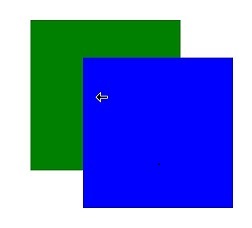
When the mouse hovers over the green area, it displays an east-pointing arrow cursor style.
