Users gain access to premium app features or content for a set duration upon purchasing an auto-renewable subscription. At the end of a billing cycle, the subscription automatically renews for the next cycle unless the user cancels it.

[h2]Subscription Group
Subscriptions are managed and maintained by subscription groups. Before creating a subscription, create a subscription group and specify the subscription group to which the subscription belongs.
-
A subscription group comprises subscriptions of similar services.
-
Only one subscription within the same subscription group can be active for each user at a time. For an active subscription, your app needs to grant relevant rights to the user.
Such a mechanism provides you with a convenient way to easily manage products with slight differences in their functions.
[h2]Billing Cycle
The billing cycle of an auto-renewable subscription can be 1 week, 30 days, 31 days, 1 month, 2 months, 3 months, 6 months, or 12 months. To set the billing cycle, refer to Configuring an Auto-renewable Subscription.
[h2]Account Hold Period
If a subscription expires due to cancellation, renewal failure, or other causes, the subscription enters the account hold period of up to 180 days. During this period, the user has no access to this subscription. However, if the user resumes a subscription during the account hold period, all services of this subscription are immediately accessible.
[h2]Subscription Statuses
| Status | Service Accessible | Description |
|---|---|---|
| To be active | No | The subscription has not taken effect and the user has no access to services of this subscription. (The subscription in this status cannot be queried.) If a user switches to a subscription that takes effect later in a subscription group, the original subscription is about to expire, and the new subscription is in the to-be-active state. The user can view the start time of the new subscription on the details screen of the original subscription. |
| Active | Yes | Renewable: The subscription will be automatically renewed after the current billing cycle ends. Expire soon: The subscription will not be automatically renewed after the current billing cycle ends. |
| Expired | No | The possible causes may be as follows: The fee deduction fails in the last renewal, the user cancels the subscription, the user does not agree to the price increase, or the fee deduction account is abnormal. Then, the subscription enters the Account Hold Period. |
| Renewal attempt | No | The system will automatically attempt to renew your subscription at regular intervals, either shortly before or after your current subscription expires. |
| Cancelled | No | The subscription has been successfully canceled. Relevant benefits will be revoked immediately, and neither the user nor you can undo the cancellation. |
[h2]Subscription Status Changes
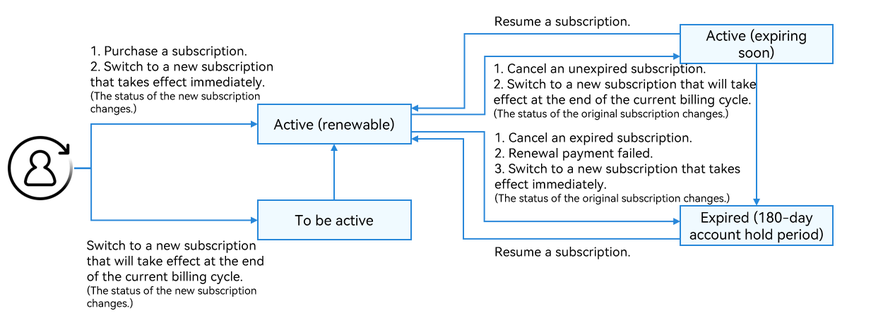
After a user successfully purchases a subscription, the subscription enters the renewable state. The subscription status changes when the following operations are performed:
| Status Change | Description |
|---|---|
| Canceling a subscription | A user cancels an auto-renewable subscription. After a subscription is canceled, the user retains access to it until the end of the current billing cycle. Note: In this scenario, your server will receive a server key event notification of AUTO_RENEW_DISABLED. |
| Resuming a subscription | A user can resume an expiring or expired subscription to regain access to it. Note: In this scenario, your server will receive a server key event notification of AUTO_RENEW_ENABLED or RESTORE. |
| Switching from one subscription to another | When a user has an active subscription and wants to switch to a different subscription within the same subscription group, two things can happen. - The new subscription takes effect immediately (no account hold period for the original subscription): The original subscription balance will be converted into days for the new subscription, extending the validity period of the new subscription. This happens in the following scenarios: 1. Subscription upgrade: The new subscription has a higher level than the original subscription. 2. The new subscription has the same level and also the same billing cycle as the original subscription. NOTE In this scenario, your server will receive the server key event notification of UPGRADE. For details about how to calculate the validity period of a subscription, please refer to How to Calculate the Validity Period for New Subscriptions upon Immediate Switch of Auto-Renewable Subscriptions?. - The new subscription will take effect at the end of the current billing cycle: The original subscription is set to the expiring state and the new subscription is marked as to-be-active. The new subscription will be charged and take effect upon the date when the original subscription becomes expired. This happens in the following scenarios: 1. Subscription downgrade: The new subscription has a lower level than the original subscription. 2. The new subscription has the same level as the original subscription, but they have different billing cycles. Note: In this scenario, your server will receive a server key event notification of DOWNGRADE. |
The subscription status changes as follows:
Subscription Management by Users
Your app can use the iap.showManagedSubscriptions API to redirect users to the subscription page or subscription details page to manage subscriptions. Users can also go to Settings > HUAWEI ID > Payment and purchases > Subscriptions to manage subscriptions. They can perform operations such as viewing, canceling, changing, and resuming subscriptions.


Renewal Processing
The renewal price for a subscription (including the original price, the price after any increases, and the price after any decreases) will be determined 10 days before the renewal date. For a subscription with a billing cycle of one week, the price for the next renewal needs to be confirmed immediately after the current renewal is successful. If the price is adjusted after it is confirmed, the next renewal will still be at the original price, while the renewal after that will be at the new price.
24 hours before the end of a billing cycle, the IAP server will attempt to charge the user to renew their subscription. If the charge fails, the IAP server will retry the charge within a certain period to restore the subscription.


If a subscription becomes inactive due to failed billing, the system will automatically retry the billing for up to 60 days.
Promotional Offers
To make subscriptions more attractive, the following promotion methods are available:
-
Introductory offers for new users
Promotional pricing can be set for a subscription to attract new users. You can specify the duration and type of the offer (free trial or recurring billing).
Promotion rules:
- A user is entitled to only one promotion in each subscription group. If a user has already enjoyed the promotion of one subscription in a group, the user will not be entitled to any other promotions, even after switching to another subscription in the group.
- A user is entitled to the promotion of a subscription no matter whether the user subscribes to it for the first time, resumes it, or switches to it from another subscription. The only restriction is that a user can enjoy only one promotion in a subscription group.
-
Promotional offers for specific user groups
You can tailor promotional activities to specific user groups in certain regions. Before a purchase is made, your app can retrieve promotional information for a particular product. This information is then passed to IAP Kit and displayed to the user during checkout.
Promotion rules:
- When a user meets the conditions of both the promotion for specific user groups and the promotion for new users, the former promotion takes priority over the latter.
- If a user has enjoyed a user group–based promotion in the past, the user is still qualified to enjoy a new-user promotion.
- There is no limit on the number of times that a user enjoys user group–based promotions.

User group–based promotions require the operation of generating a signed purchase parameter for a promotion and are applicable only to apps with servers deployed.
-
Win-back offers for users considering cancellation (coming soon)
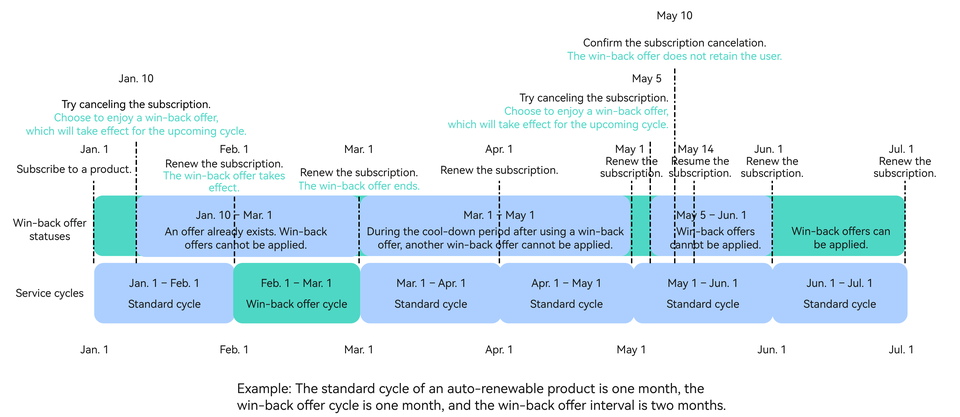
Promotional pricing can be set for a subscription to attract new users. You can specify the duration and type of the offer (free trial or recurring billing) and the interval for multiple uses of the offer (starting from the end time of the previous offer) to retain users who are considering canceling their subscriptions. When a user who meets the criteria for a win-back offer attempts to cancel their subscription on the subscription management screen, a pop-up will appear to provide the offer. The user can then choose to accept the offer and continue their subscription, or proceed with cancellation. If the user chooses to accept the win-back offer, it will take effect for the next renewal cycle, and they will be charged the promotional price.
Rules of win-back offers:
- If a user cancels their subscription before renewal after accepting a win-back offer, the win-back offer is voided. If the user subsequently resumes their subscription, the win-back offer cannot be used again within the current subscription period and will only be available after the next renewal.
- A win-back offer can only be used again after the interval set by you has passed since the end of the user's last win-back offer.
- Win-back offers can be used an unlimited number of times, but they cannot be used in the following scenarios:
- Win-back offers are unavailable for users who are currently benefiting from an introductory offer for new users or a promotional offer for specific user groups or will benefit from such an offer in the upcoming cycle.
- Win-back offers are unavailable for users who are currently benefiting from or will benefit from a win-back offer in the upcoming cycle.
- Win-back offers are unavailable for users who have not agreed to price increases configured by you.
When setting a promotion, besides specifying the promotion type, you also need to select a payment method for each promotion:
-
Free trial: Users can access a subscription free of charge for a specific duration. They won't be billed until the free offer duration ends.
-
Discounted recurring payments: Users are provided with a lower price for the first few billing cycles to encourage more purchases.
-
Pay up front: Users pay a one-time discounted price up front for a specific duration. Once the duration is over, they will be billed at the standard renewal price.
For details about how to configure the product, please refer to Configuring Products.

-
Whether a user can enjoy an offer depends on the offer ID passed by you. For more information about this parameter, please refer to Generating a Signed Purchase Parameter for a Promotion.
-
The IAP server determines whether a user can enjoy an introductory offer and automatically applies the offer to the user. You can check the hasEligibilityForIntroOffer field of SubscriptionInfo in the return value of iap.queryProducts to determine whether a user has enjoyed an introductory offer.
[h2]Adjusting the Price of a Subscription
You can raise or lower the price of a subscription if you need. Check Modifying a Single Product > Auto-Renewable Subscription for the detailed operations.
-
Lowering a price: This adjustment is effective for all users, including existing subscribers and new subscribers. If the price is adjusted within 10 days before the next renewal date, the current price will be used for the next renewal, and the new price will be used for the renewal after the next renewal.
-
Raising a price: You can raise the price of an auto-renewable subscription in either of the following ways:
- Retain the original price for existing subscribers and apply the new price to new subscribers.
- Apply the new price to all subscribers. The IAP server will notify existing subscribers of the new price and the date when they will be billed at the new price. The notification will be sent 10 days before the next billing date. If the price adjustment occurs within 10 days before the next billing date, the IAP server will renew the subscription for one more cycle based on the original price and then notifies existing subscribers of the price adjustment 10 days before the "one more cycle" ends. However, there are still some other limitations:
- The new price of a subscription applies to existing subscribers only after they agree to it. If a subscriber does not agree to the new price, the subscription cannot be automatically renewed anymore for this subscriber.
- After a price increase takes effect, you cannot cancel it. You can, however, make another adjustment to lower the price. For users who have canceled their subscriptions due to a price increase, their subscriptions cannot be resumed automatically. They must repurchase the subscription if they still want to use it.
- If a user is in a discount-price period of a subscription when its price is adjusted, the user will be charged for the next renewal at the original price before the price adjustment when the discount-price period ends. Then, the new price will apply to the user for the renewal after the next one.
[h2]Removing a Subscription
It is necessary to consider the impact on users when you plan to remove certain auto-renewable subscriptions.
-
Allowing existing users to renew the subscriptions and preventing new users from subscribing to them: You can remove the subscriptions on the Product Management page to prevent new users from subscribing to them, while still allowing the existing users to access and renew them.
-
Making subscriptions unavailable to both new and existing users: You can delete digital products on the Product Management page to prevent new users from purchasing and existing users from renewing. It is recommended to delete a digital product and then officially stop offering services after a certain period of time. This period should be consistent with its renewal cycle to ensure that existing users can experience the services for a full cycle. For example, for a subscription with a billing cycle of one month, the subscription should be deleted one month in advance to ensure that no new purchase can be made during this period, and that existing users can experience the services for a full cycle before the subscription reaches its end of service.
Receiving Notifications About Key Subscription Events
If you have specified the notification receiving address, the IAP server will call this API to notify the configured server of some key events in the subscription scenario after a user purchases an auto-renewable subscription. For details, please refer to Key Event Notifications. Here are some key events:
-
A user successfully makes a subscription for the first time.
-
An expired subscription is resumed after a successful auto-renewal.
-
A user proactively renews an expired subscription.
-
A user switches from one auto-renewable subscription to another at the same level. If the two subscriptions have the same billing cycle, the new subscription will take effect immediately.
-
A user switches from one auto-renewable subscription to another at the same level. If the two subscriptions have different billing cycles, the new subscription will take effect on the next billing date.
-
A user proactively cancels or your app cancels an auto-renewable subscription. In this scenario, the user can still access the services, but no more renewal will happen after this cycle ends.
-
An auto-renewable subscription is successfully renewed.
-
An expired subscription enters the account hold period.
If your app server returns a failure response (the HTTP status code in the response is not 200), the notification about the key event will be periodically resent to your app server. It is recommended that your app server return a success response immediately after receiving the notification, to avoid constantly receiving messages from the IAP server.
Notes on Integrating the Subscription Functions for an App with Multiple Roles for an Account
A user uses their HUAWEI ID to purchase a subscription. For one subscription, only one purchase is allowed for each HUAWEI ID at the same time. In this case, if your app allows an account to have multiple roles, there is a possibility that services are delivered incorrectly. The recommended solutions for this issue are as follows:
-
Allow a user to purchase only common duration-based products for their roles other than role A, for which they have purchased an auto-renewable subscription. (This can be implemented via consumables.)
-
Design a mechanism for transferring retained benefits. For example, when a user purchases a subscription for role B after they have purchased an auto-renewable subscription for role A, this mechanism can be used to transfer retained benefits from role A to role B.
-
Configure multiple subscriptions. For example, for a game in which different game servers have different roles, create independent subscriptions for each server.