Some frameworks or applications have their own text layout capabilities, which are integrated into the ArkGraphics2D text engine during porting. To avoid the need for redeveloping text components, the Text component provides the NODE_TEXT_CONTENT_WITH_STYLED_STRING API, which can directly render text generated by the Ark text engine.
The following describes how to create a font engine text and render the text using a Text component based on integration with ArkTS pages.

For APIs involving the font engine, add target_link_libraries(entry PUBLIC libnative_drawing.so) to CMakeLists.txt; otherwise, a linking error will occur.
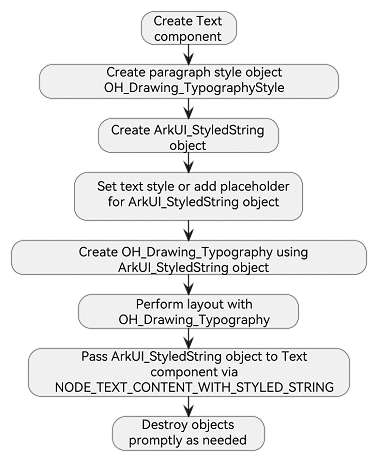
The following figure shows the main process for using the NODE_TEXT_CONTENT_WITH_STYLED_STRING API.
Creating a Text Component
Since text styles are set through font engine APIs, there is no need to configure style attributes such as text color and font size when creating a Text component. However, universal attributes such as width and height still need to be set. If they are unspecified, the component automatically adapts to the text content dimensions.
ArkUI_NativeNodeAPI_1 *nodeApi = reinterpret_cast<ArkUI_NativeNodeAPI_1 *>(
    OH_ArkUI_QueryModuleInterfaceByName(ARKUI_NATIVE_NODE, "ArkUI_NativeNodeAPI_1"));
if (nodeApi == nullptr) {
    return;
}
// ···
// Create a Text component.
ArkUI_NodeHandle text = nodeApi->createNode(ARKUI_NODE_TEXT);
ArkUI_NumberValue textWidth[] = {{.f32 = 300}};
ArkUI_AttributeItem textWidthItem = {.value = textWidth, .size = 1};
nodeApi->setAttribute(text, NODE_WIDTH, &textWidthItem);
ArkUI_NumberValue textHeight[] = {{.f32 = 100}};
ArkUI_AttributeItem textHeightItem = {.value = textHeight, .size = 1};
nodeApi->setAttribute(text, NODE_HEIGHT, &textHeightItem);
Setting Paragraph and Text Styles
-
Setting the Paragraph Style
The paragraph style defines the overall attributes of a paragraph of text, such as the maximum number of display lines and text direction. The following code example sets text centering and a maximum line limit of 10.

The OH_Drawing_ prefixed APIs are provided by the Ark text engine. For details, see Drawing and Displaying Simple Text (C/C++) and Drawing and Displaying Complex Text (C/C++).
OH_Drawing_TypographyStyle *typographyStyle = OH_Drawing_CreateTypographyStyle();
OH_Drawing_SetTypographyTextAlign(typographyStyle, OH_Drawing_TextAlign::TEXT_ALIGN_CENTER);
OH_Drawing_SetTypographyTextMaxLines(typographyStyle, NUM_10);
-
Setting the Text Style
Different text styles can be applied to different text segments, but must be set in the following sequence:
- OH_ArkUI_StyledString_PushTextStyle: pushes the text style to the stack.
- OH_ArkUI_StyledString_AddText: adds the text content to modify.
- OH_ArkUI_StyledString_PopTextStyle: pops the text style from the stack.

The OH_ArkUI_StyledString_ prefixed APIs are provided by the Text component.
The OH_Drawing_ prefixed APIs are provided by the Ark text engine. For details, see Drawing and Displaying Simple Text (C/C++) and Drawing and Displaying Complex Text (C/C++).
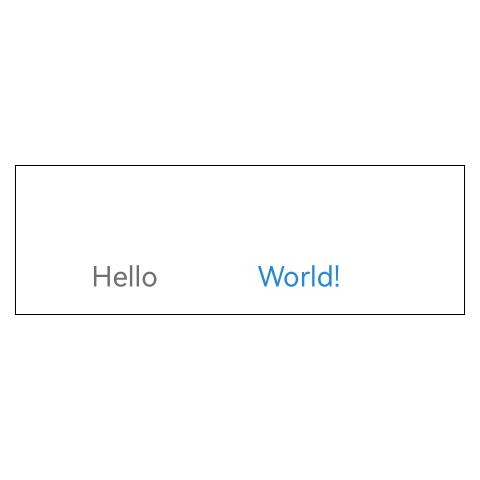
Use OH_Drawing_CreateTextStyle to create a text style. Set the font size of "Hello" to 28 px and the color to 0xFF707070. Set the font size of "World!" to 28 px and the color to 0xFF2787D9.
ArkUI_StyledString *styledString = OH_ArkUI_StyledString_Create(typographyStyle, OH_Drawing_CreateFontCollection());
// Create a text style and set the font and color.
OH_Drawing_TextStyle *textStyle = OH_Drawing_CreateTextStyle();
OH_Drawing_SetTextStyleFontSize(textStyle, NUM_28);
OH_Drawing_SetTextStyleColor(textStyle, OH_Drawing_ColorSetArgb(0xFF, 0x70, 0x70, 0x70));
// Apply style sequence: push -> add -> pop.
OH_ArkUI_StyledString_PushTextStyle(styledString, textStyle);
OH_ArkUI_StyledString_AddText(styledString, "Hello");
OH_ArkUI_StyledString_PopTextStyle(styledString);
// ···
// Apply different styles.
OH_Drawing_TextStyle *worldTextStyle = OH_Drawing_CreateTextStyle();
OH_Drawing_SetTextStyleFontSize(worldTextStyle, NUM_28);
OH_Drawing_SetTextStyleColor(worldTextStyle, OH_Drawing_ColorSetArgb(0xFF, 0x27, 0x87, 0xD9));
OH_ArkUI_StyledString_PushTextStyle(styledString, worldTextStyle);
OH_ArkUI_StyledString_AddText(styledString, "World!");
OH_ArkUI_StyledString_PopTextStyle(styledString);
Adding a Placeholder
Placeholders reserve blank areas of specified sizes. While no text is drawn in these areas, they participate in layout measurement and affect text typesetting.
Line height is determined by the larger value between text height and placeholder height.
This example inserts a placeholder between "Hello" and "World!":
OH_Drawing_TextStyle *textStyle = OH_Drawing_CreateTextStyle();
OH_Drawing_SetTextStyleFontSize(textStyle, NUM_28);
OH_Drawing_SetTextStyleColor(textStyle, OH_Drawing_ColorSetArgb(0xFF, 0x70, 0x70, 0x70));
// Apply style sequence: push -> add -> pop.
OH_ArkUI_StyledString_PushTextStyle(styledString, textStyle);
OH_ArkUI_StyledString_AddText(styledString, "Hello");
OH_ArkUI_StyledString_PopTextStyle(styledString);
// Add a placeholder. No text is rendered in this area, but it reserves space for other components. You can mount Image components at placeholder positions to achieve mixed text and image layouts.
OH_Drawing_PlaceholderSpan placeHolder{.width = 100, .height = 100};
OH_ArkUI_StyledString_AddPlaceholder(styledString, &placeHolder);
// Apply different styles.
OH_Drawing_TextStyle *worldTextStyle = OH_Drawing_CreateTextStyle();
OH_Drawing_SetTextStyleFontSize(worldTextStyle, NUM_28);
OH_Drawing_SetTextStyleColor(worldTextStyle, OH_Drawing_ColorSetArgb(0xFF, 0x27, 0x87, 0xD9));
OH_ArkUI_StyledString_PushTextStyle(styledString, worldTextStyle);
OH_ArkUI_StyledString_AddText(styledString, "World!");
OH_ArkUI_StyledString_PopTextStyle(styledString);
Implementing Text Layout and Drawing
-
Text Layout
After configuring text styles and content, call the font engine API OH_Drawing_TypographyLayout to perform text layout, specifying the maximum width. Text will automatically wrap if it exceeds this width.

Text that has not been laid out is not displayed.
OH_Drawing_Typography *typography = OH_ArkUI_StyledString_CreateTypography(styledString);
// Call the font engine layout method. The width must match the width of the Text component.
// Layout width = Text component width - (Left padding + Right padding)
OH_Drawing_TypographyLayout(typography, NUM_400);
-
Text Drawing
Text drawing is completed through interaction between the text engine and graphics, requiring no additional settings. The Text component will call the text engine drawing API when the component triggers drawing under the ArkUI rendering mechanism. Here, only the created StyledString object needs to be passed to the created Text component.
ArkUI_AttributeItem styledStringItem = {.object = styledString};
// After the layout is complete, pass the object to the Text component through NODE_TEXT_CONTENT_WITH_STYLED_STRING.
nodeApi->setAttribute(text, NODE_TEXT_CONTENT_WITH_STYLED_STRING, &styledStringItem);
Destroying an Object
The Text component does not manage the lifecycle of any objects involved in this process. You are responsible for this.
**OH_Drawing_DestroyTextStyle(OH_Drawing_TextStyle *style)**: destroys the text style object.
**OH_Drawing_DestroyTypographyStyle(OH_Drawing_TypographyStyle *style)**: destroys the paragraph style object.
Releasing objects while the Text component is still displayed will cause rendering failures. Ensure that the Text component is no longer in use before releasing resources.
For details about the font engine cleanup APIs, see OH_Drawing_DestroyTextStyle and OH_Drawing_DestroyTypographyStyle.
The Text component provides OH_ArkUI_StyledString_Destroy to destroy styled string objects.
Sample
This section demonstrates core API usage only. For the complete sample project, see StyledStringSample.
#include "manager.h"
#include <sstream>
#include <arkui/native_interface.h>
#include <arkui/styled_string.h>
// ···
#include <native_drawing/drawing_font_collection.h>
#include <native_drawing/drawing_text_declaration.h>

namespace NativeNode::Manager {
constexpr int32_t NUM_10 = 10;
constexpr int32_t NUM_28 = 28;
constexpr int32_t NUM_400 = 400;
// ···
void NodeManager::CreateNativeNode()
{
    // ···
    ArkUI_NativeNodeAPI_1 *nodeApi = reinterpret_cast<ArkUI_NativeNodeAPI_1 *>(
        OH_ArkUI_QueryModuleInterfaceByName(ARKUI_NATIVE_NODE, "ArkUI_NativeNodeAPI_1"));
    if (nodeApi == nullptr) {
        return;
    }
    // Create a Column container component.
    ArkUI_NodeHandle column = nodeApi->createNode(ARKUI_NODE_COLUMN);
    ArkUI_NumberValue colWidth[] = {{.f32 = 300}};
    ArkUI_AttributeItem widthItem = {.value = colWidth, .size = 1};
    nodeApi->setAttribute(column, NODE_WIDTH, &widthItem);
    // Create a Text component.
    ArkUI_NodeHandle text = nodeApi->createNode(ARKUI_NODE_TEXT);
    ArkUI_NumberValue textWidth[] = {{.f32 = 300}};
    ArkUI_AttributeItem textWidthItem = {.value = textWidth, .size = 1};
    nodeApi->setAttribute(text, NODE_WIDTH, &textWidthItem);
    ArkUI_NumberValue textHeight[] = {{.f32 = 100}};
    ArkUI_AttributeItem textHeightItem = {.value = textHeight, .size = 1};
    nodeApi->setAttribute(text, NODE_HEIGHT, &textHeightItem);
    ArkUI_NumberValue borderWidth[] = {{.f32 = 1}};
    ArkUI_AttributeItem borderWidthItem = {.value = borderWidth, .size = 1};
    nodeApi->setAttribute(text, NODE_BORDER_WIDTH, &borderWidthItem);

    // OH_Drawing_ prefixed APIs are provided by the font engine. typographyStyle represents paragraph style configuration.
    OH_Drawing_TypographyStyle *typographyStyle = OH_Drawing_CreateTypographyStyle();
    OH_Drawing_SetTypographyTextAlign(typographyStyle, OH_Drawing_TextAlign::TEXT_ALIGN_CENTER);
    OH_Drawing_SetTypographyTextMaxLines(typographyStyle, NUM_10);
    // Create an ArkUI_StyledString object.
    ArkUI_StyledString *styledString = OH_ArkUI_StyledString_Create(typographyStyle, OH_Drawing_CreateFontCollection());
    // Create a text style and set the font and color.
    OH_Drawing_TextStyle *textStyle = OH_Drawing_CreateTextStyle();
    OH_Drawing_SetTextStyleFontSize(textStyle, NUM_28);
    OH_Drawing_SetTextStyleColor(textStyle, OH_Drawing_ColorSetArgb(0xFF, 0x70, 0x70, 0x70));
    // Apply style sequence: push -> add -> pop.
    OH_ArkUI_StyledString_PushTextStyle(styledString, textStyle);
    OH_ArkUI_StyledString_AddText(styledString, "Hello");
    OH_ArkUI_StyledString_PopTextStyle(styledString);
    // Add a placeholder. No text is rendered in this area, but it reserves space for other components. You can mount Image components at placeholder positions to achieve mixed text and image layouts.
    OH_Drawing_PlaceholderSpan placeHolder{.width = 100, .height = 100};
    OH_ArkUI_StyledString_AddPlaceholder(styledString, &placeHolder);
    // Apply different styles.
    OH_Drawing_TextStyle *worldTextStyle = OH_Drawing_CreateTextStyle();
    OH_Drawing_SetTextStyleFontSize(worldTextStyle, NUM_28);
    OH_Drawing_SetTextStyleColor(worldTextStyle, OH_Drawing_ColorSetArgb(0xFF, 0x27, 0x87, 0xD9));
    OH_ArkUI_StyledString_PushTextStyle(styledString, worldTextStyle);
    OH_ArkUI_StyledString_AddText(styledString, "World!");
    OH_ArkUI_StyledString_PopTextStyle(styledString);
    // Create Typography of the font engine based on the StyledString object. The Typography object contains the configured text and its style.
    OH_Drawing_Typography *typography = OH_ArkUI_StyledString_CreateTypography(styledString);
    // Call the font engine layout method. The width must match the width of the Text component.
    // Layout width = Text component width - (Left padding + Right padding)
    OH_Drawing_TypographyLayout(typography, NUM_400);
    ArkUI_AttributeItem styledStringItem = {.object = styledString};
    // After the layout is complete, pass the object to the Text component through NODE_TEXT_CONTENT_WITH_STYLED_STRING.
    nodeApi->setAttribute(text, NODE_TEXT_CONTENT_WITH_STYLED_STRING, &styledStringItem);

    // Release resources. The application can determine when to release resources.
    OH_ArkUI_StyledString_Destroy(styledString);
    // Add Text as a child component of Column.
    nodeApi->addChild(column, text);
    // Add Column as a child component of XComponent.
    OH_NativeXComponent_AttachNativeRootNode(xComponent_, column);
}
} // namespace NativeNode::Manager