@Track is used for property-level updates of class objects. When a property decorated with @Track changes, only the UI update associated with this property is triggered.
Before reading this topic, you are advised to read @State to have an understanding of the basic observation capabilities of state management.

This decorator is supported in ArkTS widgets since API version 11.
This decorator can be used in atomic services since API version 12.
Overview
@Track enables property-level update for the class object. When a class object is a state variable, the change of the @Track decorated property triggers only the update of the property associated UI. If the class uses the @Track decorator, do not use properties that are not decorated with @Track in the UI. Otherwise, a runtime error will be reported.
Class Property-Level Update
In state management V1, decorators such as @State support observation of the changes of first-layer properties by default. Although the changes of first-layer properties can trigger updates, observation at the class property level cannot be implemented. The following example shows such a restriction:
import { hilog } from '@kit.PerformanceAnalysisKit';
const DOMAIN_NUMBER: number = 0XFF00;
const TAG: string = '[Sample_StateTrack]';
class Info {
  public name: string = 'Jack';
  public age: number = 12;
}

@Entry
@Component
struct Index {
  @State info: Info = new Info();

  // Use the log printing of getFontSize to determine which component triggers rendering.
  getFontSize(id: number): number {
    hilog.info(DOMAIN_NUMBER, TAG, `Component ${id} render`);
    return 30;
  }

  build() {
    Column() {
      Text(`name: ${this.info.name}`)
        .fontSize(this.getFontSize(1))
        .margin(10)
      Text(`age: ${this.info.age}`)
        .fontSize(this.getFontSize(2))
        .margin(10)

      // Click the current button. You can find that only the name property is changed.
      // However, the refresh of two Text components is still triggered.
      // Text(`age: ${this.info.age}`) is a redundant refresh.
      Button('change name')
        .width(300)
        .margin(10)
        .onClick(() => {
          this.info.name = 'Jane';
        })

      // Click the current button. You can find that only the age property is changed.
      // However, the refresh of two Text components is still triggered.
      // Text(`name: ${this.info.name}`) is a redundant refresh.
      Button('change age')
        .width(300)
        .margin(10)
        .onClick(() => {
          this.info.age++;
        })
    }
    .height('100%')
    .width('100%')
  }
} 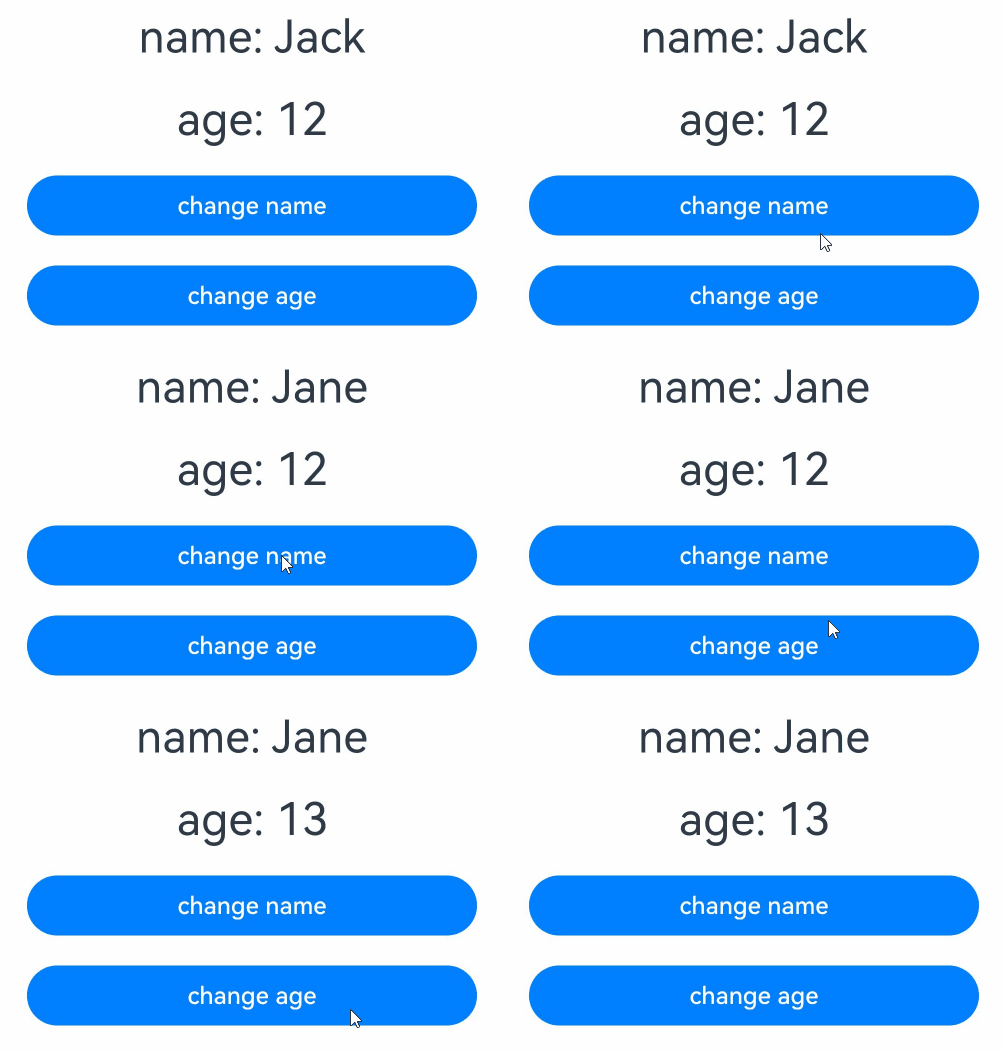

When the UI is refreshed, the property setting method of the component is executed. You can check whether the getFontSize API is called to determine whether the current component is refreshed.
-
After the first UI rendering is complete, the following log is displayed:
Component 1 render
Component 2 render
-
When you click Button('change name'), the two Text components are still re-rendered even if only info.name is modified. The Text(age: ${this.info.age}) component does not use the name property, but is still refreshed because the info.name property is changed. Therefore, this refresh is redundant. The output logs are as follows:
Component 1 render
Component 2 render
-
Similarly, when you click Button('change age'), Text(name: ${this.info.name}) is also refreshed. The output logs are as follows:
Component 1 render
Component 2 render
The root cause of the preceding redundant refresh is that the @State decorator in state management V1 cannot accurately observe the access and change of class properties. To observe class object properties accurately, the @Track decorator is introduced.
Decorator Description
| @Track Decorator | Description |
|---|---|
| Decorator parameters | None |
| Allowed variable types | Non-static properties of class objects. @Track does not support observing changes in data of the function type. If the data of the function type decorated with @Track is modified, the UI is not refreshed accordingly. |
Observed Changes and Behavior
When a class object is a state variable, any changes to its properties decorated with @Track will trigger only updates to the UI associated with those properties.

When no property in the class object is decorated with @Track, the behavior remains unchanged. @Track is unable to observe changes of nested objects.
Using the @Track decorator can avoid redundant updates.
import { hilog } from '@kit.PerformanceAnalysisKit';
const DOMAIN_NUMBER: number = 0XFF00;
const TAG: string = '[Sample_StateTrack]';

class LogTrack {
  @Track public str1: string;
  @Track public str2: string;

  constructor(str1: string) {
    this.str1 = str1;
    this.str2 = 'World';
  }
}

class LogNotTrack {
  public str1: string;
  public str2: string;

  constructor(str1: string) {
    this.str1 = str1;
    this.str2 = 'World';
  }
}

@Entry
@Component
struct AddLog {
  @State logTrack: LogTrack = new LogTrack('Hello');
  @State logNotTrack: LogNotTrack = new LogNotTrack('Hello');

  isRender(index: number): number {
    hilog.info(DOMAIN_NUMBER, TAG, `Text ${index} is rendered`);
    return 50;
  }

  build() {
    Row() {
      Column() {
        Text(this.logTrack.str1) // Text1
          .id('str1')
          .fontSize(this.isRender(1))
          .fontWeight(FontWeight.Bold)
          .margin(10)
        Text(this.logTrack.str2) // Text2
          .fontSize(this.isRender(2))
          .fontWeight(FontWeight.Bold)
          .margin(10)
        Button('change logTrack.str1')
          .id('str2')
          .width(300)
          .margin(10)
          .onClick(() => {
            this.logTrack.str1 = 'Bye';
          })
        Text(this.logNotTrack.str1) // Text3
          .fontSize(this.isRender(3))
          .fontWeight(FontWeight.Bold)
          .margin(10)
        Text(this.logNotTrack.str2) // Text4
          .fontSize(this.isRender(4))
          .fontWeight(FontWeight.Bold)
          .margin(10)
        Button('change logNotTrack.str1')
          .width(300)
          .margin(10)
          .onClick(() => {
            this.logNotTrack.str1 = 'Bye';
          })
      }
      .width('100%')
    }
    .height('100%')
  }
} 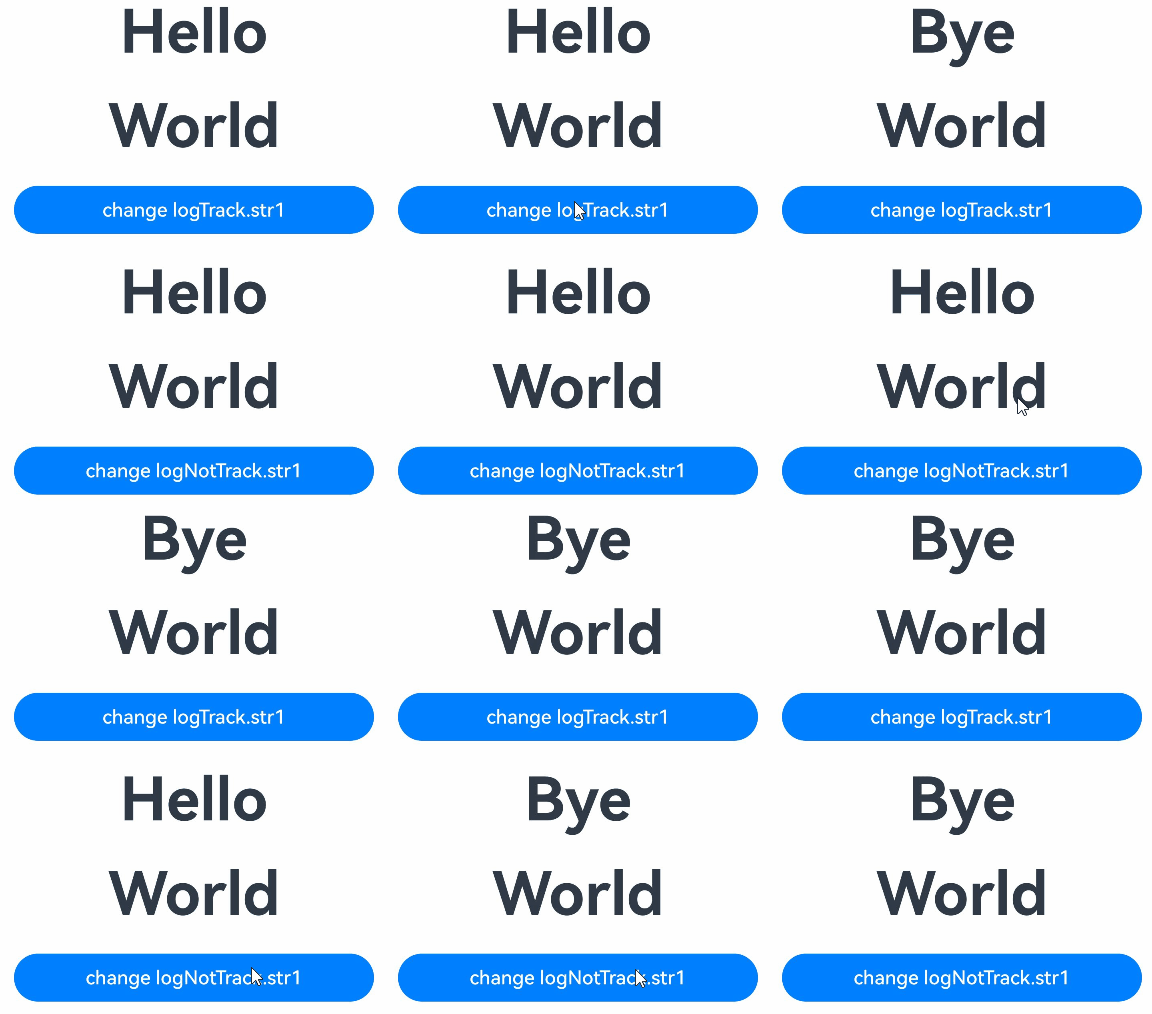
In the preceding example:
-
All properties in the LogTrack class are decorated with @Track. After the change logTrack.str1 button is clicked, Text1 is updated, but Text2 is not, as only one log record is generated.
Text 1 is rendered
-
None of the properties in the LogNotTrack class are decorated with the @Track decorator. When the button change logNotTrack.str1 is clicked, both Text3 and Text4 are refreshed, generating two log entries and resulting in redundant updates.
Text 3 is rendered
Text 4 is rendered
Constraints
-
If the @Track decorator is used in a class, the properties that are not decorated with the @Track decorator in the class cannot be used in the @Component decorated UI. For example, these properties cannot be bound to components or used to initialize child components. If the properties are incorrectly used, an error is reported during runtime. To be specific, since API version 23, error code 140110 is returned. For details, see Improperly Using Non-@Track Decorated Properties Causes Errors. You can use a non-@Track decorated property in non-UI functions, such as event callbacks and lifecycle callbacks.
-
Since API version 19, @Track is used in the @ComponentV2 decorated UI. In this case, no runtime error is reported, but the UI still does not refresh. For details, see @Observed+@Track Decorated Class (V1->V2) and @Observed+@Track Decorated Class (V2->V1).
-
Whenever possible, avoid any combination of class objects that contain @Track and those that do not in, for example, union types and class inheritance. Otherwise, non-@Track-decorated attributes may be misused in the UI, causing a runtime error.
[h2]@Track and Custom Component Updates
This example is used to clarify the processing steps of custom component updates and @Track. The log object is a state variable decorated with @State. Its logInfo property is decorated with @Track, but other properties are not, and the values of these other properties are not updated through the UI.
import { hilog } from '@kit.PerformanceAnalysisKit';
const DOMAIN_NUMBER: number = 0XFF00;
const TAG: string = '[Sample_StateTrack]';
class Log {
  @Track public logInfo: string;
  public owner: string;
  public id: number;
  public time: Date;
  public location: string;
  public reason: string;

  constructor(logInfo: string) {
    this.logInfo = logInfo;
    this.owner = 'OH';
    this.id = 0;
    this.time = new Date();
    this.location = 'CN';
    this.reason = 'NULL';
  }
}

@Entry
@Component
struct AddLog {
  @State log: Log = new Log('origin info.');

  build() {
    Row() {
      Column() {
        Text(this.log.logInfo)
          .fontSize(50)
          .fontWeight(FontWeight.Bold)
          .onClick(() => {
            // Properties that are not decorated with @Track can be used in click events.
            hilog.info(DOMAIN_NUMBER, TAG, 'owner: ' + this.log.owner +
              ' id: ' + this.log.id +
              ' time: ' + this.log.time +
              ' location: ' + this.log.location +
              ' reason: ' + this.log.reason);
            this.log.time = new Date();
            this.log.id++;
            this.log.logInfo += ' info.';
          })
      }
      .width('100%')
    }
    .height('100%')
  }
} 
Procedure:
-
The click event Text.onClick of the AddLog custom component increases the value of 'info.'.
-
The Text component is re-rendered because the @Track decorated property logInfo of @State decorated variable log is changed.
[h2]Improperly Using Non-@Track Decorated Properties Causes Errors
If a non-@Track decorated property is used in the UI, an error (error code 140110 since API version 23) is reported during runtime. You need to decorate age with @Track.
class Person {
  // id is decorated with @Track.
  @Track id: number;
  // age is not decorated with @Track.
  age: number;

  constructor(id: number, age: number) {
    this.id = id;
    this.age = age;
  }
}

@Entry
@Component
struct Parent {
  @State parent: Person = new Person(2, 30);

  build() {
    // Property that is not decorated by @Track cannot be used in the UI. Otherwise, an error is reported during runtime.
    Text(`Parent id is: ${this.parent.id} and Parent age is: ${this.parent.age}`)
      .fontSize(20)
      .margin(10)
  }
}