This guide describes how to integrate cloud file collaboration into your application. It covers environment setup, file synchronization, and file caching, and concludes with a complete sample project.
Environment Preparation
Devices: Two HarmonyOS devices running HarmonyOS 6.0.0.115 or later, with cloud space version 6.0.0.300 or later.
Development environment: Subject to cloud space version restrictions, the IDE must be DevEco Studio 6.0.1 Release or a later version, with build version 6.0.1.251 and SDK version API Version 21 Release or later.
Application: Add the cloudFileSyncEnabled field and set it to true in the project path AppScope/app.json5.
{
  "app": {
    "cloudFileSyncEnabled": true
  }
}
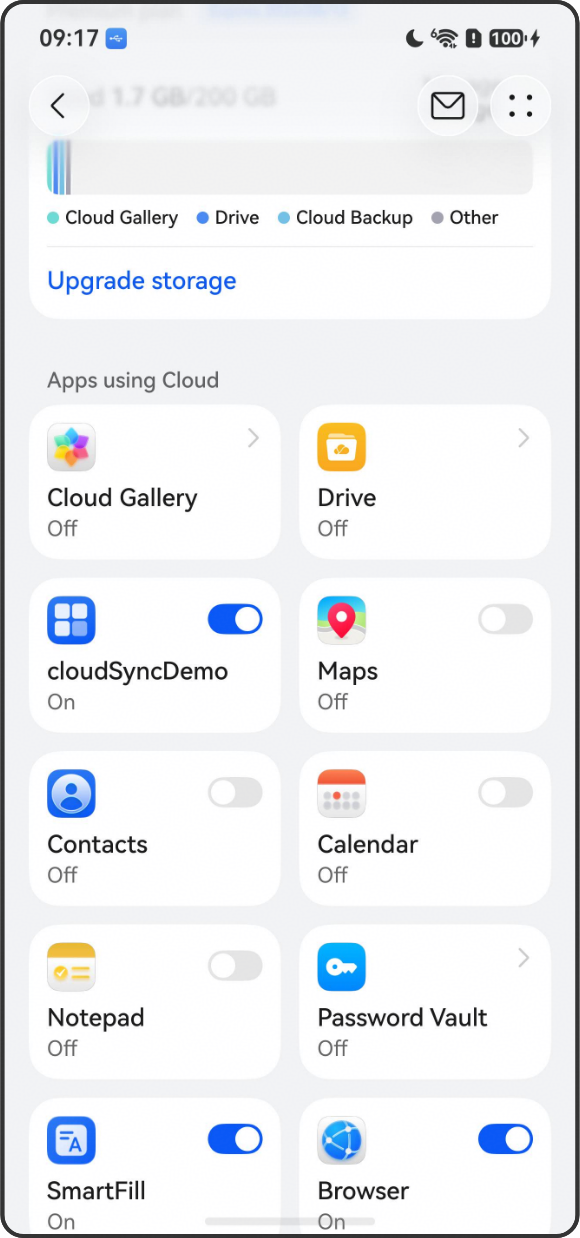
Application installation: Install the application on both devices and sign in with the same HUAWEI ID. In Settings > Cloud, locate the synchronization switch for the development application (for example, Cloud File Sync Demo) and turn it on. You can then use Device File Browser in DevEco Studio to browse the /data/storage/el2/cloud directory.
File Sync
You can use the basic file operation APIs to read, write, rename, copy files, and create directories in the sandbox path /data/storage/el2/cloud. After a file is written or a folder is created successfully, the device-cloud sync service automatically triggers the synchronization process to sync the newly created file or folder to the cloud.
In abnormal scenarios such as network anomalies, high temperature, or low battery on some devices, the device-cloud sync service cannot synchronize file modifications to the cloud server in a timely manner due to power consumption control. In such cases, developers can use the cloudSync.FileSync object to subscribe to the synchronization status and manage synchronization based on the status.
Meanwhile, you can view newly added files or modifications to existing files in the sandbox path /data/storage/el2/cloud on another device. The other device is mainly used to verify the multi-device synchronization capability.
[h2]Available APIs
| Name | Description | Notes |
|---|---|---|
| FileSync.on(event: 'progress', callback: Callback<SyncProgress>): void | Adds an event listener for the sync progress of a cloud drive sync object. | The object for which the listener is added must not be mixed with the object that triggers the sync. |
| FileSync.off(event: 'progress', callback?: Callback<SyncProgress>): void | Removes the specified callback of the progress type from a cloud drive sync object. | Ensure that the event listener is added before removing it. |
| FileSync.start(): Promise<void> | Starts the device-cloud sync of the cloud drive asynchronously. | The object for which the listener is added must be the same as the object that triggers the sync. Usage constraint: This asynchronous API supports only limited concurrency. Excessive call frequency may cause device exceptions. |
| FileSync.stop(): Promise<void> | Stops the device-cloud sync of the cloud drive asynchronously. | The object for which the listener is removed must be the same as the object that stops the sync. |
[h2]Sample Code
// Index.ets
import { cloudSync } from '@kit.CoreFileKit';

@Entry
@Component
struct Index {
  @State errorCode: number = 0;
  @State errorMessage: string = "";
  // Record the status of this sync process. For details about the enumeration values, see the API description.
  @State state: cloudSync.SyncState = cloudSync.SyncState.STOPPED;
  // Record the error information when the sync process terminates, including error states such as temperature, battery, and network.
  @State errCode: cloudSync.ErrorType = cloudSync.ErrorType.NO_ERROR;
  // Declare a FileSync class object.
  private fileSync = new cloudSync.FileSync();
  // Declare an event listener function to obtain the sync status and sync error code.
  private cloudSyncCallback = (pg: cloudSync.SyncProgress) => {
    this.state = pg.state;
    this.errCode = pg.error;
  }

  build() {
    Column({space: 20}) {
      // Add event listeners for the FileSync object. Consecutive clicks will capture exceptions.
      Button("Register Listener").onClick(() => {
        try {
            this.fileSync.on("progress", this.cloudSyncCallback);
        } catch (error) {
            console.error("Failed to register listener: ", error);
            this.errorCode = error.code;
            this.errorMessage = error.message;
        }
      });
      // Actively trigger sync through the FileSync object. When data on the device side and cloud side are inconsistent, the sync process synchronizes cloud modifications to the device side and local modifications to the cloud.
      Button("Trigger Sync").onClick(() => {
        try {
            this.fileSync.start();
        } catch (error) {
            console.error("Sync trigger failed: ", error);
            this.errorCode = error.code;
            this.errorMessage = error.message;
        }
      });
      // Stop synchronization actively through the FileSync object. When the device side does not want to stay synchronized with the cloud side, stopping the sync process can stop synchronization with the cloud.
      Button("Stop Sync").onClick(() => {
        try {
            this.fileSync.stop();
        } catch (error) {
            console.error("Failed to stop sync: ", error);
            this.errorCode = error.code;
            this.errorMessage = error.message;
        }
      })
      // Remove the sync event listener. After removal, when the sync status changes, the application will not be able to perceive the sync status or sync error codes.
      Button("Unregister the listener.").onClick(() => {
        try {
            this.fileSync.off("progress");
        } catch (error) {
            console.error("Unregister listener: ", error);
            this.errorCode = error.code;
            this.errorMessage = error.message;
        }
      });
      // Used to display the current sync status and sync error code. When a network exception occurs, the error code is NETWORK_UNAVAILABLE=1.
      Text(`Sync status: ${this.state}`).fontSize(12)
      Text(`Error code: ${this.errCode}`).fontSize(12)
    }
    .width("100%")
    .height("100%")
  }
}
File Caching
After uploading files in the /data/storage/el2/cloud directory to the cloud, you can release the local space occupied, or cache cloud files to the local device. The Location information of a file can be obtained by calling the fileIo.statSync method. Based on the Location information, a file can have three states: local=1, cloud=2, local&cloud=3. For a locally created file that has been successfully uploaded to the cloud, the Location is 3, meaning the user's data exists both locally and in the cloud, occupying both local and cloud space. For a file that has not been uploaded to the cloud, the Location is 1, meaning the user's data exists only locally, occupying only local space. For a file newly added in the cloud, when its metadata is downloaded to the local device, the Location is 2, meaning only the metadata information exists locally while the file itself remains in the cloud, occupying only cloud space. You can use the cache and release cache APIs provided by the CloudFileCache object to convert the Location between 2 and 3, thereby releasing the occupied local space or caching cloud data to the local device.
[h2]Available APIs
| Name | Description | Notes |
|---|---|---|
| CloudFileCache.on(event: 'progress', callback: Callback<DownloadProgress>): void | Adds a listener for the cloud file cache progress event. | Do not mix the object that adds the listener with the object that triggers caching. |
| CloudFileCache.off(event: 'progress', callback?: Callback<DownloadProgress>): void | Removes the specified callback of the 'progress' type from the cloud file cache object. | Ensure that the event listener is added before removing it. |
| CloudFileCache.start(uri: string): Promise<void> | Starts caching cloud files. This API uses a promise to return the result. | Keep the object that adds the listener consistent with the object that triggers caching. Note: This asynchronous API supports only limited concurrency, with a maximum of 10 concurrent operations. Exceeding this limit may cause system-wide exceptions. If the number of cloud files to cache exceeds 10, use the batch download API startbatch. |
| CloudFileCache.stop(uri: string, needClean?: boolean): Promise<void> | Stops caching cloud files. This API uses a promise to return the result. | Keep the object that removes the listener consistent with the object that stops caching. |
| CloudFileCache.cleanFileCache(uri: string): void | Deletes the file cache. This API is synchronous. | Do not release the cache for a file that is being uploaded. |
[h2]Sample Code
// Index.ets
import { cloudSync, fileIo, fileUri } from '@kit.CoreFileKit';
import { common } from '@kit.AbilityKit';

@Entry
@Component
struct Index {
  @State currFilePath: string = "";
  @State errorCode: number = 0;
  @State errorMessage: string = "";
  // Record the cached size of a single file during the caching process.
  @State process: number = 0;
  // Record the error code encountered during the caching process. For details, see the API description.
  @State downloadErr: cloudSync.DownloadErrorType = cloudSync.DownloadErrorType.NO_ERROR;
  private context = getContext(this) as common.UIAbilityContext;
  // Obtain the sandbox path /data/storage/el2/cloud of the current application.
  private basePath = this.context.cloudFileDir + "/";
  // Declare a CloudFileCache object.
  private cloudFileCache = new cloudSync.CloudFileCache();
  // Declare a cache process listener function to monitor the cache progress of the current file.
  private downloadProcess = (pg: cloudSync.DownloadProgress) => {
    this.process = pg.processed;
    this.downloadErr = pg.error;
  }

  build() {
    Column({space: 20}) {
      // Add an event listener for the file cache process.
      Button("Register Listener").onClick(() => {
        try {
            this.cloudFileCache.on("progress", this.downloadProcess);
        } catch (error) {
            console.error("Failed to register listener for cache process: ", error);
            this.errorCode = error.code;
            this.errorMessage = error.message;
        }
      });
      // When only file metadata exists locally and the file entity resource is on the cloud, the file Location value is 2. In this case, you can cache the file entity from the cloud to the local device by caching the file.
      Button("Cache File").onClick(() => {
        try {
            let uri = fileUri.getUriFromPath(this.basePath + this.currFilePath);
            let fileStat = fileIo.statSync(this.basePath + this.currFilePath);
            console.info("File location information: ", fileStat.location);
            this.cloudFileCache.start(uri);
        } catch (error) {
            console.error("Failed to cache the file: ", error);
            this.errorCode = error.code;
            this.errorMessage = error.message;
        }
      });
      // When the file entity resource exists on both the cloud and the local device, the file location information is 3. In this case, you can release the cache to free up the local space.
      Button("Release Cache").onClick(() => {
        try {
            let uri = fileUri.getUriFromPath(this.basePath + this.currFilePath);
            let fileStat = fileIo.statSync(this.basePath + this.currFilePath);
            console.info("File Location information: ", fileStat.location);
            this.cloudFileCache.cleanFileCache(uri);
        } catch (error) {
            console.error("Failed to release file cache: ", error);
            this.errorCode = error.code;
            this.errorMessage = error.message;
        }
      });
      // Unregister the cache progress listener.
      Button("Unregister Listener").onClick(() => {
        try {
            this.cloudFileCache.off("progress");
        } catch (error) {
            console.error("Failed to unregister the cache progress callback: ", error);
            this.errorCode = error.code;
            this.errorMessage = error.message;
        }
      });
      Text(`Cache progress: ${this.process}`).fontSize(12)
      Text(`Error code: ${this.downloadErr}`).fontSize(12)
    }
    .width("100%")
    .height("100%")
  }
}
File Property Synchronization
You can set custom extended properties for files or directories in the sandbox (/data/storage/el2/cloud). Once set, these custom extended properties can be automatically uploaded to the cloud along with the file and synchronized across multiple devices.
[h2]Available APIs
| Name | Description | Notes |
|---|---|---|
| setxattrSync(path: string, key: string, value: string): void | Sets extended attributes for a file or directory. | path is a file or directory in the sandbox. The sandbox root path is /data/storage/el2/cloud. key must start with user. and its length must be less than 256 bytes. |
| getxattrSync(path: string, key: string): string | Obtains extended attributes of a file or directory. | path is a file or directory in the sandbox. The sandbox root path is /data/storage/el2/cloud. key must start with user. and its length must be less than 256 bytes. |
[h2]Sample Code
// Index.ets
import { BusinessError } from '@kit.BasicServicesKit';
import { cloudSync, fileIo, fileUri } from '@kit.CoreFileKit';
import { common } from '@kit.AbilityKit';

@Entry
@Component
struct Index {
  @State fileName: string = "";
  @State attrKey: string = "";
  @State attrVal: string = "";
  private context = getContext(this) as common.UIAbilityContext;
  private basePath = this.context.cloudFileDir + "/";

  build() {
    Column({space: 20}) {
      // Display the currently selected file path.
      Text(`Currently selected file path: ${this.basePath + this.fileName}`)
        .fontSize(16).fontWeight(500).margin({top: 10})

      // Text input box for selecting the current file.
      TextInput({
        placeholder: "Enter the file name",
        text: this.fileName
      }).onChange((value: string) => {
        this.fileName = value
      }).width("80%").height(50).backgroundColor("#f0f0f0").borderRadius(10).margin({top: 20})

      // Text input box for entering the custom tag key of the current file.
      TextInput({
        placeholder: "Enter the custom tag key",
        text: this.attrKey
      }).onChange((value: string) => {
        this.attrKey = value
      }).width("80%").height(50).backgroundColor("#f0f0f0").borderRadius(10).margin({top: 20})

      // Text input box for entering/obtaining the custom tag value of the current file.
      TextInput({
        placeholder: "When setting, enter the corresponding value. When obtaining, the obtained value is displayed here.",
        text: this.attrVal
      }).onChange((value: string) => {
        this.attrVal = value
      }).width("80%").height(50).backgroundColor("#f0f0f0").borderRadius(10).margin({top: 20})

      // Set custom tag.
      Button("Set Custom Tag").onClick(() => {
        try {
          fileIo.setxattrSync(this.basePath + this.fileName, this.attrKey, this.attrVal);
          console.info("Set extended attribute successfully.");
        } catch (err) {
          console.error(`Failed to set extended attribute. Code: ${err.code}, message: ${err.message}`);
        }
      });

      // Get custom tag.
      Button("Get Custom Tag").onClick(() => {
        this.attrVal = "";
        try {
          let attrValue = fileIo.getxattrSync(this.basePath + this.fileName, this.attrKey);
          this.attrVal = attrValue;
          console.info("Get extended attribute succeed, the value is: " + attrValue);
        } catch (err) {
          console.error(`Failed to get extended attribute. Code: ${err.code}, message: ${err.message}`);
        }
      });
    }
  }
}
Device-Cloud Sync Application
To help you quickly get familiar with the APIs, a sample application covering file caching, sync, and basic file operations is provided. This sample supports collaboration between two debug devices: Device A can create and edit files, while Device B can cache the initial files and automatically sync updates after modifications are made on Device A. For the sample application, see AppCloudSync.