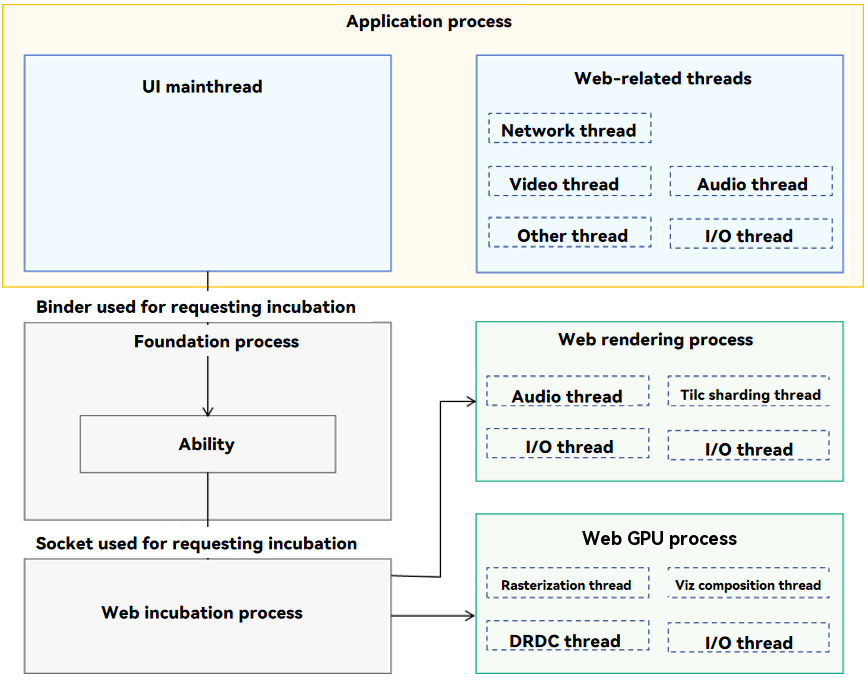
ArkWeb is a multi-process model, which consists of the application process, Web rendering process, Web GPU process, Web incubation process, and Foundation process.

The Web kernel has no limit on the memory size it requests.
Figure 1 ArkWeb process model
-
Web-related threads in the application process (unique for the application)
-
The application process is the main process, which includes the network thread, video thread, audio thread, and I/O thread.
-
It processes external APIs and callbacks of the Web component, and provides functionalities that require interaction with other system services, such as network requests and media services.
-
-
Foundation process (unique in the system)
Receives requests from the application process to spawn processes and manages the binding relationship between the application process and Web rendering process.
-
Web incubation process (unique in the system)
-
Receives requests from the Foundation process and incubates the Web rendering and Web GPU processes.
-
Performs post-incubation processing such as sandbox privilege reduction and preloading of dynamic link libraries to improve performance.
-
-
Web rendering process (shared or independent processes can be specified for multiple Web instances)
-
Runs the Web rendering process engine, which implements HTML parsing, typesetting, drawing, and rendering.
-
Runs the ArkWeb execution engine, which executes JavaScript and Web Assembly.
-
Provides APIs for applications to choose whether to share rendering processes among multiple Web instances, meeting requirements on security, stability, and memory usage in different scenarios.
-
Default policy: Share rendering processes on mobile devices to save memory, and use independent rendering processes on 2-in-1 devices to improve security and stability.
-
-
Web GPU process (unique for an application)
Responsible for interaction with GPU and RenderService, such as rasterization and composition for display. Improves the stability and security of the application process.
-
You can use setRenderProcessMode to set the rendering process mode to single-process or multi-process.
Mobile devices use single-process rendering by default, while 2-in-1 devices use multi-process rendering by default. You can call getRenderProcessMode to query the current render subprocess mode, where the enumeration value 0 indicates single-process mode and the enumeration value 1 indicates multi-process mode. If the value passed to setRenderProcessMode is not within the RenderProcessMode enumeration range, the system automatically uses multi-process rendering mode as the default setting.
import { webview } from '@kit.ArkWeb'; import { BusinessError } from '@kit.BasicServicesKit'; @Entry @Component struct WebComponent { controller: webview.WebviewController = new webview.WebviewController(); build() { Column() { Button('getRenderProcessMode') .onClick(() => { let mode = webview.WebviewController.getRenderProcessMode(); console.info('getRenderProcessMode: ' + mode); }) Button('setRenderProcessMode') .onClick(() => { try { webview.WebviewController.setRenderProcessMode(webview.RenderProcessMode.MULTIPLE); } catch (error) { console.error(`ErrorCode: ${(error as BusinessError).code}, Message: ${(error as BusinessError).message}`); } }) Web({ src: 'www.example.com', controller: this.controller }) } } } -
You can use terminateRenderProcess to stop the rendering process. If a rendering process is not started or has been destroyed, this operation does not have any impact. However, destroying a rendering process affects all other instances associated with it.
import { webview } from '@kit.ArkWeb'; @Entry @Component struct WebComponent { controller: webview.WebviewController = new webview.WebviewController(); build() { Column() { Button('terminateRenderProcess') .onClick(() => { let result = this.controller.terminateRenderProcess(); console.info('terminateRenderProcess result: ' + result); }) Web({ src: 'www.example.com', controller: this.controller }) } } } -
You can use onRenderExited to listen for the exit event of the rendering process to obtain the specific exit cause (such as OOM, crash, or normal exit). Multiple Web components may share the same rendering process. Therefore, each time the rendering process exits, each affected Web component triggers a corresponding callback.
import { webview } from '@kit.ArkWeb'; @Entry @Component struct WebComponent { controller: webview.WebviewController = new webview.WebviewController(); build() { Column() { Web({ src: 'chrome://crash/', controller: this.controller }) .onRenderExited((event) => { if (event) { console.info('reason:' + event.renderExitReason); } }) } } } -
You can use onRenderProcessNotResponding and onRenderProcessResponding to listen for the non-response status of the rendering process.
When a Web component cannot process an input event or fails to navigate to a new URL within the expected time, the system determines that the web page process does not respond and triggers the onRenderProcessNotResponding callback. When a web page process does not respond for a long time, this callback may be triggered repeatedly until the process is restored to the normal running state. In this case, the onRenderProcessResponding callback is triggered.
import { webview } from '@kit.ArkWeb';

@Entry
@Component
struct WebComponent {
  controller: webview.WebviewController = new webview.WebviewController();

  build() {
    Column() {
      Web({ src: 'www.example.com', controller: this.controller })
        .onRenderProcessNotResponding((data) => {
          console.info('onRenderProcessNotResponding: [jsStack]= ' + data.jsStack +
            ', [process]=' + data.pid + ', [reason]=' + data.reason);
        })
    }
  }
}
import { webview } from '@kit.ArkWeb'; @Entry @Component struct WebComponent { controller: webview.WebviewController = new webview.WebviewController(); build() { Column() { Web({ src: 'www.example.com', controller: this.controller }) .onRenderProcessResponding(() => { console.info('onRenderProcessResponding again'); }) } } } -
Parameters of the Web component cover the use of the multi-process model. sharedRenderProcessToken identifies the token of a shared rendering process specified by the current Web component. In multi-rendering process mode, Web components with the same token preferentially attempt to reuse the rendering process bound to the token. The token and the rendering process are bound in the initialization phase of the rendering process. Once a rendering process is no longer associated with any Web component, its binding to the token is removed.
import { webview } from '@kit.ArkWeb';

@Entry
@Component
struct WebComponent {
  controller1: webview.WebviewController = new webview.WebviewController();
  controller2: webview.WebviewController = new webview.WebviewController();

  build() {
    Column() {
      Web({ src: 'www.example.com', controller: this.controller1, sharedRenderProcessToken: '111' })
      Web({ src: 'www.w3.org', controller: this.controller2, sharedRenderProcessToken: '111' })
    }
  }
}