Service Process
-
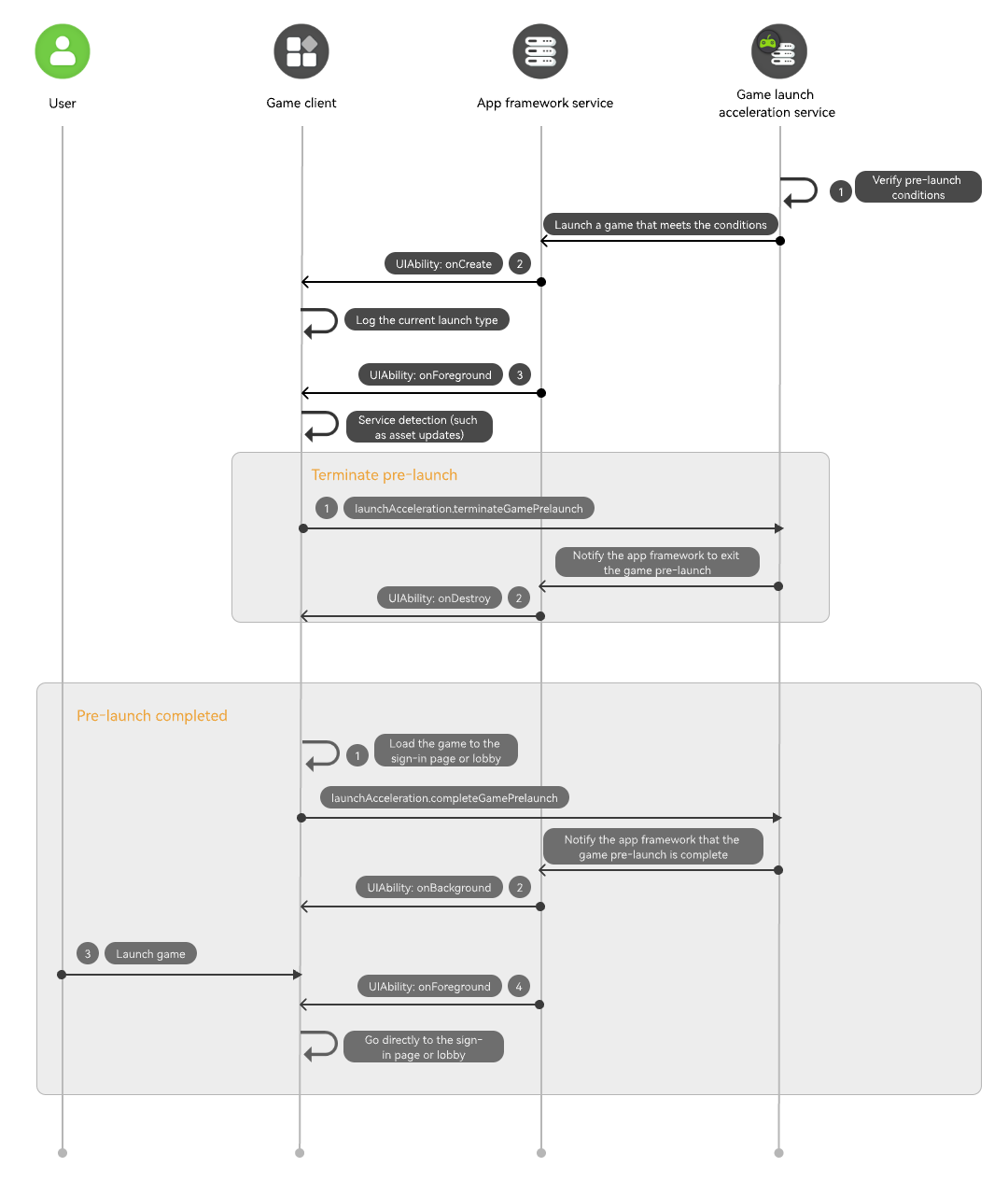
The game launch acceleration service pre-loads the game based on the user's usage habits when the system resources are sufficient.
-
In the onCreate lifecycle callback of the UIAbility, want.parameters carries the launch parameters. If the value of ohos.params.gamePrelaunch is true, the current UIAbility is launched by the game pre-launch. In this case, you need to record the launch reason for the system to determine whether the game has been launched.
-
The game then enters the onForeground lifecycle of the UIAbility. At this point, the game engine starts running. The game launch completion status and service detection during the launch process are usually handled by the engine. The game can proactively notify the game launch acceleration service of the execution result of the current pre-launch process based on different running states. When the pre-launch is completed normally, a completion notification is triggered. When an interruption is detected (for example, due to asset updates), a termination notification is triggered.
Pre-launch Terminated
-
You need to call the terminateGamePrelaunch API to notify the game launch acceleration service to exit the current game pre-launch. After receiving the message, the game launch acceleration service notifies the app framework service.
-
After the system app framework receives the notification of terminating game pre-launch, the UIAbility of the current game enters the onDestroy lifecycle.
Pre-launch Completed
-
The game continues to run, and the engine starts self-rendering and displays the sign-in page or hall screen. If the current operation is game pre-launch, you need to call the completeGamePrelaunch API to notify the game launch acceleration service that the game has been launched.
-
After the system app framework receives the notification of game pre-launch completed, the UIAbility of the current game enters the onBackground lifecycle.
-
A user launches the game.
-
The UIAbility of the game directly enters the onForeground state and displays the screen when the game pre-launch is completed.
API Description
For details about the APIs, see API Reference.
| API | Description |
|---|---|
| completeGamePrelaunch(context: common.UIAbilityContext): Promise<void> | Notifies the system that the pre-launch of the current game is complete. |
| terminateGamePrelaunch(context: common.UIAbilityContext): Promise<void> | Instructs the system to exit the current game pre-launch process. |
Development Procedure
-
Obtain the launch reason of the UIAbility.
You can obtain the launch reason from want.parameters in the onCreate lifecycle callback of the UIAbility. If the value of ohos.params.gamePrelaunch is true, the current UIAbility is launched due to game pre-launch.
onCreate(want: Want, _launchParam: AbilityConstant.LaunchParam): void { // ... // Check whether a game is pre-launched. The value of **ohos.params.gamePrelaunch** in **want** may be **undefined**. Set the default value to **false**. let isPrelaunchStart = (want.parameters?.["ohos.params.gamePrelaunch"] as boolean) ?? false; console.info(`EntryAbility onCreate, isPrelaunchStart:${isPrelaunchStart}`); // ... // ... } -
Notify the game launch acceleration service that the pre-launch of the current game is complete.
async completeGamePrelaunch() { if (!isPrelaunchStart) { // If the current launch is not a pre-launch, no processing is performed after the game is launched. return; } if (canIUse('SystemCapability.GraphicsGame.LaunchAcceleration')) { try { // Notify the game launch acceleration service that the pre-launch is complete. await launchAcceleration.completeGamePrelaunch(this.context); console.info('completeGamePrelaunch success'); } catch (err) { console.error(`completeGamePrelaunch failed, code is ${err.code}, message is ${err.message}`); } } } -
Notify the game launch acceleration service to cancel the current game pre-launch.
async terminateGamePrelaunch() {
  if (!isPrelaunchStart) {
    // If the current launch is not a pre-launch, no processing is performed after the game is launched.
    return;
  }
  if (canIUse('SystemCapability.GraphicsGame.LaunchAcceleration')) {
    try {
      // Notify the game launch acceleration service to terminate the current pre-launch.
      await launchAcceleration.terminateGamePrelaunch(this.context);
      console.info('terminateGamePrelaunch success');
    } catch (err) {
      console.error(`terminateGamePrelaunch failed, code is ${err.code}, message is ${err.message}`);
    }
  }
}