Function Overview
HarmonyOS provides the Password Vault feature, which delivers a seamless password-free login experience for users.
This feature allows easy generation, secure saving, and automatic filling of strong passwords with just a few taps during the registration or login in an application or browser. Users no longer need to remember or manually enter complex passwords, as the system offers centralized and robust password management.
Identity authentication is required for users to access their passwords or utilize the password autofill feature. The passwords are accessible only after the users enter correct passwords or complete fingerprint or facial authentication.
Scenario
The Password Vault feature can be used in the following scenarios:
Login: If user account data is already saved in the password vault, the password autofill service is automatically provided. When manually entering the username and password during login, the user will be asked whether to save the entered password to the password vault.
Registration: Strong password recommendation is automatically provided when a user sets a password during registration. The user can determine whether to use the recommended password. When successfully registering an account, the user is asked whether to save the password in password vault.
Account viewing: Users can view details of all their saved accounts on the device.
The passwords generated during registration and login can be viewed on the Password Vault screen as follows: Choose Settings > Privacy & security > Password Vault and view all saved passwords after authenticating via the lock screen password or biometrics (fingerprint/facial recognition)
Architecture
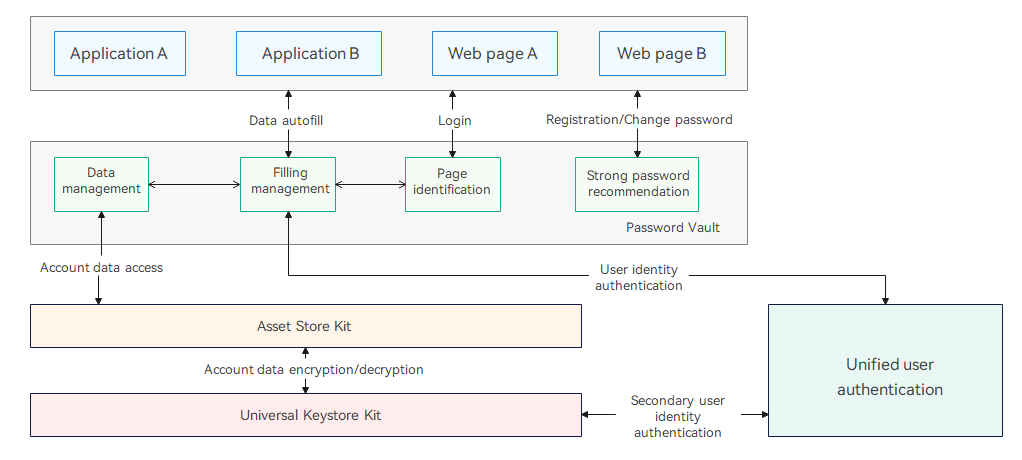
The Password Vault feature leverages Asset Store Kit to save and protect user accounts and passwords, as shown in the following figure.
The system identifies the scenario (such as login, registration, or password change) based on user operations, and provides password-free login services accordingly.
The password autofill feature is implemented with user identity authentication. If a user specifies a particular account password for autofill, user identity authentication (lock screen password, fingerprint, or facial authentication) is performed to ensure that the right person accesses the right data.
Figure 1 Password Vault architecture