The visual effect attributes set filter effects (such as blur and pixel stretch) and non-filter effects (such as point light) for components.

-
The initial APIs of this module are supported since API version 12. Updates will be marked with a superscript to indicate their earliest API version.
-
The APIs of this module can be used only in the stage model.
visualEffect
visualEffect(effect: VisualEffect): T
Sets a visual effect that is not a filter effect.

Atomic service API: This API can be used in atomic services since API version 12.
System capability: SystemCapability.ArkUI.ArkUI.Full
Parameters
| Name | Type | Mandatory | Description |
|---|---|---|---|
| effect | VisualEffect | Yes | Visual effect. |
Return value
| Type | Description |
|---|---|
| T | Current component. |
backgroundFilter
backgroundFilter(filter: Filter): T
Sets the visual effect of the background filter.

Atomic service API: This API can be used in atomic services since API version 12.
System capability: SystemCapability.ArkUI.ArkUI.Full
Parameters
| Name | Type | Mandatory | Description |
|---|---|---|---|
| filter | Filter | Yes | Visual effect of the background filter. |
Return value
| Type | Description |
|---|---|
| T | Current component. |
foregroundFilter
foregroundFilter(filter: Filter): T
Sets the visual effect of the foreground (content) filter.

Atomic service API: This API can be used in atomic services since API version 12.
System capability: SystemCapability.ArkUI.ArkUI.Full
Parameters
| Name | Type | Mandatory | Description |
|---|---|---|---|
| filter | Filter | Yes | Visual effect of the foreground (content) filter. |
Return value
| Type | Description |
|---|---|
| T | Current component. |
compositingFilter
compositingFilter(filter: Filter): T
Sets the visual effect of the compositing filter.

Atomic service API: This API can be used in atomic services since API version 12.
System capability: SystemCapability.ArkUI.ArkUI.Full
Parameters
| Name | Type | Mandatory | Description |
|---|---|---|---|
| filter | Filter | Yes | Visual effect of the compositing filter. |
Return value
| Type | Description |
|---|---|
| T | Current component. |
materialFilter23+
materialFilter(filter: Filter | undefined): T
Sets the system material filter effect. The system material filter is rendered prior to backgroundFilter, so it occupies a layer beneath backgroundFilter.

Atomic service API: This API can be used in atomic services since API version 23.
System capability: SystemCapability.ArkUI.ArkUI.Full
Parameters
| Name | Type | Mandatory | Description |
|---|---|---|---|
| filter | Filter | undefined | Yes | Visual effect of the system material filter. When this parameter is set to undefined, no system material filter is applied. |
Return value
| Type | Description |
|---|---|
| T | Current component. |
Filter
type Filter = import('../api/@ohos.graphics.uiEffect').default.Filter
Represents a filter object.
Atomic service API: This API can be used in atomic services since API version 12.
System capability: SystemCapability.ArkUI.ArkUI.Full
| Type | Description |
|---|---|
| import('../api/@ohos.graphics.uiEffect').default.Filter | Used to apply the specified visual effect to the target component. |
VisualEffect
type VisualEffect = import('../api/@ohos.graphics.uiEffect').default.VisualEffect
Represents a visual effect configuration object.
Atomic service API: This API can be used in atomic services since API version 12.
System capability: SystemCapability.ArkUI.ArkUI.Full
| Type | Description |
|---|---|
| import('../api/@ohos.graphics.uiEffect').default.VisualEffect | Used to apply the specified visual effect to the target component. |
Example
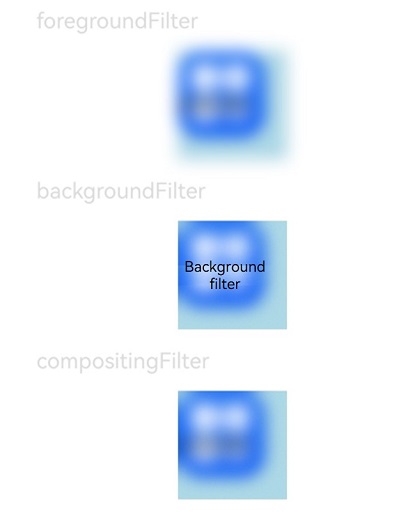
This example demonstrates how to apply blur effects using foregroundFilter, backgroundFilter, and compositingFilter.
// xxx.ets
import { uiEffect } from '@kit.ArkGraphics2D';

@Entry
@Component
struct FilterEffectExample {
  @State filterTest1: uiEffect.Filter = uiEffect.createFilter().blur(10);
  @State filterTest2: uiEffect.Filter = uiEffect.createFilter().blur(10);
  @State filterTest3: uiEffect.Filter = uiEffect.createFilter().blur(10);

  build() {
    Column({ space: 15 }) {

      Text('foregroundFilter').fontSize(20).width('75%').fontColor('#DCDCDC')
      Text('Foreground filter')
        .width(100)
        .height(100)
        .backgroundColor('#ADD8E6')
        // Replace $r("app.media.app_icon") with the resource file you use.
        .backgroundImage($r("app.media.app_icon"))
        .backgroundImageSize({ width: 80, height: 80 })
        .foregroundFilter(this.filterTest1) // Set the blur effect using foregroundFilter.

      Text('backgroundFilter').fontSize(20).width('75%').fontColor('#DCDCDC')
      Text('Background filter')
        .width(100)
        .height(100)
        .backgroundColor('#ADD8E6')
        // Replace $r("app.media.app_icon") with the resource file you use.
        .backgroundImage($r("app.media.app_icon"))
        .backgroundImageSize({ width: 80, height: 80 })
        .backgroundFilter(this.filterTest2) // Set the blur effect using backgroundFilter.

      Text('compositingFilter').fontSize(20).width('75%').fontColor('#DCDCDC')
      Text('Compositing filter')
        .width(100)
        .height(100)
        .backgroundColor('#ADD8E6')
        // Replace $r("app.media.app_icon") with the resource file you use.
        .backgroundImage($r("app.media.app_icon"))
        .backgroundImageSize({ width: 80, height: 80 })
        .compositingFilter(this.filterTest3) // Set the blur effect using compositingFilter.
    }
    .height('100%')
    .width('100%')
  }
}