The Web component can be attached to and detached from the component trees in different windows. With this capability, you can create Web components in advance to optimize performance. For example, when a tab page is implemented with a Web component, pre-creation of the Web component allows for ahead-of-time rendering, so that the page appears instantly when accessed.
The offline Web component is created based on the custom placeholder component NodeContainer. The basic principle is as follows: Web components that are created using commands are not attached to the component tree immediately after being created. This means they are not displayed to users immediately, remaining in the Hidden or Inactive state until explicitly attached. You can dynamically attach these components as required to implement more flexible usage.
Offline Web components can be used to pre-start the rendering process and pre-render web pages.
-
Pre-start rendering process: By creating an empty Web component prior to the user's access of the web page, the rendering process is initiated in advance, preparing for subsequent use of the page.
-
Pre-render web pages: In the web page startup or redirection scenario, creating Web components in the background in advance allows for ahead-of-time data loading and rendering. In this way, web pages can be instantly displayed when being redirected to.
Overall Architecture
As shown in the following figure, to create an offline Web component, you need to define a custom stateless NodeContainer to encapsulate the Web component, and bind the component to the corresponding NodeController. To display a Web component that has been pre-rendered in the background, use NodeController to attach the component to NodeContainer of ViewTree.
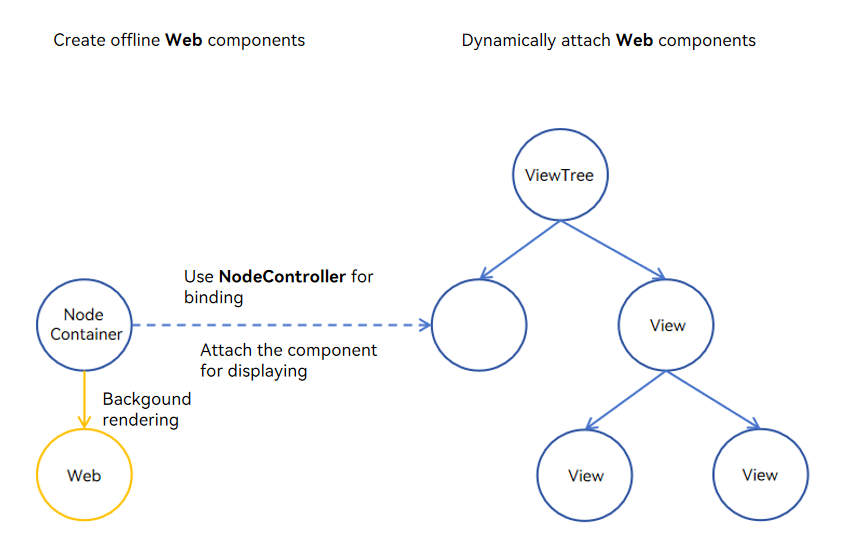
Creating an Offline Web Component
This example shows how to create an offline Web component in advance and attach it to the component tree for display when necessary. Such an offline Web component can be used in pre-starting the rendering process and pre-rendering the web page to optimize the performance.

When creating Web components, be mindful that each component consumes a significant amount of memory (about 200 MB) and computing resources. To optimize resource usage, limit the number of offline Web components created at a time.
import { createNWeb } from "../pages/Common";
import { AbilityConstant, UIAbility, Want } from '@kit.AbilityKit';
import { window } from '@kit.ArkUI';
// ...
  onWindowStageCreate(windowStage: window.WindowStage): void {
    windowStage.loadContent('pages/Index', (err, data) => {
      if (err && err.code) {
        console.info('loadContent failed. errorCode: ' + err.code);
        return;
      }
      let windowClass: window.Window = windowStage.getMainWindowSync(); // Obtain the main window of the application.
      if (!windowClass) {
        console.info('windowClass is null');
        return;
      }
      // Create a dynamic Web component (UIContext is required). It can be created at any time after loadContent.
      createNWeb('www.example.com', windowClass.getUIContext());
    });
  }
// Common.ets
import { UIContext, NodeController, BuilderNode, Size, FrameNode } from '@kit.ArkUI';
import { webview } from '@kit.ArkWeb';
// @Builder contains the specific information of the dynamic component.
// Data is an input parameter of encapsulation class.
class Data {
public url: ResourceStr = 'www.example.com';
public controller: WebviewController = new webview.WebviewController();
}
@Builder
function webBuilder(data: Data) {
Column() {
Web({ src: data.url, controller: data.controller })
.width('100%')
.height('100%')
}
}
let wrap = wrapBuilder<Data[]>(webBuilder);
// Used to control and report the behavior of the node in NodeContainer. This function must be used together with NodeContainer.
export class MyNodeController extends NodeController {
private rootNode: BuilderNode<Data[]> | null = null;
// Method that must be overridden to build the node tree and return the node to be mounted in the corresponding NodeContainer.
// Call it when the NodeContainer is created or call rebuild() to refresh.
makeNode(uiContext: UIContext): FrameNode | null {
console.info('uiContext is undefined : ' + (uiContext === undefined));
if (this.rootNode !== null) {
// Return the FrameNode.
return this.rootNode.getFrameNode();
}
// Return null to detach the dynamic component from the bound node.
return null;
}
// Called when the layout size changes.
aboutToResize(size: Size) {
console.info('aboutToResize width : ' + size.width + ' height : ' + size.height);
}
// Called when the NodeContainer bound to the controller is about to appear.
aboutToAppear() {
console.info('aboutToAppear');
}
// Called when the NodeContainer bound to the controller is about to disappear.
aboutToDisappear() {
console.info('aboutToDisappear');
}
// This function is a custom function and can be used as an initialization function.
// Initialize BuilderNode through UIContext, and then initialize the content in @Builder through the build API in BuilderNode.
initWeb(url: ResourceStr, uiContext: UIContext, control: WebviewController) {
if (this.rootNode !== null) {
return;
}
// Create a node, during which the UIContext should be passed.
this.rootNode = new BuilderNode(uiContext);
// Create a dynamic Web component.
this.rootNode.build(wrap, { url: url, controller: control });
}
}
// Create a Map to save the required NodeController.
let nodeMap: Map<ResourceStr, MyNodeController | undefined> = new Map();
// Create a Map to store the required WebviewController.
let controllerMap: Map<ResourceStr, WebviewController | undefined> = new Map();
// UIContext is required for initialization and needs to be obtained from the ability.
export const createNWeb = (url: ResourceStr, uiContext: UIContext) => {
// Create a NodeController instance.
let baseNode = new MyNodeController();
let controller = new webview.WebviewController();
// Initialize the custom Web component.
baseNode.initWeb(url, uiContext, controller);
controllerMap.set(url, controller);
nodeMap.set(url, baseNode);
}
// Customize the API for obtaining the NodeController.
export const getNWeb = (url: ResourceStr): MyNodeController | undefined => {
return nodeMap.get(url);
} import { getNWeb } from './Common'
@Entry
@Component
struct Index {
build() {
Row() {
Column() {
// NodeContainer is used to bind to the NodeController. A rebuild call triggers makeNode.
// The Page page is bound to the NodeController through the NodeContainer API to display the dynamic component.
NodeContainer(getNWeb('www.example.com'))
.height('90%')
.width('100%')
}
.width('100%')
}
.height('100%')
}
} Pre-starting the Web Rendering Process
To save time required for starting the web rendering process when the Web component is loaded, you can create a Web component in the background in advance.

The optimization effect is obvious only when the single-rendering-process mode is used, that is, one web rendering process is globally shared. The web rendering process is terminated when all Web components are destroyed. Therefore, you are advised to keep at least one Web component active.
Creating additional Web components incurs memory overhead.
In the following example, a Web component is pre-created during onWindowStageCreate phase to load a blank page. In this way, the rendering process is started in advance. When the index is redirected to index2, the time required for starting and initializing the rendering process of the Web component is reduced.
import { AbilityConstant, UIAbility, Want } from '@kit.AbilityKit';
import { hilog } from '@kit.PerformanceAnalysisKit';
import { window } from '@kit.ArkUI';
import { createNWeb } from '../pages/Common';
// ...
  onWindowStageCreate(windowStage: window.WindowStage): void {
    windowStage.loadContent('pages/Index', (err, data) => {
      if (err && err.code) {
        console.info('loadContent failed. errorCode: ' + err.code);
        return;
      }
      let windowClass: window.Window = windowStage.getMainWindowSync(); // Obtain the main window of the application.
      if (!windowClass) {
        console.info('windowClass is null');
        return;
      }
      // Create an empty Web dynamic component (UIContext must be passed in). It can be created at any time after loadContent.
      createNWeb('about:blank', windowClass.getUIContext());
    });
  }
// Common.ets
import { UIContext, NodeController, BuilderNode, Size, FrameNode } from '@kit.ArkUI';
import { webview } from '@kit.ArkWeb';
// @Builder contains the specific information of the dynamic component.
// Data is an input parameter of encapsulation class.
class Data {
public url: ResourceStr = 'www.example.com';
public controller: WebviewController = new webview.WebviewController();
}
@Builder
function webBuilder(data: Data) {
Column() {
Web({ src: data.url, controller: data.controller })
.width('100%')
.height('100%')
}
}
let wrap = wrapBuilder<Data[]>(webBuilder);
// Used to control and report the behavior of the node in NodeContainer. This function must be used together with NodeContainer.
export class MyNodeController extends NodeController {
private rootNode: BuilderNode<Data[]> | null = null;
// A method that must be overridden, used to build the node tree and return the node to be mounted in the corresponding NodeContainer.
// Call it when the NodeContainer is created or call rebuild() to refresh.
makeNode(uiContext: UIContext): FrameNode | null {
console.info('uiContext is undefined : ' + (uiContext === undefined));
if (this.rootNode !== null) {
// Return the FrameNode.
return this.rootNode.getFrameNode();
}
// Return null to detach the dynamic component from the bound node.
return null;
}
// Called when the layout size changes.
aboutToResize(size: Size) {
console.info('aboutToResize width : ' + size.width + ' height : ' + size.height);
}
// Called when the NodeContainer bound to the controller is about to appear.
aboutToAppear() {
console.info('aboutToAppear');
}
// Called when the NodeContainer bound to the controller is about to disappear.
aboutToDisappear() {
console.info('aboutToDisappear');
}
// This function is a custom function and can be used as an initialization function.
// Initialize BuilderNode through UIContext, and then initialize the content in @Builder through the build API in BuilderNode.
initWeb(url: ResourceStr, uiContext: UIContext, control: WebviewController) {
if (this.rootNode !== null) {
return;
}
// Create a node, during which the UIContext should be passed.
this.rootNode = new BuilderNode(uiContext);
// Create a dynamic Web component.
this.rootNode.build(wrap, { url: url, controller: control });
}
}
// Create a Map to save the required NodeController.
let nodeMap: Map<ResourceStr, MyNodeController | undefined> = new Map();
// Create a Map to store the required WebviewController.
let controllerMap: Map<ResourceStr, WebviewController | undefined> = new Map();
// UIContext is required for initialization and needs to be obtained from the ability.
export const createNWeb = (url: ResourceStr, uiContext: UIContext) => {
// Create a NodeController instance.
let baseNode = new MyNodeController();
let controller = new webview.WebviewController();
// Initialize the custom Web component.
baseNode.initWeb(url, uiContext, controller);
controllerMap.set(url, controller);
nodeMap.set(url, baseNode);
}
// Customize the API for obtaining the NodeController.
export const getNWeb = (url: ResourceStr): MyNodeController | undefined => {
return nodeMap.get(url);
} // index.ets
import { webview } from '@kit.ArkWeb';
import { hilog } from '@kit.PerformanceAnalysisKit';
import { BusinessError } from '@kit.BasicServicesKit';
@Entry
@Component
struct Index1 {
webviewController: webview.WebviewController = new webview.WebviewController();
build() {
Column() {
Button('Jump to web page').onClick(()=> {
this.getUIContext().getRouter().pushUrl({ url: 'pages/Index2' }).catch((error: BusinessError) => {
hilog.info(0x0000, 'testTag', 'pushUrl error, %{public}s', error);
})
}).width('100%').height('100%')
}
}
} import { webview } from '@kit.ArkWeb';
@Entry
@Component
struct Index2 {
webviewController: webview.WebviewController = new webview.WebviewController();
build() {
Row() {
Column() {
Web({src: $r('app.string.ExampleUrl'), controller: this.webviewController})
.width('100%')
.height('100%')
}
.width('100%')
}
.height('100%')
}
} Pre-rendering Web Pages
Pre-rendering optimization is particularly beneficial for scenarios involving web page startup and redirection. For example, you can apply it in the situation where the user accesses the home page and is then redirected to a different page. For best possible effects, use this solution on pages that have a high cache hit ratio, meaning they are frequently revisited by users.
To pre-render a web page, create an offline Web component in advance and activate it. The activation enables the rendering engine to initiate background rendering.

- For a web page to be pre-rendered successfully, identify the resources to be loaded beforehand.
- In this solution, the invisible Web component in the background is activated. Due to this activation, avoid pre-rendering pages that automatically play audio or video, as this could inadvertently lead to unintended media playback. Check and manage the behavior of the page on the application side.
- The pre-rendered web page is continuously rendered in the background. To prevent overheating and power consumption, you are advised to stop the rendering process immediately after the pre-rendering is complete. The following example shows how to use onFirstMeaningfulPaint to determine the time for stopping pre-rendering. This API can be used in HTTP and HTTPS online web pages.
import { createNWeb } from "../pages/Common";
import { AbilityConstant, UIAbility, Want } from '@kit.AbilityKit';
import { window } from '@kit.ArkUI';
// ...
  onWindowStageCreate(windowStage: window.WindowStage): void {
    windowStage.loadContent('pages/Index', (err, data) => {
      if (err && err.code) {
        console.info('loadContent failed. errorCode: ' + err.code);
        return;
      }
      let windowClass: window.Window = windowStage.getMainWindowSync(); // Obtain the main window of the application.
      if (!windowClass) {
        console.info('windowClass is null');
        return;
      }
      // Create a dynamic Web component (UIContext is required). It can be created at any time after loadContent.
      createNWeb('www.example.com', windowClass.getUIContext());
    });
  }
// Common.ets
import { UIContext } from '@kit.ArkUI';
import { webview } from '@kit.ArkWeb';
import { NodeController, BuilderNode, Size, FrameNode } from '@kit.ArkUI';
// @Builder contains the specific information of the dynamic component.
// Data is an input parameter of encapsulation class.
class Data {
public url: string = 'www.example.com';
public controller: WebviewController = new webview.WebviewController();
}
// Use the Boolean variable shouldInactive to stop rendering after the web page is pre-rendered in the background.
let shouldInactive: boolean = true;
@Builder
function webBuilder(data: Data) {
Column() {
Web({ src: data.url, controller: data.controller })
.onPageBegin(() => {
// Call onActive to enable rendering.
data.controller.onActive();
})
.onFirstMeaningfulPaint(() => {
if (!shouldInactive) {
return;
}
// Triggered when the pre-rendering is complete to stop rendering.
data.controller.onInactive();
shouldInactive = false;
})
.width('100%')
.height('100%')
}
}
let wrap = wrapBuilder<Data[]>(webBuilder);
// Used to control and report the behavior of the node in NodeContainer. This function must be used together with NodeContainer.
export class MyNodeController extends NodeController {
private rootNode: BuilderNode<Data[]> | null = null;
// A method that must be overridden to build the node tree and return the node to be mounted in the corresponding NodeContainer.
// Call it when the NodeContainer is created or call rebuild() to refresh.
makeNode(uiContext: UIContext): FrameNode | null {
console.info('uiContext is undefined : ' + (uiContext === undefined));
if (this.rootNode !== null) {
// Return the FrameNode.
return this.rootNode.getFrameNode();
}
// Return null to detach the dynamic component from the bound node.
return null;
}
// Called when the layout size changes.
aboutToResize(size: Size) {
console.info('aboutToResize width : ' + size.width + ' height : ' + size.height);
}
// Called when the NodeContainer bound to the controller is about to appear.
aboutToAppear() {
console.info('aboutToAppear');
// When the page is switched to the foreground, the rendering does not need to be stopped.
shouldInactive = false;
}
// Called when the NodeContainer bound to the controller is about to disappear.
aboutToDisappear() {
console.info('aboutToDisappear');
}
// This function is a custom function and can be used as an initialization function.
// Initialize BuilderNode through UIContext, and then initialize the content in @Builder through the build API in BuilderNode.
initWeb(url: string, uiContext: UIContext, control: WebviewController) {
if (this.rootNode !== null) {
return;
}
// Create a node, during which the UIContext should be passed.
this.rootNode = new BuilderNode(uiContext);
// Create a dynamic Web component.
this.rootNode.build(wrap, { url: url, controller: control });
}
}
// Create a Map to save the required NodeController.
let nodeMap: Map<string, MyNodeController | undefined> = new Map();
// Create a Map to store the required WebviewController.
let controllerMap: Map<string, WebviewController | undefined> = new Map();
// UIContext is required for initialization and needs to be obtained from the ability.
export const createNWeb = (url: string, uiContext: UIContext) => {
// Create a NodeController instance.
let baseNode = new MyNodeController();
let controller = new webview.WebviewController();
// Initialize the custom Web component.
baseNode.initWeb(url, uiContext, controller);
controllerMap.set(url, controller);
nodeMap.set(url, baseNode);
}
// Customize the API for obtaining the NodeController.
export const getNWeb = (url: string): MyNodeController | undefined => {
return nodeMap.get(url);
} import { getNWeb } from './Common'
@Entry
@Component
struct Index {
build() {
Row() {
Column() {
// NodeContainer is used to bind to the NodeController. A rebuild call triggers makeNode.
// The Page page is bound to the NodeController through the NodeContainer API to display the dynamic component.
NodeContainer(getNWeb('www.example.com'))
.height('90%')
.width('100%')
}
.width('100%')
}
.height('100%')
}
} Reusing and Releasing Offline Web Components
By reusing and releasing offline Web components, you can optimize memory usage and reduce the probability that the app is terminated by the system due to excessive memory usage.

- You are advised to use only one Web component in each window.
- You are advised to reuse offline Web components.
- You are advised to release offline Web components that are not required.
[h2]Reusing Offline Web Components
If multiple UI pages of an application all need to display web content, you are advised to reuse offline Web components. This reduces the performance consumption of component creation and destruction and the memory usage of creating multiple Web components.
Reusing methods:
-
When an offline Web component is no longer used, call the loadUrl method of WebviewController to load the about:blank blank page, preparing the offline Web component for reuse by other UI pages.
-
When a new UI page reuses this offline Web component, call the loadUrl method of WebviewController again to load the required web page.
[h2]Releasing Offline Web Components
When an application is switched to the background or no longer needs the offline Web component in a specified period, you are advised to release the component to reduce the memory usage of the application.

- The offline Web component can be released only when it is not bound to the UI page. Otherwise, the NodeContainer component may be blank.
- You can use the onBind and onUnbind callbacks of the NodeController to trace the binding status of the offline Web component.
Code implementation:
// Create a Map to save the required NodeController.
let nodeMap: Map<ResourceStr, MyNodeController | undefined> = new Map();

// Create a global variable for saving uiContext.
let globalUiContext: UIContext | undefined = undefined;

// Create a Set to save the URL information of the released offline component.
let recycledNWebs: Set<ResourceStr> = new Set()

// UIContext is required for initialization and needs to be obtained from the ability.
export const createNWeb = (url: ResourceStr, uiContext: UIContext) => {
  console.info('createNWeb, url = ' + url);
  if (!globalUiContext) {
    globalUiContext = uiContext;
  }
  if (getNWeb(url)) {
    console.info('createNWeb, already exit this node, url:' + url);
    return;
  }

  // Create NodeController.
  let baseNode = new MyNodeController();
  // Initialize the custom Web component.
  baseNode.initWeb(url, uiContext);
  nodeMap.set(url, baseNode);
  recycledNWebs.delete(url);
}

// Customize the API for releasing/reclaiming offline Web components. The API can be used as the function for releasing offline Web components. If the release is successful, true is returned.
// If the offline component is not bound to the NodeContainer, the offline component can be safely released. Otherwise, the node displays a blank screen when not being redrawn.
export const recycleNWeb = (url: ResourceStr, force: boolean = false): boolean => {
  console.info('recycleNWeb, url = ' + url);
  let baseNode = nodeMap.get(url);
  if (!baseNode) {
    console.info('no such node, url = ' + url);
    return false;
  }
  if (!force && baseNode.isBound()) {
    console.info('the node is in bound and not force, can not delete');
    return false;
  }
  baseNode.rootNode?.dispose();
  baseNode.rebuild();
  nodeMap.delete(url);
  recycledNWebs.add(url);
  return true;
}

// Customize the API for releasing all offline Web components.
export const recycleNWebs = (force: boolean = false) => {
  nodeMap.forEach((_node: MyNodeController | undefined, url: ResourceStr) => {
    recycleNWeb(url, force);
  });
}

// Customize the API for resuming the released offline Web components.
export const restoreNWebs = (uiContext: UIContext | undefined = undefined) => {
  if (!uiContext) {
    uiContext = globalUiContext;
  }
  for (let url of recycledNWebs) {
    if (uiContext) {
      createNWeb(url, uiContext);
    }
  }
  recycledNWebs.clear()
}
[h2]Example of Reusing and Releasing Offline Web Components
Functionality Description
This example demonstrates how to reuse and release offline Web components and how to perform pre-rendering. Note that multiple offline Web components are used in this example for demonstrating related functionalities and the usage of offline Web components. In principle, you are advised to use only one Web component for each window. The functionalities are as follows:
-
Effect comparison between pre-rendering and non-pre-rendering offline Web components.
-
Steps for releasing offline Web components when the application is in the background.
-
Steps for reusing offline Web components.
The example demonstrates how to release the offline Web component when the app moves to the background and restore it when the app switches to the foreground. The offline Web component is released and restored in the onBackground and onForeground callbacks of UIAbility, respectively.
onForeground(): void {
  // Ability has brought to foreground
  hilog.info(0x0000, 'testTag', '%{public}s', 'Ability onForeground');
  restoreNWebs()
}

onBackground(): void {
  // Ability has back to background
  hilog.info(0x0000, 'testTag', '%{public}s', 'Ability onBackground');
  recycleNWebs()
}
UI Page Functionalities
The following four UI pages are used as examples: Index, Home, Page1, and Page2. The core functionalities of each UI page are as follows:
-
The index page serves as the entry point for demonstrating page redirection, as well as the reclaiming, resuming, and statistics display of offline Web components.
-
Button for redirecting to the home page.
-
Button for reclaiming offline Web components (only offline Web components that are not bound can be reclaimed).
-
Button for forcibly reclaiming offline Web components (all offline Web components, including bound and unbound components, will be forcibly reclaimed, which will cause the NodeContainer to display a blank screen).
-
Button for resuming offline Web components.
-
Displaying the number, status, and URLs of offline Web components.
-
-
The home page acts as the UI homepage, demonstrating the creation of offline Web components as well as the implementation methods and timing of pre-rendering.
-
Three offline components are created when the home page is created. One of them loads the specified web page and performs pre-rendering, and the other two are blank offline Web components.
-
The home page provides navigation buttons for redirecting to Page1 or Page2.
-
-
Page1 displays two web pages at the same time. Each page uses one offline Web component to load and display the content of the same URL. This page is used to demonstrate the effect comparison between pre-rendering and non-pre-rendering, and how to reuse offline components.
-
The first offline Web component performs pre-rendering and can directly display the page content, which is faster than the second offline Web component.
-
The second offline Web component reuses the idle offline Web component and dynamically loads the URL in the aboutToAppear lifecycle of the UI page.
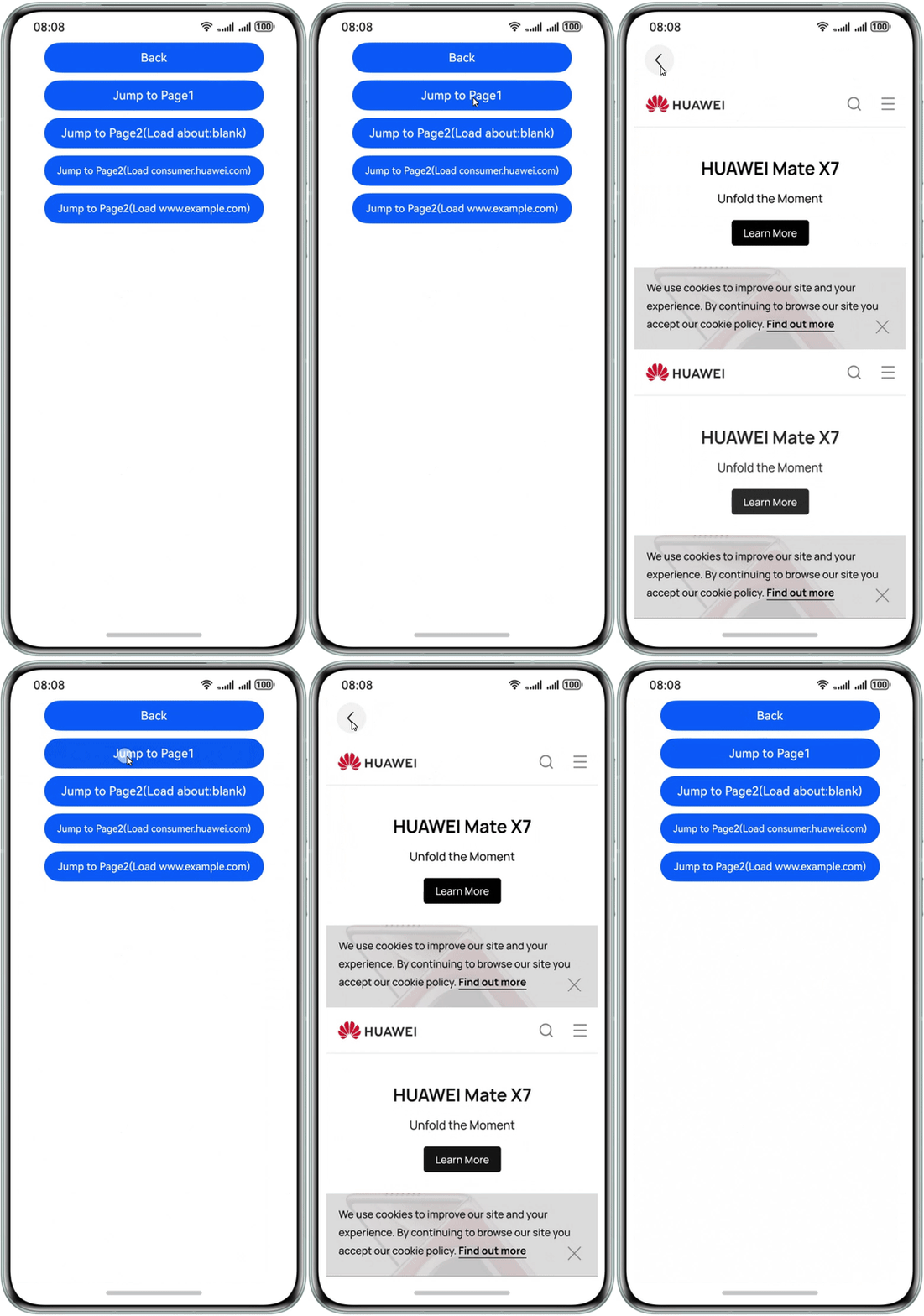
-
-
Page2 displays a single web page and loads the specified URL by reusing the idle offline Web component.
-
Page2 can load a specified URL by passing parameters and allows users to redirect to another URL after the loading.
-
In the onWillHide callback of NavDestination, Page2 will make the current Web component load a blank page and disassociate itself from the current UI, so as to prepare for subsequent reuse.
-
Page2 supports nesting. Even if there are multiple layers of UI pages, the number of Web components does not increase because offline Web components are reused.
-
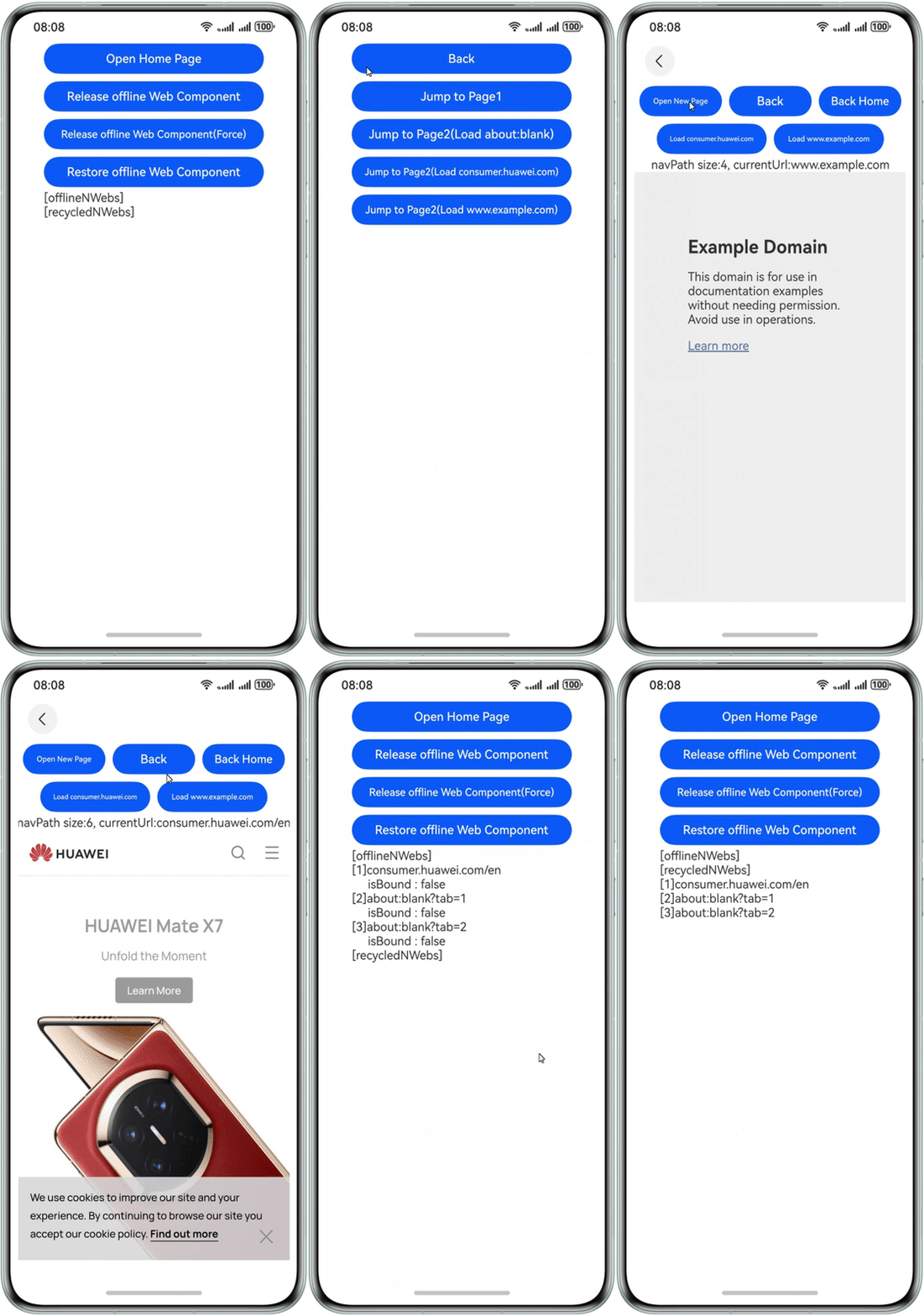
Sample Code
Common Troubleshooting Procedure
- Check the network permission of the application.
Check whether the network permission has been added to module.json5. For details, see Declaring Permissions in the Configuration File.
"requestPermissions":[
  {
    "name" : "ohos.permission.INTERNET"
  }
], - Check the logic for binding NodeContainer to the node.
Check whether the node has been added to the component tree. For diagnostics purposes, you are advised to add a Text component above the existing Web component, as shown in the following example. If the Text component is not displayed on the white screen, there is a potential issue with the binding between the NodeContainer and the node.
@Builder
function WebBuilder(data:Data) {
  Column() {
    Text('test')
    Web({ src: data.url, controller: data.controller })
      .width("100%")
      .height("100%")
  }
} - Check the visibility of the Web component.
If the node has been added to the tree, examine the WebPattern::OnVisibleAreaChange log to check whether the Web component is visible. Invisible Web components may cause a white screen.