Text sharing allows users to share a piece of text to the target device or app.
When receiving the text, the target device will save the text in the file manager as a .txt file.
When receiving the text, the target app can conveniently process the text. For example, when a piece of text is shared with Notes, a new note will be generated for the text.
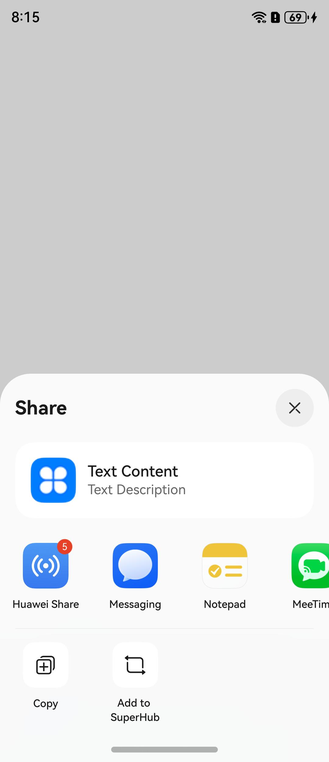
Development Procedure
Import required modules.
import { systemShare } from '@kit.ShareKit';
import { uniformTypeDescriptor as utd } from '@kit.ArkData';
import { common } from '@kit.AbilityKit';
import { BusinessError } from '@kit.BasicServicesKit';
Construct the data to be shared.
// Construct ShareData. You need to configure a valid data record.
let shareData: systemShare.SharedData = new systemShare.SharedData({
  utd: utd.UniformDataType.TEXT,
  content: 'This is a piece of text.',
  title: 'Text content', // If this parameter is not passed, the value of content will be displayed.
  description: 'Text description',
  // thumbnail: new Uint8Array() // You are advised to pass a suitable thumbnail. If no thumbnail is passed, the default text icon will be displayed.
});
Add a record.
shareData.addRecord({
  utd: utd.UniformDataType.TEXT,
  content: 'This is a piece of text.',
  title: 'Text content', // If this parameter is not passed, the value of content will be displayed.
  description: 'Text description'
});
Start the sharing panel.
// Display the sharing panel.
let controller: systemShare.ShareController = new systemShare.ShareController(shareData);
let uiContext: UIContext = this.getUIContext();
let context: common.UIAbilityContext = uiContext.getHostContext() as common.UIAbilityContext;
controller.show(context, {
  selectionMode: systemShare.SelectionMode.SINGLE,
  previewMode: systemShare.SharePreviewMode.DETAIL
}).then(() => {
  console.info('ShareController show success.');
}).catch((error: BusinessError) => {
  console.error(`ShareController show error. code: ${error.code}, message: ${error.message}`);
});
For details about the complete sample code, please refer to Sample Code - Sharing Text.