When users need to access another atomic service within an application, it is recommended to launch it in embedded mode to enhance user experience.

Under beta testing, you must establish a contract with the embedded party before running an atomic service in an application/atomic service in embedded mode. To require the permission, send email to atomicservice@huawei.com.
Embedding Effect | Scenario | Component | Constraints |
|---|---|---|---|
Full-screen embedding | Scenario where users need to fully concentrate on the atomic service, with the host application's functionalities temporarily scaled back to support this focused experience. |
| |
Half-screen embedding | Scenario where users need to view some information on the current page while utilizing the functionalities of the provider atomic service. |
Full-Screen Embedding | Provider | ||||
ArkUI-developed | HTML5-developed | ASCF-developed | ASCF- and HTML5-developed | ||
Host Application | ArkUI-developed | √ | √ | √ | √ |
HTML5-developed | Not recommended | Not recommended | Not recommended | Not recommended | |
Half-Screen Embedding | Provider (Half-Screen Adaptation Required) | ||||
ArkUI-developed | HTML5-developed | ASCF-developed | ASCF- and HTML5-developed | ||
Host Application/Atomic service | ArkUI-developed | √ | √ | √ | √ |
HTML5-developed | Not recommended | Not recommended | Not recommended | Not recommended | |
Host Atomic Service | ASCF-developed | Planned and will be provided later | Planned and will be provided later | Planned and will be provided later | Planned and will be provided later |
ASCF- and HTML5-developed | Not recommended | Not recommended | Not recommended | Not recommended | |
The following table lists the differences between these two running modes.
Mode | Comparison | Summary |
|---|---|---|
Embedded mode |
| The embedded mode provides a more immersive and user-friendly experience. |
Pop-up mode |
|
Development Guidelines for Host Applications/Atomic Services
To run atomic services in embedded mode, use FullScreenLaunchComponent for applications and HalfScreenLaunchComponent for applications/atomic services.
[h2]Specifications
- An entry component must be visible on the application UI, so that users can tap to launch the atomic service in embedded mode. This operation is not supported via APIs.
- In real-world scenarios, atomic services can be embedded and run without installation. However, this operation is not supported during debugging.
[h2]How to Implement
- Use FullScreenLaunchComponent to embed and run an atomic service. The following is the sample code.
import { FullScreenLaunchComponent } from '@ohos.arkui.advanced.FullScreenLaunchComponent'; import { common } from '@kit.AbilityKit'; @Entry @Component struct Index { pageStack: NavPathStack = new NavPathStack(); private context = getContext(this) as common.UIAbilityContext; appId = '5765880207854520769' build() { Navigation(this.pageStack) { Column() { FullScreenLaunchComponent({ content: ColumChild, appId: this.appId, options: {} }) .margin({ top: 20 }) Button('Pop-up mode').onClick(() => { this.context.openAtomicService(this.appId) }) .margin({ top: 20 }) } } .title('Application') } } @Builder function ColumChild() { Column() { Button('Embedded mode') } } - Pass custom parameters to the embedded atomic service.
Add parameter transfer to the application page:
FullScreenLaunchComponent({
  content: ColumChildHsp,
  appId: this.hspAppId,
  options: {
    parameters: {
      page: 'SubPkgPageOneHsp',
    }
  }
})
  .margin({ top: 20 })
In the onCreate method of the atomic service's UIAbility, use want to obtain the parameters passed from the application:
export default class AtomicServiceHspAbility extends UIAbility { onCreate(want: Want, launchParam: AbilityConstant.LaunchParam): void { console.log(`onCreate, want parameters: ${want.parameters?.page}`); } } - The embedded atomic service returns results to the host application by calling terminateSelfWithResult. The host application receives the results by calling onTerminated of FullScreenLaunchComponent or HalfScreenLaunchComponent.
- Debug the embedded atomic service.
By default, you need to request permissions for using the embedded atomic service capability. You can access Developer options and enable Waive restrictions for services under development to request the temporary permission before debugging the embedded atomic service.
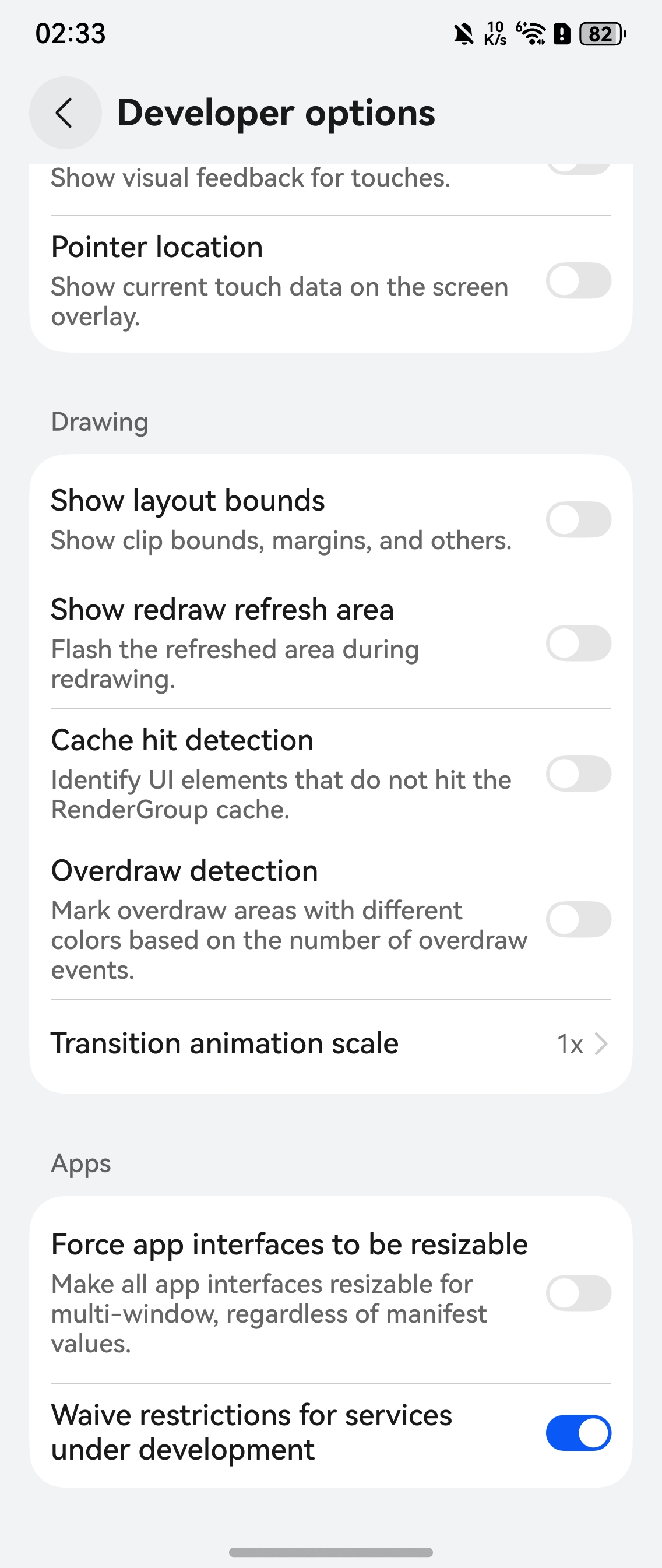

The specifications of this exemption switch are as follows:
- At least one of the signatures of the application and atomic service is a debug signature.
- If the atomic service to be debugged has been released, you need to manually search for and download the atomic service on HUAWEI Assistant·TODAY and test the atomic service. Currently, the embedded atomic service must be installed during debugging.
[h2]Specifications
- Note that some APIs of the provider atomic services are not available.
- You only need to adapt the provider atomic service to the status bar for versions earlier than API version 20.
- When an atomic service is running in embedded mode, it cannot be covered by any child windows created.
- When an atomic service is running in embedded mode, the host application cannot switch the UIAbility of the provider atomic service.
Check whether the atomic service is running in embedded mode. ↵
Specifically, check wantConstant.Params.SHOW_MODE_KEY of want. If the value is wantConstant.ShowMode.EMBEDDED_FULL, the atomic service is running in full-screen embedded mode. ↵
export default class AtomicServiceAbility extends UIAbility {↵
  onCreate(want: Want, launchParam: AbilityConstant.LaunchParam): void {↵
    hilog.info(0x0000, 'testTag', '%{public}s', 'Ability onCreate');↵
    if (want.parameters) {↵
      hilog.debug(0x0000, 'testTag', '%{public}s',↵
        'Ability onCreate:' + want.parameters[wantConstant.Params.SHOW_MODE_KEY])↵
    }↵
  }↵
}↵
[h2]Use Constraints of ArkUI Capabilities
Launching an embedded atomic service enables cross-application capability sharing with considerable openness and flexibility. To ensure the safe and stable operation of atomic services, constraints apply to their properties, components, APIs, and events.
Property
Provider atomic services do not support universal properties.
Component
By default, provider atomic services do not support the interaction with the host components and application process context. The following components are involved.
Component | Supported or Not | Description | Cause |
|---|---|---|---|
Not supported | FullScreenLaunchComponent is a component designed for launching atomic services in full screen. If the invoked application (the one being launched) grants the invoker the authorization to run the atomic service in an embedded manner, the invoker can operate the atomic service in full-screen embedded mode. If authorization is not provided, the invoker will launch the atomic service in a pop-up manner. | Due to its cross-application scheduling capability, the FullScreenLaunchComponent does not support nested launching. | |
Not supported | The EmbeddedComponent is used to embed the UI provided by other EmbeddedUIExtensionAbility components in the current application. The EmbeddedUIExtensionAbility runs in an independent process for UI layout and rendering. | Due to its cross-application scheduling capability, the FullScreenLaunchComponent does not support nested launching. | |
Not supported | The FolderStack component is usually used in modular development scenarios where .abc file hot update is required. The FolderStack component extends the Stack component by adding the hover feature for foldable devices. With the upperItems parameter set, it can automatically avoid the crease area of the foldable device and move the content to the upper half screen. | The component's capabilities require linkage with the host application's window, necessitating access to the host application's main window information within the provider. Therefore, this component is not supported at present. | |
Not supported | The XComponent can accept and display the EGL/OpenGL ES and media data input. | - | |
Supported in API version 20 and later. | The menu bound to a component through bindContextMenu on a page can be closed as needed. | - | |
Partially supported | You can set the text content and response callback for an alert dialog box. If showInSubWindow is set to true in the FullScreenLaunchComponent, the dialog box is aligned with the host window based on the FullScreenLaunchComponent. | The dialog box achieves alignment with the host application's window by utilizing data obtained from the FullScreenLaunchComponent regarding the application's window. Yet, only window alignment is supported. | |
Partially supported | An action sheet is a dialog box that displays actions a user can take. If showInSubWindow is set to true in the FullScreenLaunchComponent, the dialog box is aligned with the host window based on the FullScreenLaunchComponent. | The dialog box achieves alignment with the host application's window by utilizing data obtained from the FullScreenLaunchComponent regarding the application's window. Yet, only window alignment is supported. | |
Partially supported | The CustomDialogController class is used to display a custom dialog box. You can set the style and content to your preference for a custom dialog box. If showInSubWindow is set to true in the FullScreenLaunchComponent, the dialog box is aligned with the host window based on the FullScreenLaunchComponent. | The dialog box achieves alignment with the host application's window by utilizing data obtained from the FullScreenLaunchComponent regarding the application's window. Yet, only window alignment is supported. | |
Partially supported | Since API version 11, this component supports the safe area attribute by default, with the default attribute value being expandSafeArea([SafeAreaType.SYSTEM], [SafeAreaEdge.TOP, SafeAreaEdge.BOTTOM]). You can override this attribute to change the default behavior. |
|
API
When launching atomic services in embedded mode, the capabilities provided by ArkTS APIs must account for their potential to extend beyond the current component and interact with both the host components and the application process context. The following APIs are included.
API | Supported or Not | Description | Cause |
|---|---|---|---|
Not supported | You can customize the page entrance and exit animations in the pageTransition API for transition between pages. | - | |
Not supported | geometryTransition is used to create a smooth, seamless transition between views. By specifying the frame and position of the in and out components through geometryTransition, you can create a spatial linkage between the transition effects (such as opacity and scale) defined through the transition mechanism. In this way, you can guide the visual focus from the previous view (out component) to the new view (in component). | - | |
Not supported | The componentUtils module provides APIs for obtaining the coordinates and size of the drawing area of a component. | The information obtained pertains to the window, and by default, it is the information about WindowProxy of the EmbeddableUIAbility, not the main window information of the host application. | |
Not supported | @ohos.window adds the getUIContext API in API version 10 for obtaining the UIContext object of a UI instance. The API provided by the UIContext object can be directly applied to the corresponding UI instance. | In the default FullScreenLaunchComponent configuration, the provider lacks an actual window, and therefore it is not possible to obtain the correct UIContext through this API. | |
Not supported | The dragController module provides APIs for initiating drag actions. When receiving a gesture event, such as a touch or long-press event, an application can initiate a drag action and carry drag information therein. The functionality of this module depends on UI context. This means that the APIs of this module cannot be used where the UI context is unclear. For details, see UIContext. | Drag event transmission between components relies on UIContext instances. Since the host and provider applications do not share the UIContext content, drag event transmission is not supported by default. | |
Partially supported | The Inspector module provides APIs for registering the component layout and drawing completion callbacks. | If a FullScreenLaunchComponent is specified, all the component information in the FullScreenLaunchComponent is expected to be obtained. This capability is not supported yet. The provider can use this capability internally. | |
Not supported | The font module provides APIs for registering custom fonts. | The registered fonts have a restricted scope, and the provider is unable to influence the font settings within the host application. | |
Not supported | The PluginComponentManager module provides APIs for the PluginComponent user to request components and data and send component templates and data. | The provider component, residing in a separate process, is unable to access data from other components. As such, the capability to interact with the host application's components is not supported. |
Event
The FullScreenLaunchComponent/HalfScreenLaunchComponent does not support the universal events. Instead, it passes events to the provider's EmbeddableUIAbility after coordinate transformation.
Events are handled synchronously or asynchronously based on their use case:
- Interactions between the host process and the provider process are handled asynchronously by default: This avoids performance issues and deadlocks, which could affect the overall interaction experience.
- Synchronous event handling principles: Synchronous events are supported where they have a low trigger frequency and minimal performance impact; they should meet the actual use scenarios.
When using embedded atomic services, comply with the following design constraints:
Asynchronous event handling scenarios: Both the FullScreenLaunchComponent/HalfScreenLaunchComponent and the host application's components may receive events simultaneously. You need to manage this based on the use scenario. For example, you can configure the host application components not to handle the events. If this is not feasible, you are advised to replace the FullScreenLaunchComponent to ensure a seamless interaction experience.
Category | Event | Supported or Not | Calling Mode | Timeout Waiting Support |
|---|---|---|---|---|
Universal event | Click event (Click) | Supported | Asynchronous | - |
Universal event | Touch event (Touch) | Supported | Asynchronous | - |
Universal event | Drag event (onDragXXX) | Supported | Asynchronous | - |
Universal event | Key event (KeyEvent) | Supported | Synchronous | A timeout mechanism is provided to manage waiting periods. If the timeout threshold is exceeded, the waiting is automatically aborted. From the perspective of the upper layer, this is treated as if the event was not processed at all. |
Universal event | Focus event (onFocus/onBlur) | Supported | Synchronous | A timeout mechanism is provided to manage waiting periods. If the timeout threshold is exceeded, the waiting is automatically aborted. From the perspective of the upper layer, this is treated as if the event was not processed at all. |
Universal event | Mouse event (onHover/onMouse) | Supported | Asynchronous | - |
Gesture handling | - | Supported | Asynchronous | - |
Accessibility | - | Supported | Synchronous | A timeout mechanism is provided to manage waiting periods. If the timeout threshold is exceeded, the waiting is automatically aborted. From the perspective of the upper layer, this is treated as if the event was not processed at all. |
[h2]API Version 20 and Later
The following table lists the APIs that cannot be used by embedded atomic services in API version 20 and later.
Kit | API Declaration | API Functionality |
|---|---|---|
AbilityKit | backToCallerAbilityWithResult(abilityResult: AbilityResult, requestCode: string): Promise<void> | Returns the startup result to the caller of startAbilityForResult or openLink. Different from terminateSelfWithResult, this API does not destroy the current UIAbility (target UIAbility) when it returns the result. This API uses a promise to return the result. |
AbilityKit | setMissionContinueState(state: AbilityConstant.ContinueState, callback: AsyncCallback<void>): void | Sets the mission continuation state of this UIAbility. This API uses an asynchronous callback to return the result. |
AbilityKit | setMissionContinueState(state: AbilityConstant.ContinueState): Promise<void> | Sets the mission continuation state of this UIAbility. This API uses a promise to return the result. |
AbilityKit | restoreWindowStage(localStorage: LocalStorage): void | Restores the WindowStage data in the UIAbility. This API can be called only by the main thread. |
AbilityKit | moveAbilityToBackground(): Promise<void> | Moves this UIAbility from the foreground to the background. This API uses a promise to return the result. This API can be called only by the main thread. |
AbilityKit | setRestoreEnabled(enabled: boolean): void | Sets whether to enable backup and restore for this UIAbility. |
Media Library Kit | PhotoPickerComponent({ pickerOptions?: PickerOptions, onSelect?: (uri: string) => void, onDeselect?: (uri: string) => void, onItemClicked?: (itemInfo: ItemInfo, clickType: ClickType) => boolean, onEnterPhotoBrowser?: (photoBrowserInfo: PhotoBrowserInfo) => boolean, onExitPhotoBrowser?: (photoBrowserInfo: PhotoBrowserInfo) => boolean, onPickerControllerReady?: () => void, onPhotoBrowserChanged?: (browserItemInfo: BaseItemInfo) => boolean, onSelectedItemsDeleted?: ItemsDeletedCallback, onExceedMaxSelected?: ExceedMaxSelectedCallback, onCurrentAlbumDeleted?: CurrentAlbumDeletedCallback, pickerController: PickerController }) | The PhotoPickerComponent embedded in the application UI allows the application to access images or videos in the user directory without any permission. Only the read permission is included. The user can directly tap this component to select images or videos. |
Media Library Kit | AlbumPickerComponent({ albumPickerOptions?: AlbumPickerOptions, onAlbumClick?: (albumInfo: AlbumInfo) => boolean, onEmptyAreaClick?: EmptyAreaClickCallback }) | AlbumPickerComponent is a UI component that allows an application to access the albums in the user directory without the required permissions. This component must be used with PhotoPickerComponent. When a user selects an album via AlbumPickerComponent, PhotoPickerComponent is instructed to update the images/videos in the album. |
Media Library Kit | RecentPhotoComponent({ recentPhotoOptions?: RecentPhotoOptions, onRecentPhotoCheckResult?: RecentPhotoCheckResultCallback, onRecentPhotoClick: RecentPhotoClickCallback, onRecentPhotoCheckInfo?: RecentPhotoCheckInfoCallback, }) | RecentPhotoComponent is a UI component that allows an application to access the latest image/video in the user directory without the required permission. This component grants the application only the read permission. |
ArkUI-window | showWindow(callback: AsyncCallback<void>): void; | Displays the current window. |
ArkUI-window | showWindow(): Promise<void>; | Displays the current window. |
ArkUI-window | destroyWindow(callback: AsyncCallback<void>): void; | Destroys this window. |
ArkUI-window | destroyWindow(): Promise<void>; | Destroys this window. |
ArkUI-window | moveWindowTo(x: number, y: number): Promise<void>; | Moves this window. |
ArkUI-window | moveWindowTo(x: number, y: number, callback: AsyncCallback<void>): void; | Moves this window. |
ArkUI-window | moveWindowToAsync(x: number, y: number): Promise<void>; | Moves this window. |
ArkUI-window | moveWindowToAsync(x: number, y: number, moveConfiguration?: MoveConfiguration): Promise<void>; | Moves this window. |
ArkUI-window | moveWindowToGlobal(x: number, y: number): Promise<void>; | Moves this window. |
ArkUI-window | moveWindowToGlobal(x: number, y: number, moveConfiguration?: MoveConfiguration): Promise<void>; | Moves this window. |
ArkUI-window | resize(width: number, height: number): Promise<void>; | Resizes this window. |
ArkUI-window | resize(width: number, height: number, callback: AsyncCallback<void>): void; | Resizes this window. |
ArkUI-window | resizeAsync(width: number, height: number): Promise<void>; | Resizes this window. |
ArkUI-window | setFollowParentWindowLayoutEnabled(enabled: boolean): Promise<void>; | Sets the child window to follow the parent window. |
ArkUI-window | setSystemAvoidAreaEnabled(enabled: boolean): Promise<void>; | Enables the capability to obtain the avoid area of a window. |
ArkUI-window | isSystemAvoidAreaEnabled(): boolean; | Checks whether the avoid area of this window can be obtained. |
ArkUI-window | setPreferredOrientation(orientation: Orientation): Promise<void>; | Sets the preferred orientation for the main window. |
ArkUI-window | setPreferredOrientation(orientation: Orientation, callback: AsyncCallback<void>): void; | Sets the preferred orientation for the main window. |
ArkUI-window | getPreferredOrientation(): Orientation; | Obtains the preferred orientation of the main window. |
ArkUI-window | on(type: 'windowVisibilityChange', callback: Callback<boolean>): void; | Subscribes to the visibility change of the window. |
ArkUI-window | off(type: 'windowVisibilityChange', callback?: Callback<boolean>): void; | Unsubscribes from the visibility change of the window. |
ArkUI-window | on(type: 'noInteractionDetected', timeout: number, callback: Callback<void>): void; | Subscribes to the event indicating that there is no interaction event in the window within the specified period. |
ArkUI-window | off(type: 'noInteractionDetected', callback?: Callback<void>): void; | Unsubscribes from the event indicating that there is no interaction event in the window within the specified period. |
ArkUI-window | on(type: 'dialogTargetTouch', callback: Callback<void>): void; | Subscribes to the touch event in the window covered by a dialog. |
ArkUI-window | off(type: 'dialogTargetTouch', callback?: Callback<void>): void; | Unsubscribes from the touch event in the window covered by a dialog. |
ArkUI-window | on(type: 'windowEvent', callback: Callback<WindowEventType>): void; | Subscribes to the window lifecycle change event. |
ArkUI-window | off(type: 'windowEvent', callback?: Callback<WindowEventType>): void; | Unsubscribes from the window lifecycle change event. |
ArkUI-window | on(type: 'windowStatusChange', callback: Callback<WindowStatusType>): void; | Subscribes to the window status change event. |
ArkUI-window | off(type: 'windowStatusChange', callback?: Callback<WindowStatusType>): void; | Unsubscribes from the window status change event. |
ArkUI-window | on(type: 'subWindowClose', callback: Callback<void>): void; | Subscribes to the event indicating that the child window is closed. |
ArkUI-window | off(type: 'subWindowClose', callback?: Callback<void>): void; | Unsubscribes from the event indicating that the child window is closed. |
ArkUI-window | on(type: 'windowWillClose', callback: Callback<void, Promise<boolean>>): void; | Subscribes to the event indicating that the main window or child window will be closed. |
ArkUI-window | off(type: 'windowWillClose', callback?: Callback<void, Promise<boolean>>): void; | Unsubscribes from the event indicating that the main window or child window will be closed. |
ArkUI-window | on(type: 'windowHighlightChange', callback: Callback<boolean>): void; | Subscribes to the highlighted state change event of the window. |
ArkUI-window | off(type: 'windowHighlightChange', callback?: Callback<boolean>): void; | Unsubscribes from the highlighted state change event of the window. |
ArkUI-window | setDialogBackGestureEnabled(enabled: boolean): Promise<void>; | Sets whether the modal window responds to the back gesture event. |
ArkUI-window | isWindowSupportWideGamut(): Promise<boolean>; | Checks whether this window supports the wide-gamut color space. |
ArkUI-window | isWindowSupportWideGamut(callback: AsyncCallback<boolean>): void; | Checks whether this window supports the wide-gamut color space. |
ArkUI-window | setWindowBackgroundColor(color: string | ColorMetrics): void; | Sets the background color for this window. |
ArkUI-window | setWindowTopmost(isWindowTopmost: boolean): Promise<void>; | Sets the main window to be on top. |
ArkUI-window | setWindowFocusable(isFocusable: boolean): Promise<void>; | Sets the window to be focused on tap. |
ArkUI-window | setWindowFocusable(isFocusable: boolean, callback: AsyncCallback<void>): void; | Sets the window to be focused on tap. |
ArkUI-window | setExclusivelyHighlighted(exclusivelyHighlighted: boolean): Promise<void>; | Sets the exclusive highlight property for the window. |
ArkUI-window | isWindowHighlighted(): boolean; | Checks whether the window is highlighted. |
ArkUI-window | setWindowTouchable(isTouchable: boolean): Promise<void>; | Sets the window to be untouchable. |
ArkUI-window | setWindowTouchable(isTouchable: boolean, callback: AsyncCallback<void>): void; | Sets the window to be untouchable. |
ArkUI-window | snapshot(callback: AsyncCallback<image.PixelMap>): void; | Obtains the window screenshot. |
ArkUI-window | snapshot(): Promise<image.PixelMap>; | Obtains the window screenshot. |
ArkUI-window | snapshotIgnorePrivacy(): Promise<image.PixelMap>; | Obtains the window screenshot. |
ArkUI-window | setWindowShadowRadius(radius: number): void; | Sets the blur radius of the shadow on the edges of a child window or floating window. |
ArkUI-window | setWindowCornerRadius(cornerRadius: number): Promise<void>; | Sets the radius of the rounded corners for a child window or floating window. |
ArkUI-window | getWindowCornerRadius(): number; | Obtains the radius of the rounded corners of a child window or floating window. |
ArkUI-window | setAspectRatio(ratio: number, callback: AsyncCallback<void>): void; | Sets the aspect ratio of the window content layout. |
ArkUI-window | setAspectRatio(ratio: number): Promise<void>; | Sets the aspect ratio of the window content layout. |
ArkUI-window | resetAspectRatio(callback: AsyncCallback<void>): void; | Resets the aspect ratio of the window content layout. |
ArkUI-window | resetAspectRatio(): Promise<void>; | Resets the aspect ratio of the window content layout. |
ArkUI-window | minimize(callback: AsyncCallback<void>): void; | Minimizes or hides the window. |
ArkUI-window | minimize(): Promise<void>; | Minimizes or hides the window. |
ArkUI-window | maximize(presentation?: MaximizePresentation): Promise<void>; | Maximizes the window. |
ArkUI-window | setResizeByDragEnabled(enable: boolean, callback: AsyncCallback<void>): void; | Sets whether to resize the main window by dragging. |
ArkUI-window | setResizeByDragEnabled(enable: boolean): Promise<void>; | Sets whether to resize the main window by dragging. |
ArkUI-window | getWindowLimits(): WindowLimits; | Obtains the size limits of this application window. |
ArkUI-window | setWindowLimits(windowLimits: WindowLimits): Promise<WindowLimits>; | Sets the size limits of this application window. |
ArkUI-window | setWindowLimits(windowLimits: WindowLimits, isForcible: boolean): Promise<WindowLimits>; | Sets the size limits of this application window. |
ArkUI-window | keepKeyboardOnFocus(keepKeyboardFlag: boolean): void; | Sets whether to keep the soft keyboard created by other windows when this window is on focus. |
ArkUI-window | recover(): Promise<void>; | Recovers the full-screen window to a floating window. |
ArkUI-window | restore(): Promise<void>; | Restores the window from minimization to the foreground. |
ArkUI-window | setWindowDecorVisible(isVisible: boolean): void; | Sets whether the title bar is visible in the window. |
ArkUI-window | getWindowDecorVisible(): boolean; | Checks whether the title bar of the window is visible. |
ArkUI-window | setWindowTitleMoveEnabled(enabled: boolean): void; | Enables the capability to move the window by dragging the title bar and to maximize the window with a double-tap. |
ArkUI-window | setWindowTitle(titleName: string): Promise<void>; | Sets the window title. |
ArkUI-window | setSubWindowModal(isModal: boolean): Promise<void>; | Enables the modal property of the child window. |
ArkUI-window | setSubWindowModal(isModal: boolean, modalityType: ModalityType): Promise<void>; | Enables the modal property of the child window. |
ArkUI-window | setWindowDecorHeight(height: number): void; | Sets the height of the title bar for this window. |
ArkUI-window | getWindowDecorHeight(): number; | Sets the height of the title bar for this window. |
ArkUI-window | setDecorButtonStyle(dectorStyle: DecorButtonStyle): void; | Sets the button style of the decoration bar. |
ArkUI-window | getDecorButtonStyle(): DecorButtonStyle; | Sets the button style of the decoration bar. |
ArkUI-window | getTitleButtonRect(): TitleButtonRect; | Obtains the rectangular area of the three buttons in the window's title bar. |
ArkUI-window | setWindowTitleButtonVisible(isMaximizeButtonVisible: boolean, isMinimizeButtonVisible: boolean, isCloseButtonVisible?: boolean): void; | Sets the visibility of the three buttons in the window. |
ArkUI-window | enableLandscapeMultiWindow(): Promise<void>; | Enables the landscape-oriented multi-window layout. |
ArkUI-window | startMoving(): Promise<void>; | Sets the window to move with the mouse. |
ArkUI-window | startMoving(offsetX: number, offsetY: number): Promise<void>; | Sets the window to move with the mouse. |
ArkUI-window | stopMoving(): Promise<void>; | Sets the window to move with the mouse. |
ArkUI-window | disableLandscapeMultiWindow(): Promise<void>; | Disables the landscape-oriented multi-window layout. |
ArkUI-window | on(type: 'windowTitleButtonRectChange', callback: Callback<TitleButtonRect>): void; | Subscribes to the change of the window's three-button area. |
ArkUI-window | off(type: 'windowTitleButtonRectChange', callback?: Callback<TitleButtonRect>): void; | Unsubscribes from the change of the window's three-button area. |
ArkUI-window | setWindowMask(windowMask: Array<Array<number>>): Promise<void>; | Sets the window to an irregular shape. |
ArkUI-window | on(type: 'windowRectChange', callback: Callback<RectChangeOptions>): void; | Subscribes to window layout changes. |
ArkUI-window | off(type: 'windowRectChange', callback?: Callback<RectChangeOptions>): void; | Unsubscribes from window layout changes. |
ArkUI-window | on(type: 'rotationChange', callback: RotationChangeCallback<RotationChangeInfo, RotationChangeResult | void>): void; | Subscribes to window rotation. |
ArkUI-window | off(type: 'rotationChange', callback?: RotationChangeCallback<RotationChangeInfo, RotationChangeResult | void>): void; | Unsubscribes from window rotation. |
ArkUI-window | setWindowGrayScale(grayScale: number): Promise<void>; | Sets the grayscale effect for this window. |
ArkUI-window | getWindowStatus(): WindowStatusType; | Obtains the window mode. |
ArkUI-window | setParentWindow(windowId: number): Promise<void>; | Sets a parent window for this child window. |
ArkUI-window | getParentWindow(): Window; | Obtains the parent window of this child window. |
ArkUI-window | setFollowParentMultiScreenPolicy(enabled: boolean): Promise<void>; | Sets whether the child window can span multiple screens and be simultaneously displayed. |
ArkUI-window | setTitleAndDockHoverShown(isTitleHoverShown?: boolean, isDockHoverShown?: boolean): Promise<void>; | Sets whether to show the window title bar and dock bar. |
ArkUI-window | setWindowDelayRaiseOnDrag(isEnabled: boolean): void; | Sets whether to enable delayed raising for the window. |
ArkUI-window | setSubWindowZLevel(zLevel: number): Promise<void>; | Sets the z-level of the child window. |
ArkUI-window | getSubWindowZLevel(): number; | Obtains the z-level of the child window. |
ArkUI-window | createSubWindow(name: string): Promise<Window>; | Creates a child window for this WindowStage. |
ArkUI-window | createSubWindow(name: string, callback: AsyncCallback<Window>): void; | Creates a child window for this WindowStage. |
ArkUI-window | getSubWindow(): Promise<Array<Window>>; | Obtains all the child windows of this WindowStage. |
ArkUI-window | getSubWindow(callback: AsyncCallback<Array<Window>>): void; | Obtains all the child windows of this WindowStage. |
ArkUI-window | on(eventType: 'windowStageClose', callback: Callback<void>): void; | Subscribes to the click event on the close button in the three-button navigation bar of the main window. |
ArkUI-window | off(eventType: 'windowStageClose', callback?: Callback<void>): void; | Unsubscribes from the click event on the close button in the three-button navigation bar of the main window. |
ArkUI-window | setDefaultDensityEnabled(enabled: boolean): void; | Enables the system's default density. |
ArkUI-window | setCustomDensity(density: number): void; | Sets the custom DPI. |
ArkUI-window | removeStartingWindow(): Promise<void>; | Removes the application starting window. |
ArkUI-window | setWindowModal(isModal: boolean): Promise<void>; | Sets the modal property of the main window. |
ArkUI-window | setWindowRectAutoSave(enabled: boolean): Promise<void>; | Sets whether to enable the auto-save feature for the size of the last closed main window. |
ArkUI-window | setWindowRectAutoSave(enabled: boolean, isSaveBySpecifiedFlag: boolean): Promise<void>; | Sets whether to enable the auto-save feature for the size of the last closed main window. |
ArkUI-window | isWindowRectAutoSave(): Promise<boolean>; | Checks whether the auto-save feature is enabled for the main window's size. |
ArkUI-window | setSupportedWindowModes(supportedWindowModes: Array<bundleManager.SupportWindowMode>): Promise<void>; | Sets the supported window modes. |
ArkUI-window | getWindowDensityInfo(): WindowDensityInfo; | Obtains the DPI of the screen where the window is located. |
ArkUI-window | setWindowSystemBarProperties(systemBarProperties: SystemBarProperties): Promise<void>; | Sets whether to display the system navigation bar and status bar. |
ArkUI-window | getWindowSystemBarProperties(): SystemBarProperties; | Obtains the properties of the system navigation bar and status bar. |
ArkUI-window | setStatusBarColor(color: ColorMetrics): Promise<void>; | Sets the text color of the system status bar. |
ArkUI-window | on(type: 'touchOutside', callback: Callback<void>): void; | Subscribes to the touch event outside the window. |
ArkUI-window | off(type: 'touchOutside', callback?: Callback<void>): void; | Unsubscribes from the touch event outside the window. |
[h2]API Version 19 and Earlier
The following table lists the APIs that cannot be used by embedded atomic services in versions earlier than API version 20.
Kit | API Declaration | API Functionality |
|---|---|---|
AbilityKit | backToCallerAbilityWithResult(abilityResult: AbilityResult, requestCode: string): Promise<void> | Returns the startup result to the caller of startAbilityForResult or openLink. Different from terminateSelfWithResult, this API does not destroy the current UIAbility (target UIAbility) when it returns the result using a promise. |
AbilityKit | setMissionLabel(label: string, callback: AsyncCallback<void>): void | Sets a mission label for this UIAbility on the multitasking screen. This API uses an asynchronous callback to return the result. |
AbilityKit | setMissionLabel(label: string): Promise<void> | Sets a mission label for this UIAbility on the multitasking screen. This API uses a promise to return the result. |
AbilityKit | setMissionContinueState(state: AbilityConstant.ContinueState, callback: AsyncCallback<void>): void | Sets the mission continuation state of this UIAbility. This API uses an asynchronous callback to return the result. |
AbilityKit | setMissionContinueState(state: AbilityConstant.ContinueState): Promise<void> | Sets the mission continuation state of this UIAbility. This API uses a promise to return the result. |
AbilityKit | restoreWindowStage(localStorage: LocalStorage): void | Restores the WindowStage data in the UIAbility. This API can be called only by the main thread. |
AbilityKit | isTerminating(): boolean | Checks whether this UIAbility is in the terminating state. |
AbilityKit | startAbilityByType(type: string, wantParam: Record<string, Object>, abilityStartCallback: AbilityStartCallback, callback: AsyncCallback<void>) : void | Implicitly starts a given type of UIExtensionAbility. This API uses an asynchronous callback to return the result. It can be called only in the main thread and by applications running in the foreground. |
AbilityKit | startAbilityByType(type: string, wantParam: Record<string, Object>, abilityStartCallback: AbilityStartCallback) : Promise<void> | Implicitly starts a given type of UIExtensionAbility. This API uses a promise to return the result. It can be called only in the main thread and by applications running in the foreground. |
AbilityKit | moveAbilityToBackground(): Promise<void> | Moves this UIAbility from the foreground to the background. This API uses a promise to return the result. This API can be called only by the main thread. |
AbilityKit | setRestoreEnabled(enabled: boolean): void | Sets whether to enable backup and restore for this UIAbility. |
AbilityKit | startUIServiceExtensionAbility(want: Want): Promise<void> | Starts a UIServiceExtensionAbility. This API uses a promise to return the result. |
AbilityKit | connectUIServiceExtensionAbility(want: Want, callback: UIServiceExtensionConnectCallback) : Promise<UIServiceProxy> | Connects to a UIServiceExtensionAbility. This API uses a promise to return the result. |
AbilityKit | disconnectUIServiceExtensionAbility(proxy: UIServiceProxy): Promise<void> | Disconnects from a UIServiceExtensionAbility. This API uses a promise to return the result. |
AbilityKit | setColorMode(colorMode: ConfigurationConstant.ColorMode): void | Sets the dark/light color mode for this UIAbility. Before calling this API, ensure that the page corresponding to the UIAbility has been loaded. It can be called only by the main thread. |
Media Library Kit | PhotoPickerComponent({ pickerOptions?: PickerOptions, onSelect?: (uri: string) => void, onDeselect?: (uri: string) => void, onItemClicked?: (itemInfo: ItemInfo, clickType: ClickType) => boolean, onEnterPhotoBrowser?: (photoBrowserInfo: PhotoBrowserInfo) => boolean, onExitPhotoBrowser?: (photoBrowserInfo: PhotoBrowserInfo) => boolean, onPickerControllerReady?: () => void, onPhotoBrowserChanged?: (browserItemInfo: BaseItemInfo) => boolean, onSelectedItemsDeleted?: ItemsDeletedCallback, onExceedMaxSelected?: ExceedMaxSelectedCallback, onCurrentAlbumDeleted?: CurrentAlbumDeletedCallback, pickerController: PickerController }) | The PhotoPickerComponent embedded in the application UI allows the application to access images or videos in the user directory without any permission. Only read access is included. The user can directly tap this component to select images or videos. |
Media Library Kit | AlbumPickerComponent({ albumPickerOptions?: AlbumPickerOptions, onAlbumClick?: (albumInfo: AlbumInfo) => boolean, onEmptyAreaClick?: EmptyAreaClickCallback }) | AlbumPickerComponent is a UI component that allows an application to access the albums in the user directory without the required permissions. This component must be used with PhotoPickerComponent. When a user selects an album via AlbumPickerComponent, PhotoPickerComponent is instructed to update the images/videos in the album. |
Media Library Kit | RecentPhotoComponent({ recentPhotoOptions?: RecentPhotoOptions, onRecentPhotoCheckResult?: RecentPhotoCheckResultCallback, onRecentPhotoClick: RecentPhotoClickCallback, onRecentPhotoCheckInfo?: RecentPhotoCheckInfoCallback, }) | RecentPhotoComponent is a UI component that allows an application to access the latest image/video in the user directory without the required permission. This component grants the application only the read permission. |
ArkUI-window | showWindow(callback: AsyncCallback<void>): void; | Shows this window. |
ArkUI-window | showWindow(): Promise<void>; | Shows this window. |
ArkUI-window | destroyWindow(callback: AsyncCallback<void>): void; | Destroys this window. |
ArkUI-window | destroyWindow(): Promise<void>; | Destroys this window. |
ArkUI-window | moveWindowTo(x: number, y: number): Promise<void>; | Moves this window. |
ArkUI-window | moveWindowTo(x: number, y: number, callback: AsyncCallback<void>): void; | Moves this window. |
ArkUI-window | moveWindowToAsync(x: number, y: number): Promise<void>; | Moves this window. |
ArkUI-window | moveWindowToAsync(x: number, y: number, moveConfiguration?: MoveConfiguration): Promise<void>; | Moves this window. |
ArkUI-window | moveWindowToGlobal(x: number, y: number): Promise<void>; | Moves this window. |
ArkUI-window | moveWindowToGlobal(x: number, y: number, moveConfiguration?: MoveConfiguration): Promise<void>; | Moves this window. |
ArkUI-window | resize(width: number, height: number): Promise<void>; | Resizes this window. |
ArkUI-window | resize(width: number, height: number, callback: AsyncCallback<void>): void; | Resizes this window. |
ArkUI-window | resizeAsync(width: number, height: number): Promise<void>; | Resizes this window. |
ArkUI-window | setFollowParentWindowLayoutEnabled(enabled: boolean): Promise<void>; | Sets the child window to follow the parent window. |
ArkUI-window | getGlobalRect(): Rect; | Obtains the display area of the window. |
ArkUI-window | getWindowDensityInfo(): WindowDensityInfo; | Obtains the DPI of the screen where the window is located. |
ArkUI-window | setSystemAvoidAreaEnabled(enabled: boolean): Promise<void>; | Enables the capability to obtain the avoid area of this window. |
ArkUI-window | isSystemAvoidAreaEnabled(): boolean; | Checks whether the avoid area of this window can be obtained. |
ArkUI-window | setWindowLayoutFullScreen(isLayoutFullScreen: boolean): Promise<void>; | Sets the full-screen mode for the window. |
ArkUI-window | setWindowSystemBarEnable(names: Array<'status' | 'navigation'>): Promise<void>; | Sets whether to display the system navigation bar and status bar. |
ArkUI-window | setSpecificSystemBarEnabled(name: SpecificSystemBar, enable: boolean, enableAnimation?: boolean): Promise<void>; | Sets whether to display the system navigation bar and status bar. |
ArkUI-window | setWindowSystemBarProperties(systemBarProperties: SystemBarProperties): Promise<void>; | Sets whether to display the system navigation bar and status bar. |
ArkUI-window | getWindowSystemBarProperties(): SystemBarProperties; | Obtains the properties of the system navigation bar and status bar. |
ArkUI-window | setStatusBarColor(color: ColorMetrics): Promise<void>; | Sets the text color of the system status bar. |
ArkUI-window | getStatusBarProperty(): StatusBarProperty; | Obtains the properties of the system status bar. |
ArkUI-window | setGestureBackEnabled(enabled: boolean): Promise<void>; | Sets whether to disable the back gesture feature. |
ArkUI-window | isGestureBackEnabled(): boolean; | Checks whether the back gesture feature is disabled in the current window. |
ArkUI-window | setPreferredOrientation(orientation: Orientation): Promise<void>; | Sets the preferred orientation for the main window. |
ArkUI-window | setPreferredOrientation(orientation: Orientation, callback: AsyncCallback<void>): void; | Sets the preferred orientation for the main window. |
ArkUI-window | getPreferredOrientation(): Orientation; | Obtains the preferred orientation of the main window. |
ArkUI-window | getUIContext() : UIContext; | Obtains a UIContext instance. |
ArkUI-window | setUIContent(path: string, callback: AsyncCallback<void>): void; | Loads a page based on the page path. |
ArkUI-window | setUIContent(path: string): Promise<void>; | Loads a page based on the page path. |
ArkUI-window | off(type: 'keyboardHeightChange', callback?: Callback<number>): void; | Unsubscribes from the event indicating soft keyboard height changes in the fixed state. |
ArkUI-window | on(type: 'keyboardDidShow', callback: Callback<KeyboardInfo>): void; | Subscribes to the event indicating that the show animation of the soft keyboard in the fixed state is completed. |
ArkUI-window | off(type: 'keyboardDidShow', callback?: Callback<KeyboardInfo>): void; | Unsubscribes from the event indicating that the show animation of the soft keyboard in the fixed state is completed. |
ArkUI-window | on(type: 'keyboardDidHide', callback: Callback<KeyboardInfo>): void; | Subscribes to the event indicating that the hide animation of the soft keyboard in the fixed state is completed. |
ArkUI-window | off(type: 'keyboardDidHide', callback?: Callback<KeyboardInfo>): void; | Unsubscribes from the event indicating that the hide animation of the soft keyboard in the fixed state is completed. |
ArkUI-window | on(type: 'touchOutside', callback: Callback<void>): void; | Subscribes to the touch event outside the window. |
ArkUI-window | off(type: 'touchOutside', callback?: Callback<void>): void; | Unsubscribes from the touch event outside the window. |
ArkUI-window | on(type: 'displayIdChange', callback: Callback<number>): void; | Subscribes to the screen change of the window. |
ArkUI-window | off(type: 'displayIdChange', callback?: Callback<number>): void; | Unsubscribes from the screen change of the window. |
ArkUI-window | on(type: 'windowVisibilityChange', callback: Callback<boolean>): void; | Subscribes to the visibility change of the window. |
ArkUI-window | off(type: 'windowVisibilityChange', callback?: Callback<boolean>): void; | Unsubscribes from the visibility change of the window. |
ArkUI-window | on(type: 'systemDensityChange', callback: Callback<number>): void; | Subscribes to the DPI change of the system. |
ArkUI-window | off(type: 'systemDensityChange', callback?: Callback<number>): void; | Unsubscribes from the DPI change of the system. |
ArkUI-window | on(type: 'noInteractionDetected', timeout: number, callback: Callback<void>): void; | Subscribes to the event indicating that there is no interaction event in the window within the specified period. |
ArkUI-window | off(type: 'noInteractionDetected', callback?: Callback<void>): void; | Unsubscribes from the event indicating that there is no interaction event in the window within the specified period. |
ArkUI-window | on(type: 'screenshot', callback: Callback<void>): void; | Subscribes to the screenshot event. |
ArkUI-window | off(type: 'screenshot', callback?: Callback<void>): void; | Unsubscribes from the screenshot event. |
ArkUI-window | on(type: 'dialogTargetTouch', callback: Callback<void>): void; | Subscribes to the touch event in the window covered by a dialog. |
ArkUI-window | off(type: 'dialogTargetTouch', callback?: Callback<void>): void; | Unsubscribes from the touch event in the window covered by a dialog. |
ArkUI-window | on(type: 'windowEvent', callback: Callback<WindowEventType>): void; | Subscribes to the window lifecycle change event. |
ArkUI-window | off(type: 'windowEvent', callback?: Callback<WindowEventType>): void; | Unsubscribes from the window lifecycle change event. |
ArkUI-window | on(type: 'windowStatusChange', callback: Callback<WindowStatusType>): void; | Subscribes to the window status change event. |
ArkUI-window | off(type: 'windowStatusChange', callback?: Callback<WindowStatusType>): void; | Unsubscribes from the window status change event. |
ArkUI-window | on(type: 'subWindowClose', callback: Callback<void>): void; | Subscribes to the event indicating that the child window is closed. |
ArkUI-window | off(type: 'subWindowClose', callback?: Callback<void>): void; | Unsubscribes from the event indicating that the child window is closed. |
ArkUI-window | on(type: 'windowWillClose', callback: Callback<void, Promise<boolean>>): void; | Subscribes to the event indicating that the main window or child window will be closed. |
ArkUI-window | off(type: 'windowWillClose', callback?: Callback<void, Promise<boolean>>): void; | Unsubscribes from the event indicating that the main window or child window will be closed. |
ArkUI-window | on(type: 'windowHighlightChange', callback: Callback<boolean>): void; | Subscribes to the highlighted state change event of the window. |
ArkUI-window | off(type: 'windowHighlightChange', callback?: Callback<boolean>): void; | Unsubscribes from the highlighted state change event of the window. |
ArkUI-window | setDialogBackGestureEnabled(enabled: boolean): Promise<void>; | Sets whether the modal window responds to the back gesture event. |
ArkUI-window | isWindowSupportWideGamut(): Promise<boolean>; | Checks whether this window supports the wide-gamut color space. |
ArkUI-window | isWindowSupportWideGamut(callback: AsyncCallback<boolean>): void; | Checks whether this window supports the wide-gamut color space. |
ArkUI-window | setWindowColorSpace(colorSpace: ColorSpace): Promise<void>; | Sets a color space for this window. |
ArkUI-window | setWindowColorSpace(colorSpace: ColorSpace, callback: AsyncCallback<void>): void; | Sets a color space for this window. |
ArkUI-window | getWindowColorSpace(): ColorSpace; | Obtains the color space of this window. |
ArkUI-window | setWindowBackgroundColor(color: string | ColorMetrics): void; | Sets the background color for this window. |
ArkUI-window | setWindowTopmost(isWindowTopmost: boolean): Promise<void>; | Sets the main window to be on top. |
ArkUI-window | setWindowBrightness(brightness: number): Promise<void>; | Sets the screen brightness. |
ArkUI-window | setWindowBrightness(brightness: number, callback: AsyncCallback<void>): void; | Sets the screen brightness. |
ArkUI-window | setWindowFocusable(isFocusable: boolean): Promise<void>; | Sets the window to be focused on tap. |
ArkUI-window | setWindowFocusable(isFocusable: boolean, callback: AsyncCallback<void>): void; | Sets the window to be focused on tap. |
ArkUI-window | setExclusivelyHighlighted(exclusivelyHighlighted: boolean): Promise<void>; | Sets the exclusive highlight property for the window. |
ArkUI-window | isWindowHighlighted(): boolean; | Checks whether the window is highlighted. |
ArkUI-window | setWindowKeepScreenOn(isKeepScreenOn: boolean): Promise<void>; | Sets whether to keep the screen always on. |
ArkUI-window | setWindowKeepScreenOn(isKeepScreenOn: boolean, callback: AsyncCallback<void>): void; | Sets whether to keep the screen always on. |
ArkUI-window | setWindowPrivacyMode(isPrivacyMode: boolean): Promise<void>; | Sets whether this window is in privacy mode. |
ArkUI-window | setWindowPrivacyMode(isPrivacyMode: boolean, callback: AsyncCallback<void>): void; | Sets whether this window is in privacy mode. |
ArkUI-window | setWindowTouchable(isTouchable: boolean): Promise<void>; | Sets whether this window is untouchable. |
ArkUI-window | setWindowTouchable(isTouchable: boolean, callback: AsyncCallback<void>): void; | Sets whether this window is untouchable. |
ArkUI-window | snapshot(callback: AsyncCallback<image.PixelMap>): void; | Obtains the window screenshot. |
ArkUI-window | snapshot(): Promise<image.PixelMap>; | Obtains the window screenshot. |
ArkUI-window | snapshotIgnorePrivacy(): Promise<image.PixelMap>; | Obtains the window screenshot. |
ArkUI-window | setWindowShadowRadius(radius: number): void; | Sets the blur radius of the shadow on the edges of a child window or floating window. |
ArkUI-window | setWindowCornerRadius(cornerRadius: number): Promise<void>; | Sets the radius of the rounded corners for a child window or floating window. |
ArkUI-window | getWindowCornerRadius(): number; | Obtains the radius of the rounded corners of a child window or floating window. |
ArkUI-window | setAspectRatio(ratio: number, callback: AsyncCallback<void>): void; | Sets the aspect ratio of the window content layout. |
ArkUI-window | setAspectRatio(ratio: number): Promise<void>; | Sets the aspect ratio of the window content layout. |
ArkUI-window | resetAspectRatio(callback: AsyncCallback<void>): void; | Resets the aspect ratio of the window content layout. |
ArkUI-window | resetAspectRatio(): Promise<void>; | Resets the aspect ratio of the window content layout. |
ArkUI-window | minimize(callback: AsyncCallback<void>): void; | Minimizes or hides the window. |
ArkUI-window | minimize(): Promise<void>; | Minimizes or hides the window. |
ArkUI-window | maximize(presentation?: MaximizePresentation): Promise<void>; | Maximizes the window. |
ArkUI-window | setResizeByDragEnabled(enable: boolean, callback: AsyncCallback<void>): void; | Sets whether to resize the main window by dragging. |
ArkUI-window | setResizeByDragEnabled(enable: boolean): Promise<void>; | Sets whether to resize the main window by dragging. |
ArkUI-window | getWindowLimits(): WindowLimits; | Obtains the size limits of this application window. |
ArkUI-window | setWindowLimits(windowLimits: WindowLimits): Promise<WindowLimits>; | Sets the size limits of this application window. |
ArkUI-window | setWindowLimits(windowLimits: WindowLimits, isForcible: boolean): Promise<WindowLimits>; | Sets the size limits of this application window. |
ArkUI-window | keepKeyboardOnFocus(keepKeyboardFlag: boolean): void; | Sets whether to keep the soft keyboard created by other windows when this window is on focus. |
ArkUI-window | recover(): Promise<void>; | Recovers the full-screen window to a floating window. |
ArkUI-window | restore(): Promise<void>; | Restores the window from minimization to the foreground. |
ArkUI-window | setWindowDecorVisible(isVisible: boolean): void; | Sets whether the title bar is visible in the window. |
ArkUI-window | getWindowDecorVisible(): boolean; | Checks whether the title bar of the window is visible. |
ArkUI-window | setWindowTitleMoveEnabled(enabled: boolean): void; | Enables the capability to move the window by dragging the title bar and to maximize the window with a double-tap. |
ArkUI-window | setWindowTitle(titleName: string): Promise<void>; | Sets the window title. |
ArkUI-window | setSubWindowModal(isModal: boolean): Promise<void>; | Enables the modal property of the child window. |
ArkUI-window | setSubWindowModal(isModal: boolean, modalityType: ModalityType): Promise<void>; | Enables the modal property of the child window. |
ArkUI-window | setWindowDecorHeight(height: number): void; | Sets the height of the title bar for this window. |
ArkUI-window | getWindowDecorHeight(): number; | Sets the height of the title bar for this window. |
ArkUI-window | setDecorButtonStyle(dectorStyle: DecorButtonStyle): void; | Sets the button style of the decoration bar. |
ArkUI-window | getDecorButtonStyle(): DecorButtonStyle; | Sets the button style of the decoration bar. |
ArkUI-window | getTitleButtonRect(): TitleButtonRect; | Obtains the rectangular area of the three buttons in the window's title bar. |
ArkUI-window | setWindowTitleButtonVisible(isMaximizeButtonVisible: boolean, isMinimizeButtonVisible: boolean, isCloseButtonVisible?: boolean): void; | Sets the visibility of the three buttons in the window. |
ArkUI-window | enableLandscapeMultiWindow(): Promise<void>; | Enables the landscape-oriented multi-window layout. |
ArkUI-window | startMoving(): Promise<void>; | Sets the window to move with the mouse. |
ArkUI-window | startMoving(offsetX: number, offsetY: number): Promise<void>; | Sets the window to move with the mouse. |
ArkUI-window | stopMoving(): Promise<void>; | Sets the window to move with the mouse. |
ArkUI-window | disableLandscapeMultiWindow(): Promise<void>; | Disables the landscape-oriented multi-window layout. |
ArkUI-window | on(type: 'windowTitleButtonRectChange', callback: Callback<TitleButtonRect>): void; | Subscribes to the change of the window's three-button area. |
ArkUI-window | off(type: 'windowTitleButtonRectChange', callback?: Callback<TitleButtonRect>): void; | Unsubscribes from the change of the window's three-button area. |
ArkUI-window | setWindowMask(windowMask: Array<Array<number>>): Promise<void>; | Sets the window to an irregular shape. |
ArkUI-window | on(type: 'windowRectChange', callback: Callback<RectChangeOptions>): void; | Subscribes to window layout changes. |
ArkUI-window | off(type: 'windowRectChange', callback?: Callback<RectChangeOptions>): void; | Unsubscribes from window layout changes. |
ArkUI-window | on(type: 'rotationChange', callback: RotationChangeCallback<RotationChangeInfo, RotationChangeResult | void>): void; | Subscribes to window rotation. |
ArkUI-window | off(type: 'rotationChange', callback?: RotationChangeCallback<RotationChangeInfo, RotationChangeResult | void>): void; | Unsubscribes from window rotation. |
ArkUI-window | setWindowGrayScale(grayScale: number): Promise<void>; | Sets the grayscale effect for this window. |
ArkUI-window | setImmersiveModeEnabledState(enabled: boolean): void; | Sets the immersive mode for the window. |
ArkUI-window | getImmersiveModeEnabledState(): boolean; | Obtains the immersive mode of the window. |
ArkUI-window | getWindowStatus(): WindowStatusType; | Obtains the window mode. |
ArkUI-window | isFocused(): boolean; | Obtains whether the window is focused. |
ArkUI-window | setParentWindow(windowId: number): Promise<void>; | Sets a parent window for this child window. |
ArkUI-window | getParentWindow(): Window; | Obtains the parent window of this child window. |
ArkUI-window | setFollowParentMultiScreenPolicy(enabled: boolean): Promise<void>; | Sets whether the child window can span multiple screens and be simultaneously displayed. |
ArkUI-window | setTitleAndDockHoverShown(isTitleHoverShown?: boolean, isDockHoverShown?: boolean): Promise<void>; | Sets whether to show the window title bar and dock bar. |
ArkUI-window | setWindowDelayRaiseOnDrag(isEnabled: boolean): void; | Sets whether to enable delayed raising for the window. |
ArkUI-window | setSubWindowZLevel(zLevel: number): Promise<void>; | Sets the z-level of the child window. |
ArkUI-window | getSubWindowZLevel(): number; | Obtains the z-level of the child window. |
ArkUI-window | createSubWindow(name: string): Promise<Window>; | Creates a child window for this WindowStage. |
ArkUI-window | createSubWindow(name: string, callback: AsyncCallback<Window>): void; | Creates a child window for this WindowStage. |
ArkUI-window | createSubWindowWithOptions(name: string, options: SubWindowOptions): Promise<Window>; | Creates a child window for this WindowStage. |
ArkUI-window | getSubWindow(): Promise<Array<Window>>; | Obtains all the child windows of this WindowStage. |
ArkUI-window | getSubWindow(callback: AsyncCallback<Array<Window>>): void; | Obtains all the child windows of this WindowStage. |
ArkUI-window | on(eventType: 'windowStageClose', callback: Callback<void>): void; | Subscribes to the click event on the close button in the three-button navigation bar of the main window. |
ArkUI-window | off(eventType: 'windowStageClose', callback?: Callback<void>): void; | Unsubscribes from the click event on the close button in the three-button navigation bar of the main window. |
ArkUI-window | setDefaultDensityEnabled(enabled: boolean): void; | Enables the system's default density. |
ArkUI-window | setCustomDensity(density: number): void; | Sets the custom DPI. |
ArkUI-window | removeStartingWindow(): Promise<void>; | Removes the application starting window. |
ArkUI-window | setWindowModal(isModal: boolean): Promise<void>; | Sets the modal property of the main window. |
ArkUI-window | setWindowRectAutoSave(enabled: boolean): Promise<void>; | Sets whether to enable the auto-save feature for the size of the last closed main window. |
ArkUI-window | setWindowRectAutoSave(enabled: boolean, isSaveBySpecifiedFlag: boolean): Promise<void>; | Sets whether to enable the auto-save feature for the size of the last closed main window. |
ArkUI-window | isWindowRectAutoSave(): Promise<boolean>; | Checks whether the auto-save feature is enabled for the main window's size. |
ArkUI-window | setSupportedWindowModes(supportedWindowModes: Array<bundleManager.SupportWindowMode>): Promise<void>; | Sets the supported window modes. |