Service Process

If you use Tuanjie Engine 1.8.1 or later, the launch acceleration capability has been built in the engine. You do not need to manually call the ArkTS API by following the procedure described in this section.
Note: In Tuanjie Engine of versions from 1.8.1 to 1.9.0, uncaught exceptions may occur on tablets. For details, see FAQs.
-
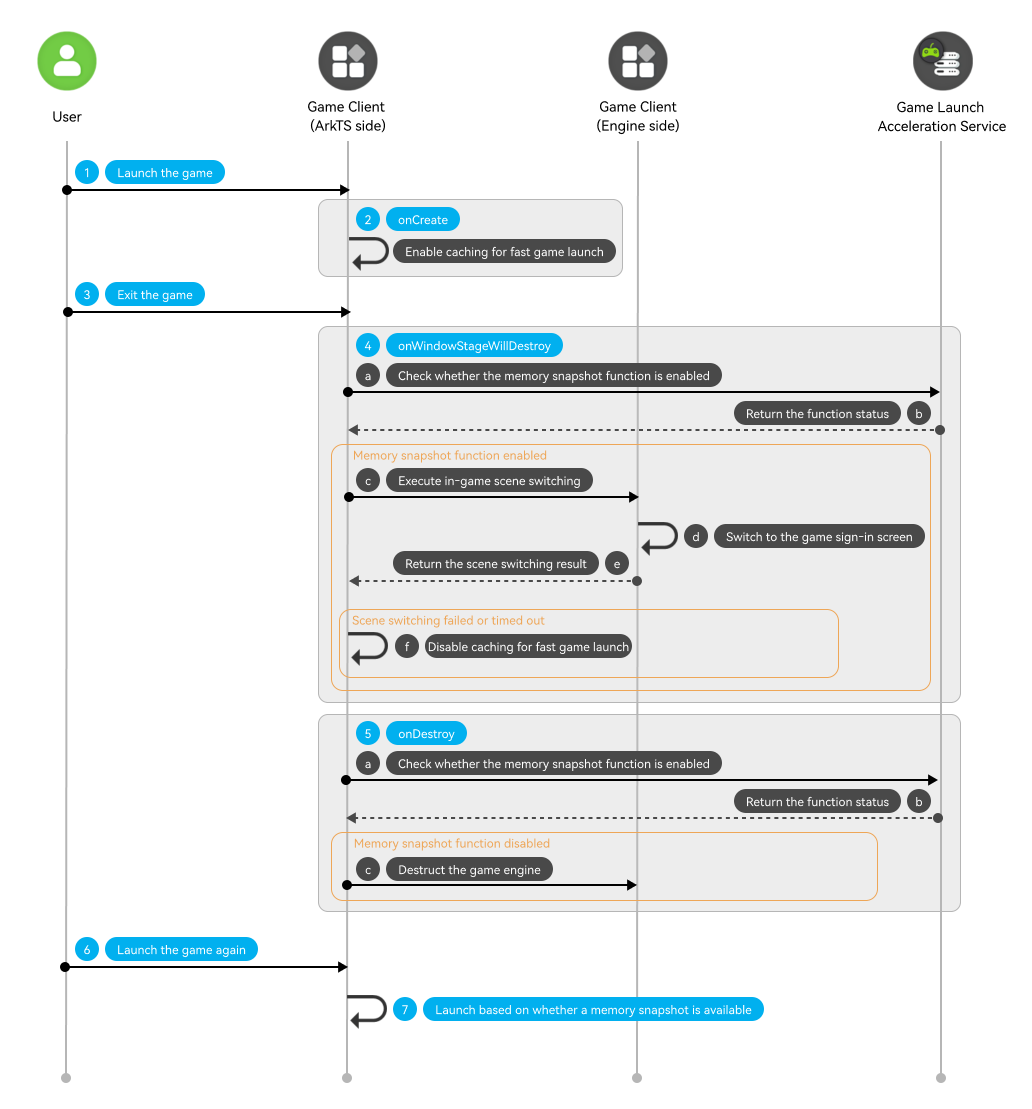
A user launches the game.
-
The game calls the setSupportedProcessCache API in the onCreate lifecycle to enable fast boot after cache.

Some device models do not support the setting for process resource caching. Therefore, you need to use a try-catch block to capture exceptions when calling setSupportedProcessCache.
-
The user swipes up to exit the game.
-
In the onWindowStageWillDestroy lifecycle, the game calls the isLaunchMirrorEnabled API to query the game launch acceleration service for whether the game memory snapshot function is enabled. If the function is enabled, the ArkTS side instructs the game engine to switch from the current scene to the sign-in screen. After the scene switching is complete, the game engine returns the result to the ArkTS side. If the scene switching fails or times out, the game calls the setSupportedProcessCache API to disable fast boot for the game.

You are advised to switch the scene to the game sign-in screen and set the switching timeout interval to 5 seconds.
-
In the onDestroy lifecycle, the game calls the isLaunchMirrorEnabled API again to confirm the memory snapshot state. If the function is disabled, the engine destruction process will be executed, and the game process will then exit immediately.
-
The user launches the game again.
-
The game determines the launch mode based on whether a memory snapshot exists. If a memory snapshot exists, the system swaps the game objects previously swapped out to the disk back into memory, implementing a fast game launch. If no memory snapshot exists, the game launches through a normal process.

According to the release review guidelines, you are advised to display a splash screen with a healthy gaming reminder before the memory snapshot screen during fast game launch.
Lifecycle
-
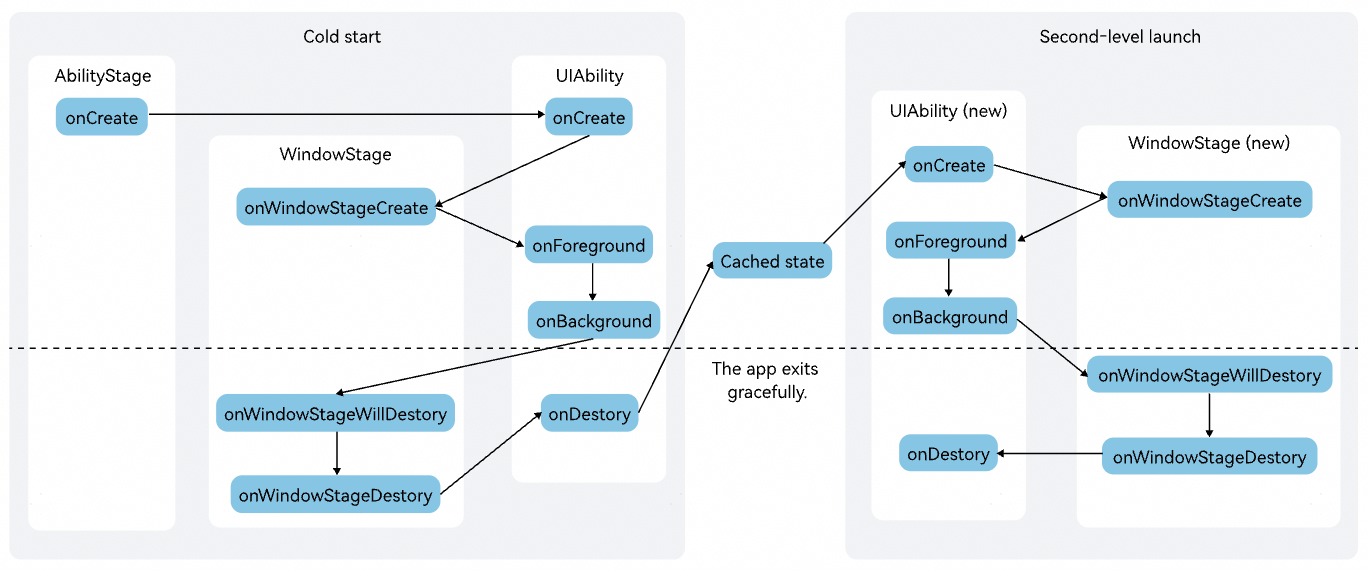
Cold start scenario
The game process creates the AbilityStage, UIAbility, and WindowStage objects in sequence to initialize the app and UI.
-
Second-level launch scenario
After the second-level game launch function is enabled, when a user swipes up to exit the game, the system destroys the WindowStage and UIAbility objects in sequence, and then deeply freezes the game process. To reduce memory usage, the system swaps out most objects in the game process to the disk and retains only a few essential objects in memory.
When a second-level game launch is triggered, the system swaps the previously swapped-out game objects back into memory, and the game process recreates the UIAbility and WindowStage objects, thereby implementing rapid recovery and launch.
API Description
For details about the APIs, see API Reference.
| API | Description |
|---|---|
| isLaunchMirrorEnabled(): boolean | Checks whether the memory snapshot function is enabled for the game. |
Development Procedure

This section describes the core process of second-level startup.
-
Import the Graphics Accelerate Kit module.
import { launchAcceleration } from '@kit.GraphicsAccelerateKit'; -
During startup, the game calls the setSupportedProcessCache API in the onCreate lifecycle to enable fast boot after cache.
if (canIUse("SystemCapability.GraphicsGame.LaunchAcceleration")) { // Compatibility: Use canIUse() to check whether the device supports the launch acceleration service. try { this.context.getApplicationContext().setSupportedProcessCache(true); } catch (error) { let code = (error as BusinessError).code; let message = (error as BusinessError).message; console.error(`setSupportedProcessCache fail, code: ${code}, msg: ${message}`); } } -
During the exit process, the game calls the isLaunchMirrorEnabled API to check whether the memory snapshot function is enabled. If the function is enabled, the game first switches to a specific scene in onWindowStageWillDestroy. You are advised to switch to the game sign-in screen and cancel the game engine destruction step in onDestroy. The system automatically creates a memory snapshot before the game exits, which takes about 4 seconds.

-
Since creating a memory snapshot takes 4 seconds, the second-level game launch function will not work if the user re-enters the game within this time window. Instead, the game will undergo a normal cold start.
-
If the user swipes up to exit again within 10 seconds after a memory snapshot–based game launch, the system's Design for Reliability (DFR) protection mechanism will disable acceleration for the next game launch to prevent potential issues.
-
The system determines whether to enable the memory snapshot function by considering the game's activity level, the number of existing memory snapshots, and the amount of memory swapped out to disk for the current day on the current device.
onWindowStageWillDestroy(): void { if (canIUse("SystemCapability.GraphicsGame.LaunchAcceleration")) { // Compatibility: Use canIUse() to check whether the device supports the launch acceleration service. let enable = launchAcceleration.isLaunchMirrorEnabled() if (enable) { // Code logic for scene switching. // ... } } } onDestroy(): void { if (canIUse("SystemCapability.GraphicsGame.LaunchAcceleration")) { // Compatibility: Use canIUse() to check whether the device supports the launch acceleration service. let enable = launchAcceleration.isLaunchMirrorEnabled() if (!enable) { // Destroy the game engine only if the game memory snapshot function is disabled. } } // ... } -