Use Cases
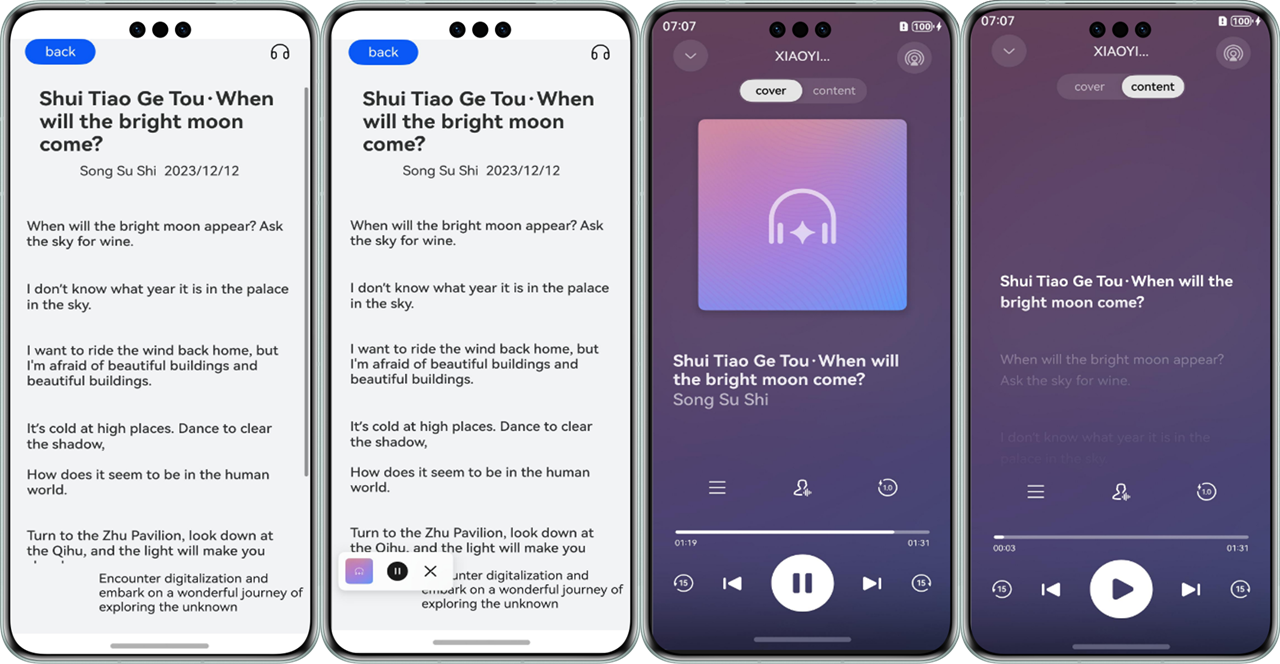
The read control TextReader is widely used when it is inconvenient for a user to view texts on the screen, and the control will read news and provide information for the user.
This section describes how to use the TextReader, as shown in the following figures.
API Description
The following lists only some main APIs called in the demo. For details about all APIs, please refer to the API Reference.
| API | Description |
|---|---|
| init(context: common.BaseContext, readParams: ReaderParam): Promise<void> | Initializes the TextReader. |
| start(readInfoList: ReadInfo[], articleId?: string): Promise<void> | Starts the TextReader. |
| on(type: string, callback: function): void | Registers callbacks for all events. For details about the event types, please refer to the API Reference. |
Development Procedure
-
Open the /src/main/ets/entryability/EntryAbility.ets file in the project root directory and add the WindowManager to the project.
import { WindowManager } from '@kit.SpeechKit'; import { ConfigurationConstant } from '@kit.AbilityKit'; -
(Optional) Add the setWindowStage method to onWindowStageCreate(windowStage: window.WindowStage) to set the window manager.
onWindowStageCreate(windowStage: window.WindowStage): void { console.info('Ability onWindowStageCreate'); WindowManager.setWindowStage(windowStage); windowStage.loadContent('pages/Index', (err, data) => { if (err.code) { console.error(`Failed to load the content. Code: ${err.code}, message: ${err.message}`); return; } console.info(`Succeeded in loading the content. Data: ${JSON.stringify(data)}.` ); }); } -
Set the color mode of the app through the onCreate() lifecycle method to ensure that the color mode of the control is the same as that of the app.
- To synchronize the app's color mode with the system, set the mode to COLOR_MODE_NOT_SET.
- To configure the color mode of the app, set the mode to COLOR_MODE_LIGHT (light) or COLOR_MODE_DARK (dark).
Synchronizing the color mode with the system is used as an example.
onCreate(): void { this.context.getApplicationContext().setColorMode(ConfigurationConstant.ColorMode.COLOR_MODE_NOT_SET); } -
Add the TextReader class and other related classes to the /src/main/ets/pages/Index.ets file in the project root directory.
import { TextReader, TextReaderIcon, ReadStateCode } from '@kit.SpeechKit'; -
Configure the page layout, add the receiver icon, and set the onClick event.
/** * Reading status */ @State readState: ReadStateCode = ReadStateCode.WAITING; build() { Column() { TextReaderIcon({ readState: this.readState }) .margin({ right: 20 }) .width(32) .height(32) .onClick(() => { // Register a listener for click events. // ... }) } } -
Initialize the TextReader.
// Display the button status on the current page. @State isInit: boolean = false; /** * Articles to be loaded */ @State readInfoList: TextReader.ReadInfo[] = []; @State selectedReadInfo: TextReader.ReadInfo = this.readInfoList[0]; async aboutToAppear() { // ... void this.init(); /** * Data loading */ let readInfoList: TextReader.ReadInfo[] = [{ id: '001', title: { text:'*Title of the text to read*', isClickable:true }, author:{ text:'*Author of the text to read*', isClickable:true }, date: { text:'2024/01/01', isClickable:false }, bodyInfo: '*Text body to read*' }]; this.readInfoList = readInfoList; this.selectedReadInfo = this.readInfoList[0]; // ... } /** * Initialization */ async init() { const readerParam: TextReader.ReaderParam = { isVoiceBrandVisible: true, businessBrandInfo: { panelName: 'AI Reader', panelIcon: $r('app.media.startIcon') } } try { let context: Context | undefined = this.getUIContext().getHostContext() if (context) { await TextReader.init(context, readerParam); this.isInit = true; this.setActionListener(); } } catch (err) { console.error(`TextReader failed to init. Code: ${err.code}, message: ${err.message}`); } } onStateChanged = (state: TextReader.ReadState) => { if (this.selectedReadInfo?.id === state.id) { this.readState = state.state; } else { this.readState = ReadStateCode.WAITING; } } // Set action listeners. setActionListener() { TextReader.on('stateChange', (state: TextReader.ReadState) => { this.onStateChanged(state); }); // When there is no more content on the list page, a loading failure message will be displayed. To get correct display information, you need to set a **requestMore** listener and call the **loadMore** function. TextReader.on('requestMore', () => { TextReader.loadMore([], true); }) } // Unregister the listeners. Call this method at an appropriate time based on your service needs. releaseActionListener() { TextReader.off('stateChange'); TextReader.off('requestMore'); } -
(Optional) Use the setActionListener method to set more listeners that trigger callbacks when users interact with the control. Unregister the listeners and release resources after the listening is complete.
// Set the listeners. setActionListener() { TextReader.on('setArticle', async (id: string) => { console.info(`setArticle ${id}`) }); TextReader.on('clickArticle', (id: string) => {console.info(`onClickArticle ${id}`) }); TextReader.on('clickAuthor', (id: string) => { console.info(`onClickAuthor ${id}`) }); TextReader.on('clickNotification', (id: string) => { console.info(`onClickNotification ${id}`) }); TextReader.on('showPanel', () => { console.info(`onShowPanel`) }); TextReader.on('hidePanel', () => { console.info(`onHidePanel`) }); // ... } // Unregister the listeners. releaseActionListener() { TextReader.off('setArticle'); TextReader.off('clickArticle'); TextReader.off('clickAuthor'); TextReader.off('clickNotification'); TextReader.off('showPanel'); TextReader.off('hidePanel'); // ... } -
Start the reading control.
build() { Column() { TextReaderIcon({ readState: this.readState }) // ... .onClick(() => { try { void TextReader.start(this.readInfoList, this.selectedReadInfo?.id); } catch (err) { console.error(`TextReader failed to start. Code: ${err.code}, message: ${err.message}`); } }) } } -
(Optional) To configure a long-duration task, add the ohos.permission.KEEP_BACKGROUND_RUNNING permission to the module.json5 configuration file, add the backgroundModes option, and set keepBackgroundRunning to true in readerParam to ensure that the background playback of the reading control is normal.
// module.json5 { "module": { // ... "requestPermissions": [ { "name": "ohos.permission.KEEP_BACKGROUND_RUNNING", "usedScene": { "abilities": [ "FormAbility" ], "when": "inuse" } }, ], "abilities": [ { // ... "backgroundModes": [ "audioPlayback" ], // ... } ] } } // Index.ets async init() { const readerParam: TextReader.ReaderParam = { // ... keepBackgroundRunning: true } } -
(Optional) To ensure normal timbre switching during reading control usage, add the ohos.permission.INTERNET and ohos.permission.GET_NETWORK_INFO permissions to the module.json5 configuration file.
{
  "module": {
    // ...
    "requestPermissions": [
      {
        "name": "ohos.permission.INTERNET",
        "reason": "$string:reason",
        "usedScene": {"abilities": []}
      },
      {
        "name": "ohos.permission.GET_NETWORK_INFO",
        "reason": "$string:reason",
        "usedScene": {"abilities": []}
      },
    ],
  }
} [h2]EntryAbility.ets
import { AbilityConstant, ConfigurationConstant, UIAbility, Want } from '@kit.AbilityKit';
import { window } from '@kit.ArkUI';
import { WindowManager } from '@kit.SpeechKit';
import { common } from '@kit.AbilityKit';
import { BusinessError } from '@kit.BasicServicesKit';

export default class EntryAbility extends UIAbility {
  onCreate(want: Want, launchParam: AbilityConstant.LaunchParam): void {
    try {
      this.context.getApplicationContext().setColorMode(ConfigurationConstant.ColorMode.COLOR_MODE_NOT_SET);
      let eventHub = this.context.eventHub;
      eventHub.on('onShowPanel', this.onShowPanel);
    } catch (err) {
      console.error(`error code: ${err.code}, message: ${err.message}.`);
    }
    console.info('Ability onCreate');
  }

  onDestroy(): void {
    console.info('Ability onDestroy');
  }

  onWindowStageCreate(windowStage: window.WindowStage): void {
    console.info('Ability onWindowStageCreate');
    WindowManager.setWindowStage(windowStage);

    windowStage.loadContent('pages/Index', (err, data) => {
      if (err.code) {
        console.error(`Failed to load the content. Code: ${err.code}, message: ${err.message}`);
        return;
      }
      console.info(`Succeeded in loading the content. Data: ${JSON.stringify(data)}.`);
    });
  }

  onWindowStageDestroy(): void {
    console.info('Ability onWindowStageDestroy');
  }

  onForeground(): void {
    console.info('Ability onForeground');
  }

  onBackground(): void {
    console.info('Ability onBackground');
  }

  onShowPanel = () => {
    let context: common.UIAbilityContext = this.context;
    let want: Want = {
      deviceId: '',
      bundleName: 'com.example.speechkit', // Replace the bundle name with the actual one.
      abilityName: 'SubAbility',
      parameters: {
        info: 'From EntryAbility onShowPanel'
      }
    };
    context?.startAbility(want).then(() => {
      console.info('Succeeded in starting ability');
    }).catch((e: BusinessError) => {
      console.error(`Failed to start ability. Code is ${e.code}, message is ${e.message}`);
    })
  };
}
[h2]Index.ets
import { TextReader, TextReaderIcon, ReadStateCode } from '@kit.SpeechKit';
import { deviceInfo } from '@kit.BasicServicesKit';

@Entry
@Component
struct Index {

  /**
   * Articles to be loaded
   */
  @State readInfoList: TextReader.ReadInfo[] = [];
  @State selectedReadInfo: TextReader.ReadInfo = this.readInfoList[0];

  /**
   * Reading status
   */
  @State readState: ReadStateCode = ReadStateCode.WAITING;

  /**
   * Display the button status on the current page.
   */
  @State isInit: boolean = false;

  async aboutToAppear() {
    /**
     * Data loading
     */
    let readInfoList: TextReader.ReadInfo[] = [{
      id: '001',
      title: {
        text:'*Title of the text to read*',
        isClickable: true
      },
      author: {
        text:'*Author of the text to read*',
        isClickable: true
      },
      date: {
        text: '2024/01/01',
        isClickable: false
      },
      bodyInfo: '*Text body to read*'
    }];
    this.readInfoList = readInfoList;
    this.selectedReadInfo = this.readInfoList[0];
    void await this.init();
    AppStorage.setOrCreate('isReadyToStart', false);
  }

  /**
   * Initialization
   */
  async init() {
    const readerParam: TextReader.ReaderParam = {
      isVoiceBrandVisible: true,
      businessBrandInfo: {
        panelName: 'AI Reader',
        panelIcon: $r('app.media.startIcon')
      }
    };
    try {
      let context: Context | undefined = this.getUIContext().getHostContext();
      if (context) {
        await TextReader.init(context, readerParam);
        this.isInit = true;
        this.setActionListener();
      }
    } catch (err) {
      console.error(`TextReader failed to init. Code: ${err.code}, message: ${err.message}`);
    }
  }

  // Set action listeners.
  setActionListener() {
    TextReader.on('stateChange', (state: TextReader.ReadState) => {
      this.onStateChanged(state);
    });

    TextReader.on('requestMore', () => {
      TextReader.loadMore([], true);
    });
  }

  onStateChanged = (state: TextReader.ReadState) => {
    if (this.selectedReadInfo?.id === state.id) {
      this.readState = state.state;
    } else {
      this.readState = ReadStateCode.WAITING;
    }
  };

  build() {
    Column() {
      TextReaderIcon({ readState: this.readState })
        .margin({ right: 20 })
        .width(32)
        .height(32)
        .onClick(() => {
          try {
            if (deviceInfo.deviceType === '2in1') {
              let context = this.getUIContext().getHostContext();
              context?.eventHub.emit('onShowPanel');
            }
            void TextReader.start(this.readInfoList, this.selectedReadInfo?.id);
            TextReader.showPanel();
          } catch (err) {
            console.error(`TextReader failed to start. Code: ${err.code}, message: ${err.message}`);
          }
        })
    }
    .height('100%')
  }
}
[h2]SubAbility.ets
import { TextReader, WindowManager } from '@kit.SpeechKit';
import { emitter } from '@kit.BasicServicesKit';
import { window } from '@kit.ArkUI';
import { AbilityConstant, UIAbility,Want } from '@kit.AbilityKit';


export default class SubAbility extends UIAbility {
  private link: SubscribedAbstractProperty<boolean> = AppStorage.link('isReadyToStart');

  onCreate(want: Want, launchParam: AbilityConstant.LaunchParam): void {
    let info = want?.parameters?.info;
  }

  onDestroy(): void {
    console.info('Ability onDestroy');
  }

  onWindowStageCreate(windowStage: window.WindowStage): void {
    // The main window is being created. Set the main page for this window.
    console.info('SubAbility onWindowStageCreate');

    WindowManager.setWindowStage(windowStage);
    let eventData: emitter.EventData = {
      data: {
        'state': 'publish'
      }
    };
    emitter.emit('onLoadSubAbility', eventData);
    this.link.set(true);
    console.debug(`onWindowStageCreate::isReadyToStart: ${AppStorage.get<boolean>('isReadyToStart')}`)
  }

  async onWindowStageDestroy(): Promise<void> {
    // The main window is being destroyed. Hide the panel and stop playback.
    console.info('Ability onWindowStageDestroy');
    TextReader.hidePanel();
    await TextReader.stop();
    this.link.set(false);
    console.debug(`onWindowStageDestroy::isReadyToStart: ${AppStorage.get<boolean>('isReadyToStart')}`)
  }

  onForeground(): void {

  }

  onBackground(): void {

  }
}
[h2]module.json5
{
  "module": {
    "name": "entry",
    "type": "entry",
    "description": "$string:module_desc",
    "mainElement": "EntryAbility",
    "deviceTypes": [
      "phone",
      "tablet",
      "2in1"
    ],
    "deliveryWithInstall": true,
    "installationFree": false,
    "pages": "$profile:main_pages",
    "abilities": [
      {
        "name": "EntryAbility",
        "srcEntry": "./ets/entryability/EntryAbility.ets",
        "description": "$string:EntryAbility_desc",
        "icon": "$media:layered_image",
        "label": "$string:EntryAbility_label",
        "startWindowIcon": "$media:startIcon",
        "startWindowBackground": "$color:start_window_background",
        "exported": true,
        "skills": [
          {
            "entities": [
              "entity.system.home"
            ],
            "actions": [
              "ohos.want.action.home"
            ]
          }
        ]
      },
      {
        "name": "SubAbility", // Name of the **UIAbility** component.
        "srcEntry": "./ets/entryability/SubAbility.ets", // Code path of the **UIAbility** component.
        "description": "$string:EntryAbility_desc", // Description of the UIAbility component.
        "icon": "$media:layered_image", // Icon of the UIAbility component.
        "label": "$string:EntryAbility_label", // Label of the UIAbility component.
        "startWindowIcon": "$media:startIcon", // Index of the icon resource file on the launch page of the UIAbility component.
        "startWindowBackground": "$color:start_window_background", // Index of the background color resource file on the launch page of the UIAbility component.
        "supportWindowMode": ['floating'],
        "maxWindowWidth": 1158,
        "minWindowWidth": 750,
        "maxWindowHeight": 772,
        "minWindowHeight": 500,
      }
    ],
    "requestPermissions": [
      {
           "name": "ohos.permission.KEEP_BACKGROUND_RUNNING",
           "usedScene": {
             "abilities": []}
      },
      {
        "name": "ohos.permission.INTERNET",
        "reason": "$string:reason",
        "usedScene": {"abilities": []}
      },
      {
        "name": "ohos.permission.GET_NETWORK_INFO",
        "reason": "$string:reason",
        "usedScene": {"abilities": []}
      },
    ]
  }
}
Adaptation Process for 2-in-1 Devices
In addition to the development steps in Development Procedure, you also need to perform the following steps for 2-in-1 devices. Otherwise, the playback panel cannot be shown.
-
Create an ability in /src/main/ets/entryability to host the main window of the 2-in-1 device and import related dependencies.
import { TextReader, WindowManager } from '@kit.SpeechKit'; import { commonEventManager } from '@kit.BasicServicesKit'; -
Declare a global status variable isReadyToStart in the new ability and manage the status variable using AppStorage.
private link: SubscribedAbstractProperty<boolean>= AppStorage.link('isReadyToStart'); -
Create a global status variable isReadyToStart in the aboutToAppear lifecycle method of Index.ets.
aboutToAppear() { AppStorage.setOrCreate('isReadyToStart', false); // ...Other configurations. } -
Configure WindowStage. For 5.1.1(19) and earlier versions, the getContext(this) API is used. For 6.0.0(20) and later versions, the following logic is used.
- In the onWindowStageCreate lifecycle method of the new ability, publish the onLoadSubAbility event.
- Set windowStage of the new ability using WindowManager.setWindowStage(windowStage).
- Set isReadyToStart to true in onWindowStageCreate.
onWindowStageCreate(windowStage: window.WindowStage): void { // The main window is being created. Set the main page for this window. WindowManager.setWindowStage(windowStage) let eventData: emitter.EventData = { data: { 'state': 'publish' } } emitter.emit('onLoadSubAbility', eventData); this.link.set(true); }; -
In the onWindowStageDestroy lifecycle method of the new ability, set isReadyToStart to false. Additionally, hide the panel and stop the playback.
async onWindowStageDestroy(): Promise<void> { try { TextReader.hidePanel(); await TextReader.stop(); this.link.set(false); }catch (e) { console.error(`onWindowStageDestroy fail , msg: ${e}`) } } -
In entryability, set the onShowPanel callback in onCreate using eventHub to create a new ability. In the onShowPanel callback, construct want first, and then create a new ability through the context.startAbility API.
import { AbilityConstant, Want } from '@kit.AbilityKit'; import { common } from '@kit.AbilityKit'; import { BusinessError } from '@kit.BasicServicesKit'; onCreate(want: Want, launchParam: AbilityConstant.LaunchParam): void { // ...Other configurations. let eventHub = this.context.eventHub; eventHub.on('onShowPanel', this.onShowPanel); } onShowPanel = () => { let context: common.UIAbilityContext = this.context; let want: Want = { deviceId: '', bundleName: 'com.example.speechkit', // Replace the bundle name with the actual one. abilityName: 'SubAbility', parameters: { info: 'From EntryAbility onShowPanel' } }; context?.startAbility(want).then(() => { console.info('Succeeded in starting ability'); }).catch((e: BusinessError) => { console.error(`Failed to start ability. Code is ${e.code}, message is ${e.message}`); }) }; -
Before calling start, check the device type. If the device is a 2-in-1 device, emit the onShowPanel event to construct an ability.
import { deviceInfo } from '@kit.BasicServicesKit'; if (deviceInfo.deviceType === '2in1') { let context = this.getUIContext().getHostContext(); context?.eventHub.emit('onShowPanel'); } try { TextReader.showPanel(); } catch (err) { console.error(`error code: ${err.code}, message: ${err.message}.`) } -
Add the ability configurations to module.json5. Set max and min values to the same to fix the window size.
{
  "name": "SubAbility", // Name of the **UIAbility** component.
  "srcEntry": "./ets/entryability/SubAbility.ets", // Code path of the **UIAbility** component.
  "description": "$string:SubAbility_desc", // Description of the **UIAbility** component.
  "icon": "$media:icon", // Icon of the UIAbility component.
  "label": "$string:EntryAbility_label", // Label of the UIAbility component.
  "startWindowIcon": "$media:icon", // Index of the icon resource file on the launch page of the UIAbility component.
  "startWindowBackground": "$color:start_window_background", // Index of the background color resource file on the launch page of the UIAbility component.
  "supportWindowMode": ['floating'], // The window supports display in floating mode.
  "maxWindowWidth": 1158,  // Maximum window width.
  "minWindowWidth": 1158,  // Minimum window width.
  "maxWindowHeight": 772,  // Maximum window height.
  "minWindowHeight": 772, // Minimum window height.
 }