How do I troubleshoot the issue that an application often crashes during running
- Specific issue: During development with Node-API, the application crashes with high probability. A cpp crash stack appears, with the top of the stack being the system library libark_jsruntime.so, and the first few frames of the crash stack also containing libace_napi.z.so. How to locate and resolve this issue?
The reproduction probability is high, and each crash stack differs slightly. However, the commonality is that the top of the crash stack is the system library libark_jsruntime.so or libace_napi.z.so.
- The crash information is as follows:
Reason:Signal:SIGSEGV(SEGV_MAPERR)@0x00000136 probably caused by NULL pointer dereference
Fault thread info:
Tid:15894, Name:e.myapplication
#00 pc 002b8dd4 /system/lib/platformsdk/libark_jsruntime.so
#01 pc 0024d3e1 /system/lib/platformsdk/libark_jsruntime.so
#02 pc 0024d0d9 /system/lib/platformsdk/libark_jsruntime.so
#03 pc 002eac5d /system/lib/platformsdk/libark_jsruntime.so
#04 pc 00428d0f /system/lib/platformsdk/libark_jsruntime.so
- Locate the issue:
If a high-probability crash occurs when using Node-API and the top of the crash stack is the system library libark_jsruntime.so, it is generally caused by improper use of Node-API APIs.
- The following approach to locating the issue can be used as a reference:
Check whether there is a thread safety issue (high probability).
DevEco Studio provides a related switch. After enabling the switch, recompile, package, and run the application, and check whether the crash stack matches the description in the following document. If so, there is a thread safety issue when using Node-API.
DevEco Studio switch:
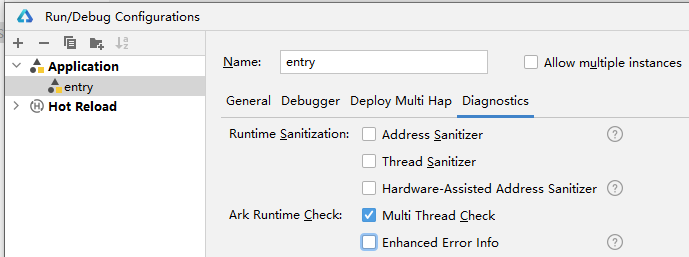
Invalid input parameters when calling Node-API interfaces.
- In this case, the .so file on the crash stack is usually shallow. The .so file calls a specific Node-API interface, such as napi_call_function, and then Node-API calls the libark_jsruntime .so file, where the crash occurs directly.
The following is an example of the stack structure.
#01 /system/lib/platformsdk/libark_jsruntime.so
#02 /system/lib/platformsdk/libark_jsruntime.so
#03 /system/lib/platformsdk/libace_napi.z.so(napi_set_named_property+170) -- The Node-API .so file. This location shows the specific API that reports the call error.
#04 /data/storage/el1/bundle/libs/arm/libentry.so -- Your .so file.
- If the issue is caused by input parameters, the .so file is usually at a shallow position on the crash stack (it does not reach a position far from the top of the stack, such as #10). However, you can still troubleshoot by following this approach.
- Troubleshooting approach:
a. Check whether any napi_value is uninitialized or not yet assigned successfully, and is directly passed to an interface as an invalid input parameter.
b. Check whether the corresponding section can be found in this list of error-prone APIs.
How to handle thread safety issues when the ArkTS method is concurrently called in the thread pool
- Consider the following scenario: there is a class method in ArkTS, and a napi_ref reference has been created for this method. You now want to call the ArkTS method concurrently in a C++ thread pool. The following questions arise:
- Can the ArkTS class method cached by napi_ref be called in a thread pool created in C++?
- How can thread safety be ensured when calling back to ArkTS?
For issue 1:
You can only throw the ArkTS task back to the ArkTS thread from the C++ thread. This is not a synchronous call, but an action of throwing a task.
Note that the actual execution of this ArkTS method can only be completed on the ArkTS thread. That is, the method can only run on the corresponding ArkTS thread.
For question 2:
As mentioned above, C++ threads throw tasks to the ArkTS thread, which then executes the ArkTS method. For thread safety, refer to Thread Safety Development Using Node-API.
In addition, during development, you can enable Ark multithreading detection, which can intercept multithreading safety issues.
What should I do if the content of napi_value changes
Description: During program initialization, env and a method (napi_value) are saved. When this method was first created, it was checked, and napi_typeof returned napi_function, which met expectations. After the program has been running for a while, when the saved env and method are used again to invoke it, the method no longer passes the check—it is no longer a napi_function. Both saving and usage occur on the same main thread. How can this be resolved?
Troubleshooting suggestions:
Confirm whether the napi_value is still being used after going out of scope, which causes a use-after-scope issue.
You are advised to use napi_ref when saving, rather than saving the napi_value directly.
Is there a method to obtain the latest napi_env
- Specific description: The native layer needs to call ArkTS methods at a deep call level and cannot pass napi_env layer by layer. Caching it directly causes crashes.
#00 /system/lib/platformsdk/libark_jsruntime.so(panda::JSValueRef::IsFunction)
#01 /system/lib/platformsdk/libace_napi.z.so(napi_call_function)
#02 /data/storage/el1/bundle/libs/arm/libentry.so
...
- Answer:
About saving napi_env:
Node-API does not provide the capability to obtain napi_env directly; it can only be passed through layer-by-layer function calls. Saving napi_env is generally not recommended for two reasons:
First, if the exit of napi_env is not perceived by the user, a use-after-free issue can easily occur.
Second, napi_env is strongly bound to the ArkTS thread. If napi_env is used on another ArkTS thread, thread safety issues arise.
Reference:
The key to this issue is as follows:
If you must save env, you need to perceive whether env has exited. You can use the callback of napi_add_env_cleanup_hook to perceive this. At the same time, enable the multi-thread detection switch during development to avoid thread safety issues.
Reference:
For the crash itself, it may occur when calling napi_call_function because the func parameter is invalid. You can check whether the napi_value has been cached. In this case, the napi_value may have been cached and then become invalid after going out of the scope of the napi_handle_scope.
If similar logic exists, use napi_ref for storage, which can extend the lifecycle.
Reference:
What should I do if napi_add_env_cleanup_hook is called incorrectly
- Specific issue: How to handle call errors of napi_add_env_cleanup_hook/napi_remove_env_cleanup_hook?
The call errors of napi_add_env_cleanup_hook and napi_remove_env_cleanup_hook are usually caused by improper API usage. The common causes and characteristic logs are as follows.
- The two APIs are called outside the ArkTS thread where env resides, causing a thread safety issue. The characteristic error log is current napi interface cannot run in multi-thread.
- When calling napi_add_env_cleanup_hook, the same args is reused to register different callback functions, causing subsequent registrations to fail. The third parameter args of this API serves as the key in the internal map. When a callback with the same args is registered repeatedly, subsequent registrations fail, and only the first registration succeeds. A registration failure may cause subsequent service functions to behave abnormally or crash. The characteristic error log is AddCleanupHook Failed.
- When calling napi_remove_env_cleanup_hook, an attempt is made to remove a callback function through an args that does not exist (or has already been removed). The API call fails, and the characteristic error log RemoveCleanupHook Failed appears.
Example:
void AddEnvCleanupHook(napi_env env)
{
    napi_add_env_cleanup_hook(env, [](void* args) -> void {
        // cleanup function callback
    }, env); // env is a common piece of data. Even if it is not registered repeatedly here, it may have been registered in advance elsewhere, causing the registration here to fail.
}

static napi_value Test(napi_env env, napi_callback_info info)
{
    // First registration.
    AddEnvCleanupHook(env);
    // Second duplicate registration.
    AddEnvCleanupHook(env);
    return nullptr;
} - Fix suggestions:
- For multi-thread safety issues, ensure that the thread calling the API is on the ArkTS thread where env resides.
- For registration failure issues, the function to be registered must be specified by the caller. Ensure that the key value (that is, the third input parameter of napi_add_env_cleanup_hook) is unique.
- For deletion failure issues, ensure that args has been registered and has not been deleted.
Reference: