Use Cases
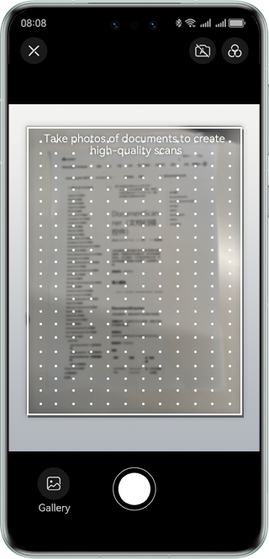
The document scanning control provides the service of taking photos of documents and converting them into high-definition scanned copies. Users can capture document photos, and these photos can be automatically cropped, optimized, and then saved or shared as images or PDF files. Users can also use this service to identify tables from photos just taken or in the gallery and generate table documents.
It can be widely used in education and office scenarios. Users can scan documents, bills, class presentations, and books, generate images or PDF files, and then send or archive them.
Figure 1 Scanning documents
Constraints
-
Supported languages: simplified Chinese and English
-
Currently, document scanning supports only phones and tablets.
-
This control should not be blocked by another component or window.
API Description
The following lists only some main APIs called in the demo. For details about all APIs, please refer to the API Reference.
| API | Description |
|---|---|
| DocumentScanner | Document scanning control. |
| DocumentScannerResultCallback | Document scanning result callback. |
Development Procedure
-
Add classes related to the document scanning control to a project.
import { DocType, DocumentScanner, DocumentScannerConfig, SaveOption, FilterId, ShootingMode, DocumentScannerController } from '@kit.VisionKit'; import { hilog } from '@kit.PerformanceAnalysisKit'; -
Some devices do not support the table extraction function of the document scanning control. Before using this function, you are advised to call the isSheetDetectionSupported API to check whether the current device supports this function.
let documentScannerController: DocumentScannerController = new DocumentScannerController(); let isSheetSupported = documentScannerController.isSheetDetectionSupported(); hilog.info(0x0001, TAG, `isSheetSupported: ${isSheetSupported}`); -
Configure the layout, set the attributes of the document scanning control based on the service scenario, and obtain the returned document image URI list.
const TAG = 'DocumentScanner';

@Entry
@Component
struct Index {
  private docScanConfig = new DocumentScannerConfig();

  aboutToAppear() {
    let documentScannerController: DocumentScannerController = new DocumentScannerController();
    let isSheetSupported = documentScannerController.isSheetDetectionSupported();
    if (isSheetSupported) {
      this.docScanConfig.supportType = [DocType.DOC, DocType.SHEET];
    } else {
      this.docScanConfig.supportType = [DocType.DOC];
    }
    this.docScanConfig.isGallerySupported = true;
    this.docScanConfig.editTabs = [];
    this.docScanConfig.maxShotCount = 3;
    this.docScanConfig.defaultFilterId = FilterId.ORIGINAL;
    this.docScanConfig.defaultShootingMode = ShootingMode.MANUAL;
    this.docScanConfig.isShareable = true;
    this.docScanConfig.originalUris = [];
  }

  build() {
    Column() {
      DocumentScanner({
        scannerConfig: this.docScanConfig,
        onResult: (code: number, saveType: SaveOption, uris: string[]) => {
          hilog.info(0x0001, TAG, `result code: ${code}, save: ${saveType}`);
          uris.forEach(uriString => {
            hilog.info(0x0001, TAG, `uri: ${uriString}`);
          })
        }
      }).size({ width: '100%', height: '100%' })
    }
    .height('100%')
    .width('100%')
  }
}
[h2]Index.ets
// The development example of document scanning is implemented on two screens. One is the entry screen, and the other is the implementation screen.
// The entry screen needs to introduce the implementation screen. In the following example, the implementation screen file name is DocDemoPage.
import { DocDemoPage } from './DocDemoPage';

@Entry
@Component
struct MainPage {
  @Provide('pathStack') pathStack: NavPathStack = new NavPathStack();

  @Builder
  PageMap(name: string) {
    if (name === 'documentScanner') {
      DocDemoPage()
    }
  }

  // Button on the document scanning entry screen.
  build() {
    Navigation(this.pathStack) {
      Button('DocumentScanner', { stateEffect: true, type: ButtonType.Capsule })
        .width('50%')
        .height(40)
        .onClick(() => {
          this.pathStack.pushPath({ name: 'documentScanner' });
        })
    }.title('Document scanning control demo').navDestination(this.PageMap)
    .mode(NavigationMode.Stack)
  }
}
[h2]DocDemoPage.ets
// Document scanning implementation screen, and its file name is DocDemoPage. This screen needs to be introduced by the entry screen.
import {
  DocType,
  DocumentScanner,
  DocumentScannerConfig,
  SaveOption,
  FilterId,
  ShootingMode,
  DocumentScannerController
} from '@kit.VisionKit';
import { hilog } from '@kit.PerformanceAnalysisKit';

const TAG: string = 'DocDemoPage';

// Document scanning screen, which is used to load uiExtensionAbility.
@Component
export struct DocDemoPage {
  @State docImageUris: string[] = [];
  @Consume('pathStack') pathStack: NavPathStack;
  private docScanConfig = new DocumentScannerConfig();

  aboutToAppear() {
    let documentScannerController: DocumentScannerController = new DocumentScannerController();
    let isSheetSupported = documentScannerController.isSheetDetectionSupported();
    if (isSheetSupported) {
      this.docScanConfig.supportType = [DocType.DOC, DocType.SHEET];
    } else {
      this.docScanConfig.supportType = [DocType.DOC];
    }
    this.docScanConfig.isGallerySupported = true;
    this.docScanConfig.editTabs = [];
    this.docScanConfig.maxShotCount = 3;
    this.docScanConfig.defaultFilterId = FilterId.ORIGINAL;
    this.docScanConfig.defaultShootingMode = ShootingMode.MANUAL;
    this.docScanConfig.isShareable = true;
    this.docScanConfig.originalUris = [];
  }

  build() {
    NavDestination() {
      Stack({ alignContent: Alignment.Top }) {
      // Display the document scanning result.
        List() {
          ForEach(this.docImageUris, (uri: string) => {
            ListItem() {
              Image(uri)
                .objectFit(ImageFit.Contain)
                .width(100)
                .height(100)
            }
          })
        }
        .listDirection(Axis.Vertical)
        .alignListItem(ListItemAlign.Center)
        .margin({
          top: 50
        })
        .width('80%')
        .height('80%')

        // Scan documents.
        DocumentScanner({
          scannerConfig: this.docScanConfig,
          onResult: (code: number, saveType: SaveOption, uris: string[]) => {
            hilog.info(0x0001, TAG, `result code: ${code}, save: ${saveType}`);
            if (code === -1) {
              this.pathStack.pop();
            }
            uris.forEach(uriString => {
              hilog.info(0x0001, TAG, `uri: ${uriString}`);
            })
            this.docImageUris = uris;
          }
        })
          .size({ width: '100%', height: '100%' })
      }
      .width('100%')
      .height('100%')
    }
    .width('100%')
    .height('100%')
    .hideTitleBar(true)
  }
}