Overview
Browser extensions can communicate with applications to access services for implementing the application's capabilities. For example, in a password manager, the application stores and encrypts passwords, allowing the browser extension to automatically fill in form fields on web pages.
Since API version 21, you can use the WebNativeMessagingExtensionAbility component in applications to provide backend services for browser extensions.
The browser extension connects to WebNativeMessagingExtensionAbility through the WebExtensions runtime API. The two parties communicate with each other by calling the I/O API after sharing the pipe file descriptor.
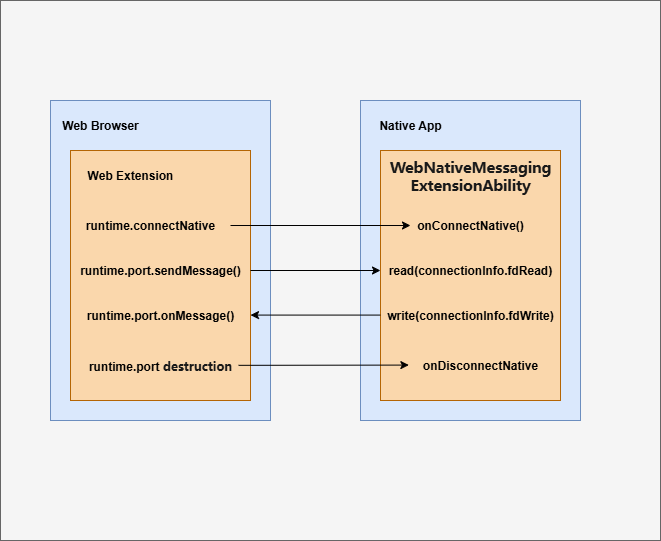

In this topic, the connection established by a browser extension using the WebExtension API runtime.connectNative is referred to as a NativeMessaging connection.
NativeMessaging is provided for both application developers and browser application developers. They need to understand the operation mechanism of WebNativeMessagingExtensionAbility, but they focus on different scenarios and APIs. Application developers use the WebNativeMessagingExtensionAbility component to develop related services. Browser developers use the WebNativeMessagingExtensionManager APIs to establish the NativeMessaging connection.
This topic outlines the key considerations for different types of developers.
[h2]Device Constraints
For API versions 21 to 23, WebNativeMessagingExtensionAbility is supported only on 2-in-1 devices. Starting from API version 24, tablet support is added.
[h2]Specifications
-
The WebNativeMessagingExtensionAbility component does not require permissions and can be integrated into any third-party application. However, the browser that starts the component must apply for the ACL permission (ohos.permission.WEB_NATIVE_MESSAGING), which is available only to browser applications.
-
APIs provided by Window cannot be called in the WebNativeMessagingExtensionAbility.
-
WebNativeMessagingExtensionAbility can only start the UIAbility of the current app. It cannot start the UIAbility of other apps or other types of ExtensionAbility.
-
WebNativeMessagingExtensionAbility is used only for communication between browser extensions and applications. It does not support other scenarios such as backend services.
-
The app bundle name can contain only lowercase letters, digits, underscores (_), and periods (.).
[h2]Overall Process
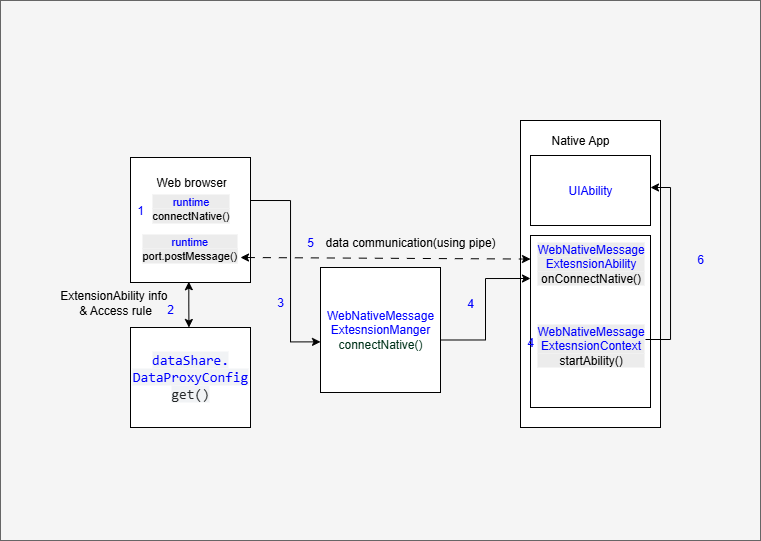
- Process:
- The browser extension calls the runtime.connectNative API to pass the application's bundle name to create a NativeMessaging connection.
- The browser application calls the dataShare API to obtain the application's configuration information, including the name of the WebNativeMessagingExtension and the access restriction rule (whether to allow an extension to access the WebNativeMessagingExtension).
- The browser application creates two pipes as a bidirectional channel, calls the WebNativeMessagingExtensionManager.connectNative API, starts the WebNativeMessagingExtension, creates a NativeMessaging connection, and transfers the pipe's file descriptors as parameters.
- The application's WebNativeMessagingExtensionAbility is started, the WebNativeMessagingExtensionAbility.onConnectNative lifecycle callback is triggered, and the pipe's file descriptor is obtained.
- The application listens for the read-end file descriptor, obtains the message instructions sent by the browser extension, and sends the message instructions back through the write-end file descriptor.
- The application uses WebNativeMessagingExtensionContext.startAbility to start its UIAbility page.

WebNativeMessagingExtensionAbility is a single-instance independent process. If the connectNative API is called multiple times, only one instance is started, and the onConnectNative callback is triggered multiple times. Therefore, the application needs to manage multiple sessions.
[h2]Lifecycle Management of WebNativeMessagingExtensionAbility
- onConnectNative: Triggered when the browser extension calls runtime.connectNative. If WebNativeMessagingExtensionAbility is not running, calling runtime.connectNative will start WebNativeMessagingExtensionAbility and trigger this callback.
- onDisconnectNative: Triggered once when the browser extension destroys runtime.port. Each disconnection of a NativeMessaging connection triggers this callback once. When all connections are disconnected, the onDestroy callback is triggered and the WebNativeMessagingExtensionAbility is then closed.
- onDestroy: Triggered before the WebNativeMessagingExtensionAbility is destroyed. If all NativeMessaging connections are disconnected, the WebNativeMessagingExtensionAbility will be destroyed.
- stopNativeConnection: Triggered to proactively disconnect a NativeMessaging connection. If the last connection is disconnected, the WebNativeMessagingExtensionAbility will be destroyed.
- terminateSelf: Triggered to proactively exit. If this callback is invoked, all NativeMessaging connections will be destroyed.
[h2]Message Format and Restrictions
Format of NativeMessaging connections: Each message is serialized using JSON, encoded in UTF-8, and prefixed with a 32-bit message length (in native byte order). To protect the browser from being affected by abnormal applications, the maximum size of a single message from WebNativeMessagingExtensionAbility is 1 MB. The maximum size of a message sent to the WebNativeMessagingExtensionAbility is 64 MB.
[h2]Implementing the connectNative Extension (for Application Developers)

You need to configure manifest.json and background.js based on the W3C standard to implement communication.
chrome.runtime.connectNative or chrome.runtime.sendNativeMessage can be used for connection.
Configure the plugin content, send ping strings, and receive pong responses. The sample code is as follows:
Configure the manifest.json file.
{
  "name": "com.example.myapplication",
  "version": "1.0.1",
  "description": "Launch APP",
  "manifest_version": 3,
  "permissions": ["nativeMessaging", "tabs", "scripting"], // Select based on whether it is needed in the actual scenario.
  "host_permissions": ["http://*/*", "https://*/*", "ftp://*/*", "file://*/*"], // Select based on the actual scenario.
  "background": {
    "service_worker": "background.js" // Used to run the extension runtime command.
  },
  "content_scripts": [
    {
      "matches": ["http://*/*", "https://*/*", "ftp://*/*", "file://*/*"], // Select based on the actual scenario.
      "js": ["main.js"] // Used to run the extension JS command.
    }
  ],
  "action": {
    "default_popup": "index.html" // Displays the extension page.
  }
}
Implement the main.js file.
// Trigger the calling from HTML.
function sendMessageToNative() {
  var message = "ping"; // Send a ping packet.
  chrome.runtime.sendMessage({
    type: "sendMessage",
    message: message
  }, function (response) {});
}
Implement the background.js file.
-
Use chrome.runtime.connectNative for connection.
var port = null; // Listen for messages from main.js. chrome.runtime.onMessage.addListener( function (request, sender, sendResponse) { if (request.type == "sendMessage") { if (port == null) { connectToNativeHost(); } port.postMessage(request.message); // Send the message to the app. } return true; // Keep the message channel open. }); function connectToNativeHost() { var bundleName = "com.example.app"; // The bundleName of the app corresponding to the extension. port = chrome.runtime.connectNative(bundleName); // Obtain the communication port based on the bundleName. port.onMessage.addListener(onNativeMessage); // Listen for messages from the native app. port.onDisconnect.addListener(onDisconnected); // Listen for disconnection. } // Triggered when a message is received from the native program. async function onNativeMessage(message) { console.info('Message received from the local app:' + JSON.stringify(message)); // The pong in the example. } // Triggered when the connection is disconnected. function onDisconnected() { port = null; } -
Use chrome.runtime.sendNativeMessage for connection.
function sendNativeMessage() {
  var bundleName = "com.example.app"; // bundleName of the app corresponding to the plugin
  var nativeMessage = "ping"; // Content that the plugin sends to the app
  chrome.runtime.sendNativeMessage(
    bundleName,
    {message: nativeMessage},
    function(response) {
    // Disconnect the connection after receiving a response from the application.
    console.info("sendNativeMessage received the application response:", JSON.stringify(response));
    }
  )
}
[h2]Implementing the WebNativeMessagingExtensionAbility (for Application Developers)
To manually create a WebNativeMessagingExtensionAbility in the DevEco Studio project, perform the following steps:
-
In the ets directory of a module in the project, right-click and choose New > Directory to create a directory named MyWebNativeMessageExtAbility.
-
Right-click the MyWebNativeMessageExtAbility directory, and choose New > ArkTS File to create a file named MyWebNativeMessageExtAbility.ets.
The directory structure is as follows:
 ├── ets
 │ ├── MyWebNativeMessageExtAbility
 │ │   ├── MyWebNativeMessageExtAbility.ets
 └
-
In the MyWebNativeMessageExtAbility.ets file, import the WebNativeMessagingExtensionAbility module. Customize a class that inherits from WebNativeMessagingExtensionAbility and implement the lifecycle callbacks.
import { WebNativeMessagingExtensionAbility, ConnectionInfo } from '@kit.ArkWeb'; import { hilog } from '@kit.PerformanceAnalysisKit'; import {buffer, util} from '@kit.ArkTS'; import { fileIo } from '@kit.CoreFileKit'; const TAG: string = '[MyWebNativeMessageExtAbility]'; const DOMAIN_NUMBER: number = 0xFF00; export default class MyWebNativeMessageExtAbility extends WebNativeMessagingExtensionAbility { // Read the message sent by the extension and reply. async ReadAsync(fdRead:number, fdWrite:number) : Promise<void> { try { // read let arrayBuffer = new ArrayBuffer(1024); let readLen = await fileIo.read(fdRead, arrayBuffer); if (readLen <= 4) { hilog.error(DOMAIN_NUMBER, TAG, 'read pipe length failed'); return; } hilog.info(DOMAIN_NUMBER, TAG, 'read pipe %{public}s', buffer.from(arrayBuffer, 4, readLen - 4).toString()); // write let strResponse : string = "pong"; const encoder = new util.TextEncoder("utf-8"); const strBytes = encoder.encodeInto(strResponse); let bufferLen = strBytes.length; const lenBytes = new Uint8Array(4); lenBytes[0] = (bufferLen >> 0) & 0xFF; lenBytes[1] = (bufferLen >> 8) & 0xFF; lenBytes[2] = (bufferLen >> 16) & 0xFF; lenBytes[3] = (bufferLen >> 24) & 0xFF; const writeBuffer = new Uint8Array(4 + bufferLen); writeBuffer.set(lenBytes, 0); writeBuffer.set(strBytes, 4); let writeLen = await fileIo.write(fdWrite, writeBuffer.buffer); hilog.info(DOMAIN_NUMBER, TAG, 'write pipe length %{public}d', writeLen); } catch (err) { hilog.error(DOMAIN_NUMBER, TAG, 'fileIo failed, error code: ' + err.code + " message: " + err.message); } } onConnectNative(info: ConnectionInfo): void { hilog.info(DOMAIN_NUMBER, TAG, `onConnectNative, connectionId ${info.connectionId} caller bundle: ${info.bundleName}, extension origin: ${info.extensionOrigin}, pipe Read: ${info.fdRead}, pipe write ${info.fdWrite} `); this.ReadAsync(info.fdRead, info.fdWrite) } onDisconnectNative(info: ConnectionInfo): void { hilog.info(DOMAIN_NUMBER, TAG, `onDisconnectNative, connectionId: ${info.connectionId}`); } onDestroy(): void { hilog.info(DOMAIN_NUMBER, TAG, 'onDestroy'); } }; -
Register the WebNativeMessagingExtensionAbility component in the module.json5 file of the module in the project. Set type to "webNativeMessaging" and srcEntry to the code path of the component.
{ "module": { // ... "extensionAbilities": [ { "name": "MyWebNativeMessageExtAbility", "description": "webNativeMessaging", "type": "webNativeMessaging", "exported": true, "srcEntry": "./ets/MyWebNativeMessageExtAbility/MyWebNativeMessageExtAbility.ets" } ] } } -
Configure crossAppSharedConfig in the module.json5 file of the module of the project. The shared configuration file must be stored in the resources/base/profile directory of the project and referenced using the $ symbol.
{ "module": { "crossAppSharedConfig": "$profile:shared_config" } } -
Add the extension configuration to shared_config.json.
{
  "crossAppSharedConfig": [
    // ...
    {
      // Fixed URI format: datashareproxy://[Bundle name]/browserNativeMessagingHosts. The browser application obtains the value from the URI, that is, the extension configuration.
      "uri": "datashareproxy://com.example.app/browserNativeMessagingHosts",
      // Extension configuration. For details about the format, see "Storing the Extension Configuration of Native Applications in dataShare". Be sure to use escape characters.
      "value": "{\"name\": \"com.example.myapplication\",\"description\": \"Send message to native app.\",\"abilityName\": \"MyWebNativeMessageExtAbility\", \"allowed_origins\":[\"chrome-extension://knldjmfmopnpolahpmmgbagdohdnhkik/\"]}",
      "allowList": [
        // appIdentifier of the application that is allowed to access. Add the appIdentifier of the browser.
        "1234567890123456789"
      ]
    }
  ]
}
[h2]Implementing the WebNativeMessagingExtensionAbility (for Browser Developers)
The browser is responsible for implementing the extension runtime API, starting the WebNativeMessagingExtensionAbility, and establishing and managing NativeMessaging connections. The following permission is required: ohos.permission.WEB_NATIVE_MESSAGING.
-
When receiving a NativeMessaging connection creation request, the browser obtains the extension configuration of the target application through the get20 API, reads the name of WebNativeMessagingExtensionAbility and the list of extensions that can be accessed, and checks whether the access is allowed.
import { dataShare } from '@kit.ArkData'; interface ExtensionConfig { abilityName:string; allowed_origins:string[]; } async function getManifestData(bundleName:string, connectExtensionOrigin:string) { try { // Call the dataShare API to obtain the extension configuration. const dsProxyHelper = await dataShare.createDataProxyHandle(); const urisToGet = [`datashareproxy://${bundleName}/browserNativeMessagingHosts`]; const config : dataShare.DataProxyConfig = { type: dataShare.DataProxyType.SHARED_CONFIG, }; const results = await dsProxyHelper.get(urisToGet, config); let foundValid = false; for (let i = 0; i < results.length; i++) { try { const result = results[i]; const json = result.value; if (typeof json !== "string") { continue; } let jsonStr:string = json as string; let info:ExtensionConfig = JSON.parse(jsonStr); if (info.abilityName) { console.info('Native message json info is ok'); if (!Array.isArray(info.allowed_origins)) { info.allowed_origins = [info.allowed_origins]; } if (!info.allowed_origins.includes(connectExtensionOrigin)) { console.error('Origin not allowed, continue searching'); continue; } foundValid = true; break; } } catch (error) { console.error('NativeMessage JSON parse error:', error); } } if (!foundValid) { console.error('NativeMessage JSON no valid manifest found'); } else { console.info('NativeMessage allowed_origins match ok'); } } catch (error) { console.error('Error getting config:', error); } } -
Call webNativeMessagingExtensionManager.connectNative to create a NativeMessaging connection. If the WebNativeMessagingExtensionAbility is not yet running, this API starts the ExtensionAbility and triggers it.
import { UIAbility, Want, common } from '@kit.AbilityKit'; import { webNativeMessagingExtensionManager } from '@kit.ArkWeb' class ConnectionCallback implements webNativeMessagingExtensionManager.WebExtensionConnectionCallback { onConnect(connection:webNativeMessagingExtensionManager.ConnectionNativeInfo) { // connected console.error(`onConnect id ${connection.connectionId} is connected`); } onDisconnect(connection:webNativeMessagingExtensionManager.ConnectionNativeInfo) { // disconnect console.error(`onDisconnect id ${connection.connectionId} is disconnected`); } onFailed(code:webNativeMessagingExtensionManager.NmErrorCode, errMsg:string) { console.error(`onFailed error code is ${code}, errMsg is ${errMsg}`); } } function connectNative(abilityContext: common.UIAbilityContext, bundleName: string, abilityName: string, connectExtensionOrigin: string, readPipe: number, writePipe: number) : void { try { let wantInfo:Want = { bundleName: bundleName, abilityName: abilityName, parameters: { 'ohos.arkweb.messageReadPipe': { 'type': 'FD', 'value': readPipe }, 'ohos.arkweb.messageWritePipe': { 'type': 'FD', 'value': writePipe }, 'ohos.arkweb.extensionOrigin': connectExtensionOrigin }, }; let options : ConnectionCallback = new ConnectionCallback; let connectId = webNativeMessagingExtensionManager.connectNative(abilityContext, wantInfo, options); console.info(`innerWebNativeMessageManager connectionId : ${connectId}` ); } catch (error) { console.info(`inner callback error Message: ${JSON.stringify(error)}`); } } -
Call webNativeMessagingExtensionManager.disconnectNative to destroy the NativeMessaging connection.
import { webNativeMessagingExtensionManager } from '@kit.ArkWeb'

function disconnectNative(connectId: number) : void {
  console.info(`NativeMessageDisconnect start connectionId is ${connectId}`);
  webNativeMessagingExtensionManager.disconnectNative(connectId);
}