Device-cloud file sync delivers a unified file system capability for application development, offering consistent file synchronization and cross-device access experiences for both users and applications.
As a system-level platform capability, device-cloud collaboration provides capabilities such as synchronization, caching, and version management, helping applications quickly integrate device-cloud collaboration capabilities and ensuring consistent user experience and data reliability.
Capabilities
Full-dimensional cloud sync: supports bidirectional synchronization of both file content modifications (such as editing and updating) and metadata modifications (such as renaming). After a file is changed, the system automatically triggers the cloud sync process. Meanwhile, the callback API notifies the application of the sync status (success, failure, or progress) in real time to ensure device-cloud data consistency.
- Optimized space: File entities are fully stored in the cloud, and only file metadata (name, type, size, and modification time) is stored locally. This greatly releases the local storage space of the device and avoids redundant files.
- Seamless experience: Operations such as opening, editing, deleting, and renaming files are performed in the same way as those on the local device. The synchronization process is automatically executed in the background, and users are unaware of the uplink and downlink processes. The application can synchronize the status through the real-time listener.
- Resumable upload: If uploads are interrupted due to network issues or device offline status, the system automatically records the progress of uploaded file chunks. After network recovery, uploads resume from the breakpoint without retransmitting data, saving data traffic and time.
- Incremental upload: When a local file is modified, only the changed parts (new or modified file segments) are uploaded. This greatly improves the upload efficiency and reduces the bandwidth usage. Currently, only the document type is supported.
- Fast sync: When the same file is uploaded consecutively (or file content remains unchanged), the cloud quickly verifies the stored file using its unique identifier and directly reuses existing cloud resources to complete synchronization. No actual file data transmission is required, enabling fast uploads.
Flexible file caching: The single-point caching and batch caching (multiple files or folders are packaged and cached) of cloud files are provided to meet the file obtaining requirements in different service scenarios.
- Resumable caching: If file caching is interrupted by network fluctuations or manual pauses, the system retains cached chunks. Subsequent caching resumes from the incomplete part instead of re-downloading the entire file, reducing mobile data consumption.
- Differential cache: After other devices modify and synchronize files, the local device only caches the changed file fragments (rather than the entire file), which shortens the cache time, reduces the mobile data cost, and improves the synchronization efficiency. Currently, only the document type is supported.
Full-lifecycle version management: supports full-lifecycle version management of files on both device and cloud sides, including version creation (automatic new version generation during synchronization) and version query (retrieval of historical version lists). It meets requirements for file modification traceability and data security.
Application Scenario
User scenarios
- Managing cloud files
- Storing app files in the cloud
Application Scenarios
- Collaboratively editing cloud files across devices
- Synchronizing and transferring cloud files across devices
Introduction
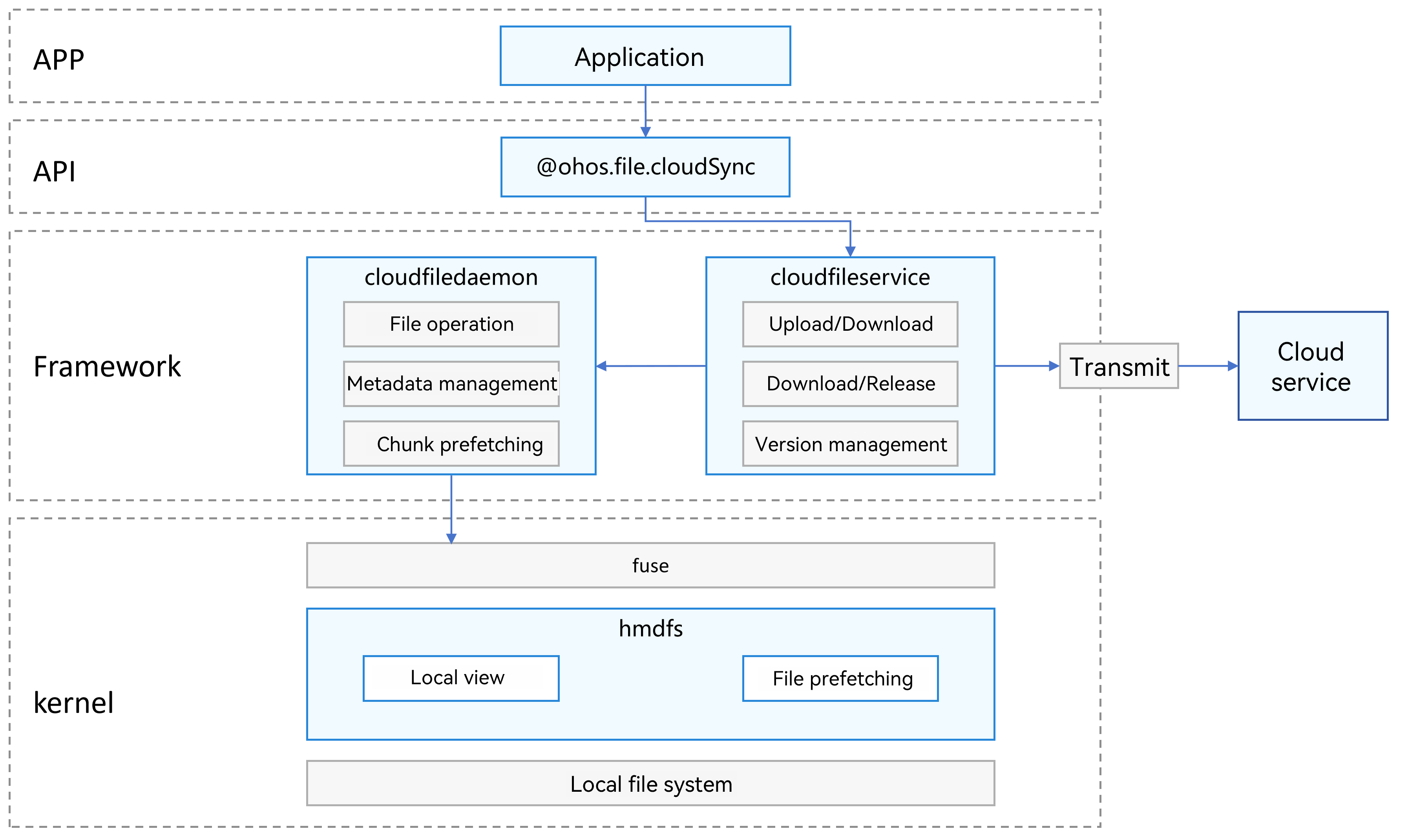
- cloudfiledaemon: device-cloud file daemon, which provides basic file operations, metadata management, and chunk prefetch capabilities for applications accessing the cloud.
- cloudfileservice: device-cloud synchronization service process, which provides uplink/downlink, file caching, and version management capabilities for applications accessing the cloud.
- fuse: a file system that allows unprivileged users to implement file system logic in user space (Filesystem in Userspace). It provides a universal virtual file system (VFS) bridge module in the kernel to forward file system operations to user-space processes, where specific logic is implemented by user programs.
- hmdfs: a distributed file system that provides file prefetch and local view capabilities for device-cloud file sync in the kernel.
- Metadata management: supports local retention of basic metadata information such as file names, sizes, and timestamps. The device-cloud file daemon manages the basic information.
- Chunk prefetch: a refined file prefetch strategy that divides read requests into multiple logical chunks, and asynchronously preloads specific chunks on demand or by priority to further optimize I/O performance and bandwidth utilization.
- File prefetch: an I/O optimization technology. Before a user explicitly requests subsequent data, hmdfs proactively loads parts of subsequent content into memory in advance based on the file read range, reducing latency on subsequent reads.
- Local view: directory structure and file list in the local file system of the current device, reflecting the actual storage status of the host. All operations (such as browsing, creating, deleting, and renaming) take effect directly on the local disk.
How to Implement
For application developers, device-cloud file collaboration provides core capability APIs such as file synchronization, single-point cache, and batch cache. Applications only need to place the files to be uploaded to the cloud in the sandbox directory /data/storage/el2/cloud, and the files can be automatically uploaded to the cloud. For details about other basic file operation APIs, see Accessing Application Files.
This capability is built on system-level services. The cloudfiledaemon process provides core functionalities such as basic file operations, metadata management, and chunk prefetch. The cloudfileservice process automatically interacts with the cloud service in the background, triggers and completes uplink/downlink and file caching based on service requirements, and also provides APIs to support version management and the proactive triggering of synchronization tasks.