HarmonyOS offers a comprehensive suite of open media capabilities, enabling you to efficiently develop popular media applications for everyday use cases, with excellent performance.
Media Subsystem Architecture
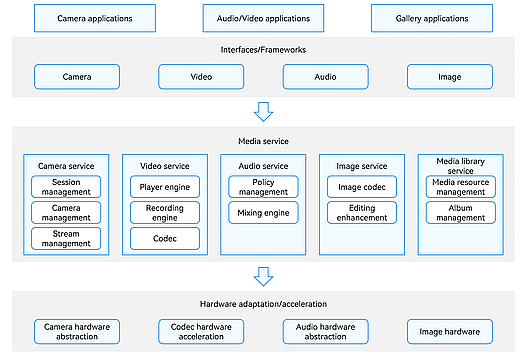
The media subsystem provides the capability of processing users' visual and auditory information. For example, it can be used to collect, encode, store, decode, and play audio and video information. Based on the type of media information to process, the media subsystem is usually divided into different modules, including audio, video, and image modules.
For application development, the media subsystem provides APIs for developing audio/video, gallery, and camera applications. For device development, it offers adaptation and acceleration features to support various hardware chips. At the core, it provides essential media features and management mechanisms in the form of services.
Audio Kit: provides scenario-specific audio playback and recording APIs, helping you quickly implement high-definition audio capture and immersive playback.
AVCodec Kit: provides fundamental capabilities such as audio/video encoding and decoding, media file multiplexing and demultiplexing, and media data input.
AVSession Kit: delivers system-level control for audio and video, managing all media-related activities across the system.
Camera Kit: provides scenario-specific camera control APIs to implement features such as image preview, photo capture, and video recording.
DRM Kit: supports decryption of DRM-protected audio and video content, and offers device certificate management, license handling, and content decryption.
Image Kit: delivers comprehensive image processing capabilities, including decoding, encoding, editing, metadata processing, and image receiving.
Media Kit: provides features such as end-to-end playback of raw media resources, audio and video recording, screen capture, metadata and thumbnail extraction, and video transcoding.
Media Library Kit: provides the capability of managing albums and media files, including images and videos.
Ringtone Kit: provides the ringtone setting feature, offering users a simple, consistent, secure, and high-quality ringtone setting experience.
Scan Kit: offers system-level scanning capabilities for barcodes and QR codes.
[h2]Camera Preview
Camera preview refers to the real-time display of images after the camera is activated, typically used before capturing photos or recording videos.
Guide
API Reference
Best Practices
[h2]Photo Capture
Photo capture is one of the most essential functions of a camera. Camera Kit supports multiple shooting modes, allowing you to directly launch the system camera to take photos, use preconfigured settings to simplify application development, or build a professional camera application using open APIs.
Guide
API Reference
ArkTS APIs: camera
ArkTS components: cameraPicker
C APIs: OH_Camera
Best Practices
Samples
[h2]Video Playback
AVPlayer provides integrated playback capabilities and supports a wide range of audio and video formats and streaming protocols. With AVPlayer, applications can perform basic playback controls and deliver an enhanced audiovisual experience through features such as subtitle support, picture-in-picture mode, custom UI components, and content copyright protection.
Guide
API Reference
Best Practices
Samples
Design Experience
[h2]Video Recording
AVRecorder enables audio and video recording, whereas AVScreenCapture supports screen capture with multi-source input and flexible configuration options, helping you easily implement recording functionality.
Guide
Introduction to AVScreenCapture (Including Formats Supported)
Using AVScreenCaptureRecorder to Record Screens and Save Them to Files (ArkTS)
Using AVScreenCapture to Capture Screens and Obtain Streams (C/C++)
Using AVScreenCapture to Capture Screens and Write Them to Files (C/C++)
API Reference
ArkTS APIs: AVRecorder
C APIs: AVRecorder
ArkTS APIs: AVScreenCaptureRecorder
C APIs: AVScreenCapture
Samples
[h2]Video Casting
With the media controller, users can seamlessly cast audio and video to other HarmonyOS devices. For example, they can continue playback on a 2-in-1 device after starting it on a smartphone.
Guide
API Reference
ArkTS APIs: avsession
ArkTS components: AVCastPicker
Samples
[h2]Audio Playback
You can use AVPlayer to play media resources, such as MP4, MP3, MKV, and MPEG-TS files, or use AudioRenderer to play raw PCM audio data.
AVPlayer Guide
AVPlayer API Reference
AudioRenderer Guide
AudioRenderer API Reference
ArkTS APIs: AudioRenderer
ArkTS APIs: audioHaptic
C APIs: OHAudio
General Guide
Best Practices
Samples
Design Experience
[h2]Audio Capture
AudioCapture provides audio capture capabilities, enabling you to obtain raw PCM data.
Guide
API Reference
ArkTS APIs: AudioCapturer
C APIs: OHAudio
Samples
[h2]Audio Recording
AVRecorder provides the audio recording capability to help you record pure audio files.
Guide
API Reference
ArkTS APIs: AVRecorder
C APIs: AVRecorder
[h2]Media Resource Selection and Saving
Guide
API Reference
ArkTS APIs: photoAccessHelper
ArkTS components: AlbumPickerComponent
ArkTS components: PhotoPickerComponent
ArkTS components: RecentPhotoComponent
Best Practices
Samples
[h2]Privacy and Security
During media application development, access to personal data (such as photos, videos, and audio files) and device resources (like the camera or microphone) is often required. These resources are protected by the system. To use them, applications must either use Picker or request corresponding permissions.
Accessing Personal Data
If an application needs to clone, back up, or synchronize image or video files, it may request restricted permissions to read from and write to the media library.
Accessing Device Data
ohos.permission.MICROPHONE, ohos.permission.CAMERA, and ohos.permission.MEDIA_LOCATION are all user-granted permissions. For details on how to apply for them, see Requesting User Authorization.
More Resources
Audio Kit
| Category | Resource Link |
|---|---|
| Audio focus | - Guide: Choosing the Right Playback Stream Type - Guide: Introduction to Audio Focus and Audio Sessions - ArkTS API reference: AudioSession - ArkTS API reference: StreamUsage |
| Audio call | |
| More |
AVCodec Kit
| Category | Resource Link |
|---|---|
| Audio codec | - Guide: Audio Encoding - Guide: Audio Decoding - Samples: AudioEncoder - Samples: AudioDecoder - C API reference: AudioCodec |
| Video codec | - Guide: Video Encoding - Samples: VideoEncoder - C API reference: VideoEncoder - Guide: Video Decoding - Samples: VideoDecoder - C API reference: VideoDecoder |
| More |
AVSession Kit
| Category | Resource Link |
|---|---|
| Local AVSession | - ArkTS API reference: AVSession Management - Guide: Accessing AVSession - Samples: AVSession Provider |
| More |
Camera Kit
| Category | Resource Link |
|---|---|
| Video recording | - ArkTS API reference: Camera Management - Guide: Video Recording (ArkTS) - Guide: Video Recording (C/C++) - Practices: Video Recording Practices (ArkTS) |
| Secure mode camera | - ArkTS API reference: SecureSession - Guide: Secure Mode Camera (ArkTS) |
| More |
DRM Kit
| Category | Resource Link |
|---|---|
| Using AVPlayer to play DRM content | - ArkTS API reference: DRM - Guide: DRM Development (ArkTS) - Practices: Using AVPlayer to Play DRM Content (ArkTS) |
| Using AVCodec to play DRM content | - C API reference: Drm (C/C++) - Guide: DRM Development (C/C++) - Practices: Using AVCodec to Play DRM Content (C/C++) |
| More |
Image Kit
| Category | Resource Link |
|---|---|
| Image decoding | Decodes images in HEIF, JPEG, PNG, WebP, GIF, BMP, SVG, ICO, and DNG formats. - ArkTS guide: Using ImageSource to Decode Images - C/C++ guide: Using Image_NativeModule to Decode Images Allocates memory for decoding images, optimizing the decoding efficiency. - ArkTS guide: Allocating Memory for Image Decoding (ArkTS) - C/C++ guide: Allocating Memory for Image Decoding (C/C++) |
| Image encoding | Encodes images in HEIF, JPEG, PNG, WebP, and GIF formats. - ArkTS guide: Using ImagePacker to Encode Images - C/C++ guide: Using Image_NativeModule to Encode Images |
| Image receiving | Receives and processes images as a consumer. - ArkTS guide: Using ImageReceiver to Receive Images - C/C++ guide: Using Image_NativeModule to Receive Images |
| Image editing and processing | Supports image transformations such as cropping, scaling, translation, rotation, flipping, and opacity setting, and PixelMap operations such as pixel data writing to specific regions of an image. - ArkTS guide: Using PixelMap to Transform Images - ArkTS guide: Using PixelMap for PixelMap Operations - C/C++ guide: Using Image_NativeModule for PixelMap Operations Reads and edits EXIF information of images. - ArkTS guide: Editing EXIF Data - C/C++ guide: Using Image_NativeModule to Edit EXIF Data Adds personalized filters to images. - C/C++: Using ImageEffect to Edit Images Enhances image clarity, converts color spaces, and converts HDR effects. - C/C++ guide: Scaling Images - C/C++ guide: Color Space Conversion for Images - C/C++ guide: Dynamic Metadata Generation for Images - C/C++ guide: Converting HDR Images from Single-Layer to Dual-Layer - C/C++ guide: Converting HDR Images from Dual-Layer to Single-Layer |
| More |
Media Kit
| Category | Resource Link |
|---|---|
| Video transcoding | - ArkTS API reference: AVTranscoder - Guide: Using AVTranscoder to Transcode Videos (ArkTS) - Guide: Creating an Asynchronous Thread for AVTranscoder Video Transcoding (ArkTS) |
| Metadata | - ArkTS API reference: AVMetadataExtractor - C API reference: AVMetadataExtractor - Guide: Using AVMetadataExtractor to Extract Audio and Video Metadata (ArkTS) - Guide: Using AVMetadataExtractor to Obtain Metadata (C/C++) |
| Thumbnail | - ArkTS API reference: AVImageGenerator - C API reference: AVImageGenerator - Guide: Using AVImageGenerator to Extract Video Images at a Specified Time (ArkTS) - Guide: Using AVImageGenerator to Obtain Video Frames (C/C++) - Best practices: Obtaining Video Thumbnails Using System Capabilities |
| More |
Media Library Kit
| Category | Resource Link |
|---|---|
| Moving photos | - Guide: Accessing and Managing Moving Photos |
| More |
Ringtone Kit
| Category | Resource Link |
|---|---|
| Ringtone setting | - ArkTS API reference: Ringtone Service - Guide: Setting a Ringtone |
Scan Kit
| Category | Resource Link |
|---|---|
| Barcode scan by default UI | - ArkTS API reference: Scanning Barcodes Using the Default UI - Guide: Barcode Scanning by Default UI |
| Barcode scan by custom UI | - ArkTS API reference: Scanning Barcodes Using the Custom UI - Guide: Barcode Scanning by Custom UI |
| Image recognition | - ArkTS API reference: Recognizing Barcodes in an Image - Guide: Scanning Barcodes in a Saved Image - Guide: Recognizing Barcodes in Image Data |
| Barcode image generation | - ArkTS API reference: Generating a Barcode Image - Guide: Generating a Barcode Image from Text |