The Web component can be attached to and detached from the component trees in different windows, which enables the same Web component to be migrated between different windows. For example, you can drag a tab page to an independent window or drag it to another window.
Web components are migrated between different windows based on the Custom Node capability. You can use BuilderNode to create offline nodes for Web components and use Custom Placeholder Node to attach and detach web nodes. The Web component is migrated between windows by detaching the web node from one window and attaching it to another window.
In the following example, a Web component is created in an imperative manner when the main window Ability starts. You can use the methods and classes provided in common.ets to mount and unmount the Web component. Index.ets provides an implementation for mounting and unmounting the Web component. In this way, you can mount and unmount the Web component on pages in different windows, that is, migrate the Web component between different windows. The following figure shows the migration process.
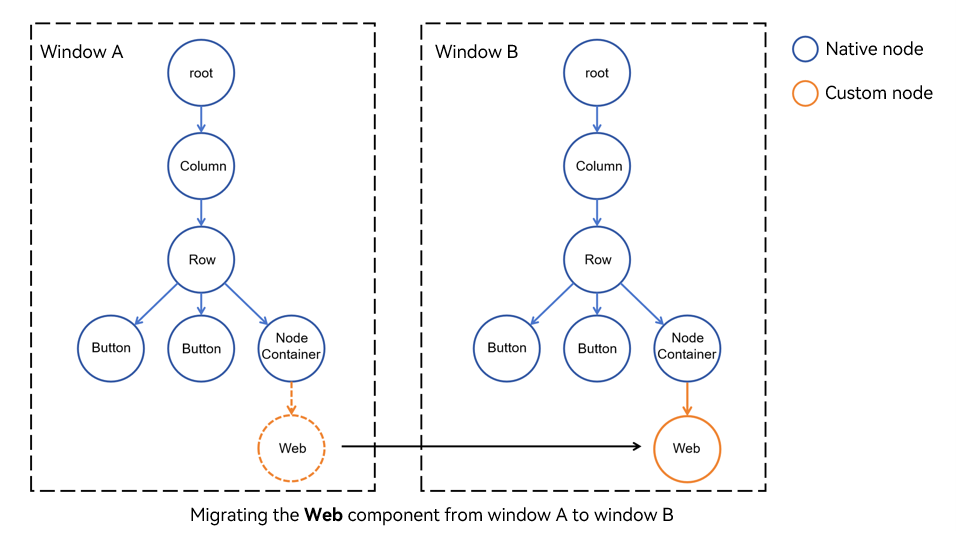

Do not attach a Web component under two parent nodes at the same time. Otherwise, unexpected behavior occurs.
// Main window Ability.
import { createNWeb, defaultUrl } from '../pages/common';

// ...

  onWindowStageCreate(windowStage: window.WindowStage): void {
    hilog.info(0x0000, 'testTag', '%{public}s', 'Ability onWindowStageCreate');

    windowStage.loadContent('pages/Index', (err) => {
      if (err && err.code) {
        hilog.error(0x0000, 'testTag', 'Failed to load the content. Cause: %{public}s', JSON.stringify(err) ?? '');
        return;
      }
      // Create a dynamic Web component, in which UIContext should be passed. (The component can be created at any time after loadContent() is called, and only one Web component is created for the application.)
      createNWeb(defaultUrl, windowStage.getMainWindowSync().getUIContext());
      hilog.info(0x0000, 'testTag', 'Succeeded in loading the content.');
    });
  }

// ...
// Provide the capability for attaching Web components dynamically.
// pages/common.ets
import { UIContext, NodeController, BuilderNode, FrameNode } from '@kit.ArkUI';
import { webview } from '@kit.ArkWeb';
import { hilog } from '@kit.PerformanceAnalysisKit';
export const defaultUrl : string = 'https://www.example.com';
// Data is an input parameter of encapsulation class.
class Data{
public url: string = '';
public webController: webview.WebviewController | null = null;
constructor(url: string, webController: webview.WebviewController) {
this.url = url;
this.webController = webController;
}
}
// @Builder contains the specific information of the dynamic component.
@Builder
function webBuilder(data:Data) {
Web({ src: data.url, controller: data.webController })
.width('100%')
.height('100%')
.borderStyle(BorderStyle.Dashed)
.borderWidth(2)
}
let wrap = wrapBuilder<[Data]>(webBuilder);
// Used to control and report the behavior of the node in NodeContainer. This function must be used together with NodeContainer.
export class MyNodeController extends NodeController {
private builderNode: BuilderNode<[Data]> | null | undefined = null;
private webController : webview.WebviewController | null | undefined = null;
private rootNode : FrameNode | null = null;
constructor(builderNode : BuilderNode<[Data]> | undefined, webController : webview.WebviewController | undefined) {
super();
this.builderNode = builderNode;
this.webController = webController;
}
// Method that must be overridden to build the node tree and return the node mounted in the corresponding NodeContainer.
// Call it or rebuild() to refresh when NodeContainer is created.
makeNode(uiContext: UIContext): FrameNode | null {
// This node will be attached to the parent node of NodeContainer.
return this.rootNode;
}
// Attach the Webview.
attachWeb() : void {
if (this.builderNode) {
let frameNode : FrameNode | null = this.builderNode.getFrameNode();
if (frameNode?.getParent() != null) {
// Check whether the custom node is attached before.
hilog.warn(0x0000, 'testTag', '%{public}s', 'The frameNode is already attached');
return;
}
this.rootNode = this.builderNode.getFrameNode();
}
}
// Detach the Webview.
detachWeb() : void {
this.rootNode = null;
}
getWebController() : webview.WebviewController | null | undefined {
return this.webController;
}
}
// Create a BuilderNode required for saving Map.
let builderNodeMap : Map<string, BuilderNode<[Data]> | undefined> = new Map();
// Create a webview.WebviewController required for saving Map.
let webControllerMap : Map<string, webview.WebviewController | undefined> = new Map();
// Use getUIContext() of the window or custom component to obtain the UIContext object required for initialization.
export const createNWeb = (url: string, uiContext: UIContext) => {
// Create a WebviewController.
let webController = new webview.WebviewController();
// Create a BuilderNode.
let builderNode : BuilderNode<[Data]> = new BuilderNode(uiContext);
// Create a dynamic Web component.
builderNode.build(wrap, new Data(url, webController));
// Save the BuilderNode.
builderNodeMap.set(url, builderNode);
// Save the WebviewController.
webControllerMap.set(url, webController);
}
// Customize the API for obtaining BuilderNode.
export const getBuilderNode = (url: string) : BuilderNode<[Data]> | undefined => {
return builderNodeMap.get(url);
}
// Customize the API for obtaining WebviewController.
export const getWebviewController = (url : string) : webview.WebviewController | undefined => {
return webControllerMap.get(url);
} // Use the pages of NodeController.
// pages/Index.ets
import { getBuilderNode, MyNodeController, defaultUrl, getWebviewController } from "./common"
@Entry
@Component
struct Index {
private nodeController : MyNodeController =
new MyNodeController(getBuilderNode(defaultUrl), getWebviewController(defaultUrl));
build() {
Row() {
Column() {
Button("Attach Webview")
.onClick(() => {
// Do not attach the same node to different pages at the same time.
this.nodeController.attachWeb();
this.nodeController.rebuild();
})
Button("Detach Webview")
.onClick(() => {
this.nodeController.detachWeb();
this.nodeController.rebuild();
})
// NodeContainer is used to bind to the NodeController node. Calling rebuild() triggers makeNode().
// The Page is bound to NodeController() through NodeContainer(). As a result, the dynamic component page is successfully displayed.
NodeContainer(this.nodeController)
.height('80%')
.width('80%')
}
.width('100%')
}
.height('100%')
}
}