Dynamic imports support conditional loading and partial reflection, enhancing page load speed. It allows loading HSP modules, HAR modules, ohpm packages, and native libraries. It also enables module decoupling when variables are dynamically imported between HAR modules, facilitating module access and eliminating strong dependency during compilation.
When to Use
Dynamic imports can be used in application development when you need to import modules conditionally or on-demand, as an alternative to [static import]. The following are some cases where you might want to use dynamic import:
- Statically imported modules significantly slow the loading of your code and are rarely used or not immediately needed.
- Statically imported modules consume a large amount of system memory and are rarely used.
- The imported module does not exist at load time and needs to be fetched asynchronously.
- The import specifier string needs to be constructed dynamically. Static imports support only static specifiers.
- The imported module has side effects (the module contains code that is directly executed) that are required only when specific conditions are met.
Service Expansion Scenarios
As aforementioned, in addition to conditional loading, dynamic imports can implement partial reflection. In the following example, an HAP dynamically imports a HAR package (harlibrary) and calls the static member function staticAdd(), instance member function instanceAdd(), and global function addHarLibrary() of the Calc class.
// harlibrary's src/main/ets/utils/Calc.ets
export class Calc {
  public static staticAdd(a: number, b: number): number {
    let c = a + b;
    console.info('DynamicImport I am harlibrary in staticAdd, %d + %d = %d', a, b, c);
    return c;
  }

  public instanceAdd(a: number, b: number): number {
    let c = a + b;
    console.info('DynamicImport I am harlibrary in instanceAdd, %d + %d = %d', a, b, c);
    return c;
  }
}

export function addHarLibrary(a: number, b: number): number {
  let c = a + b;
  console.info('DynamicImport I am harlibrary in addHarLibrary, %d + %d = %d', a, b, c);
  return c;
}
// harlibrary's Index.ets
export { Calc, addHarLibrary } from './src/main/ets/utils/Calc' // HAP's oh-package.json5
"dependencies": {
"harlibrary": "file:../harlibrary"
} // HAP's src/main/ets/pages/Index.ets
import('harlibrary').then((ns:ESObject) => {
ns.Calc.staticAdd(8, 9); // Call the static member function staticAdd().
let calc:ESObject = new ns.Calc(); // Instantiate the class Calc.
calc.instanceAdd(10, 11); // Call the instance member function instanceAdd().
ns.addHarLibrary(6, 7); // Call the global method addHarLibrary().
// Reflection using class, member function, and method names as strings.
let className = 'Calc';
let methodName = 'instanceAdd';
let staticMethod = 'staticAdd';
let functionName = 'addHarLibrary';
ns[className][staticMethod](12, 13); // Call the static member function staticAdd().
let calc1:ESObject = new ns[className](); // Instantiate the class Calc.
calc1[methodName](14, 15); // Call the instance member function instanceAdd().
ns[functionName](16, 17); // Call the global function addHarLibrary().
}); Implementation of Dynamic Import
A dynamic import expression accepts a constant or variable as its argument.
The following table lists the specifications of dynamic import.
| Scenario | Module Specifier | Description |
|---|---|---|
| Local module | File path | The path must start with ./ or ../. |
| Local module | HSP module name | - |
| Local module | HSP module file path | - |
| Local module | HAR module name | - |
| Local module | HAR module file path | - |
| Remote module | Remote HAR module name | - |
| Remote module | ohpm package name | - |
| API | @system.* | - |
| API | @ohos.* | - |
| API | @arkui-x.* | - |
| Native library module | libNativeLibrary.so | - |

Module names used in all imports are the aliases defined under dependencies in the oh-package.json5 file.
It is recommended that the alias configured under dependencies be the same as the values of moduleName and packageName, both of which indicate the name of the module to import. moduleName is set in the module.json5 file of the module, and packageName is set in the oh-package.json5 file.
- Importing a module by name is importing the module's entry file, generally Index.ets/ts.
[h2]Dynamic Imports with Constant Expressions
Dynamic imports with constant expressions refer to scenarios where the input to import is a constant. The following examples show how to use this type of dynamic import to import APIs of other modules into a HAP module.
In the examples, the paths, such as the path to Index.ets, are set based on the current DevEco Studio module configuration and are subject to change.
HAP dynamically imports a HAR module using a constant module name
// HAR's Index.ets
export function add(a: number, b: number): number {
  let c = a + b;
  console.info('DynamicImport I am a HAR, %d + %d = %d', a, b, c);
  return c;
}
// HAP's src/main/ets/pages/Index.ets import('myhar').then((ns:ESObject) => { console.info('DynamicImport ns.add(3, 5) = %d', ns.add(3, 5)); }); // You can use await to process dynamic import. (It must be used in an async function.) async function asyncDynamicImport() { let ns:ESObject = await import('myhar'); console.info('DynamicImport ns.add(3, 5) = %d', ns.add(3, 5)); }// HAP's oh-package.json5 "dependencies": { "myhar": "file:../myhar" }HAP dynamically imports a HAR module using a constant file path
// HAR's Index.ets
export function add(a: number, b: number): number {
  let c = a + b;
  console.info('DynamicImport I am a HAR, %d + %d = %d', a, b, c);
  return c;
}
// HAP's src/main/ets/pages/Index.ets import('myhar/Index').then((ns:ESObject) => { console.info('DynamicImport ns.add(3, 5) = %d', ns.add(3, 5)); });// HAP's oh-package.json5 "dependencies": { "myhar": "file:../myhar" }HAP dynamically imports an HSP module using a constant module name
// HSP's Index.ets
export function add(a: number, b: number): number {
  let c = a + b;
  console.info('DynamicImport I am a HSP, %d + %d = %d', a, b, c);
  return c;
}
// HAP's src/main/ets/pages/Index.ets import('myhsp').then((ns:ESObject) => { console.info('DynamicImport ns.add(3, 5) = %d', ns.add(3, 5)); });// HAP's oh-package.json5 "dependencies": { "myhsp": "file:../myhsp" }HAP dynamically imports an HSP module using a constant file path
// HSP's Index.ets
export function add(a: number, b: number): number {
  let c = a + b;
  console.info('DynamicImport I am a HSP, %d + %d = %d', a, b, c);
  return c;
}
// HAP's src/main/ets/pages/Index.ets import('myhsp/Index').then((ns:ESObject) => { console.info('DynamicImport ns.add(3, 5) = %d', ns.add(3, 5)); });// HAP's oh-package.json5 "dependencies": { "myhsp": "file:../myhsp" }HAP dynamically imports a remote HAR module using a constant module name
// HAP's src/main/ets/pages/Index.ets
import('@ohos/crypto-js').then((ns:ESObject) => {
  console.info('DynamicImport @ohos/crypto-js: ' + ns.CryptoJS.MD5(123456));
});
// HAP's oh-package.json5 "dependencies": { "@ohos/crypto-js": "2.0.3-rc.0" }HAP dynamically imports an ohpm package using a constant
// HAP's src/main/ets/pages/Index.ets
import('json5').then((ns:ESObject) => {
  console.info('DynamicImport json5');
});
// HAP's oh-package.json5 "dependencies": { "json5": "1.0.2" }HAP dynamically imports its own single file using a constant
// HAP's src/main/ets/Calc.ets
export function add(a: number, b: number): number {
  let c = a + b;
  console.info('DynamicImport I am a HAP, %d + %d = %d', a, b, c);
  return c;
}
// HAP's src/main/ets/pages/Index.ets import('../Calc').then((ns:ESObject) => { console.info('DynamicImport ns.add(3, 5) = %d', ns.add(3, 5)); });HAP dynamically imports its own native library using a constant
// libnativeapi.so's index.d.ts
export const add: (a: number, b: number) => number;
// HAP's src/main/ets/pages/Index.ets
import('libnativeapi.so').then((ns:ESObject) => {
  console.info('DynamicImport libnativeapi.so: ' + ns.default.add(2, 3));
});
// HAP's oh-package.json5 "dependencies": { "libnativeapi.so": "file:./src/main/cpp/types/libnativeapi" }HAP dynamically imports APIs using a constant
// HAP's src/main/ets/pages/Index.ets
import('@system.app').then((ns:ESObject) => { ns.default.terminate(); });
import('@system.router').then((ns:ESObject) => { ns.default.clear(); });
import('@ohos.curves').then((ns:ESObject) => { ns.default.springMotion(0.555, 0.75, 0.001); });
import('@ohos.matrix4').then((ns:ESObject) => { ns.default.identity(); });
import('@ohos.hilog').then((ns:ESObject) => { ns.default.info(0x0000, 'testTag', '%{public}s', 'DynamicImport @ohos.hilog.'); });
[h2]Dynamic Imports with Variable Expressions
In DevEco Studio, module dependencies are configured through the dependencies field in the oh-package.json5 file. By default, all modules listed under dependencies are installed (for local modules) or downloaded (for remote modules), but are not built. During HAP/HSP compilation, the dependency relationship is searched from the entry file (generally Index.ets/Index.ts), and only the dependencies found are added to the compilation.
During compilation, static imports and dynamic imports with constant expressions can be identified and parsed by the packaging tool rollup and its plug-ins. This means that the related dependencies can be added to the dependency tree, participate in the build process, and finally generate Ark bytecode. However, dynamic imports with variable expressions cannot be resolved at compile-time because their values may depend on runtime calculations or external inputs. To add these dependencies to the build process, add runtimeOnly under buildOption and set it to the actual module name or file path pertaining to the variable.
Schema configuration format of the runtimeOnly field
If you are using dynamic imports with variable expressions to import modules or files, but not APIs, you need to add the runtimeOnly field under buildOption in the build-profile.json5 file of the HAP/HSP/HAR module. The following are some examples.
// Dynamically import a module based on the module name myhar.
let harName = 'myhar';
import(harName).then((obj: ESObject) => {
    console.info('DynamicImport I am a har');
})

// Dynamically import a file of the module itself based on the file path src/main/ets/index.ets.
let filePath = './utils/Calc';
import(filePath).then((obj: ESObject) => {
    console.info('DynamicImport I am a file');
})
The corresponding runtimeOnly configuration is as follows:
"buildOption": {
  "arkOptions": {
    "runtimeOnly": {
      "packages": [ "myhar" ],  // Set the name of the module to dynamically import. It must be the same as the one specified under dependencies.
      "sources": [ "./src/main/ets/utils/Calc.ets" ]  // Set the path of the file to dynamically import. The path is relative to the build-profile.json5 file of the module.
    }
  }
}
packages of runtimeOnly: name of the module to dynamically import. It must be the same as the one specified under dependencies.
sources of runtimeOnly: path of the file to dynamically import. The path is relative to the build-profile.json5 file of the module.
Usage Examples
HAP dynamically imports a HAR module using a variable module name
// HAR's Index.ets
export function add(a: number, b: number): number {
  let c = a + b;
  console.info('DynamicImport I am a HAR, %d + %d = %d', a, b, c);
  return c;
}
// HAP's src/main/ets/pages/Index.ets let packageName = 'myhar'; import(packageName).then((ns:ESObject) => { console.info('DynamicImport ns.add(3, 5) = %d', ns.add(3, 5)); });// HAP's oh-package.json5 "dependencies": { "myhar": "file:../myhar" }// HAP's build-profile.json5 "buildOption": { "arkOptions": { "runtimeOnly": { "packages": [ "myhar" // Applicable only when a variable is used to dynamically import a module. ] } } }HAP dynamically imports an HSP module using a variable module name
// HSP's Index.ets
export function add(a: number, b: number): number {
  let c = a + b;
  console.info('DynamicImport I am a HSP, %d + %d = %d', a, b, c);
  return c;
}
// HAP's src/main/ets/pages/Index.ets let packageName = 'myhsp'; import(packageName).then((ns:ESObject) => { console.info('DynamicImport ns.add(3, 5) = %d', ns.add(3, 5)); });// HAP's oh-package.json5 "dependencies": { "myhsp": "file:../myhsp" }// HAP's build-profile.json5 "buildOption": { "arkOptions": { "runtimeOnly": { "packages": [ "myhsp" // Applicable only when a variable is used to dynamically import a module. ] } } }HAP dynamically imports a remote HAR module using a variable module name
// HAP's src/main/ets/pages/Index.ets
let packageName = '@ohos/crypto-js';
import(packageName).then((ns:ESObject) => {
  console.info('DynamicImport @ohos/crypto-js: ' + ns.CryptoJS.MD5(123456));
});
// HAP's oh-package.json5 "dependencies": { "@ohos/crypto-js": "2.0.3-rc.0" }// HAP's build-profile.json5 "buildOption": { "arkOptions": { "runtimeOnly": { "packages": [ "@ohos/crypto-js" // Applicable only when a variable is used to dynamically import a module. ] } } }HAP dynamically imports an ohpm package using a variable
// HAP's src/main/ets/pages/Index.ets
let packageName = 'json5';
import(packageName).then((ns:ESObject) => {
  console.info('DynamicImport json5');
});
// HAP's oh-package.json5 "dependencies": { "json5": "1.0.2" }// HAP's build-profile.json5 "buildOption": { "arkOptions": { "runtimeOnly": { "packages": [ "json5" // Applicable only when a variable is used to dynamically import a module. ] } } }HAP dynamically imports its own single file using a variable
// HAP's src/main/ets/Calc.ets
export function add(a: number, b: number): number {
  let c = a + b;
  console.info('DynamicImport I am a HAP, %d + %d = %d', a, b, c);
  return c;
}
// HAP's src/main/ets/pages/Index.ets let filePath = '../Calc'; import(filePath).then((ns:ESObject) => { console.info('DynamicImport ns.add(3, 5) = %d', ns.add(3, 5)); });// HAP's build-profile.json5 "buildOption": { "arkOptions": { "runtimeOnly": { "sources": [ "./src/main/ets/Calc.ets" // Applicable only when a variable is used to dynamically import a file of the module itself. ] } } }HAP dynamically imports its own native library using a variable
// libnativeapi.so's index.d.ts
export const add: (a: number, b: number) => number;
// HAP's src/main/ets/pages/Index.ets
let soName = 'libnativeapi.so';
import(soName).then((ns:ESObject) => {
  console.info('DynamicImport libnativeapi.so: ' + ns.default.add(2, 3));
});
// HAP's oh-package.json5 "dependencies": { "libnativeapi.so": "file:./src/main/cpp/types/libnativeapi" }// HAP's build-profile.json5 "buildOption": { "arkOptions": { "runtimeOnly": { "packages": [ "libnativeapi.so" // Applicable only when a variable is used to dynamically import a module. ] } } }HAP dynamically imports APIs using a variable
// HAP's src/main/ets/pages/Index.ets
let packageName = '@system.app';
import(packageName).then((ns:ESObject) => { ns.default.terminate(); });
packageName = '@system.router';
import(packageName).then((ns:ESObject) => { ns.default.clear(); });
packageName = '@ohos.curves';
import(packageName).then((ns:ESObject) => { ns.default.springMotion(0.555, 0.75, 0.001); });
packageName = '@ohos.matrix4';
import(packageName).then((ns:ESObject) => { ns.default.identity(); });
packageName = '@ohos.hilog';
import(packageName).then((ns:ESObject) => { ns.default.info(0x0000, 'testTag', '%{public}s', 'DynamicImport @ohos.hilog.'); });
You do not need to set runtimeOnly when dynamically importing APIs with variables.
[h2]Decoupling Dynamic Imports Between HAR Modules
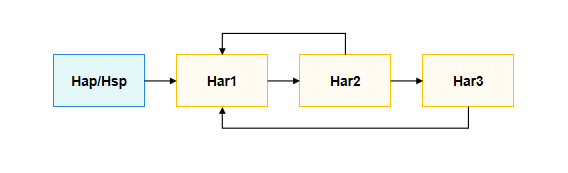
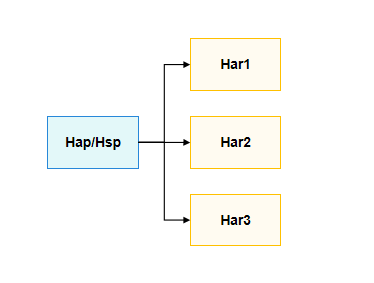
When an application contains multiple HAR packages with complex dependency relationships, circular dependencies may occur when configuring dependencies in DevEco Studio. If the dependencies between HAR packages are only through dynamic imports with variable expressions, the direct dependency relationships between HAR packages can be transferred to the HAP/HSP configuration. This decouples the dependencies between HAR packages, as shown in the figure below.
The figure shows the dependency graph after dependency conversion.
Constraints
- This workaround applies only to the scenario where circular dependencies exist between local HAR packages.
- The transferred dependencies between HAR packages can only be through dynamic imports with variable expressions, not static imports or dynamic imports with constant expressions.
- When transferring dependencies, both dependencies and runtimeOnly configurations must be transferred simultaneously.
- HSP does not support transferring dependencies. For example, in the chain HAP -> HSP1 -> HSP2 -> HSP3, dependency between HSP2 and HSP3 cannot be transferred to HAP.
- The entire chain of transferred dependencies must consist only of HAR packages. Dependencies cannot be transferred across HSP packages. For example, in the chain HAP -> HAR1 -> HAR2 -> HSP -> HAR3 -> HAR4, the dependency of HAR1 on HAR2 can be transferred to HAP, and the dependency of HAR3 on HAR4 can be transferred to HSP. However, HAR3 or HAR4 cannot be transferred to HAP.
- If there are references to other project modules, remote packages, or integrated HSP packages, you must ensure that the useNormalizedOHMUrl configuration is consistent and set to either true or false. Failure to do so may result in runtime errors such as Cannot find dynamic-import module library.
Usage Examples
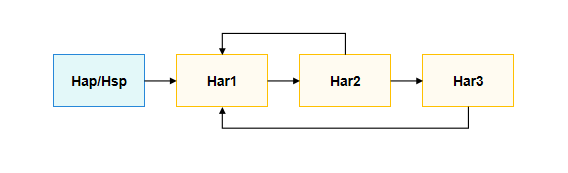
The following example adds dependencies HAR2 -> HAR1 and HAR3 -> HAR1 to the unidirectional dependency HAP -> HAR1 -> HAR2 -> HAR3, forming a circular dependency.
// HAP's src/main/ets/pages/Index.ets
let harName = 'har1'
import(harName).then((ns: ESObject) => {
  console.info('[DynamicImport] hap -> har1, 0 + 1 = ' + ns.classHar1.add(0, 1));
})

// HAR1's src/main/ets/utils/Calc.ets
export class classHar1 {
  static isImportedHar2: boolean = false;

  static add(a: number, b: number): number {
    const c = a + b;
    console.info('[DynamicImport] classHar1.add(), %d + %d = %d', a, b, c);

    if (!classHar1.isImportedHar2) {
      const harName = 'har2';
      import(harName).then((ns: ESObject) => {
        classHar1.isImportedHar2 = true;
        console.info('[DynamicImport] har1 -> har2, 1 + 2 = ' + ns.classHar2.add(1, 2));
      })
    }

    return c;
  }
}
// HAR1's Index.ets
export { classHar1 } from './src/main/ets/utils/Calc';

// HAR2's src/main/ets/utils/Calc.ets
export class classHar2 {
  static isImportedHar1: boolean = false;
  static isImportedHar3: boolean = false;

  static add(a: number, b: number): number {
    const c = a + b;
    console.info('[DynamicImport] classHar2.add(), %d + %d = %d', a, b, c);

    if (!classHar2.isImportedHar1) {
      const harName = 'har1';
      import(harName).then((ns: ESObject) => {
        classHar2.isImportedHar1 = true;
        console.info('[DynamicImport] har2 -> har1, 2 + 1 = ' + ns.classHar1.add(2, 1));
      })
    }

    if (!classHar2.isImportedHar3) {
      const harName = 'har3';
      import(harName).then((ns: ESObject) => {
        classHar2.isImportedHar3 = true;
        console.info('[DynamicImport] har2 -> har3, 2 + 3 = ' + ns.classHar3.add(2, 3));
      })
    }

    return c;
  }
}
// HAR2's Index.ets
export { classHar2 } from './src/main/ets/utils/Calc';

// HAR3's src/main/ets/utils/Calc.ets
export class classHar3 {
  static isImportedHar1: boolean = false;

  static add(a: number, b: number): number {
    const c = a + b;
    console.info('[DynamicImport] classHar3.add(), %d + %d = %d', a, b, c);

    if (!classHar3.isImportedHar1) {
      const harName = 'har1';
      import(harName).then((ns: ESObject) => {
        classHar3.isImportedHar1 = true;
        console.info('[DynamicImport] har3 -> har1, 3 + 1 = ' + ns.classHar1.add(3, 1));
      })
    }

    return c;
  }
}
// HAR3's Index.ets
export { classHar3 } from './src/main/ets/utils/Calc';
If dependencies and runtimeOnly configurations between HAR packages are not decoupled, ohpm cannot resolve cyclic dependencies, and the dependency installation fails.
// HAP's oh-package.json5
"dependencies": {
  "har1": "file:../har1"
}
// HAP's build-profile.json5
"buildOption": {
  "arkOptions": {
    "runtimeOnly": {
      "packages": [ // Applicable only to dynamic variable loading. Static loading or constant dynamic loading does not need to be configured.
        "har1"
      ]
    }
  }
}

// HAR1's oh-package.json5
"dependencies": {
  "har2": "file:../har2"
}
// HAR1's build-profile.json5
"buildOption": {
  "arkOptions": {
    "runtimeOnly": {
      "packages": [ // Applicable only to dynamic variable loading. Static loading or constant dynamic loading does not need to be configured.
        "har2"
      ]
    }
  }
}

// HAR2's oh-package.json5
"dependencies": {
  "har1": "file:../har1",
  "har3": "file:../har3"
}
// HAR2's build-profile.json5
"buildOption": {
  "arkOptions": {
    "runtimeOnly": {
      "packages": [ // Applicable only to dynamic variable loading. Static loading or constant dynamic loading does not need to be configured.
        "har1",
        "har3"
      ]
    }
  }
}

// HAR3's oh-package.json5
"dependencies": {
  "har1": "file:../har1",
}
// HAR3's build-profile.json5
"buildOption": {
  "arkOptions": {
    "runtimeOnly": {
      "packages": [ // Applicable only to dynamic variable loading. Static loading or constant dynamic loading does not need to be configured.
        "har1"
      ]
    }
  }
}
The error message is as follows:
ohpm ERROR: Run install command failed
Error: 00618005 Invalid Dependency
Error Message: Invalid dependency har2@~\Coupled\har2 -> har2@1.0.0.

Try the following:
The name of an indirect dependency cannot be the same as the module name.
You can transfer the dependencies and runtimeOnly configurations between HARs to the HAP, which decouples the cyclic dependencies between packages and allows the program to run correctly.
// HAP's oh-package.json5
"dependencies": {
  "har1": "file:../har1",
  "har2": "file:../har2",
  "har3": "file:../har3"
}
// HAP's build-profiles.json5
"buildOption": {
  "arkOptions": {
    "runtimeOnly": {
      "packages" : [ // Applicable only to dynamic variable loading. Static loading or constant dynamic loading does not need to be configured.
        "har1",
        "har2",
        "har3"
      ]
    }
  }
}

// HAR1's oh-package.json5
"dependencies": {}
// HAR1's build-profile.json5
"buildOption": {}

// HAR2's oh-package.json5
"dependencies": {}
// HAR2's build-profile.json5
"buildOption": {}

// HAR3's oh-package.json5
"dependencies": {}
// HAR3's build-profile.json5
"buildOption": {}
The corresponding run log is as follows:
[DynamicImport] classHar1.add(), 0 + 1 = 1
[DynamicImport] hap -> har1, 0 + 1 = 1
[DynamicImport] classHar2.add(), 1 + 2 = 3
[DynamicImport] har1 -> har2, 1 + 2 = 3
[DynamicImport] classHar1.add(), 2 + 1 = 3
[DynamicImport] har2 -> har1, 2 + 1 = 3
[DynamicImport] classHar3.add(), 2 + 3 = 5
[DynamicImport] har2 -> har3, 2 + 3 = 5
[DynamicImport] classHar1.add(), 3 + 1 = 4
[DynamicImport] har3 -> har1, 3 + 1 = 4