Use Case
This kit supports single-layer icon processing since version 5.0.0(12).
Perform this processing when your icon is a single-layer one and needs to comply with the design style of HarmonyOS Design System. You can check the typical application scenarios of layered icons.
Constraints
The single-layer icon processing function supports phones, tablets, PCs/2-in-1 devices, and (since 5.1.1(19)) TVs.
Development Procedure
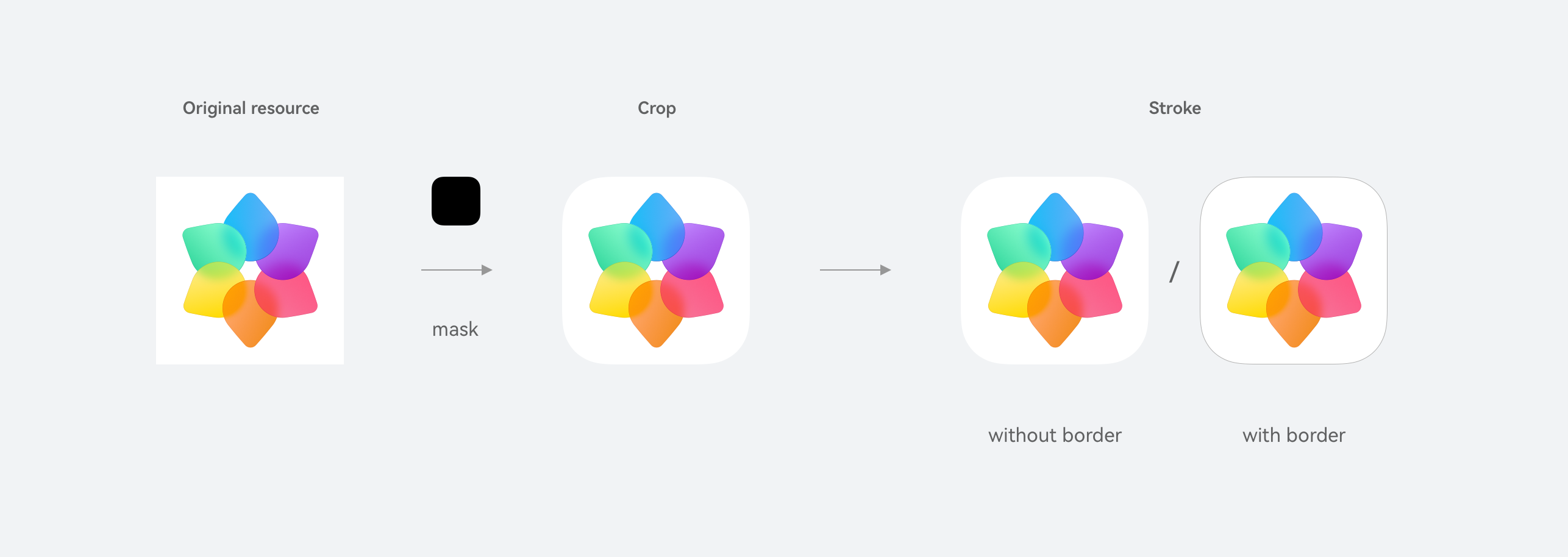
-
Place an image resource file normal_icon.png in entry/src/main/resources/base/media.
-
Import the classes related to icon processing to the project.
import { LayeredDrawableDescriptor, DrawableDescriptor } from '@kit.ArkUI'; import { hdsDrawable } from '@kit.UIDesignKit'; import { image } from '@kit.ImageKit'; import { BusinessError } from '@kit.BasicServicesKit'; import { resourceManager } from '@kit.LocalizationKit'; import { common } from '@kit.AbilityKit'; -
Configure the page layout simply. You can either call the single-layer icon processing API to process a single icon or call the asynchronous batch processing API to process icons in batches.
@Entry
@Component
struct Index{
  bundleName: string = 'com.example.uidesignsample';
  resManager: resourceManager.ResourceManager | undefined = undefined;
  layeredDrawableDescriptor: LayeredDrawableDescriptor | undefined = undefined;
  drawableDescriptor: DrawableDescriptor | undefined = undefined;
  @State iconsResult: Array<hdsDrawable.ProcessedIcon> = [];

  build() {
    Column() {
      Column() {
        Text('getHdsIcon')
          .fontWeight(FontWeight.Bold)
          .fontSize(16)
          .margin(5)

        Image(this.getHdsIcon())
          .width(48)
          .height(48)
      }
      .margin(20)

      Text('getHdsIcons')
        .fontWeight(FontWeight.Bold)
        .fontSize(16)
        .margin(5)

      List() {
        ForEach(this.iconsResult,
          (item: hdsDrawable.ProcessedIcon, index?: number) => {
            ListItem() {
              Column() {
                Text(item.bundleName)
                  .fontWeight(FontWeight.Medium)
                  .fontSize(16)
                  .margin(5)

                Image(item.pixelMap)
                  .width(48)
                  .height(48)
              }
              .margin(15)
            }
            .width('100%')
          }, (item: hdsDrawable.ProcessedIcon) => item.toString())
      }
      .scrollBar(BarState.On)
      .height('60%')
    }
    .height('100%')
    .width('100%')
  }

  aboutToAppear(): void {
    // Obtain a resource manager.
    this.resManager = (this.getUIContext().getHostContext() as common.UIAbilityContext)?.resourceManager;
    if (!this.resManager) {
      return;
    }

    // Obtain the layered icon information through the resource manager.
    this.layeredDrawableDescriptor = (this.resManager.getDrawableDescriptor($r('app.media.drawable').id)) as LayeredDrawableDescriptor;

    // Obtain the single-layer icon information through the resource manager.
    this.drawableDescriptor =
      (this.resManager?.getDrawableDescriptor($r('app.media.normal_icon').id)) as DrawableDescriptor;

    this.getHdsIcons();
  }

  private getHdsIcon(): image.PixelMap | null {
    try {
      // Call the single-layer icon processing API of the HDS.
      return hdsDrawable.getHdsIcon(this.bundleName, this.drawableDescriptor?.getPixelMap(), 48,
        this.layeredDrawableDescriptor?.getMask().getPixelMap(), true);
    } catch (err) {
      let message = (err as BusinessError).message;
      let code = (err as BusinessError).code;
      console.error(`getHdsIcon failed, code: ${code}, message: ${message}`);
      return null;
    }
  }

  getHdsIcons(): void {
    if (!this.drawableDescriptor) {
      console.error(`getHdsIcons drawableDescriptor is undefined.`);
      return;
    }

    if (!this.layeredDrawableDescriptor) {
      console.error(`getHdsIcons layeredDrawableDescriptor is undefined.`);
      return;
    }

    // Construct parameters for calling the batch API.
    let options: hdsDrawable.Options = {
      size: 48,
      hasBorder: true,
      parallelNumber: 4
    };

    let icons: hdsDrawable.Icon[] = [];
    for (let i = 0; i < 10; i++) {
      icons.push({
        bundleName: `${this.bundleName}-${i}`,
        pixelMap: this.drawableDescriptor.getPixelMap()
      })
    }

    try {
      // Call the single-layer icon batch processing API of the HDS.
      hdsDrawable.getHdsIcons(icons, this.layeredDrawableDescriptor.getMask().getPixelMap(), options)
        .then((data: hdsDrawable.ProcessedIcon[]) => {
          console.info(`getHdsIcons data size: ${data.length}`);
          this.iconsResult = data;
        })
        .catch((err: BusinessError) => {
          console.error(`getHdsIcons error, code: ${err.code}, msg: ${err.message}`);
        });
    } catch (err) {
      let message = (err as BusinessError).message;
      let code = (err as BusinessError).code;
      console.error(`getHdsIcons callback failed: ${message}, code: ${code}`);
    }
  }
}