Share Kit provides cross-app and cross-device sharing of text, images, and videos.
To share content to another app or device through Share Kit, an app needs to send configuration about the content to be shared and its preview style to Share Kit. Share Kit then processes the sharing request based on the scenario:
-
If the content is to be shared to another app, Share Kit constructs a sharing panel based on the shared data type and quantity of shared items to provide users with content preview, recommended sharing contacts, associated apps, and relevant operations. Users can quickly select the target app to share content or choose the desired operation.
-
If the content is to be shared to another device, Share Kit constructs a preview page based on the shared data type and quantity of shared items for cross-device sharing.
To receive the shared content, the target app needs to be displayed on the sharing panel. You need to develop the data processing ability and declare it in the target app's configuration file based on the configuration requirements. Social apps can provide contact information through the API of Intents Kit so that a user can share content to a specified contact.
The Sample Code provided by Share Kit showcases the integration mode, examples of text/image sharing, example of Tap to Transfer, and widget templates. You can refer to the sample code to develop your app.
Figure 1 Sharing panel on a phone
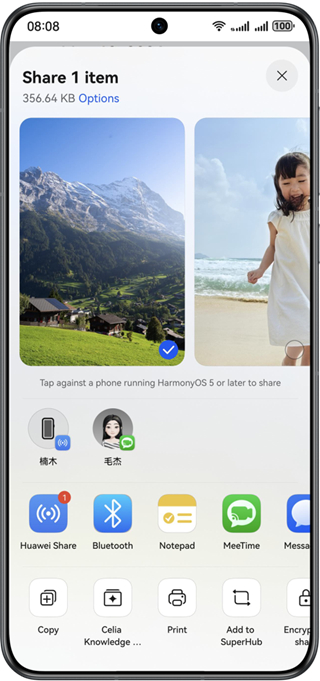
Figure 2 Tap to Transfer through Huawei Share across phones
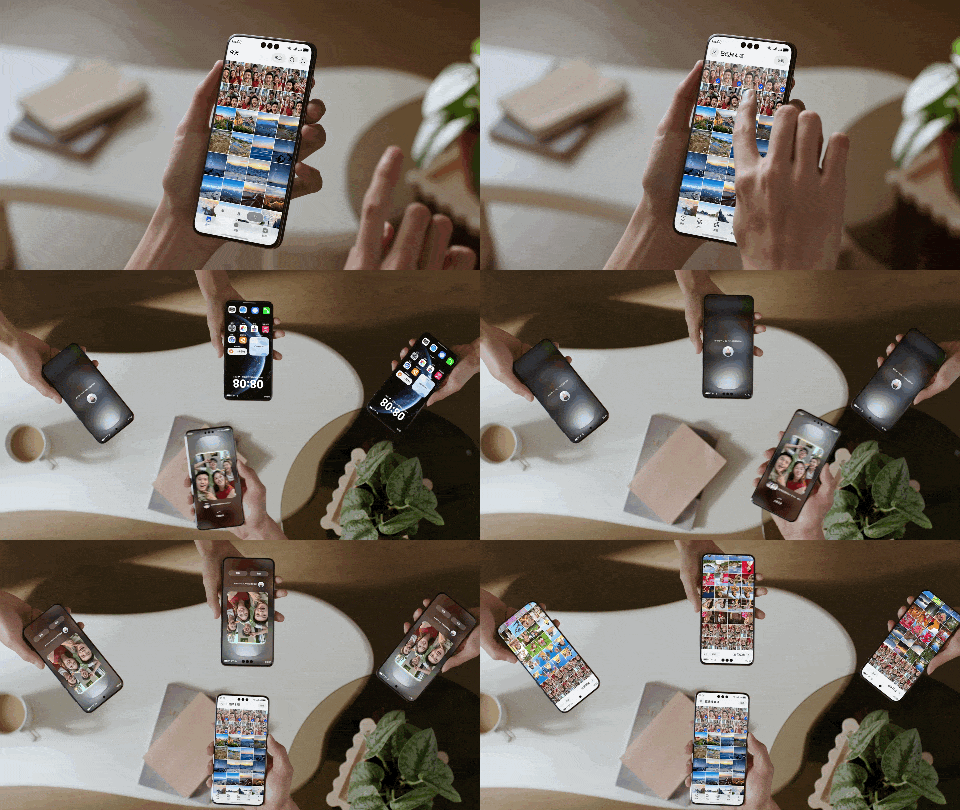
Figure 3 Tap to Transfer between a phone and a PC/2-in-1 device

Basic Concepts
-
Host app
App that initiates the sharing. The host app calls the sharing API to configure information such as the content to be shared and preview style and displays the sharing panel.
-
Target app
App that receives the shared content. You need to develop the data processing ability in the target app and declare the ability according to the target app integration guide, so that the package management service can identify the ability supported by the app.
-
Content area
Displays the title, preview, and selection of the shared content.
-
Recommendation area
Integrates Share Kit and Intents Kit and uses algorithms to efficiently and accurately recommend devices and target app users that can process the shared content.
-
Sharing mode area
Obtains target apps that support the shared content through the package management service of HarmonyOS. The following redirection methods are supported:
-
Redirects to the UIAbility component in the target app.
-
Redirects to the ExtensionAbility component provided by the target app (hereinafter referred to as the sharing details page).
The target app developer needs to configure the description of the UIAbility and ExtensionAbility components in the module.json5 configuration file to declare the supported types of shared data.
-
-
Operation area
Provides content-related operations, such as copying, saving, saving as, and printing.
Mechanism
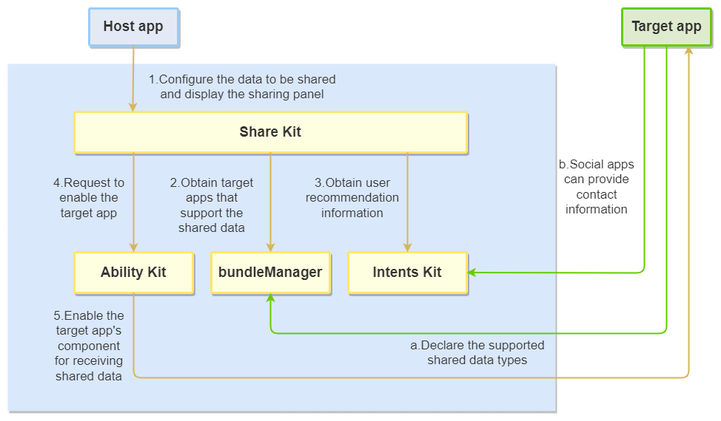
Figure 4 Mechanism of content sharing
| App Type | Logic |
|---|---|
| Host app | You need to provide a sharing entry for the content to be shared in the host app. When a user taps Share, the host app needs to send configuration about the shared content to Share Kit and starts the sharing panel. |
| Target app | 1. You need to develop a data processing component in the target app. The following sharing methods are available: - Processing the Shared Content Inside a Target App - Processing the Shared Content on the Sharing Details Page 2. (Optional) Social apps can provide contact information in recent sharings to Intents Kit based on the Intents Kit integration specifications. Share Kit obtains recommendation information from Intents Kit. When a user selects a recommended contact, Share Kit sends the contact information to the target app together with the shared content. The target app then directly sends the content to the specified user based on the contact information. |
Constraints
-
Devices
Capability Phone Tablet PC/2-in-1 Device TV System Share Supported Supported Supported Partially supported (Only sharing to nearby devices is supported. System operations and sharing to other apps are not supported.) Tap to Transfer Supported Supported Supported Not supported Grab & drop Supported Supported Supported Not supported -
Usage
- The data types defined by the host app and target app must comply with the Uniform Type Descriptor (UTD) specifications provided by the Unified Data Management Framework (UDMF). The supported content types must be configured in the target app configuration file. If all image types are supported, declare general.image.
- The total size of the description about shared data configured in the host app cannot exceed 200 KB, and the total number of shared items cannot exceed 500.
Emulator Support
This kit is supported on the Emulator.
There are some general differences between the Emulator and real devices. For details, please refer to Differences Between the Emulator and the Real Device.