Overlays, implemented using OverlayManager, are used to display custom UI content on top of a page, but below such components as created through Dialog, Popup, Menu, BindSheet, BindContentCover, and Toast. These overlays are confined to the safe area of the current window. They are applicable to scenarios such as persistent floating elements.

You can use the getOverlayManager API in UIContext to obtain the OverlayManager object associated with the current UI context, and then call the corresponding APIs using this object.
Specifications Constraints
- The nodes on OverlayManager are above the page level, but below such components such as Dialog, Popup, Menu, BindSheet, BindContentCover, and Toast.
- There is no default animation when nodes on OverlayManager appear or disappear.
- The drawing method inside and outside the safe area of nodes on OverlayManager is consistent with that of the page, and the keyboard avoidance method is also the same as that of the page.
- You are advised to use AppStorage to store attributes related to OverlayManager to prevent service errors caused by attribute value changes during page switching.
- For API versions earlier than 19, OverlayManager does not support swipe-to-close gestures (left or right). You must add the logic to close the OverlayManager in onBackPress. In API version 19 or later, you can set the enableBackPressedEvent property in OverlayManagerOptions to control whether OverlayManager responds to the swipe-to-close gesture.
- The event mechanism in OverlayManager gives priority to the component decorated with WrappedBuilder. To enable the bottom layer of the overlay to receive events, set hitTestBehavior to HitTestMode.Transparent to pass events through to the underlying layers.
Managing Overlays
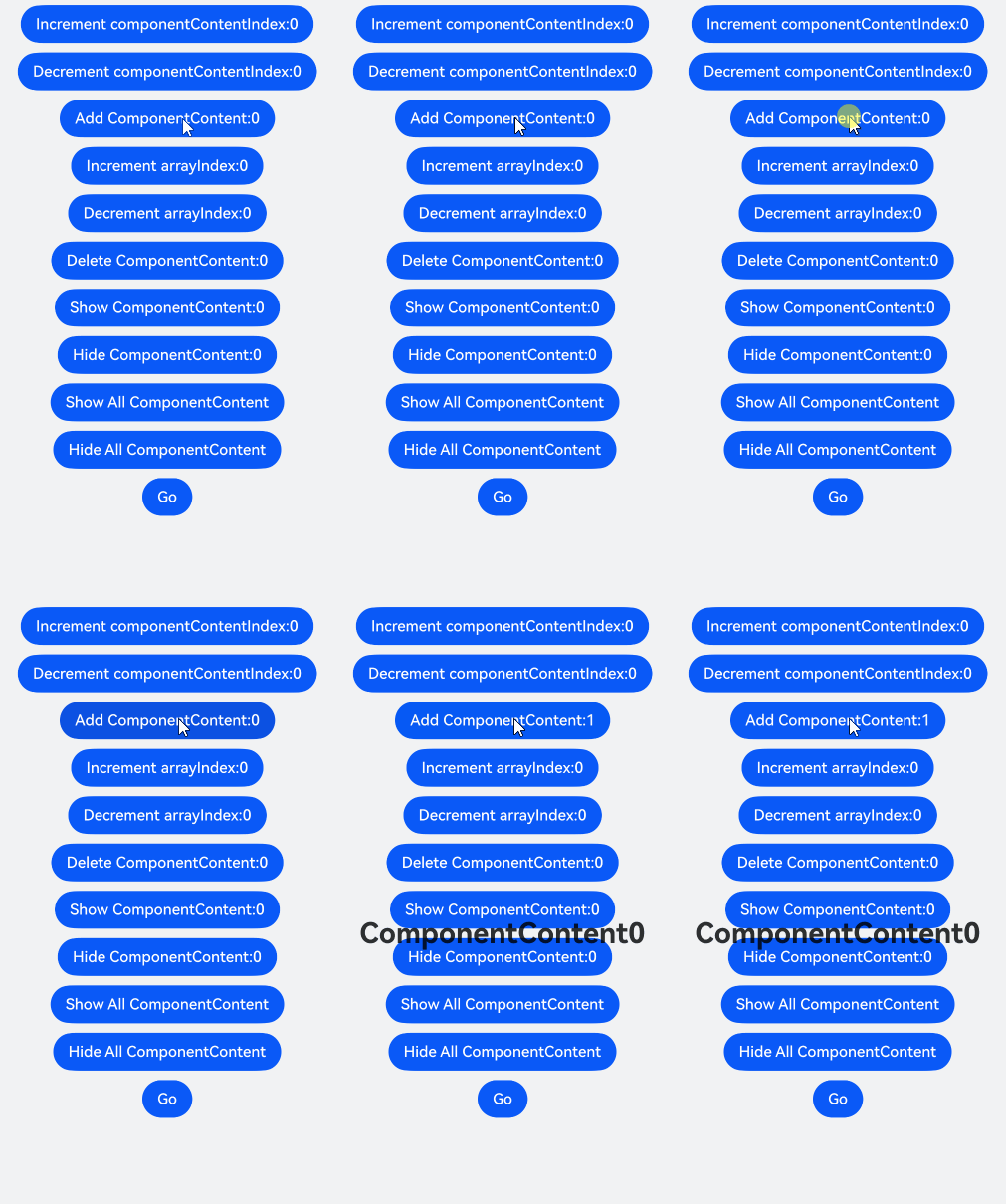
On the OverlayManager, add a specified node (addComponentContent), remove a specified node (removeComponentContent), show all nodes (showAllComponentContents), and hide all nodes (hideAllComponentContents).
import { ComponentContent, OverlayManager } from '@kit.ArkUI';
import { hilog } from '@kit.PerformanceAnalysisKit';

const TAG: string = '[Sample_dialogproject]';
const DOMAIN: number = 0xFF00;

class Params {
  public text: string = '';
  public offset: Position;

  constructor(text: string, offset: Position) {
    this.text = text;
    this.offset = offset;
  }
}

@Builder
function builderText(params: Params) {
  Column() {
    Text(params.text)
      .fontSize(30)
      .fontWeight(FontWeight.Bold)
  }.offset(params.offset)
}

@Entry
@Component
export struct OverlayManagerComponent {
  @State message: string = 'ComponentContent';
  private uiContext: UIContext = this.getUIContext();
  private overlayNode: OverlayManager = this.uiContext.getOverlayManager();
  @StorageLink('contentArray') contentArray: ComponentContent<Params>[] = [];
  @StorageLink('componentContentIndex') componentContentIndex: number = 0;
  @StorageLink('arrayIndex') arrayIndex: number = 0;
  @StorageLink('componentOffset') componentOffset: Position = { x: 0, y: 30 };

  build() {
    // ...
      Column({ space: 10 }) {
        Button('Increment componentContentIndex:' + this.componentContentIndex)
          .onClick(() => {
            ++this.componentContentIndex;
          })
        Button('Decrement componentContentIndex:' + this.componentContentIndex)
          .onClick(() => {
            --this.componentContentIndex;
          })
        Button('Add ComponentContent:' + this.contentArray.length)
          .onClick(() => {
            let componentContent = new ComponentContent(
              this.uiContext, wrapBuilder<[Params]>(builderText),
              new Params(this.message + (this.contentArray.length), this.componentOffset)
            )
            this.contentArray.push(componentContent);
            this.overlayNode.addComponentContent(componentContent, this.componentContentIndex);
          })
        Button('Increment arrayIndex:' + this.arrayIndex)
          .onClick(() => {
            ++this.arrayIndex;
          })
        Button('Decrement arrayIndex:' + this.arrayIndex)
          .onClick(() => {
            --this.arrayIndex;
          })
        Button('Delete ComponentContent:' + this.arrayIndex)
          .onClick(() => {
            if (this.arrayIndex >= 0 && this.arrayIndex < this.contentArray.length) {
              let componentContent = this.contentArray.splice(this.arrayIndex, 1);
              this.overlayNode.removeComponentContent(componentContent.pop());
            } else {
              hilog.error(DOMAIN, TAG, '%{public}s', 'arrayIndex error');
            }
          })
        Button('Show ComponentContent:' + this.arrayIndex)
          .onClick(() => {
            if (this.arrayIndex >= 0 && this.arrayIndex < this.contentArray.length) {
              let componentContent = this.contentArray[this.arrayIndex];
              this.overlayNode.showComponentContent(componentContent);
            } else {
              hilog.error(DOMAIN, TAG, '%{public}s', 'arrayIndex error');
            }
          })
        Button('Hide ComponentContent:' + this.arrayIndex)
          .onClick(() => {
            if (this.arrayIndex >= 0 && this.arrayIndex < this.contentArray.length) {
              let componentContent = this.contentArray[this.arrayIndex];
              this.overlayNode.hideComponentContent(componentContent);
            } else {
              hilog.error(DOMAIN, TAG, '%{public}s', 'arrayIndex error');
            }
          })
        Button('Show All ComponentContent')
          .onClick(() => {
            this.overlayNode.showAllComponentContents();
          })
        Button('Hide All ComponentContent')
          .onClick(() => {
            this.overlayNode.hideAllComponentContents();
          })

        Button('Go')
          .onClick(() => {
            this.getUIContext().getRouter().pushUrl({
              url: 'pages/Second'
            })
          })
      }
      .width('100%')
      .height('100%')
      // ...
  }
} 
The following example shows how to display a floating bubble that always stays on the left side of the screen, and clicking it displays an alert dialog box.
import { ComponentContent, OverlayManager } from '@kit.ArkUI';

class Params {
  public context: UIContext;
  public offset: Position;
  constructor(context: UIContext, offset: Position) {
    this.context = context;
    this.offset = offset;
  }
}
@Builder
function builderOverlay(params: Params) {
  Column() {
    Stack(){
    }.width(50).height(50).backgroundColor(Color.Yellow).position(params.offset).borderRadius(50)
    .onClick(() => {
      params.context.showAlertDialog(
        {
          title: 'title',
          message: 'Text',
          autoCancel: true,
          alignment: DialogAlignment.Center,
          gridCount: 3,
          confirm: {
            value: 'Button',
            action: () => {}
          },
          cancel: () => {}
        }
      )
    })
  }.focusable(false).width('100%').height('100%').hitTestBehavior(HitTestMode.Transparent)
}

@Entry
@Component
export struct OverlayManagerAlertDialog {
  private uiContext: UIContext = this.getUIContext();
  private overlayNode: OverlayManager = this.uiContext.getOverlayManager();
  private overlayContent: ComponentContent<Params>[] = [];

  aboutToAppear(): void {
    let uiContext = this.getUIContext();
    let componentContent = new ComponentContent(
      this.uiContext, wrapBuilder<[Params]>(builderOverlay),
      new Params(uiContext, {x:0, y: 100})
    );
    this.overlayNode.addComponentContent(componentContent, 0);
    this.overlayContent.push(componentContent);
  }

  aboutToDisappear(): void {
    let componentContent = this.overlayContent.pop();
    this.overlayNode.removeComponentContent(componentContent);
  }

  build() {
    // ...
      Column() {

      }
      .width('100%')
      .height('100%')
    // ...
  }
} 
Starting from API version 18, you can use the OverlayManager object to add a specified node at a specified level (addComponentContentWithOrder). Overlays at higher levels cover those at lower levels.
import { ComponentContent, LevelOrder, OverlayManager } from '@kit.ArkUI';
import { hilog } from '@kit.PerformanceAnalysisKit';

const TAG: string = '[Sample_dialogproject]';
const DOMAIN: number = 0xFF00;

class Params {
  public text: string = '';
  public offset: Position;

  constructor(text: string, offset: Position) {
    this.text = text;
    this.offset = offset;
  }
}

@Builder
function builderTopText(params: Params) {
  Column() {
    Stack() {
      Text(params.text)
        .fontSize(30)
        .fontWeight(FontWeight.Bold)
    }
    .width(300)
    .height(200)
    .padding(5)
    .backgroundColor('#F7F7F7')
    .alignContent(Alignment.Top)
  }.offset(params.offset)
}

@Builder
function builderNormalText(params: Params) {
  Column() {
    Stack() {
      Text(params.text)
        .fontSize(30)
        .fontWeight(FontWeight.Bold)
    }
    .width(300)
    .height(400)
    .padding(5)
    .backgroundColor('#D5D5D5')
    .alignContent(Alignment.Top)
  }.offset(params.offset)
}

@Entry
@Component
export struct OverlayManagerWithOrder {
  private ctx: UIContext = this.getUIContext();
  private overlayManager: OverlayManager = this.ctx.getOverlayManager();
  @StorageLink('contentArray') contentArray: ComponentContent<Params>[] = [];
  @StorageLink('componentContentIndex') componentContentIndex: number = 0;
  @StorageLink('arrayIndex') arrayIndex: number = 0;
  @StorageLink('componentOffset') componentOffset: Position = { x: 0, y: 80 };

  build() {
    // ...
      Row() {
        Column({ space: 5 }) {
          Button('Open Top-Level Dialog Box')
            .onClick(() => {
              let componentContent = new ComponentContent(
                this.ctx, wrapBuilder<[Params]>(builderTopText),
                new Params('I am a top-level dialog box', this.componentOffset)
              );
              this.contentArray.push(componentContent);
              this.overlayManager.addComponentContentWithOrder(componentContent, LevelOrder.clamp(100000));
            })
          Button('Open Normal Dialog Box')
            .onClick(() => {
              let componentContent = new ComponentContent(
                this.ctx, wrapBuilder<[Params]>(builderNormalText),
                new Params('I am a normal dialog box', this.componentOffset)
              );
              this.contentArray.push(componentContent);
              this.overlayManager.addComponentContentWithOrder(componentContent, LevelOrder.clamp(0));
            })
          Button('Remove Dialog Box').onClick(() => {
            if (this.arrayIndex >= 0 && this.arrayIndex < this.contentArray.length) {
              let componentContent = this.contentArray.splice(this.arrayIndex, 1);
              this.overlayManager.removeComponentContent(componentContent.pop());
            } else {
              hilog.error(DOMAIN, TAG, '%{public}s', 'arrayIndex error');
            }
          })
        }.width('100%')
      }
      // ...
  }
} 
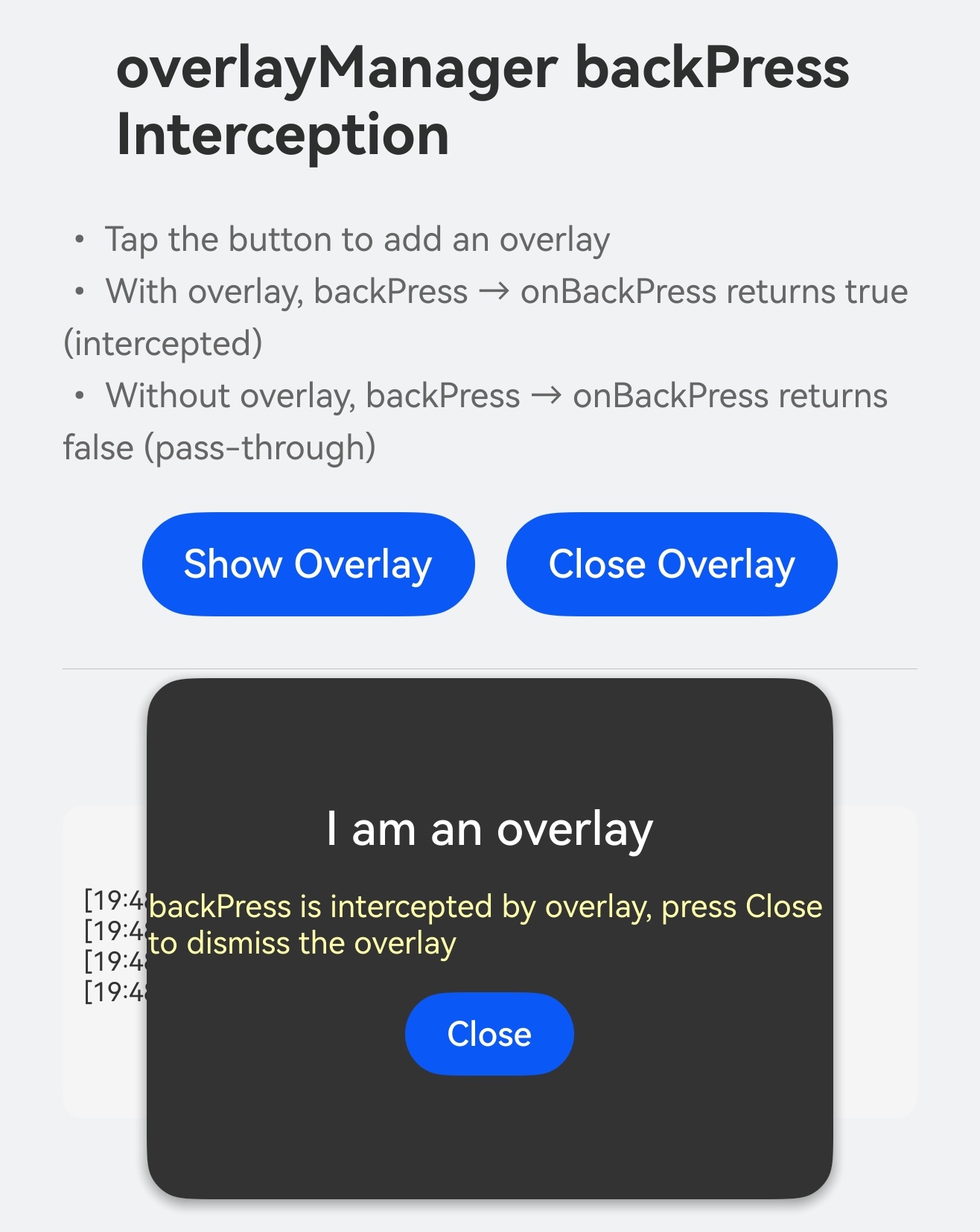
Starting from API version 26.0.0, you can intercept the swipe-back event of an overlay by setting the onBackPress callback in OverlayManagerOptions. When enableBackPressedEvent is set to true and the onBackPress callback is registered, the swipe-back event does not automatically close the overlay. Instead, the callback is invoked for you to decide whether to intercept the event: returning true indicates that the event is intercepted (the event is consumed and will not be passed to lower layers), and returning false indicates that the event is passed through to lower-layer components. This callback must be configured through setOverlayManagerOptions before calling getOverlayManager.
import { ComponentContent, OverlayManagerOptions } from '@kit.ArkUI'
import { BusinessError } from '@kit.BasicServicesKit';

class FloatParams {
  public message: string = ''
  public onDismiss: () => void = () => {}

  constructor(message: string, onDismiss: () => void) {
    this.message = message
    this.onDismiss = onDismiss
  }
}

@Builder
function floatBuilder(params: FloatParams) {
  Column({ space: 12 }) {
    Text(params.message)
      .fontSize(18)
      .fontWeight(FontWeight.Medium)
      .fontColor(Color.White)

    Text('Swipe-back is intercepted by the overlay. Tap Close to close the overlay.')
      .fontSize(12)
      .fontColor('#FFFFFFAA')

    Button('Close')
      .height(32)
      .fontSize(13)
      .fontColor(Color.White)
      .onClick(() => params.onDismiss())
  }
  .width('70%')
  .height(200)
  .justifyContent(FlexAlign.Center)
  .borderRadius(16)
  .backgroundColor('#333333')
  .shadow({ radius: 20, color: '#66000000', offsetX: 0, offsetY: 6 })
}

@Entry
@Component
export struct OverlayManagerOnBackPress {
  @State showStatus: string = 'No overlay';
  @State logText: string = '';
  private floatContent: ComponentContent<FloatParams> | null = null;
  private optionsSet: boolean = false;

  // Append a log entry. The latest entry is displayed at the top to facilitate observing the interception and pass-through of onBackPress.
  addLog(msg: string): void {
    let now = new Date();
    let ts = `${now.getHours()}:${now.getMinutes()}:${now.getSeconds()}`;
    this.logText = `[${ts}] ${msg}\n` + this.logText;
  }

  // Set enableBackPressedEvent to true through setOverlayManagerOptions and register the onBackPress callback,
  // to intercept the swipe-back event of the overlay. Returning true indicates interception (the event is consumed and is not passed to lower layers);
  // returning false indicates no interception, and the event is passed through to lower-layer components.
  ensureOptions(): void {
    if (this.optionsSet) {
      return;
    }
    let ctx = this.getUIContext();
    let ret = ctx.setOverlayManagerOptions({
      enableBackPressedEvent: true,
      onBackPress: (): boolean => {
        if (this.floatContent !== null) {
          this.addLog('onBackPress → overlay exists, return TRUE (intercept)');
          try {
            this.getUIContext().getPromptAction().showToast({
              message: 'The backPress event is intercepted by the overlay',
              duration: 2000
            });
          } catch (error) {
            let message = (error as BusinessError).message;
            let code = (error as BusinessError).code;
            console.error(`showToast args error code is ${code}, message is ${message}`);
          }
          return true;
        }
        this.addLog('onBackPress → no overlay, return FALSE (pass through)');
        return false;
      }
    } as OverlayManagerOptions);
    this.optionsSet = ret;
    this.addLog(`setOverlayManagerOptions: ${ret}`);
  }

  showFloat(): void {
    if (this.floatContent !== null) {
      this.addLog('Overlay already exists');
      return;
    }
    this.ensureOptions();
    let ctx = this.getUIContext();
    let om = ctx.getOverlayManager();
    let params = new FloatParams('I am an overlay', () => { this.dismissFloat(); });
    this.floatContent = new ComponentContent(ctx, wrapBuilder<[FloatParams]>(floatBuilder), params);
    om.addComponentContent(this.floatContent);
    this.showStatus = 'Overlay is displayed';
    this.addLog('Open overlay');
  }

  dismissFloat(): void {
    if (this.floatContent === null) {
      return;
    }
    let ctx = this.getUIContext();
    let om = ctx.getOverlayManager();
    om.removeComponentContent(this.floatContent!);
    this.floatContent = null;
    this.showStatus = 'No overlay';
    this.addLog('Close overlay');
  }

  aboutToDisappear(): void {
    this.dismissFloat();
  }

  build() {
    // ...
      Column({ space: 16 }) {
        Text('overlayManager swipe-back interception')
          .fontSize(22)
          .fontWeight(FontWeight.Bold)

        Text('• Tap the button to add an overlay\n• With an overlay, swipe-back/back → onBackPress returns true to intercept\n• Without an overlay, swipe-back/back → onBackPress returns false to pass through')
          .fontSize(13)
          .fontColor('#666666')
          .lineHeight(20)

        Row({ space: 12 }) {
          Button('Show overlay')
            .fontSize(15)
            .height(40)
            .onClick(() => this.showFloat())

          Button('Close overlay')
            .fontSize(15)
            .height(40)
            .onClick(() => this.dismissFloat())
        }

        Divider().margin({ top: 4, bottom: 4 })

        Text(`Status: ${this.showStatus}`)
          .fontSize(14)
          .fontWeight(FontWeight.Medium)

        Scroll() {
          Text(this.logText)
            .fontSize(10)
            .fontColor('#333333')
            .width('100%')
        }
        .height(120)
        .width('100%')
        .backgroundColor('#F5F5F5')
        .borderRadius(8)
        .padding(8)
      }
      .width('100%')
      .height('100%')
      .padding(24)
      // ...
  }
}