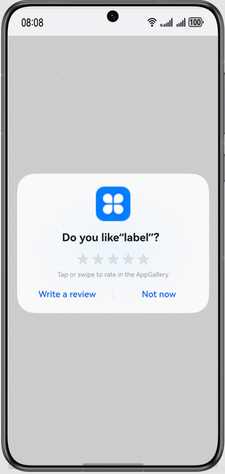
With this service, users can submit reviews directly within the app, without navigating to the details page on AppGallery.

From version 6.0.0(20), the app review pop-up is supported.
Use Cases
You can use this API to launch an app review pop-up, allowing users to rate and comment on your app without navigating to the details page on AppGallery.
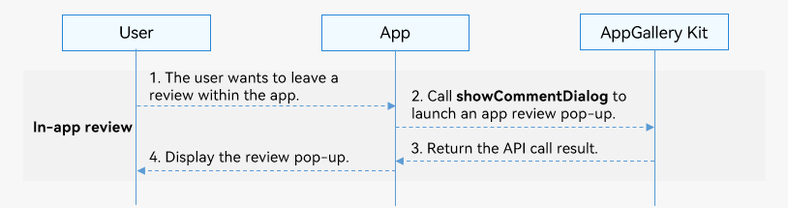
Service Process
-
The user wants to leave a review within the app.
-
The app calls the showCommentDialog API to launch an app review pop-up.
-
AppGallery Kit returns the API call result to the app.
-
The app displays the review pop-up to the user.
API Description
The app review service provides the following APIs. For details, please refer to the API reference.
| API | Description |
|---|---|
| showCommentDialog(context: common.UIExtensionContext | common.UIAbilityContext): Promise<void> | Launches an app review pop-up for users to rate and comment on your app. |
Development Procedure
-
Import the commentManager module and related common modules.
import { BusinessError } from '@kit.BasicServicesKit'; import { hilog } from '@kit.PerformanceAnalysisKit'; import type { common, Want } from '@kit.AbilityKit'; import { commentManager} from '@kit.AppGalleryKit'; -
Call showCommentDialog to launch a review pop-up.
try {
  const uiContext = this.getUIContext().getHostContext() as common.UIAbilityContext;
  commentManager.showCommentDialog(uiContext).then(()=>{
    hilog.info(0, 'TAG', 'succeeded in showing commentDialog.');
  }).catch((error: BusinessError<Object>) => {
    hilog.error(0, 'TAG', `showCommentDialog failed, Code: ${error.code}, message: ${error.message}`);
  });
} catch (error) {
  hilog.error(0, 'TAG', `showCommentDialog failed, Code: ${error.code}, message: ${error.message}`);
}
Launching the App Review Page Through a Deep Link
To open the AppGallery review page for an app, you can use a deep link. In this way, when the relevant API is called by an app or when users tap the link on a web page, the app review page will be launched on the details page, where users can rate and comment on the app.
Construct a deep link by concatenating bundleName and action. bundleName represents the package name of the app for which the review page needs to be launched, while action should be implicitly set to write-review, which indicates that the review page will be launched after the details page is displayed. The format is as follows:
// bundleName indicates the package name of the app for which the review page needs to be launched, and action should be implicitly set to write-review, indicating that the review page will be launched after the details page is displayed.
uri: 'store://appgallery.huawei.com/app/detail?id=' + bundleName + '&action=write-review',
Call the startAbility method in an app to launch the app review page on AppGallery.
import { BusinessError } from '@kit.BasicServicesKit';
import { hilog } from '@kit.PerformanceAnalysisKit';
import type { common, Want } from '@kit.AbilityKit';
// ...

// Launch a specified review page on AppGallery through a deep link.
function startAppGalleryDetailAbility(context: common.UIAbilityContext, bundleName: string): void {
  let want: Want = {
    // Implicitly set action to ohos.want.action.appdetail.
    action: 'ohos.want.action.appdetail',
    // bundleName indicates the package name of the app for which the review page needs to be launched, and action should be implicitly set to write-review, indicating that the review page will be launched after the details page is displayed.
    uri: 'store://appgallery.huawei.com/app/detail?id=' + bundleName + '&action=write-review',
  };
  context.startAbility(want).then(() => {
    hilog.info(0x0001, 'TAG', 'Succeeded in starting Ability successfully.')
  }).catch((error: BusinessError) => {
    hilog.error(0x0001, 'TAG', `Failed to startAbility. Code: ${error.code}, message is ${error.message}`);
  });
}

@Entry
@Component
struct Index {
  // ...

  build() {
    Row() {
      Column() {
        // ...
        Button('DeepLink')
          .fontSize(24)
          .fontWeight(FontWeight.Bold)
          .onClick(() => {
            const context: common.UIAbilityContext = this.getUIContext().getHostContext() as common.UIAbilityContext;
            // Set the value of bundleName, for example, com.huawei.hmsapp.books.
            const bundleName = 'xxxx';
            startAppGalleryDetailAbility(context, bundleName);
          })
        // ...
      }
      .width('100%')
    }
    .height('100%')
  }
}
Use a deep link on a web page to launch the review page of an app on AppGallery.
<html lang="en">
  <head>
    <meta charset="UTF-8">
  </head>
  <body>
    <div>
      <button type="button" onclick="openDeepLink()">Use deep link to launch review page on AppGallery</button>
    </div>
  </body>
</html>
<script>
  function openDeepLink() {
    window.open('store://appgallery.huawei.com/app/detail?id=com.xxxx.xxxx&action=write-review')
  }
</script>
Launching the App Review Page Through an App Linking URL
To open the AppGallery review page for an app, you can use an App Linking URL. In this way, when the relevant API is called by an app or when users tap the link on a web page, the app review page will be launched on the details page, where users can rate and comment on the app.
Construct an App Linking URL by concatenating bundleName and action. bundleName represents the package name of the app for which the review page needs to be launched, while action should be implicitly set to write-review, which indicates that the review page will be launched after the details page is displayed. The format is as follows:
let link: string = 'https://xxx/app/detail?id=' + bundleName + '&action=write-review';
Call the openLink API in an app to launch the page specified by the App Linking URL.
import { BusinessError } from '@kit.BasicServicesKit';
import { hilog } from '@kit.PerformanceAnalysisKit';
import type { common, Want } from '@kit.AbilityKit';
// ...

@Entry
@Component
struct Index {
  // ...

  build() {
    // ...
        Button('start app linking', { type: ButtonType.Capsule, stateEffect: true })
          .width('87%')
          .height('5%')
          .margin({ bottom: '12vp' })
          .onClick(() => {
            let context: common.UIAbilityContext = this.getUIContext().getHostContext() as common.UIAbilityContext;
            // Configure different app package names to launch review pages of different apps. For example, set bundleName to com.huawei.hmsapp.books.
            let bundleName: string = 'xxxx';
            let link: string = 'https://xxx/app/detail?id=' + bundleName + '&action=write-review';
            // Display the app review page of the specified package name on AppGallery using App Linking as the preferred mode.
            context.openLink(link, { appLinkingOnly: false })
              .then(() => {
                hilog.info(0x0001, 'TAG', 'openlink success.');
              })
              .catch((error: BusinessError) => {
                hilog.error(0x0001, 'TAG', `openlink failed. Code: ${error.code}, message is ${error.message}`);
              });
          })
        // ...
  }
}
Open an App Linking URL on a web page.
<html lang="en">
  <head>
    <meta charset="UTF-8">
    <title>Redirection example</title>
  </head>
  <body>
    <a href='https://appgallery.huawei.com/app/detail?id=bundleName&action=write-review'>Launch review page on AppGallery through an App Linking URL</a>
  </body>
</html>