Starting from API version 23, OHAudioSuite provides a spatial rendering effect node EFFECT_NODE_TYPE_SPACE_RENDER, which is used to implement 3D spatial audio rendering capabilities. The node offers three working modes: fixed placement, rotation, and extension. It can position, rotate, and extend audio sources in three-dimensional space, helping you efficiently create immersive spatial audio experiences.
Coordinate System
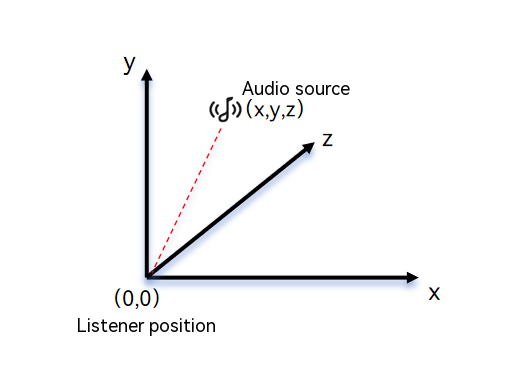
Spatial rendering uses a left-hand coordinate system. Extend your left hand and form an "L" shape with your thumb and index finger.
- Thumb pointing to the right indicates the positive X-axis direction.
- Index finger pointing upward indicates the positive Y-axis direction.
- The remaining fingers pointing forward indicate the positive Z-axis direction.
Coordinate system parameter description:
- X coordinate: left-right direction. A negative value indicates the left side, and a positive value indicates the right side. The value range is [-5.0, 5.0], and the unit is meter (m).
- Y coordinate: up-down direction. A negative value indicates the lower side, and a positive value indicates the upper side. The value range is [-5.0, 5.0], and the unit is meter (m).
- Z coordinate: front-back direction. A negative value indicates the rear, and a positive value indicates the front. The value range is [-5.0, 5.0], and the unit is meter (m).
[h2]Fixed Placement Mode
Fixed placement mode is used to place an audio source at a fixed position in a specific space. It is suitable for scenarios that require a fixed sound source position. You can configure parameters for the spatial rendering node by calling OH_AudioSuiteEngine_SetSpaceRenderPositionParams. The following figure shows the fixed placement mode.
[h2]Rotation Mode
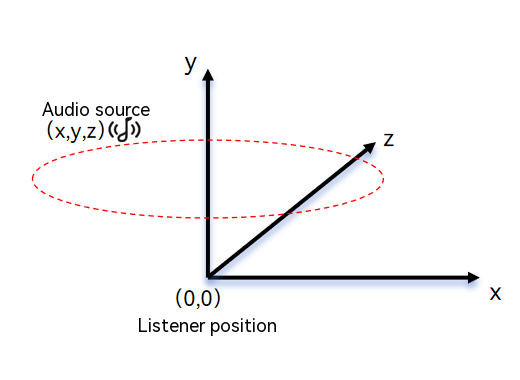
Rotation mode enables dynamic rendering of an audio source by setting the single-cycle rotation time and direction at a specified position. You can call OH_AudioSuiteEngine_SetSpaceRenderRotationParams to configure parameters for the spatial rendering node. The following figure shows the rotation mode.
[h2]Extension Mode
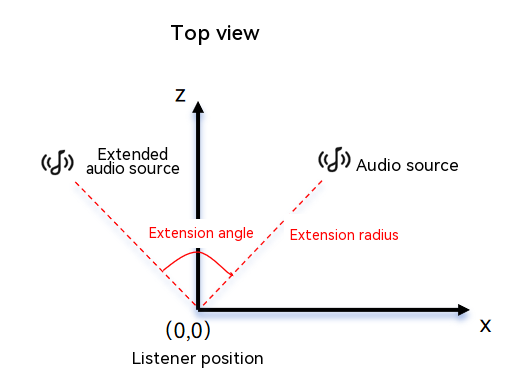
In extension mode, the audio source is extended based on radius and angle. You can call OH_AudioSuiteEngine_SetSpaceRenderExtensionParams to configure parameters for the spatial rendering node. The following figure shows the extension mode.
Basic Development Configuration
To use the spatial rendering effect node provided by OHAudioSuite, you need to include the corresponding header files and link the dynamic libraries.
[h2]Linking the Dynamic Library in the CMake Script
target_link_libraries(entry PUBLIC libohaudio.so)
target_link_libraries(entry PUBLIC libohaudiosuite.so)
[h2]Including Header Files
Include the following header files to use AudioSuite APIs.
#include <ohaudiosuite/native_audio_suite_base.h>
#include <ohaudiosuite/native_audio_suite_engine.h>
#include <ohaudio/native_audiorenderer.h>
#include <ohaudio/native_audiostreambuilder.h>
[h2]Implementing Fixed Placement Spatial Rendering
-
Create the engine and pipeline.
// The example API does not include return value validation. You must add validation logic in actual use. // Create the engine. OH_AudioSuiteEngine_Create(&g_audioSuiteEngine); // Create a pipeline for real-time playback spatial rendering. OH_AudioSuiteEngine_CreatePipeline(g_audioSuiteEngine, &g_audioSuitePipeline, OH_AudioSuite_PipelineWorkMode::AUDIOSUITE_PIPELINE_REALTIME_MODE); -
Create input, output, and spatial rendering nodes, and connect them into a network.
To create an input node, implement the custom callback function InputNodeWriteDataCallBack, whose function type is OH_InputNode_RequestDataCallback(). Call OH_AudioSuiteNodeBuilder_SetRequestDataCallback() to set the callback function.
struct AudioDataInfo {
    uint8_t *buffer = nullptr;   // Audio data.
    int32_t bufferSize = 0;      // Total size of audio data.
    int32_t totalWriteSize = 0;  // Total size of processed audio data.
    int32_t totalReadSize = 0;  // Total size of read audio data.
};
// The sample code does not include return value checks. Add the check logic in actual use. // Callback function for the input node to request data. static int32_t InputNodeWriteDataCallBack(OH_AudioNode *audioNode, void *userData, void *audioData, int32_t audioDataSize, bool *finished) { if ((audioNode == nullptr) || (userData == nullptr) || (audioData == nullptr) || (audioDataSize <= 0) || (finished == nullptr)) { return -1; } struct AudioDataInfo *info = static_cast<struct AudioDataInfo *>(userData); // Size of the audio data to process. int32_t actualDataSize = std::min(audioDataSize, info->bufferSize - info->totalWriteSize); // Write the PCM audio data to audioData. if (actualDataSize > 0) { std::copy(info->buffer + info->totalWriteSize, info->buffer + info->totalWriteSize + actualDataSize, static_cast<uint8_t *>(audioData)); } info->totalWriteSize += actualDataSize; // All audio data has been processed. if (info->totalWriteSize >= info->bufferSize) { *finished = true; } return actualDataSize; }// The sample API does not include return value validation. Add validation logic in actual use. // Create a node builder. OH_AudioNodeBuilder *nodeBuilder = nullptr; OH_AudioSuiteNodeBuilder_Create(&nodeBuilder); // Configure the audio data format. Set the sample rate, channel layout, number of channels, bit depth, and encoding format based on the audio data to be processed. OH_AudioFormat audioFormatInput; ConfigureAudioFormat(audioFormatInput); OH_AudioSuiteNodeBuilder_SetFormat(nodeBuilder, audioFormatInput); OH_AudioSuiteNodeBuilder_SetNodeType(nodeBuilder, OH_AudioNode_Type::INPUT_NODE_TYPE_DEFAULT); // You can set one or more input nodes based on your audio source. // Set the callback for the first audio stream. void *userData = static_cast<void *>(audioInfoForVocals); OH_AudioSuiteNodeBuilder_SetRequestDataCallback(nodeBuilder, InputNodeWriteDataCallBack, userData); // Create the first input node. OH_AudioSuiteEngine_CreateNode(g_audioSuitePipeline, nodeBuilder, &g_inputNodeForVocals); // Reset the builder configuration and set it to the input node type. OH_AudioSuiteNodeBuilder_Reset(nodeBuilder); OH_AudioSuiteNodeBuilder_SetNodeType(nodeBuilder, OH_AudioNode_Type::INPUT_NODE_TYPE_DEFAULT); OH_AudioSuiteNodeBuilder_SetFormat(nodeBuilder, audioFormatInput); // Set the callback for the second audio stream. userData = static_cast<void *>(audioInfoForAccompaniment); OH_AudioSuiteNodeBuilder_SetRequestDataCallback(nodeBuilder, InputNodeWriteDataCallBack, userData); // Create the second input node. OH_AudioSuiteEngine_CreateNode(g_audioSuitePipeline, nodeBuilder, &g_inputNodeForAccompaniment); // After setting the spatial audio with fixed placement for spatial rendering, you can also update the spatial audio position in real time to achieve periodic changes. // Reset the builder configuration and set the node type to spatial rendering node. OH_AudioSuiteNodeBuilder_Reset(nodeBuilder); OH_AudioSuiteNodeBuilder_SetNodeType(nodeBuilder, OH_AudioNode_Type::EFFECT_NODE_TYPE_SPACE_RENDER); // Create the first spatial rendering node. OH_AudioSuiteEngine_CreateNode(g_audioSuitePipeline, nodeBuilder, &g_spaceNodeForVocals); // Set the spatial rendering node to fixed placement. OH_AudioSuiteEngine_SetSpaceRenderPositionParams( g_spaceNodeForVocals, OH_AudioSuite_SpaceRenderPositionParams{-SPACE_RENDER_RADIUS, POSITION_ORIGIN, -SPACE_RENDER_RADIUS}); // Reset the builder configuration and set the node type to spatial rendering node. OH_AudioSuiteNodeBuilder_Reset(nodeBuilder); OH_AudioSuiteNodeBuilder_SetNodeType(nodeBuilder, OH_AudioNode_Type::EFFECT_NODE_TYPE_SPACE_RENDER); // Create the second spatial rendering node. OH_AudioSuiteEngine_CreateNode(g_audioSuitePipeline, nodeBuilder, &g_spaceNodeForAccompaniment); // Set the spatial rendering node to fixed placement. OH_AudioSuiteEngine_SetSpaceRenderPositionParams( g_spaceNodeForAccompaniment, OH_AudioSuite_SpaceRenderPositionParams{SPACE_RENDER_RADIUS, POSITION_ORIGIN, SPACE_RENDER_RADIUS}); // Reset the builder configuration and set the node type to mixer. OH_AudioSuiteNodeBuilder_Reset(nodeBuilder); OH_AudioSuiteNodeBuilder_SetNodeType(nodeBuilder, OH_AudioNode_Type::EFFECT_NODE_TYPE_AUDIO_MIXER); // Create the mixer node. OH_AudioSuiteEngine_CreateNode(g_audioSuitePipeline, nodeBuilder, &g_mixerNode); // Reset the builder configuration and set the node type to output. OH_AudioSuiteNodeBuilder_Reset(nodeBuilder); OH_AudioSuiteNodeBuilder_SetNodeType(nodeBuilder, OH_AudioNode_Type::OUTPUT_NODE_TYPE_DEFAULT); // Configure the audio data format. Set the sample rate, channel layout, channel count, bit depth, and encoding format parameters based on the expected output audio format. OH_AudioFormat audioFormatOutput; ConfigureAudioFormat(audioFormatOutput); OH_AudioSuiteNodeBuilder_SetFormat(nodeBuilder, audioFormatOutput); // Create the output node. OH_AudioSuiteEngine_CreateNode(g_audioSuitePipeline, nodeBuilder, &g_outputNode); // Destroy the node builder. OH_AudioSuiteNodeBuilder_Destroy(nodeBuilder); // Connect the nodes to form a pipeline. OH_AudioSuiteEngine_ConnectNodes(g_inputNodeForVocals, g_spaceNodeForVocals); OH_AudioSuiteEngine_ConnectNodes(g_spaceNodeForVocals, g_mixerNode); OH_AudioSuiteEngine_ConnectNodes(g_inputNodeForAccompaniment, g_spaceNodeForAccompaniment); OH_AudioSuiteEngine_ConnectNodes(g_spaceNodeForAccompaniment, g_mixerNode); OH_AudioSuiteEngine_ConnectNodes(g_mixerNode, g_outputNode); -
In the player callback function, copy the processed data to the buffer of the OH_AudioRenderer instance to enable real-time preview during audio playback.
// The sample API does not include return value validation. Be sure to add validation logic in actual use.
static OH_AudioData_Callback_Result AudioRendererOnWriteData(OH_AudioRenderer *renderer, void *userData,
                                                             void *audioData, int32_t audioDataSize)
{
    bool finishedFlag = false;
    int32_t writeSize = 0;
    OH_AudioSuite_Result result = OH_AudioSuiteEngine_RenderFrame(static_cast<OH_AudioSuitePipeline *>(userData),
                                                                  audioData, audioDataSize, &writeSize, &finishedFlag);
    if (result != OH_AudioSuite_Result::AUDIOSUITE_SUCCESS) {
        // Audio creation rendering failed.
        return AUDIO_DATA_CALLBACK_RESULT_INVALID;
    }
    // Audio creation rendering is complete.
    if (finishedFlag) {
        // Implement custom behavior here.
    }

    return AUDIO_DATA_CALLBACK_RESULT_VALID;
}
// The sample API does not include return value verification. Add verification logic in actual use. // Create the builder. OH_AudioStreamBuilder_Create(&g_rendererBuilder, OH_AudioStream_Type::AUDIOSTREAM_TYPE_RENDERER); OH_AudioStreamBuilder_SetSamplingRate(g_rendererBuilder, OH_Audio_SampleRate::SAMPLE_RATE_48000); OH_AudioStreamBuilder_SetChannelCount(g_rendererBuilder, CHANNEL_COUNT); OH_AudioStreamBuilder_SetSampleFormat(g_rendererBuilder, AUDIOSTREAM_SAMPLE_S16LE); OH_AudioStreamBuilder_SetEncodingType(g_rendererBuilder, AUDIOSTREAM_ENCODING_TYPE_RAW); OH_AudioStreamBuilder_SetRendererInfo(g_rendererBuilder, AUDIOSTREAM_USAGE_MUSIC); // If the sampling rate is 11025, use 40 ms for calculation. OH_AudioFormat audioFormatOutput; ConfigureAudioFormat(audioFormatOutput); int32_t frameSize = RENDER_FRAME_DURATION_MS * audioFormatOutput.samplingRate * audioFormatOutput.channelCount * SAMPLE_FORMAT_S16LE_BYTE_SIZE / MS_PER_SECOND; // Set the audioDataSize length (size of data to be played). OH_AudioStreamBuilder_SetFrameSizeInCallback(g_rendererBuilder, frameSize); // Configure the callback for writing audio data. OH_AudioStreamBuilder_SetRendererWriteDataCallback(g_rendererBuilder, AudioRendererOnWriteData, static_cast<void *>(g_audioSuitePipeline)); // Start the pipeline. OH_AudioSuiteEngine_StartPipeline(g_audioSuitePipeline); // ... // Stop the pipeline. OH_AudioSuiteEngine_StopPipeline(g_audioSuitePipeline); -
Destroy resources.
// The sample API does not include return value verification. Add verification logic in actual use.
// Destroy the stream builder.
OH_AudioStreamBuilder_Destroy(g_rendererBuilder);

// Destroy the node.
OH_AudioSuiteEngine_DestroyNode(g_inputNodeForVocals);
OH_AudioSuiteEngine_DestroyNode(g_inputNodeForAccompaniment);
OH_AudioSuiteEngine_DestroyNode(g_spaceNodeForVocals);
OH_AudioSuiteEngine_DestroyNode(g_spaceNodeForAccompaniment);
OH_AudioSuiteEngine_DestroyNode(g_mixerNode);
OH_AudioSuiteEngine_DestroyNode(g_outputNode);

// Destroy the pipeline.
OH_AudioSuiteEngine_DestroyPipeline(g_audioSuitePipeline);

// Destroy the engine.
OH_AudioSuiteEngine_Destroy(g_audioSuiteEngine);