Use Cases
An app calls the API of Device Security Kit to obtain fraudulent message information for anti-fraud purposes, such as reporting fraudulent messages.
Constraints
Currently, this capability is supported only on phones and tablets. It is available only to anti-fraud apps.
Service Process
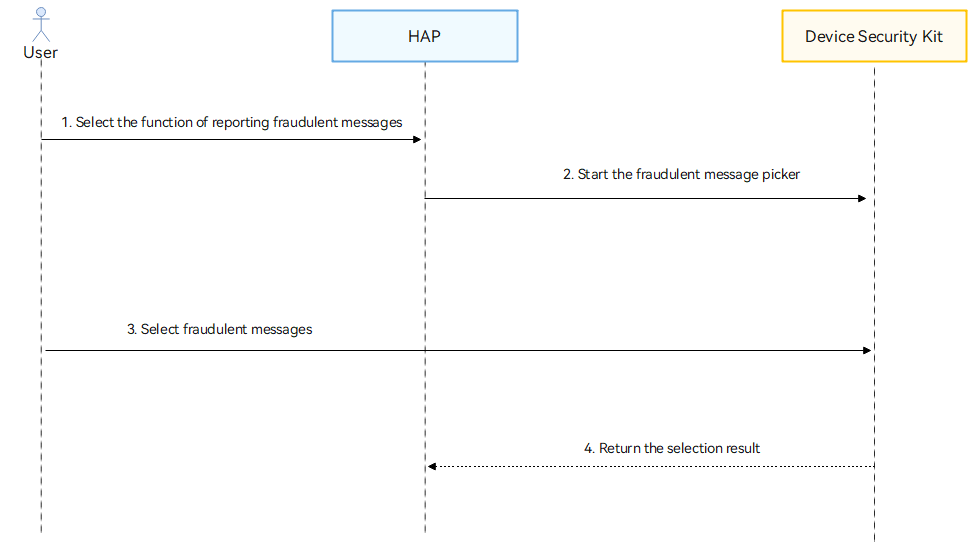
Process description:
-
A user selects the function of reporting fraudulent messages in your app.
-
Your app calls the API of Device Security Kit to start the fraudulent message picker.
-
The user selects fraudulent messages in the fraudulent message picker.
-
Device Security Kit calls the callback function to notify your app of the selection result. Your app then processes the service based on the fraudulent message information.
API Description
The following table lists the API for obtaining fraudulent messages. For more information about the API, please refer to API Reference.
| API | Description |
|---|---|
| selectFraudMessage(context: common.Context, options?: AntifraudMessageOptions): Promise<AntifraudMessageResult> | Obtains fraudulent message information. |
Development Procedure

-
When preparing for the development, you need to apply for the ohos.permission.USE_FRAUD_MESSAGES_PICKER permission.
-
Only apps in the trustlist can apply for this permission. For details about how to apply for this permission, please refer to Requesting Restricted Permissions.
-
You need to inform users about the purpose, methods, and scope of data usage.
-
Import the Device Security Kit module and related public modules.
import { BusinessError } from '@kit.BasicServicesKit'; import antifraudPicker from '@hms.security.antifraudPicker'; import hilog from '@ohos.hilog'; import { common } from '@kit.AbilityKit'; -
Call the selectFraudMessage API to obtain the fraudulent message information.
const TAG = "AntifraudPickerJsTest";

// Request to obtain the fraudulent message information and process the service.
let options: antifraudPicker.AntifraudMessageOptions = {
  maxSelectNumber: 5
};
try {
  hilog.info(0x0000, TAG, 'SelectFraudMessage begin.');
  let context = this.getUIContext().getHostContext();
  const result: antifraudPicker.AntifraudMessageResult = await antifraudPicker.selectFraudMessage(context, options);
} catch (err) {
  let e: BusinessError = err as BusinessError;
  hilog.error(0x0000, TAG, 'SelectFraudMessage failed: %{public}d %{public}s', e.code, e.message);
}