Overview
Video transcoding is the process of converting a video file from one format to another by modifying parameters such as encoding, bit rate, resolution, frame rate, and file format. The system provides the buffer mode for video encoding and decoding, which is the core capability of the media subsystem. In buffer mode, the data that has been encoded or decoded is output through shared memory, allowing access to the shared memory's address and associated data details. This mode is well-suited for video transcoding and editing scenarios.
This topic describes the basic concepts of video encoding and decoding, the principles of video encoding and decoding in buffer mode, and the implementation solution and development procedure of video transcoding.
[h2]Basic Concepts
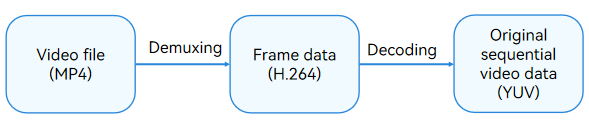
Common video file formats include MP4, AVI, and more. To decode a video file (for example, an MP4 file), you need to demultiplex it first. Demultiplexing separates the audio and video data streams from a multiplexed audio and video file (such as MP4 and FLV). Then, a video sample is extracted from the data stream and decoded into YUV data via the video decoder, as shown in the following figure.
To encode a video file (for example, an MP4 file), YUV data is encoded first to compress it into an H.264 video stream, which is multiplexed to the MP4 file, as shown in the following figure.

For details about the formats supported for video file encoding and decoding, see AVCodec Supported Formats.
[h2]YUV Stride Alignment
YUV is a type of true-color color space. Related proper nouns such as Y'UV and YUV belong to the YUV color space category. I420, NV12, and NV21 are distinct YUV storage formats. Meanwhile, I420 and YV12 fall under the YUV420P (Planar) category, while NV12 and NV21 belong to the YUV420SP (Semi-Planar) category.
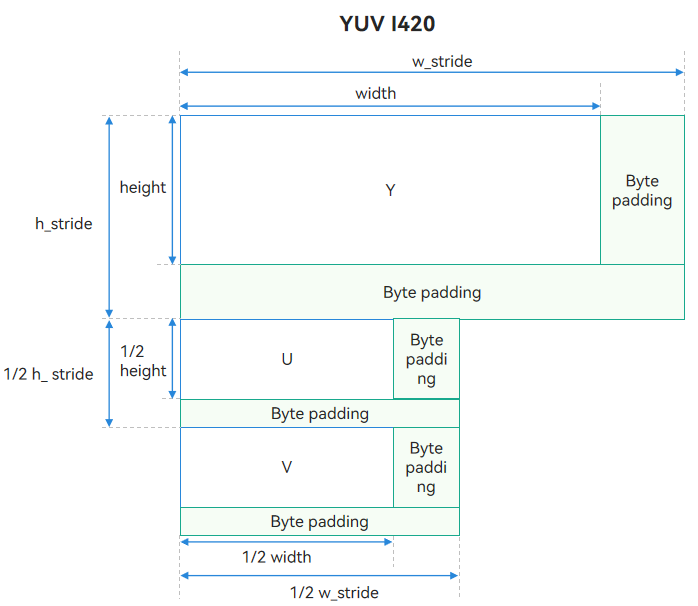
Due to hardware memory access alignment requirements, when YUV image data is written into memory buffers, the per-line storage length is automatically padded by hardware or the underlying driver to match the specified alignment granularity (such as 16, 32, or 64 bytes). This is precisely what YUV stride alignment entails. During YUV stride alignment, padding is added to each line of valid pixel data, which means the stride is greater than the image's actual valid pixel width in bytes.
The following figure shows the format after I420 stride alignment. w_stride indicates the width stride after data padding, h_stride indicates the height stride after data padding, height indicates the actual height, and width indicates the actual width.
[h2]Video Encoding and Decoding Principles
While video encoders and decoders share principles and implementation mechanisms, the data they process diverges. During encoding, the input is the raw data (YUV), and the output is the video data (such as H.264). Conversely, the decoding process reverses this workflow: it takes the video data as input and outputs reconstructed YUV data. The following uses video decoding as an example to describe the principles.
Video decoding involves the processing of two key data flows: input data stream and output data stream. You need to feed the data to be decoded into the decoder through the input data stream before the decoder starts data decoding. In the output data flow, the decoder outputs the decoded video data. Once the data is used, the decoder must be signaled to release the video data to enable overall buffer recycling. The detailed workflow is illustrated in the figure below.
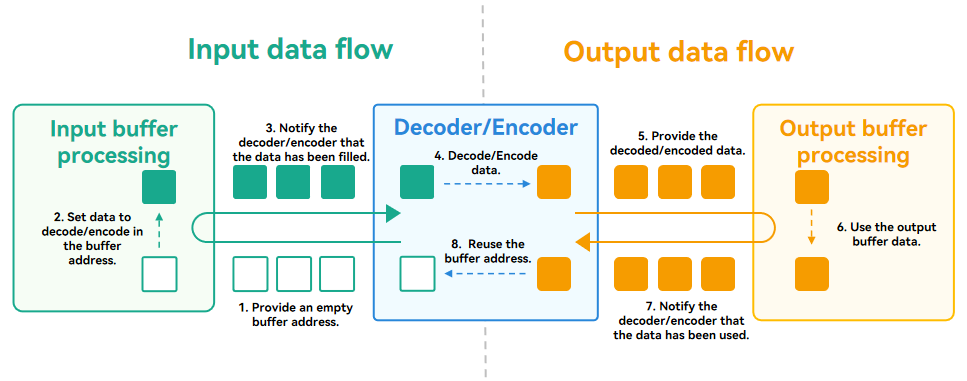
The input data flow is as follows:
- The decoder provides an empty buffer address for filling video data to be decoded.
- The demultiplexed video data (such as H.264) is fed into the buffer address provided by the decoder.
- The decoder is notified that the video data has been filled in the current buffer address.
- Once receiving the notification, the decoder starts data decoding.
The output data flow is as follows:
- Once the output of decoded data is ready, the decoder delivers the decoded video data.
- After obtaining the data, you can use it to fulfill diverse service requirements, for example, displaying it on the screen.
- Once the data is used, you need to transfer the buffer usage permission to the decoder.
- The decoder reuses the buffer address cyclically. The video data in the buffer is not released or cleared. Instead, the decoded data is directly overwritten to the idle buffer address in the next cycle.
[h2]Scenario
Since different devices and platforms have varying video format compatibility, transcoding converts source videos into formats compatible across a wide range of devices and platforms, thereby ensuring seamless video playback. For example, some platforms support only specific video formats. Even with the same video format, resolution, frame rate, and bit rate can vary significantly. Adjusting these parameters can reduce video file size, thereby saving storage space.
In ArkTS, the system provides the AVTranscoder API to implement simple video transcoding. In complex scenarios, such as video cropping, you need to call system's video encoding and decoding capabilities. In buffer mode, video transcoding allows video data read and write to adapt to more dynamic and diverse scenarios.
[h2]How to Develop
In video transcoding, a video file goes through demultiplexing, decoding, encoding, and multiplexing, as shown in the following figure.

The process consists of three key steps.
1. Initialize the video encoding and decoding environment: Create an instance for subsequent video encoding and decoding and set required parameters.
2. Decode the video file: Decoding includes video demultiplexing and decoding and generates. Decoded video data is output.
3. Encode the video file: Retrieve the decoded data, encode it, then multiplex the encoded data into the target video file.
The following shows how to initialize the video encoding and decoding environment.
Create and configure the demuxer.
Create and configure the decoder, and register the callback function of the decoder. The callback function OnNeedInputBuffer() provides the address of the empty buffer for decoding, and the callback function OnNewOutputBuffer() provides the decoded video data.
Create and configure the muxer.
Create and configure the encoder, and register the callback function of the encoder. The callback function configuration is the same as that of the decoder.
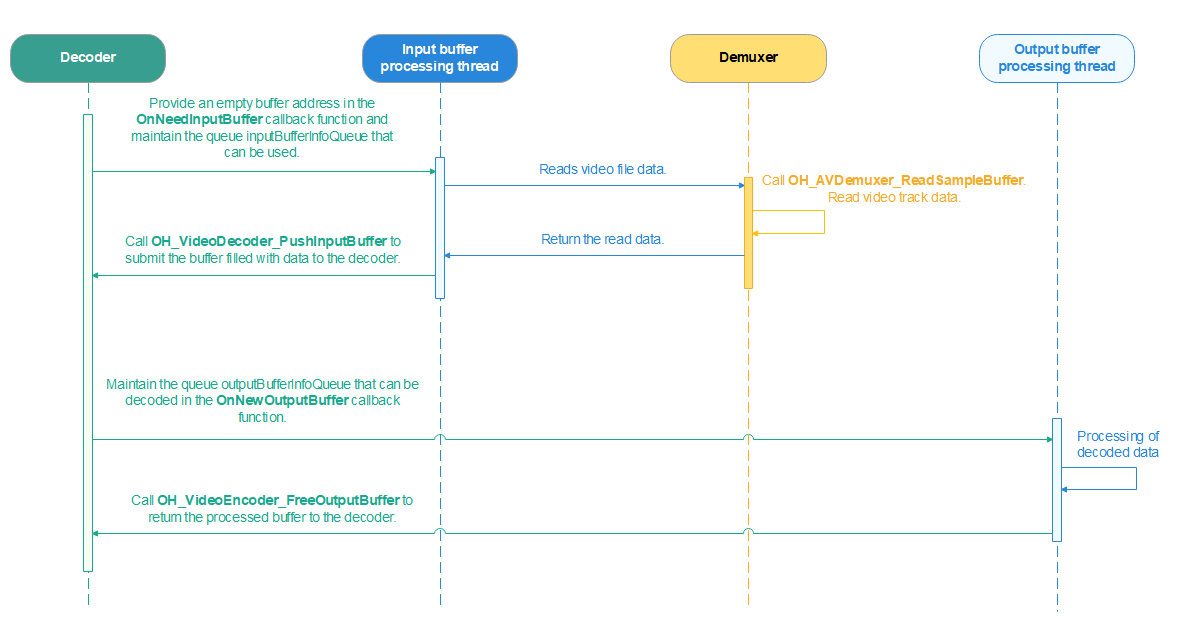
Video file decoding involves two steps: input buffer processing and output buffer processing. The OnNeedInputBuffer() callback function maintains a buffer queue of empty buffers. During input buffer processing, the stream must be demultiplexed, and the buffers filled with video data. The OnNewOutputBuffer() callback function maintains a buffer queue of decoded video data. During output buffer processing, the video data must be processed. The call sequence is as follows:
The following shows how to develop video file decoding.
Obtain the address of the empty video buffer through inputBufferInfoQueue.
Read media data (video stream data and format) through the demuxer.
Set the corresponding video buffer data in OH_VideoDecoder_PushInputBuffer().
After the decoding is complete, obtain the video buffer data through outputBufferInfoQueue.
Process the buffer data, refresh the buffer through OH_VideoDecoder_FreeOutputBuffer(), and return the buffer resources to the decoder.
The following shows how to develop video file encoding. Video file encoding shares similarities with video file decoding. The encoder's input buffer data is derived from the decoder's output buffer; thus, the encoder's input buffer data can be processed synchronously within the decoder's output buffer processing sub-thread.
Obtain the video buffer address through inputBufferInfoQueue.
Copy the decoded data from the buffer to the input buffer of encoding.
Submit the filled input buffer to the encoder through OH_VideoEncoder_PushInputBuffer().
After the encoding is complete, obtain the video buffer data through outputBufferInfoQueue.
Write the encoded video data to the video file through the muxer.
[h2]Code Implementation
Initialize the video encoding and decoding environments.
Initialize the video decoding environment.
int32_t Transcoding::InitDecoder() {
    CHECK_AND_RETURN_RET_LOG(!isStarted_, AVCODEC_SAMPLE_ERR_ERROR, "Already started.");
    CHECK_AND_RETURN_RET_LOG(demuxer_ == nullptr && videoDecoder_ == nullptr,
                             AVCODEC_SAMPLE_ERR_ERROR, "Already started.");

    videoDecoder_ = std::make_unique<VideoDecoder>();
    demuxer_ = std::make_unique<Demuxer>();

    isReleased_ = false;
    int32_t ret = demuxer_->Create(sampleInfo_);

    if (ret == AVCODEC_SAMPLE_ERR_OK) {
        ret = CreateVideoDecoder();
    } else {
        AVCODEC_SAMPLE_LOGE("Create audio decoder failed");
    }
    return ret;
}
Create a demuxer. You need to create an OH_AVSource object based on the file descriptor (fd) of the video to be decoded and a mapping decoder.
int32_t Demuxer::Create(SampleInfo &info) {
    source_ = OH_AVSource_CreateWithFD(info.inputFd, info.inputFileOffset, info.inputFileSize);
    CHECK_AND_RETURN_RET_LOG(source_ != nullptr, AVCODEC_SAMPLE_ERR_ERROR,
                             "Create demuxer source failed, fd: %{public}d, offset: %{public}" PRId64
                             ", file size: %{public}" PRId64,
                             info.inputFd, info.inputFileOffset, info.inputFileSize);
    demuxer_ = OH_AVDemuxer_CreateWithSource(source_);
    CHECK_AND_RETURN_RET_LOG(demuxer_ != nullptr, AVCODEC_SAMPLE_ERR_ERROR, "Create demuxer failed");

    auto sourceFormat = std::shared_ptr<OH_AVFormat>(OH_AVSource_GetSourceFormat(source_), OH_AVFormat_Destroy);
    CHECK_AND_RETURN_RET_LOG(sourceFormat != nullptr, AVCODEC_SAMPLE_ERR_ERROR, "Get source format failed");

    int32_t ret = GetTrackInfo(sourceFormat, info);
    CHECK_AND_RETURN_RET_LOG(ret == AVCODEC_SAMPLE_ERR_OK, AVCODEC_SAMPLE_ERR_ERROR, "Get video track info failed");

    return AVCODEC_SAMPLE_ERR_OK;
}
After the demuxer is created, obtain video parameters, such as the video width, height, and frame rate, through the demuxer.
int32_t Demuxer::GetTrackInfo(std::shared_ptr<OH_AVFormat> sourceFormat, SampleInfo &info) {
    int32_t trackCount = 0;
    OH_AVFormat_GetIntValue(sourceFormat.get(), OH_MD_KEY_TRACK_COUNT, &trackCount);
    for (int32_t index = 0; index < trackCount; index++) {
        int trackType = -1;
        auto trackFormat =
            std::shared_ptr<OH_AVFormat>(OH_AVSource_GetTrackFormat(source_, index), OH_AVFormat_Destroy);
        OH_AVFormat_GetIntValue(trackFormat.get(), OH_MD_KEY_TRACK_TYPE, &trackType);
        if (trackType == MEDIA_TYPE_VID) {
            OH_AVDemuxer_SelectTrackByID(demuxer_, index);
            OH_AVFormat_GetIntValue(trackFormat.get(), OH_MD_KEY_WIDTH, &info.videoWidth);
            OH_AVFormat_GetIntValue(trackFormat.get(), OH_MD_KEY_HEIGHT, &info.videoHeight);
            OH_AVFormat_GetDoubleValue(trackFormat.get(), OH_MD_KEY_FRAME_RATE, &info.frameRate);
            OH_AVFormat_GetLongValue(trackFormat.get(), OH_MD_KEY_BITRATE, &info.bitrate);
            OH_AVFormat_GetIntValue(trackFormat.get(), OH_MD_KEY_ROTATION, &info.rotation);
            char *videoCodecMime;
            OH_AVFormat_GetStringValue(trackFormat.get(), OH_MD_KEY_CODEC_MIME,
                                       const_cast<char const **>(&videoCodecMime));
            info.videoCodecMime = videoCodecMime;
            OH_AVFormat_GetIntValue(trackFormat.get(), OH_MD_KEY_PROFILE, &info.hevcProfile);
            videoTrackId_ = index;

            AVCODEC_SAMPLE_LOGI("====== Demuxer Video config ======");
            AVCODEC_SAMPLE_LOGI("Mime: %{public}s", videoCodecMime);
            AVCODEC_SAMPLE_LOGI("%{public}d*%{public}d, %{public}.1ffps, %{public}" PRId64 "kbps", info.videoWidth,
                                info.videoHeight, info.frameRate, info.bitrate / 1024);
            AVCODEC_SAMPLE_LOGI("====== Demuxer Video config ======");
        } else if (trackType == MEDIA_TYPE_AUD) {
            OH_AVDemuxer_SelectTrackByID(demuxer_, index);
            OH_AVFormat_GetIntValue(trackFormat.get(), OH_MD_KEY_AUDIO_SAMPLE_FORMAT, &info.audioSampleForamt);
            OH_AVFormat_GetIntValue(trackFormat.get(), OH_MD_KEY_AUD_CHANNEL_COUNT, &info.audioChannelCount);
            OH_AVFormat_GetLongValue(trackFormat.get(), OH_MD_KEY_CHANNEL_LAYOUT, &info.audioChannelLayout);
            OH_AVFormat_GetIntValue(trackFormat.get(), OH_MD_KEY_AUD_SAMPLE_RATE, &info.audioSampleRate);
            char *audioCodecMime;
            OH_AVFormat_GetStringValue(trackFormat.get(), OH_MD_KEY_CODEC_MIME,
                                       const_cast<char const **>(&audioCodecMime));
            uint8_t *codecConfig = nullptr;
            OH_AVFormat_GetBuffer(trackFormat.get(), OH_MD_KEY_CODEC_CONFIG, &codecConfig, &info.codecConfigLen);
            if (info.codecConfigLen > 0 && info.codecConfigLen < sizeof(info.codecConfig)) {
                memcpy(info.codecConfig, codecConfig, info.codecConfigLen);
                AVCODEC_SAMPLE_LOGI(
                    "codecConfig:%{public}p, len:%{public}i, 0:0x%{public}02x 1:0x:%{public}02x, bufLen:%{public}u",
                    info.codecConfig, (int)info.codecConfigLen, info.codecConfig[0], info.codecConfig[1],
                    sizeof(info.codecConfig));
            }
            OH_AVFormat_GetIntValue(trackFormat.get(), OH_MD_KEY_AAC_IS_ADTS, &info.aacAdts);

            info.audioCodecMime = audioCodecMime;
            audioTrackId_ = index;

            AVCODEC_SAMPLE_LOGI("====== Demuxer Audio config ======");
            AVCODEC_SAMPLE_LOGI(
                "audioMime:%{public}s sampleForamt:%{public}d "
                "sampleRate:%{public}d channelCount:%{public}d channelLayout:%{public}d adts:%{public}i",
                info.audioCodecMime.c_str(), info.audioSampleForamt, info.audioSampleRate, info.audioChannelCount,
                info.audioChannelLayout, info.aacAdts);
            AVCODEC_SAMPLE_LOGI("====== Demuxer Audio config ======");
        }
    }

    return AVCODEC_SAMPLE_ERR_OK;
}
Create a video decoder.
int32_t Transcoding::CreateVideoDecoder() {
    AVCODEC_SAMPLE_LOGW("video mime:%{public}s", sampleInfo_.videoCodecMime.c_str());
    int32_t ret = videoDecoder_->Create(sampleInfo_.videoCodecMime);
    if (ret != AVCODEC_SAMPLE_ERR_OK) {
        AVCODEC_SAMPLE_LOGW("Create video decoder failed, mime:%{public}s", sampleInfo_.videoCodecMime.c_str());
    } else {
        videoDecContext_ = new CodecUserData;
        ret = videoDecoder_->Config(sampleInfo_, videoDecContext_);
        CHECK_AND_RETURN_RET_LOG(ret == AVCODEC_SAMPLE_ERR_OK, ret, "Video Decoder config failed");
    }
    return AVCODEC_SAMPLE_ERR_OK;
}
Configure the video decoder, including basic information such as the video width, height, and resolution, and the callback function of the decoder.
int32_t VideoDecoder::SetCallback(CodecUserData *codecUserData) {
    int32_t ret = AV_ERR_OK;
    ret = OH_VideoDecoder_RegisterCallback(decoder_,
                                           {SampleCallback::OnCodecError, SampleCallback::OnCodecFormatChange,
                                            SampleCallback::OnNeedInputBuffer, SampleCallback::OnNewOutputBuffer},
                                           codecUserData);
    CHECK_AND_RETURN_RET_LOG(ret == AV_ERR_OK, AVCODEC_SAMPLE_ERR_ERROR, "Set callback failed, ret: %{public}d", ret);

    return AVCODEC_SAMPLE_ERR_OK;
}

int32_t VideoDecoder::Configure(const SampleInfo &sampleInfo) {
    OH_AVFormat *format = OH_AVFormat_Create();
    CHECK_AND_RETURN_RET_LOG(format != nullptr, AVCODEC_SAMPLE_ERR_ERROR, "AVFormat create failed");

    OH_AVFormat_SetIntValue(format, OH_MD_KEY_WIDTH, sampleInfo.videoWidth);
    OH_AVFormat_SetIntValue(format, OH_MD_KEY_HEIGHT, sampleInfo.videoHeight);
    OH_AVFormat_SetDoubleValue(format, OH_MD_KEY_FRAME_RATE, sampleInfo.frameRate);
    OH_AVFormat_SetIntValue(format, OH_MD_KEY_PIXEL_FORMAT, sampleInfo.pixelFormat);
    OH_AVFormat_SetIntValue(format, OH_MD_KEY_ROTATION, sampleInfo.rotation);

    AVCODEC_SAMPLE_LOGI("====== VideoDecoder config ======");
    AVCODEC_SAMPLE_LOGI("%{public}d*%{public}d, %{public}.1ffps", sampleInfo.videoWidth, sampleInfo.videoHeight,
                        sampleInfo.frameRate);
    AVCODEC_SAMPLE_LOGI("====== VideoDecoder config ======");
    int ret = OH_VideoDecoder_Configure(decoder_, format);
    OH_AVFormat_Destroy(format);
    format = nullptr;
    CHECK_AND_RETURN_RET_LOG(ret == AV_ERR_OK, AVCODEC_SAMPLE_ERR_ERROR, "Config failed, ret: %{public}d", ret);
    return AVCODEC_SAMPLE_ERR_OK;
}

int32_t VideoDecoder::Config(const SampleInfo &sampleInfo, CodecUserData *codecUserData) {
    CHECK_AND_RETURN_RET_LOG(decoder_ != nullptr, AVCODEC_SAMPLE_ERR_ERROR, "Decoder is null");
    CHECK_AND_RETURN_RET_LOG(codecUserData != nullptr, AVCODEC_SAMPLE_ERR_ERROR, "Invalid param: codecUserData");

    int32_t ret = Configure(sampleInfo);
    CHECK_AND_RETURN_RET_LOG(ret == AVCODEC_SAMPLE_ERR_OK, AVCODEC_SAMPLE_ERR_ERROR, "Configure failed");

    ret = SetCallback(codecUserData);
    CHECK_AND_RETURN_RET_LOG(ret == AVCODEC_SAMPLE_ERR_OK, AVCODEC_SAMPLE_ERR_ERROR,
                             "Set callback failed, ret: %{public}d", ret);

    ret = OH_VideoDecoder_Prepare(decoder_);
    CHECK_AND_RETURN_RET_LOG(ret == AV_ERR_OK, AVCODEC_SAMPLE_ERR_ERROR, "Prepare failed, ret: %{public}d", ret);

    return AVCODEC_SAMPLE_ERR_OK;
}
Initialize the video encoding environment, including creating and configuring the video encoder and muxer.

- The system supports a limited number of encapsulation formats. For details about the supported formats, see AVCodec Supported Formats.
- In common video transcoding, recording, and playback scenarios, both audio and video streams are involved. This example focuses only on video stream processing. For details about related capabilities, see Audio and Video Codecs.
int32_t Transcoding::InitEncoder() {
    CHECK_AND_RETURN_RET_LOG(!isStarted_, AVCODEC_SAMPLE_ERR_ERROR, "Already started.");
    CHECK_AND_RETURN_RET_LOG(muxer_ == nullptr && videoEncoder_ == nullptr,
                             AVCODEC_SAMPLE_ERR_ERROR, "Already started.");

    videoEncoder_ = std::make_unique<VideoEncoder>();
    muxer_ = std::make_unique<Muxer>();

    int32_t ret = muxer_->Create(sampleInfo_.outputFd);
    CHECK_AND_RETURN_RET_LOG(ret == AVCODEC_SAMPLE_ERR_OK, ret, "Create muxer with fd(%{public}d) failed",
                             sampleInfo_.outputFd);
    ret = muxer_->Config(sampleInfo_);

    CHECK_AND_RETURN_RET_LOG(ret == AVCODEC_SAMPLE_ERR_OK, ret, "Create audio encoder failed");

    ret = CreateVideoEncoder();
    CHECK_AND_RETURN_RET_LOG(ret == AVCODEC_SAMPLE_ERR_OK, ret, "Create video encoder failed");

    AVCODEC_SAMPLE_LOGI("Succeed");
    return AVCODEC_SAMPLE_ERR_OK;
}
Create a video encoder.
int32_t VideoEncoder::Create(const std::string &videoCodecMime) {
    encoder_ = OH_VideoEncoder_CreateByMime(videoCodecMime.c_str());
    CHECK_AND_RETURN_RET_LOG(encoder_ != nullptr, AVCODEC_SAMPLE_ERR_ERROR, "Create failed");
    return AVCODEC_SAMPLE_ERR_OK;
}
Configure the video encoder.
int32_t VideoEncoder::Config(SampleInfo &sampleInfo, CodecUserData *codecUserData) {
    CHECK_AND_RETURN_RET_LOG(encoder_ != nullptr, AVCODEC_SAMPLE_ERR_ERROR, "Encoder is null");
    CHECK_AND_RETURN_RET_LOG(codecUserData != nullptr, AVCODEC_SAMPLE_ERR_ERROR, "Invalid param: codecUserData");

    int32_t ret = Configure(sampleInfo);
    CHECK_AND_RETURN_RET_LOG(ret == AVCODEC_SAMPLE_ERR_OK, AVCODEC_SAMPLE_ERR_ERROR, "Configure failed");

    ret = SetCallback(codecUserData);
    CHECK_AND_RETURN_RET_LOG(ret == AVCODEC_SAMPLE_ERR_OK, AVCODEC_SAMPLE_ERR_ERROR,
                             "Set callback failed, ret: %{public}d", ret);

    ret = OH_VideoEncoder_Prepare(encoder_);
    CHECK_AND_RETURN_RET_LOG(ret == AV_ERR_OK, AVCODEC_SAMPLE_ERR_ERROR, "Prepare failed, ret: %{public}d", ret);

    return AVCODEC_SAMPLE_ERR_OK;
}

// ...

int32_t VideoEncoder::Configure(const SampleInfo &sampleInfo) {
    OH_AVFormat *format = OH_AVFormat_Create();
    CHECK_AND_RETURN_RET_LOG(format != nullptr, AVCODEC_SAMPLE_ERR_ERROR, "AVFormat create failed");

    OH_AVFormat_SetIntValue(format, OH_MD_KEY_WIDTH, sampleInfo.videoWidth);
    OH_AVFormat_SetIntValue(format, OH_MD_KEY_HEIGHT, sampleInfo.videoHeight);
    OH_AVFormat_SetDoubleValue(format, OH_MD_KEY_FRAME_RATE, sampleInfo.outputFrameRate);
    OH_AVFormat_SetIntValue(format, OH_MD_KEY_PIXEL_FORMAT, sampleInfo.pixelFormat);
    OH_AVFormat_SetIntValue(format, OH_MD_KEY_VIDEO_ENCODE_BITRATE_MODE, sampleInfo.bitrateMode);
    OH_AVFormat_SetLongValue(format, OH_MD_KEY_BITRATE, sampleInfo.outputBitrate);
    OH_AVFormat_SetIntValue(format, OH_MD_KEY_PROFILE, sampleInfo.hevcProfile);
    if (sampleInfo.isHDRVivid) {
        OH_AVFormat_SetIntValue(format, OH_MD_KEY_I_FRAME_INTERVAL, sampleInfo.iFrameInterval);
        OH_AVFormat_SetIntValue(format, OH_MD_KEY_RANGE_FLAG, sampleInfo.rangFlag);
        OH_AVFormat_SetIntValue(format, OH_MD_KEY_COLOR_PRIMARIES, sampleInfo.primary);
        OH_AVFormat_SetIntValue(format, OH_MD_KEY_TRANSFER_CHARACTERISTICS, sampleInfo.transfer);
        OH_AVFormat_SetIntValue(format, OH_MD_KEY_MATRIX_COEFFICIENTS, sampleInfo.matrix);
    }
    AVCODEC_SAMPLE_LOGI("====== VideoEncoder config ======");
    AVCODEC_SAMPLE_LOGI("%{public}d*%{public}d, %{public}.1ffps", sampleInfo.videoWidth, sampleInfo.videoHeight,
                        sampleInfo.frameRate);
    AVCODEC_SAMPLE_LOGI("BitRate Mode: %{public}d, BitRate: %{public}" PRId64 "kbps", sampleInfo.bitrateMode,
                        sampleInfo.bitrate / 1024);
    AVCODEC_SAMPLE_LOGI("====== VideoEncoder config ======");

    int ret = OH_VideoEncoder_Configure(encoder_, format);
    OH_AVFormat_Destroy(format);
    format = nullptr;
    CHECK_AND_RETURN_RET_LOG(ret == AV_ERR_OK, AVCODEC_SAMPLE_ERR_ERROR, "Config failed, ret: %{public}d", ret);
    return AVCODEC_SAMPLE_ERR_OK;
}
Configure the video muxer. You need to set the video multiplexing format, including the video width, height, frame rate, and encoding format.
int32_t Muxer::Config(SampleInfo &sampleInfo) {
    CHECK_AND_RETURN_RET_LOG(muxer_ != nullptr, AVCODEC_SAMPLE_ERR_ERROR, "Muxer is null");
    OH_AVFormat *formatAudio = OH_AVFormat_CreateAudioFormat(sampleInfo.audioCodecMime.data(),
                                                             sampleInfo.audioSampleRate, sampleInfo.audioChannelCount);
    CHECK_AND_RETURN_RET_LOG(formatAudio != nullptr, AVCODEC_SAMPLE_ERR_ERROR, "Create audio format failed");
    OH_AVFormat_SetIntValue(formatAudio, OH_MD_KEY_PROFILE, AAC_PROFILE_LC);
    int32_t ret = OH_AVMuxer_AddTrack(muxer_, &audioTrackId_, formatAudio);
    OH_AVFormat_Destroy(formatAudio);

    OH_AVFormat *formatVideo =
        OH_AVFormat_CreateVideoFormat(sampleInfo.outputVideoCodecMime.data(), sampleInfo.videoWidth, sampleInfo.videoHeight);
    CHECK_AND_RETURN_RET_LOG(formatVideo != nullptr, AVCODEC_SAMPLE_ERR_ERROR, "Create video format failed");

    OH_AVFormat_SetDoubleValue(formatVideo, OH_MD_KEY_FRAME_RATE, sampleInfo.outputFrameRate);
    OH_AVFormat_SetIntValue(formatVideo, OH_MD_KEY_WIDTH, sampleInfo.videoWidth);
    OH_AVFormat_SetIntValue(formatVideo, OH_MD_KEY_HEIGHT, sampleInfo.videoHeight);
    OH_AVFormat_SetStringValue(formatVideo, OH_MD_KEY_CODEC_MIME, sampleInfo.outputVideoCodecMime.data());
    if (sampleInfo.isHDRVivid) {
        OH_AVFormat_SetIntValue(formatVideo, OH_MD_KEY_VIDEO_IS_HDR_VIVID, 1);
        OH_AVFormat_SetIntValue(formatVideo, OH_MD_KEY_RANGE_FLAG, sampleInfo.rangFlag);
        OH_AVFormat_SetIntValue(formatVideo, OH_MD_KEY_COLOR_PRIMARIES, sampleInfo.primary);
        OH_AVFormat_SetIntValue(formatVideo, OH_MD_KEY_TRANSFER_CHARACTERISTICS, sampleInfo.transfer);
        OH_AVFormat_SetIntValue(formatVideo, OH_MD_KEY_MATRIX_COEFFICIENTS, sampleInfo.matrix);
    }

    ret = OH_AVMuxer_AddTrack(muxer_, &videoTrackId_, formatVideo);
    OH_AVFormat_Destroy(formatVideo);
    formatVideo = nullptr;
    OH_AVMuxer_SetRotation(muxer_, sampleInfo.rotation);
    CHECK_AND_RETURN_RET_LOG(ret == AV_ERR_OK, AVCODEC_SAMPLE_ERR_ERROR, "AddTrack failed");
    return AVCODEC_SAMPLE_ERR_OK;
}
Decode the video file.
Start video transcoding, including the video decoding input buffer processing thread, output buffer processing thread, and encoding output buffer processing thread.
int32_t Transcoding::Start() {
    std::unique_lock<std::mutex> lock(mutex_);
    int32_t ret;
    CHECK_AND_RETURN_RET_LOG(!isStarted_, AVCODEC_SAMPLE_ERR_ERROR, "Already started.");
    CHECK_AND_RETURN_RET_LOG(demuxer_ != nullptr, AVCODEC_SAMPLE_ERR_ERROR, "Already started.");
    if (videoDecContext_) {
        ret = videoDecoder_->Start();
        if (ret != AVCODEC_SAMPLE_ERR_OK) {
            AVCODEC_SAMPLE_LOGE("Video Decoder start failed");
            lock.unlock();
            StartRelease();
            return AVCODEC_SAMPLE_ERR_ERROR;
        }
        isStarted_ = true;
        videoDecInputThread_ = std::make_unique<std::thread>(&Transcoding::VideoDecInputThread, this);
        videoDecOutputThread_ = std::make_unique<std::thread>(&Transcoding::VideoDecOutputThread, this);

        if (videoDecInputThread_ == nullptr || videoDecOutputThread_ == nullptr) {
            AVCODEC_SAMPLE_LOGE("Create thread failed");
            lock.unlock();
            StartRelease();
            return AVCODEC_SAMPLE_ERR_ERROR;
        }
    }

    if (videoEncContext_) {
        CHECK_AND_RETURN_RET_LOG(videoEncoder_ != nullptr && muxer_ != nullptr, AVCODEC_SAMPLE_ERR_ERROR,
                                 "Already started.");
        int32_t ret = muxer_->Start();
        CHECK_AND_RETURN_RET_LOG(ret == AVCODEC_SAMPLE_ERR_OK, ret, "Muxer start failed");
        ret = videoEncoder_->Start();
        CHECK_AND_RETURN_RET_LOG(ret == AVCODEC_SAMPLE_ERR_OK, ret, "Encoder start failed");
        videoEncOutputThread_ = std::make_unique<std::thread>(&Transcoding::VideoEncOutputThread, this);
        if (videoEncOutputThread_ == nullptr) {
            AVCODEC_SAMPLE_LOGE("Create thread failed");
            StartRelease();
            return AVCODEC_SAMPLE_ERR_ERROR;
        }
    }

    audioThread_ = std::make_unique<std::thread>(&Transcoding::AudioTranscoderThread, this);
    AVCODEC_SAMPLE_LOGI("Succeed");
    doneCond_.notify_all();
    return AVCODEC_SAMPLE_ERR_OK;
}
Process the input buffer of video decoding.
void Transcoding::VideoDecInputThread() {
    while (true) {
        CHECK_AND_BREAK_LOG(isStarted_, "Decoder input thread out");
        std::unique_lock<std::mutex> lock(videoDecContext_->inputMutex);
        bool condRet = videoDecContext_->inputCond.wait_for(
            lock, 5s, [this]() { return !isStarted_ || !videoDecContext_->inputBufferInfoQueue.empty(); });
        CHECK_AND_BREAK_LOG(isStarted_, "Work done, thread out");
        CHECK_AND_CONTINUE_LOG(!videoDecContext_->inputBufferInfoQueue.empty(),
                               "Buffer queue is empty, continue, cond ret: %{public}d", condRet);

        CodecBufferInfo bufferInfo = videoDecContext_->inputBufferInfoQueue.front();
        videoDecContext_->inputBufferInfoQueue.pop();
        videoDecContext_->inputFrameCount++;
        lock.unlock();

        demuxer_->ReadSample(demuxer_->GetVideoTrackId(), reinterpret_cast<OH_AVBuffer *>(bufferInfo.buffer),
                             bufferInfo.attr);

        int32_t ret = videoDecoder_->PushInputBuffer(bufferInfo);
        CHECK_AND_BREAK_LOG(ret == AVCODEC_SAMPLE_ERR_OK, "Push data failed, thread out");

        CHECK_AND_BREAK_LOG(!(bufferInfo.attr.flags & AVCODEC_BUFFER_FLAGS_EOS),
                            "VideoDecInputThread Catch EOS, thread out");
    }
}
Process the output buffer of video decoding.
void Transcoding::VideoDecOutputThread() {
    sampleInfo_.frameInterval = MICROSECOND / sampleInfo_.frameRate;
    while (true) {
        CHECK_AND_BREAK_LOG(isStarted_, "Decoder output thread out");
        std::unique_lock<std::mutex> lock(videoDecContext_->outputMutex);
        bool condRet = videoDecContext_->outputCond.wait_for(lock, 5s, [this]() {
            return !isStarted_ ||
                   !(videoDecContext_->outputBufferInfoQueue.empty() && videoEncContext_->inputBufferInfoQueue.empty());
        });
        CHECK_AND_BREAK_LOG(isStarted_, "Decoder output thread out");
        CHECK_AND_CONTINUE_LOG(!videoDecContext_->outputBufferInfoQueue.empty(),
                               "Buffer queue is empty, continue, cond ret: %{public}d", condRet);
        CHECK_AND_CONTINUE_LOG(!videoEncContext_->inputBufferInfoQueue.empty(),
                               "Buffer queue is empty, continue, cond ret: %{public}d", condRet);

        CodecBufferInfo bufferInfo = videoDecContext_->outputBufferInfoQueue.front();
        videoDecContext_->outputBufferInfoQueue.pop();
        videoDecContext_->outputFrameCount++;
        AVCODEC_SAMPLE_LOGW("Out buffer count: %{public}u, size: %{public}d, flag: %{public}u, pts: %{public}" PRId64,
                            videoDecContext_->outputFrameCount, bufferInfo.attr.size, bufferInfo.attr.flags,
                            bufferInfo.attr.pts);
        lock.unlock();

        CodecBufferInfo encBufferInfo = videoEncContext_->inputBufferInfoQueue.front();
        videoEncContext_->inputBufferInfoQueue.pop();
        videoEncContext_->inputFrameCount++;

        AVCODEC_SAMPLE_LOGW(
            "Out bufferInfo flags: %{public}u, offset: %{public}d, pts: %{public}u, size: %{public}" PRId64,
            bufferInfo.attr.flags, bufferInfo.attr.offset, bufferInfo.attr.pts, bufferInfo.attr.size);


        encBufferInfo.bufferAddr = OH_AVBuffer_GetAddr(reinterpret_cast<OH_AVBuffer *>(encBufferInfo.buffer));
        bufferInfo.bufferAddr = OH_AVBuffer_GetAddr(reinterpret_cast<OH_AVBuffer *>(bufferInfo.buffer));
        CopyStrideYUV420SP(encBufferInfo, bufferInfo);

        AVCODEC_SAMPLE_LOGW(
            "Out encBufferInfo flags: %{public}u, offset: %{public}d, pts: %{public}u, size: %{public}d" PRId64,
            encBufferInfo.attr.flags, encBufferInfo.attr.offset, encBufferInfo.attr.pts, encBufferInfo.attr.size);

        OH_AVBuffer_SetBufferAttr(reinterpret_cast<OH_AVBuffer *>(encBufferInfo.buffer), &encBufferInfo.attr);

        int32_t ret = videoDecoder_->FreeOutputBuffer(bufferInfo.bufferIndex, false);
        CHECK_AND_BREAK_LOG(ret == AVCODEC_SAMPLE_ERR_OK, "Decoder output thread out");

        videoEncoder_->PushInputBuffer(encBufferInfo);

        if (bufferInfo.attr.flags & AVCODEC_BUFFER_FLAGS_EOS) {
            AVCODEC_SAMPLE_LOGW("VideoDecOutputThread Catch EOS, thread out" PRId64);
            break;
        }
    }
}
Encode the video file.
Within the decoding output buffer sub-thread, transfer the decoding output buffer to the AVBuffer synchronously. Note that the YUV stride is aligned in the decoded data, and stride and padding data must be processed to ensure proper video encoding. If the resolution or frame rate changes during decoding, you need to perform adaptation. The system provides the super resolution, downsampling, and frame discarding capabilities. For details, see Video Scaling and Encoding with Preprocessing. Currently, the system does not provide the automatic frame insertion feature. You need to implement the frame insertion logic.
void Transcoding::CopyStrideYUV420SP(CodecBufferInfo &encBufferInfo, CodecBufferInfo &bufferInfo) {
    int32_t videoWidth = videoDecContext_->width;
    int32_t &stride = videoDecContext_->widthStride;
    int32_t size = 0;
    uint8_t *tempBufferAddr = encBufferInfo.bufferAddr;

    size += videoDecContext_->height * videoWidth * 3 / 2;
    if (videoWidth == videoDecContext_->widthStride && videoDecContext_->heightStride == videoDecContext_->height) {
        std::memcpy(tempBufferAddr, bufferInfo.bufferAddr, size);
    } else {
        for (int32_t row = 0; row < videoDecContext_->height; row++) {
            std::memcpy(tempBufferAddr, bufferInfo.bufferAddr, videoWidth);
            tempBufferAddr += videoWidth;
            bufferInfo.bufferAddr += stride;
        }
        bufferInfo.bufferAddr += (videoDecContext_->heightStride - videoDecContext_->height) * stride;

        for (int32_t row = 0; row < (videoDecContext_->height / 2); row++) {
            std::memcpy(tempBufferAddr, bufferInfo.bufferAddr, videoWidth);
            tempBufferAddr += videoWidth;
            bufferInfo.bufferAddr += stride;
        }
    }

    encBufferInfo.attr.size = size;
    encBufferInfo.attr.flags = bufferInfo.attr.flags;
    encBufferInfo.attr.offset = bufferInfo.attr.offset;
    encBufferInfo.attr.pts = bufferInfo.attr.pts;

    tempBufferAddr = nullptr;
    delete tempBufferAddr;
}
Additionally, set properties of the copied AVBuffer memory by calling OH_AVBuffer_SetBufferAttr(). size refers to the size of the current data, which is the actual data size of the AVBuffer. The filled input buffer data is submitted to the encoder by calling OH_VideoEncoder_PushInputBuffer().
int32_t VideoEncoder::PushInputBuffer(CodecBufferInfo &info) {
    CHECK_AND_RETURN_RET_LOG(encoder_ != nullptr, AVCODEC_SAMPLE_ERR_ERROR, "Decoder is null");
    int32_t ret = OH_VideoEncoder_PushInputBuffer(encoder_, info.bufferIndex);
    CHECK_AND_RETURN_RET_LOG(ret == AV_ERR_OK, AVCODEC_SAMPLE_ERR_ERROR, "Push input data failed");
    return AVCODEC_SAMPLE_ERR_OK;
}
Retrieve the encoded video data from the encoding output processing.
void Transcoding::VideoEncOutputThread() {
    while (true) {
        std::unique_lock<std::mutex> lock(videoEncContext_->outputMutex);
        bool condRet = videoEncContext_->outputCond.wait_for(
            lock, 5s, [this]() { return !isStarted_ || !videoEncContext_->outputBufferInfoQueue.empty(); });
        CHECK_AND_BREAK_LOG(isStarted_, "Work done, thread out");
        CHECK_AND_CONTINUE_LOG(!videoEncContext_->outputBufferInfoQueue.empty(),
                               "Buffer queue is empty, continue, cond ret: %{public}d", condRet);

        CodecBufferInfo bufferInfo = videoEncContext_->outputBufferInfoQueue.front();
        videoEncContext_->outputBufferInfoQueue.pop();
        CHECK_AND_BREAK_LOG(!(bufferInfo.attr.flags & AVCODEC_BUFFER_FLAGS_EOS),
                            "VideoEncOutputThread  Catch EOS, thread out");
        lock.unlock();
        if ((bufferInfo.attr.flags & AVCODEC_BUFFER_FLAGS_SYNC_FRAME) ||
            (bufferInfo.attr.flags == AVCODEC_BUFFER_FLAGS_NONE)) {
            videoEncContext_->outputFrameCount++;
            bufferInfo.attr.pts = videoEncContext_->outputFrameCount * MICROSECOND / sampleInfo_.frameRate;
        } else {
            bufferInfo.attr.pts = 0;
        }
        AVCODEC_SAMPLE_LOGW("Out buffer count: %{public}u, size: %{public}d, flag: %{public}u, pts: %{public}" PRId64,
                            videoEncContext_->outputFrameCount, bufferInfo.attr.size, bufferInfo.attr.flags,
                            bufferInfo.attr.pts);

        muxer_->WriteSample(muxer_->GetVideoTrackId(), reinterpret_cast<OH_AVBuffer *>(bufferInfo.buffer),
                            bufferInfo.attr);
        int32_t ret = videoEncoder_->FreeOutputBuffer(bufferInfo.bufferIndex);
        CHECK_AND_BREAK_LOG(ret == AVCODEC_SAMPLE_ERR_OK, "Encoder output thread out");
    }
    AVCODEC_SAMPLE_LOGI("Exit, frame count: %{public}u", videoEncContext_->outputFrameCount);
    StartRelease();
}
Write the encoded data to the video file using OH_AVMuxer_WriteSampleBuffer to complete video transcoding.
int32_t Muxer::WriteSample(int32_t trackId, OH_AVBuffer *buffer, OH_AVCodecBufferAttr &attr){
    std::lock_guard<std::mutex> lock(writeMutex_);

    CHECK_AND_RETURN_RET_LOG(muxer_ != nullptr, AVCODEC_SAMPLE_ERR_ERROR, "Muxer is null");
    CHECK_AND_RETURN_RET_LOG(buffer != nullptr, AVCODEC_SAMPLE_ERR_ERROR, "Get a empty buffer");

    int32_t ret = OH_AVBuffer_SetBufferAttr(buffer, &attr);
    CHECK_AND_RETURN_RET_LOG(ret == AV_ERR_OK, AVCODEC_SAMPLE_ERR_ERROR, "SetBufferAttr failed");

    ret = OH_AVMuxer_WriteSampleBuffer(muxer_, trackId, buffer);
    CHECK_AND_RETURN_RET_LOG(ret == AV_ERR_OK, AVCODEC_SAMPLE_ERR_ERROR, "Write sample failed");
    return AVCODEC_SAMPLE_ERR_OK;
}
[h2]How Do I Remove Artifacts or Green Borders During Video Encoding and Decoding in Buffer Mode?
A likely cause is the failure to account for YUV stride during video encoding and decoding. Additionally, width and height must undergo alignment, and the stride must be properly handled. For details about the stride, see YUV Stride Alignment. During video encoding, the span can be obtained from the callback function EncOnNeedInputBuffer(). OH_MD_KEY_VIDEO_PIC_WIDTH and OH_MD_KEY_VIDEO_PIC_HEIGHT indicate the width and height of the video image, respectively. OH_MD_KEY_VIDEO_STRIDE and OH_MD_KEY_VIDEO_SLICE_HEIGHT indicate the width and height after byte padding. During video decoding, you can obtain the stride from the OnNewOutputBuffer() callback. The sample code is as follows:
void SampleCallback::OnNewOutputBuffer(OH_AVCodec *codec, uint32_t index, OH_AVBuffer *buffer, void *userData) {
    if (userData == nullptr) {
        return;
    }
    CodecUserData *codecUserData = static_cast<CodecUserData *>(userData);
    if(codecUserData->isDecFirstFrame) {
        OH_AVFormat *format = OH_VideoDecoder_GetOutputDescription(codec);
        OH_AVFormat_GetIntValue(format, OH_MD_KEY_VIDEO_PIC_WIDTH, &codecUserData->width);
        OH_AVFormat_GetIntValue(format, OH_MD_KEY_VIDEO_PIC_HEIGHT, &codecUserData->height);
        OH_AVFormat_GetIntValue(format, OH_MD_KEY_VIDEO_STRIDE, &codecUserData->widthStride);
        OH_AVFormat_GetIntValue(format, OH_MD_KEY_VIDEO_SLICE_HEIGHT, &codecUserData->heightStride);
        OH_AVFormat_Destroy(format);
        codecUserData->isDecFirstFrame = false;
    }
    std::unique_lock<std::mutex> lock(codecUserData->outputMutex);
    codecUserData->outputBufferInfoQueue.emplace(index, buffer);
    codecUserData->outputCond.notify_all();
}

void SampleCallback::EncOnNeedInputBuffer(OH_AVCodec *codec, uint32_t index, OH_AVBuffer *buffer, void *userData) {
    if (userData == nullptr) {
        return;
    }
    CodecUserData *codecUserData = static_cast<CodecUserData *>(userData);
    if (codecUserData->isEncFirstFrame) {
        OH_AVFormat *format = OH_VideoDecoder_GetOutputDescription(codec);
        OH_AVFormat_GetIntValue(format, OH_MD_KEY_VIDEO_PIC_WIDTH, &codecUserData->width);
        OH_AVFormat_GetIntValue(format, OH_MD_KEY_VIDEO_PIC_HEIGHT, &codecUserData->height);
        OH_AVFormat_GetIntValue(format, OH_MD_KEY_VIDEO_STRIDE, &codecUserData->widthStride);
        OH_AVFormat_GetIntValue(format, OH_MD_KEY_VIDEO_SLICE_HEIGHT, &codecUserData->heightStride);
        OH_AVFormat_Destroy(format);
        codecUserData->isEncFirstFrame = false;
    }
    std::unique_lock<std::mutex> lock(codecUserData->inputMutex);
    codecUserData->inputBufferInfoQueue.emplace(index, buffer);
    codecUserData->inputCond.notify_all();
} 
When processing the stride, pay attention to the size calculation and setting. If the size is inconsistent with the buffer size, buffer data will be lost during video encoding and decoding.
[h2]What Is the Difference Between the Surface Mode and Buffer Mode in Video Encoding and Decoding?
Video encoding and decoding can be implemented in either surface or buffer mode. In surface mode, the window object is used to connect to other modules, such as the camera and screen recording modules. Compared with surface mode, buffer mode is more flexible and complex in video data processing. For details about the differences between the surface mode and buffer mode, see Video Encoding.